

AI summarizer tools in 2026 have evolved from simple “TL;DR” generators into multi‑format research co‑pilots that digest PDFs, web pages, videos, and notes into clean, structured takeaways. After comparing current line‑ups and user reviews across 20+ options, the nine tools below stand out for accuracy, speed, usability, and flexibility.
Why AI summarizers matter in 2026
AI summarizers now handle far more than text snippets; they process full research papers, long PDFs, YouTube videos, meeting transcripts, and even mixed media documents. For students, knowledge workers, and creators, they turn “information overload” into scannable briefs, key points, and action items in seconds.
● They reduce reading time by extracting key points, highlights, and questions from long‑form content.
● Many tools now support PDFs, URLs, documents, and transcripts in one place, with export to notes or mind maps.
● Some platforms combine summarization with annotation, Q&A chat, and second‑brain features for ongoing research.
1. QuillBot AI Summarizer
QuillBot’s AI Summarizer is a popular, ad‑free web tool that condenses long articles, papers, and documents into shorter, clear summaries in one click. It lets you choose between paragraph‑style or bullet‑point outputs, with a slider to control summary length.
Key features
● Modes for paragraph, bullet‑point, and custom summaries, plus adjustable length.
● Works with blogs, research papers, news articles, and more via paste or document upload.
● Always‑on free tier with up to about 1,200 words per summary, with paid plans from around 8.33 USD/month.
Pros
● Flexible output formats and length controls.
● Strong for general‑purpose reading, studying, and content review.
● Clean, beginner‑friendly interface with no ads in the summarizer.
Cons
● Free tier has word‑count limits per input.
● Not specialized for PDFs or video‑first workflows compared with niche tools.
Best for
● Students, bloggers, and professionals who want a reliable, everyday browser‑based summarizer for mixed reading and research.
2. TLDR This
TLDR This focuses on ultra‑concise summaries from URLs and pasted text, making it ideal for quickly skimming articles and blog posts. With browser extensions, you can summarize any page in one click without leaving your tab.
Key features
● Supports TL;DR format, key sentences, and detailed modes for web pages.
● Works via URL input, text paste, or Chrome/Firefox extensions for frictionless use.
● Free plan plus paid tiers starting from roughly 4 USD/month.
Pros
● Fast one‑click summaries for news, blogs, and opinion pieces.
● Good for clutter‑free TL;DR outputs that strip ads and sidebars.
● Lightweight, with minimal setup or configuration required.
Cons
● Primarily web‑page focused; not as strong for heavy PDF workflows.
● Short summaries can occasionally miss nuance in highly technical content.
Best for
● Knowledge workers and readers who spend most of their time in the browser and want instant TL;DRs of news, blogs, and long articles.
3. Wordtune Summarizer
Wordtune’s Summarizer sits inside a broader AI writing suite that refines, rewrites, and simplifies business content. Its summarization is tuned for detailed breakdowns of longer documents, reports, and emails rather than only ultra‑short TL;DRs.
Key features
● Detailed breakdowns of long content, often with structured sections.
● Integration with rewriting, tone adjustments, and clarification tools for business documents.
● Works via web and browser extension across common writing workflows.
Pros
● Great when you need both summarization and rewriting in one place.
● Strong fit for emails, internal docs, and client‑facing materials.
● Helps turn dense text into more readable, simplified versions.
Cons
● Less focused on academic PDFs and scientific content.
● Best capabilities live behind paid plans in the broader suite.
Best for
● Teams and professionals who routinely handle long business docs and want an AI assistant to both summarize and polish the writing.
4. Jotform AI PDF Summarizer
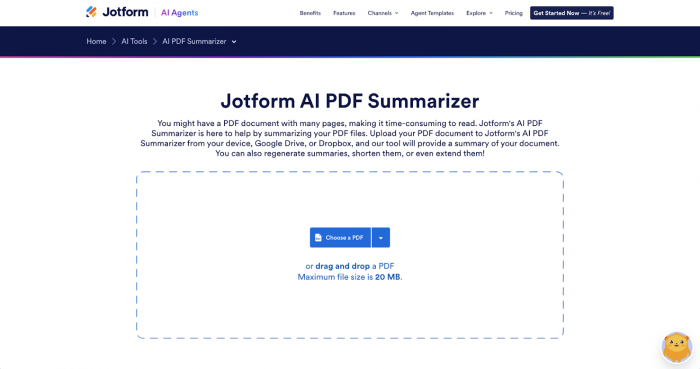
Jotform’s AI PDF Summarizer is built specifically to handle long PDF documents like reports, contracts, and ebooks. It sits within the Jotform ecosystem, making it especially useful if you already manage PDFs and forms there.
Key features
● Upload long PDFs and generate concise summaries and key points.
● Designed to surface the main ideas and sections from multi‑page documents.
● Integrates with Jotform workflows for document management and sharing.
Pros
● Targeted at PDFs rather than generic text, making it reliable for document‑heavy work.
● Reduces time to understand reports, agreements, and form‑related docs.
● Helpful for teams already using Jotform for data collection.
Cons
● Less versatile for web pages, videos, and notes compared with all‑in‑one tools.
● Full value appears when combined with other Jotform products.
Best for
● Businesses and operations teams summarizing contracts, submissions, and form‑generated PDFs inside the Jotform ecosystem.
5. SciSummary
SciSummary specializes in making academic and scientific papers more digestible for researchers, students, and science communicators. It focuses on terminology‑aware summarization that respects domain context instead of oversimplifying.
Key features
● Tailored to academic research and science articles, with discipline‑aware summaries.
● Designed to surface hypotheses, methods, and results sections clearly.
● Often used by researchers to triage large reading lists.
Pros
● Domain‑focused summarization improves accuracy for scientific literature.
● Helps quickly decide which papers are worth full‑text reading.
● Useful for literature reviews and early‑stage exploration.
Cons
● Less relevant for general news, marketing copy, or everyday documents.
● May require a paid plan for heavy usage and advanced options.
Best for
● Researchers, graduate students, and science writers summarizing large volumes of peer‑reviewed papers and technical reports.
6. Recall
Recall is designed as a “second brain” that captures content you consume and turns it into searchable, summarized knowledge. It emphasizes long‑term organization as much as the quality of individual summaries.
Key features
● Saves, highlights, and summarizes content into a centralized knowledge base.
● Focus on recallable notes rather than one‑off summaries.
● Helps connect ideas across different pieces of content.
Pros
● Ideal if you want persistent, organized knowledge from what you read.
● Good for building a personal research archive.
● Summaries integrate with highlights and tags for better retrieval.
Cons
● Overkill if you only need quick TL;DRs occasionally.
● Learning curve around workflows and organization.
Best for
● Knowledge workers, researchers, and creators building long‑term knowledge systems rather than one‑off summaries.
7. Glasp
Glasp combines web highlighting, saving, and summarization in a single browser‑centric workflow. It’s particularly popular among students and content consumers who want to capture insights from online reading.
Key features
● Save and highlight web content, then auto‑generate summaries.
● Supports YouTube video summarization via transcripts.
● Community layer where users can explore others’ highlights and notes.
Pros
● Excellent for annotating while reading, not just post‑hoc summarizing.
● Strong for web content and video‑based learning.
● Social features can help discover useful sources and summaries.
Cons
● Less suited for heavy offline PDF workflows.
● Social layer may be unnecessary for purely private research.
Best for
● Students, lifelong learners, and creators who read a lot online and want highlights + summaries + discovery in one place.
8. Summarizer.org
Summarizer.org is a free, browser‑based summarizer that supports multiple languages and a range of input formats. It positions itself as a simple, no‑login option for quick summaries.
Key features
● Multi‑language summarization support for global users.
● Handles pasted text, URLs, and some document formats.
● Accessible without registration, with instant outputs.
Pros
● Completely free to start, lowering the barrier for casual users.
● Supports non‑English content for multilingual workflows.
● Straightforward interface with minimal friction.
Cons
● Fewer advanced controls and integrations than premium tools.
● Quality and consistency can vary more on very technical content.
Best for
● Casual users and multilingual readers who need occasional, fast summaries without subscriptions or complex features.
9. Decopy AI Summarizer
Decopy’s free all‑in‑one AI Summarizer stands out for its multi‑format support and advanced output modes, including mind maps. It aims to be a central hub for summarizing articles, PDFs, videos, and notes in different contexts.
Key features
● Summarizes text, PDFs, images (via OCR), audio transcriptions, and video subtitles.
● Multiple summary modes: precise, overview, question‑driven, comparison, and bullet‑point.
● Can transform summaries into structured mind maps for visual understanding.
Pros
● Versatile multi‑format support, ideal for mixed media research.
● Mind‑map outputs help with comprehension and memory.
● Built‑in preview of original text alongside summaries to cross‑check.
Cons
● Rich feature set can feel more complex than single‑purpose tools.
● Web‑based workflow may not integrate deeply with existing note apps by default.
Best for
● Students, analysts, and professionals who work across PDFs, videos, and long articles and appreciate visual mind‑map summaries.
How to pick the right summarizer in 2026
Choosing the right AI summarizer depends mainly on content type, workflow, and how deeply you need to integrate summaries into your daily tools. The list above intentionally spans general‑purpose web summarizers, PDF‑focused engines, research‑ready tools, and second‑brain platforms so different users can find a suitable fit.
● For broad daily use, a combination of a general text summarizer like QuillBot plus a browser‑first tool like TLDR This covers most reading.
● Researchers and students can layer SciSummary, Decopy, or a PDF‑centric option like Jotform AI PDF Summarizer for complex documents and literature reviews.
● Knowledge workers building long‑term personal knowledge bases will benefit from tools like Recall or Glasp, which emphasize highlights, organization, and retrieval as much as the summary itself.
Used thoughtfully, checking outputs, combining multiple tools where needed, and saving the best results into your own notes—AI summarizers in 2026 can shift hours of reading into minutes of high‑quality insight.
Comments