

Choosing a haircut sounds simple until you’re sitting in the barber’s chair, trying to explain “short on the sides but not too short” while immediately regretting every word.
That anxiety is exactly what BarberGPT is trying to solve.
I tested BarberGPT using real photos, experimented with different styles, dug through Reddit threads, review aggregators, and indie-tool listings, and here’s the honest breakdown of what it does well, where it falls apart, and who it’s actually for.
What Is BarberGPT AI? (Quick Context)
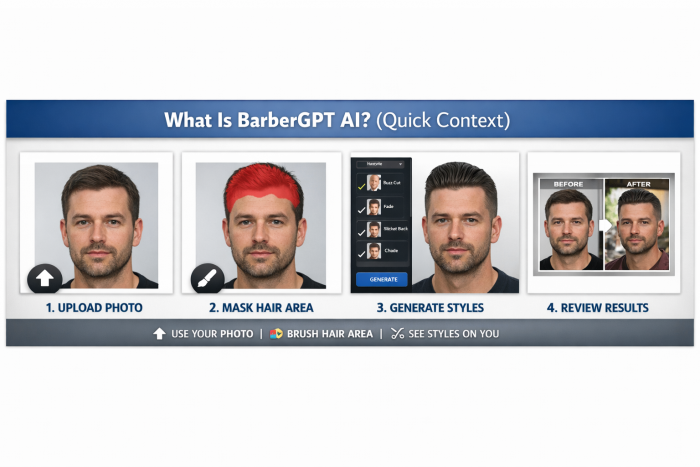
BarberGPT is an AI-powered haircut visualization tool designed primarily for men who want to preview hairstyles before committing in real life.
Instead of trusting imagination or stock photos, you upload your own image, manually mask your hair area, and let AI generate different haircut styles directly onto your face.
It’s not a salon replacement, it’s a decision-support tool.
BarberGPT by the Numbers
Here’s what the data shows across launch reports and directories:
| Metric | Snapshot |
| Initial Release | June 2023 |
| First-Month Users | 6,000+ |
| Hairstyles Generated (30 days) | 13,000+ |
| Avg. Rating (Aggregators) | ~2.0 / 5.0 |
| Review Sentiment | Highly polarized |
The low average rating is misleading, most negative reviews focus on realism limits, not usability or intent.
My BarberGPT Journey (From Curiosity to “Okay, That Helps”)
Getting Started: Fast but Locked In
The first thing you notice:
You must log in with Google before doing anything meaningful.
No demo.
No sample preview.
Straight to sign-in.
That’s already a friction point, and something many users complain about.
Once inside, though, the interface is clean and minimal.
Uploading My Photo & Masking the Hair
This is BarberGPT’s biggest difference compared to “auto-swap” haircut apps.
Instead of automatically detecting hair, you manually brush the area where you want changes.
What I liked:
- You control where AI touches the image
- Less random face distortion
- Better alignment on fades and buzz cuts
What breaks easily:
Slight masking errors = hair on forehead or ears
Unsteady brush = uneven results
This is powerful, but not beginner-proof.
Generating Hairstyles: Fast, But Not Always Realistic
Once masked, generations usually complete in under 60 seconds.
Styles tested:
- Buzz cut
- Skin fade
- Short textured crop
- Bald look
Results felt:
- Great for shape and proportions
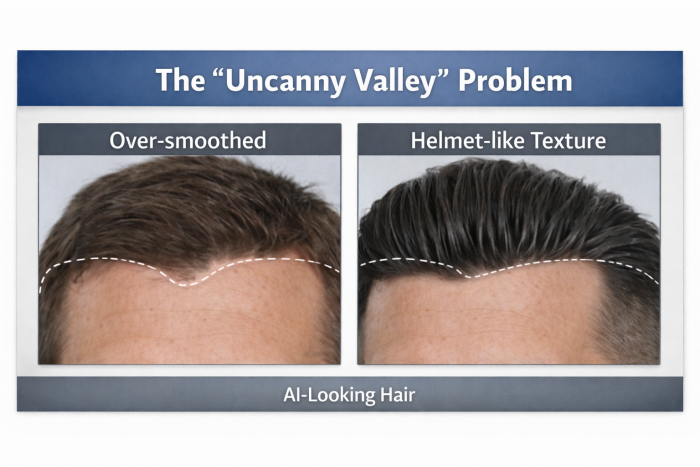
- Weak on hair texture realism
- Occasionally “helmet-like” (common complaint)
This aligns exactly with Reddit feedback.
Feature Breakdown
Manual Masking (Most Important Feature)
This is the core of BarberGPT.
Pros:
- Precision
- Control over hairline placement
- Less face warping
Cons:
- Steep learning curve
- Poor masking ruins results
This is why reviews split so sharply.
Generative AI Hairstyles
BarberGPT excels at:
- High-level style decisions (short vs long, bald vs hair)
- Seeing if a fade suits your face shape
- Testing risky ideas without consequences
It struggles with:
- Hair density realism
- Ethnic hair textures
- Complex hairlines
Save & Share (Underrated but Useful)
One feature users consistently praise:
You can download the final image and show it directly to your barber.
Many Reddit users describe BarberGPT as:
“A communication tool, not a prediction engine.”
That’s the right mental model.
Privacy and Data Handling
BarberGPT positions itself as privacy-first:
- No public galleries
- No shared images
- No social feed
While full audits aren’t public, there’s no evidence of resale or public exposure, and complaints here are minimal.
Pricing and Credit System
BarberGPT runs on a credit-based model.
- Free sign-in gives dashboard access
- Generations require credits
- Pricing fluctuates (common in indie tools)
Based on similar tools and user reports:
Estimated range: $5–$15 for multiple generations
There’s no aggressive subscription push, a positive signal.
Founder & Tech Stack (Indie Tool Transparency)
BarberGPT was built by an independent developer, not a large grooming brand.
Publicly shared stack:
- Nuxt 3 (Vue)
- Supabase (backend & auth)
- Astria.ai (image generation)
The founder has openly stated the goal:
“Reduce the anxiety of choosing a haircut.”
This intention shows in the design choices.
The Not-So-Good Parts
The “Uncanny Valley” Problem
This is the #1 complaint.
Hair can look:
- Too smooth
- Too uniform
- Slightly detached from scalp
Especially noticeable on:
- Curly hair
- Coarse hair
- Non-European hair textures
Login Wall Before Trust
Many users bounce before trying because:
- No preview
- No sample run
- Immediate Google login
This hurts first impressions.
Precision Depends on User Skill
BarberGPT doesn’t hide its complexity.
If you’re careless with masking:
- Results degrade quickly
- AI places hair in unrealistic zones
This is powerful, but unforgiving.
Pros vs Cons (Reality Check)
| Pros | Cons |
| Zero-risk haircut experimentation | Results can look artificial |
| Excellent barber communication tool | Login required upfront |
| Fast generation speed | Manual masking takes practice |
| No subscription traps | Weak on hair texture realism |
Community and External Sentiment
Across platforms like:
- There's An AI For That
- Indie launch directories
Sentiment follows a pattern:
- Early excitement
- Followed by realism criticism
- Balanced by users who “use it correctly”
Low ratings ≠ useless tool and they reflect expectation mismatch.
Final Verdict: Is BarberGPT Worth Using?
BarberGPT is not a crystal ball.
It won’t show you exactly how your hair will look after 3 weeks of growth or a perfect fade. What it will do is:
- Help you decide between styles
- Reduce barber-chair anxiety
- Give you a visual reference instead of vague descriptions
Best used as: a brainstorming and communication tool
Worst used as: a literal prediction of reality
If you understand that, BarberGPT becomes genuinely useful.
Who Should Try BarberGPT
- First-time haircut changers
- Men considering bald or buzz cuts
- Anyone bad at explaining styles
Who Should Skip It
- Users expecting photorealism
- Those unwilling to mask carefully
- People who hate sign-in walls
Comments