

Running out of phone or laptop storage is frustrating. Losing photos, documents, or work files can be even worse. That is why cloud storage has become essential in 2026. It allows you to store your data online, access it from any device, and keep it safe from accidental loss, theft, or hardware failure.
But not all cloud storage services are the same. Some are built for photos, some for business work, some for privacy, and others for unlimited backups. This guide explains the best cloud storage apps in simple language so you can choose the one that truly fits your needs.
Best Cloud Storage Apps in 2026
| Cloud Storage | Best For | Free Storage | Key Strength | Ideal Users |
| Google Drive | Google users & small businesses | 15GB | Seamless Docs, Gmail & Photos integration | Students, freelancers, teams |
| iCloud | Apple users | 5GB | Built into iPhone, iPad & Mac | iPhone and Mac owners |
| OneDrive | Microsoft & Windows users | 5GB | Works with Word, Excel & PowerPoint | Office users, students |
| Dropbox | Remote teams | 2GB | Team collaboration & file sharing | Agencies, remote workers |
| Box | Enterprise businesses | 10GB | Unlimited storage & compliance tools | Large organizations |
| Jottacloud | Unlimited backups | 5GB | Truly unlimited storage | Heavy data users |
| Koofr | Multiple cloud accounts | 10GB | Combine Google Drive, Dropbox & more | Multi-account users |
| pCloud | Media & video storage | 10GB | 4K streaming & lifetime plans | Content creators |
| IDrive | Backup & office files | 10GB | Full device & cloud backup | Businesses, power users |
| Proton Drive | Privacy & security | 5GB | End-to-end encryption | Privacy-focused users |
| TeraBox | Free storage | 1TB | Largest free cloud storage | Budget users |
1. Google Drive: Best for Google Users & Small Businesses
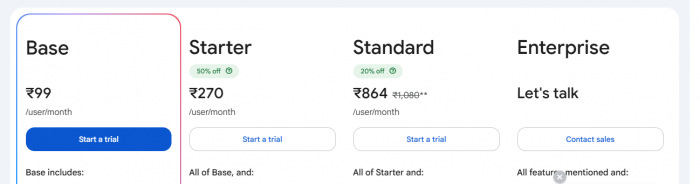
Google Drive works perfectly with Gmail, Google Docs, Sheets, and Slides. If you already use Google for work or studies, it is the easiest cloud storage option.
Key Features:
● Store files in the cloud or keep them offline for anytime access.
● Automatic photo backup through Google Photos.
● Real-time collaboration with colleagues or classmates.
● Share files or folders easily with controlled permissions.
Tips:
● Use folders and color-coding to stay organized.
● Combine with Google Workspace for advanced business tools.
Best for: Students, freelancers, and businesses that rely on Google apps.
2. iCloud: Best for Apple Users
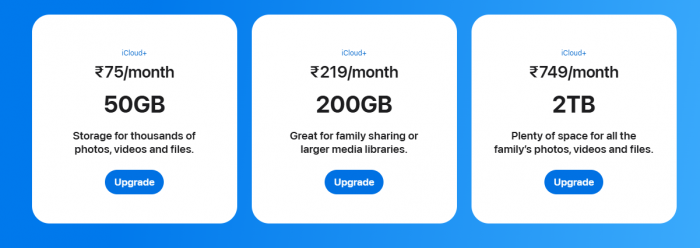
iCloud is built into every iPhone, iPad, and Mac. It automatically stores your photos, messages, files, and device backups.
Key Features:
● Seamless syncing across Apple devices.
● Supports Family Sharing for multiple users.
● iCloud Drive integrates with Mac Finder for easy access.
● Works with Apple One for bundled storage with Music, TV, and more.
Tips:
● Use “Optimize iPhone Storage” to save space on your device.
● Enable iCloud Photos to instantly access your library across devices.
Best for: People who rely on iPhones, iPads, and Macs.
3. OneDrive: Best for Microsoft and Windows Users
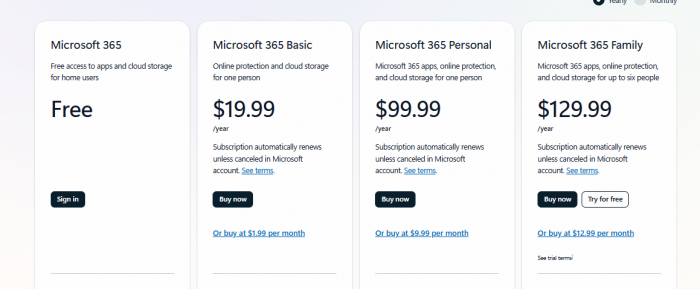
OneDrive is Microsoft’s cloud solution and integrates deeply with Word, Excel, PowerPoint, and Outlook.
Key Features:
● Personal Vault for sensitive files like IDs or insurance documents.
● Automatic sync across Windows PCs, smartphones, and web browsers.
● Collaboration with real-time editing in Office apps.
Tips:
● Use OneDrive’s “Files On-Demand” feature to save local space.
● Ideal for students using Office 365 for school projects.
Best for: Office users, students, and Windows enthusiasts.
4. Dropbox: Best for Remote Teams
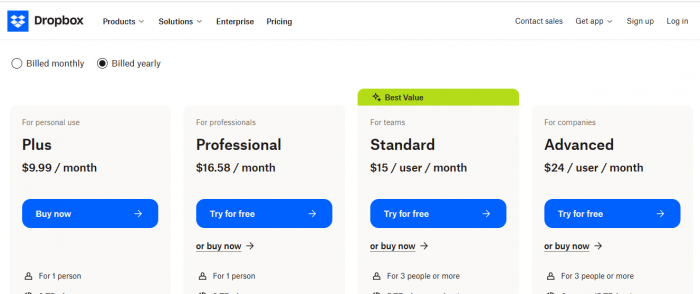
Dropbox is designed for collaboration. Its tools are optimized for sharing files, managing projects, and team workflows.
Key Features:
● File version history and recovery.
● Integration with Zoom, Slack, and project management tools.
● Smart Sync lets you access files without downloading them.
Tips:
● Use shared folders to centralize team work.
● Set up automated document signing for contracts and approvals.
Best for: Teams, freelancers, and remote workers.
5. Box: Best for Enterprise Businesses
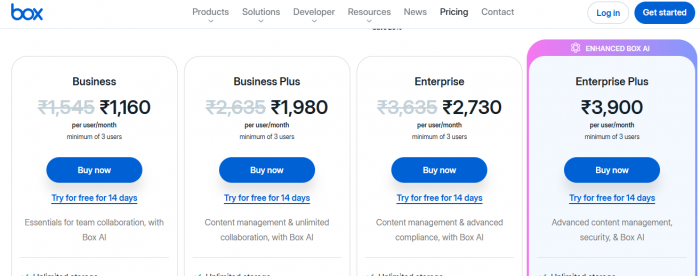
Box is built for large organizations that need high security and compliance.
Key Features:
● Unlimited storage with strict security controls.
● Digital signatures and workflow automation.
● HIPAA and GDPR compliance for sensitive industries.
Tips:
● Use Box for legal, healthcare, or financial document storage.
● Combine Box with enterprise tools like Salesforce or Microsoft Teams.
Best for: Large companies and enterprise users.
6. Jottacloud: Best for Unlimited Storage
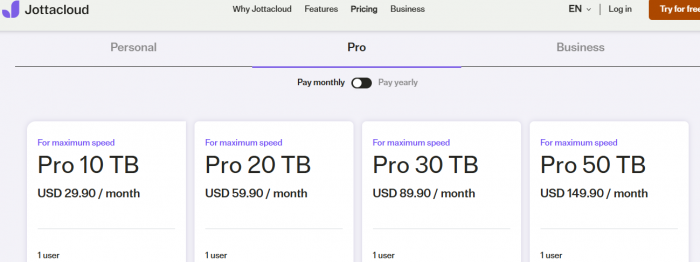
Jottacloud offers truly unlimited storage for your devices.
Key Features:
● Automatic backup for computers, phones, external drives, and NAS devices.
● No need to worry about storage limits.
● Focused on security and data privacy.
Tips:
● Ideal for photographers, videographers, or anyone with heavy data needs.
● Use automatic backup to keep files safe without manual effort.
Best for: Heavy storage users and backup enthusiasts.
7. Koofr: Best for Managing Multiple Cloud Accounts
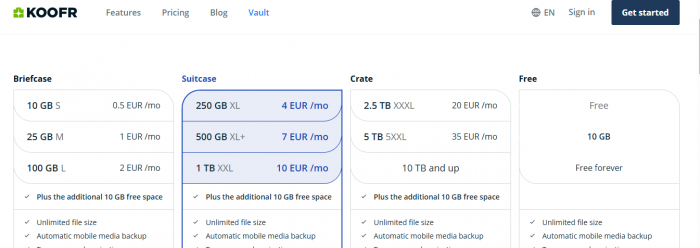
Koofr allows you to manage Google Drive, Dropbox, OneDrive, and others in a single interface.
Key Features:
● Combine multiple free accounts to increase storage.
● Backup social media accounts like Facebook or Instagram.
● Organize and search across cloud accounts.
Tips:
● Great if you use multiple cloud platforms and want one unified app.
● Ideal for digital hoarders who want all files in one place.
Best for: Users who already use multiple cloud services.
8. pCloud: Best for Media and Video Storage
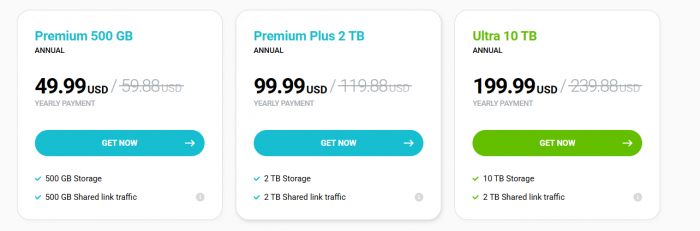
pCloud is perfect for storing movies, music, and videos.
Key Features:
● Stream video and audio directly from the cloud.
● Supports 4K video streaming.
● Lifetime plans available pay once, use forever.
Tips:
● Use shared links to send large media files.
● Store high-resolution content safely without affecting device storage.
Best for: Video lovers, travelers, and content creators.
9. IDrive: Best for Backup and Office Files
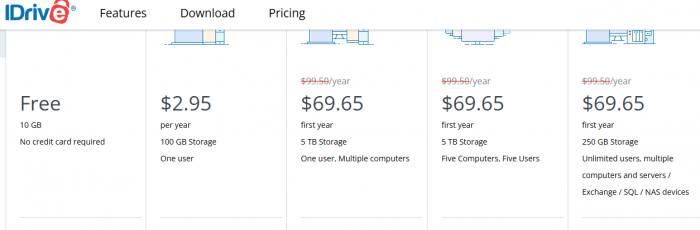
IDrive is a combination of cloud storage and backup service.
Key Features:
● Backs up entire devices automatically.
● Keeps deleted files until manually removed.
● Edit Office documents online.
Tips:
● Perfect for businesses needing reliable backup.
● Use cross-platform support to protect files from multiple devices.
Best for: Businesses and users who want strong backup protection.
10. Proton Drive: Best for Privacy
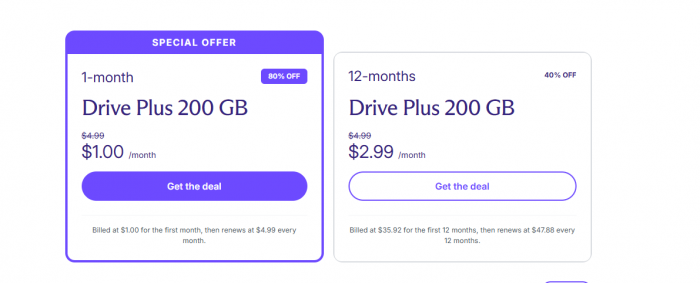
Proton Drive uses end-to-end encryption for maximum security.
Key Features:
● Part of Proton ecosystem (email, VPN, password manager).
● Files are encrypted locally before uploading.
● No one, not even Proton, can access your files.
Tips:
● Use Proton Drive if you work with sensitive data.
● Combine with ProtonMail for secure communications.
Best for: Privacy-focused users.
11. TeraBox: Best Free Cloud Storage
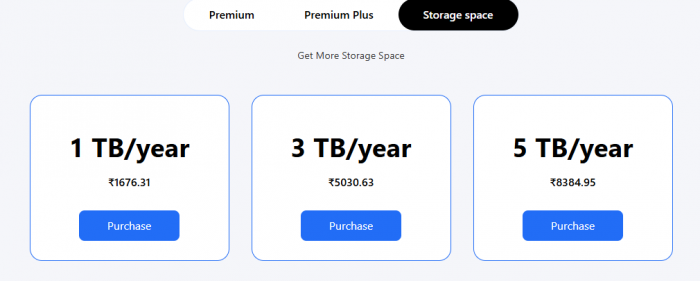
TeraBox offers 1TB of free storage more than most other services.
Key Features:
● Store files and stream videos directly.
● Paid plans remove ads and add encryption.
● Easy access from mobile and desktop apps.
Tips:
● Great starting point if you need lots of free space.
● Ideal for storing media or large personal files.
Best for: Budget users and those who need free storage.
Conclusion
Your digital files are more valuable than you realize photos, work, documents, and memories all deserve a safe place. In 2025, cloud storage is no longer a luxury, it is a necessity.
Whether you prefer Google Drive for everyday work, iCloud for your iPhone, Jottacloud for unlimited backups, or Proton Drive for privacy, the right cloud service can simplify your life and protect your data.
Choose the platform that matches how you use your devices. Start small with a free plan, and upgrade only when you need more space. A smart cloud storage choice today will save you stress, time, and money in the future.
Comments