

AI dubbing has gone from a niche experiment to a serious, budget‑friendly alternative to traditional studios, letting creators, brands, and educators ship multilingual videos in hours instead of weeks. If you pick the right tool, you can keep lip‑sync believable, preserve emotion, and stay within a realistic SaaS budget while scaling to dozens of languages.
Below are six of the best AI tools for video dubbing right now, with a practical breakdown of features, pros, cons, ideal use cases, and pricing.
1. HeyGen
HeyGen started as an AI avatar video tool but its translation and dubbing stack is now strong enough for serious YouTube and marketing localization. It combines lip‑sync, multilingual voice cloning, and a relatively clean browser studio.
Key features
HeyGen supports dubbing and translation into 175+ languages on paid plans, with options to recreate or clone voices and maintain sync between lip movement and translated audio. You can work fully inside the web editor, add subtitles, and export in up to 4K on Team plans. API access on higher tiers lets agencies automate bulk dubbing workflows.
Pros
HeyGen’s strength is realism: lip‑sync and voice quality feel natural enough for audiences to forget they’re watching a dubbed video. For solo creators, the Free and Creator tiers are accessible, while teams get collaboration and better export quality at a still manageable price. Video translation is included on Scale/advanced plans, which is useful if you also use HeyGen for avatar videos.
Cons
Credits and minute limits can be confusing for new users, especially when mixing avatars and dubbing in one account. Pricing scales up quickly if you need high volumes or API usage. Voice controls and fine‑grained translation editing, while improving, still lag behind some specialist localization platforms.
Best use case
HeyGen fits creators and marketing teams who care about visually convincing lip‑sync for talking‑head content in multiple languages (YouTube, ads, product explainers).
Pricing snapshot
Recent guides list HeyGen’s core plans roughly as:
● Free: $0/month, up to 3‑minute videos, watermark, limited languages (around 30+).
● Creator: $29/month, up to 30‑minute videos, 1080p export, 175+ languages, no watermark.
● Team: from $39/seat per month, 4K export, collaboration, 175+ languages.
● Scale/Enterprise: from about $330/month for 660 API credits and advanced translation features.
2. Rask AI
Rask AI is a focused AI dubbing and video localization platform designed for turning one video into many language versions with minimal manual work. It’s popular for e‑learning, training, and social content.
Key features
Rask AI offers automatic speech recognition, translation, dubbing, and subtitle generation in a single pipeline, enabling multi‑language output from a single upload. It provides browser‑based editing for transcripts and timing along with AI voices tuned for different regions. Teams can manage multiple projects and export localized versions for platforms like YouTube or LMS systems.
Pros
Rask is praised for its simple workflow: upload, choose languages, review, export. For training and internal videos, users value the time savings compared with re‑recording voiceovers with native speakers. It also offers business‑oriented plans with higher minute allocations, making it attractive for companies rolling out localization across entire content libraries.
Cons
While voice quality is solid, it is not yet at the ultra‑premium level of some high‑end voice cloning engines, which may matter for cinematic or entertainment content. Costs can rise if you regularly process long videos across many languages, because minutes are the main pricing lever.
Best use case
Rask AI is well‑suited to organizations localizing training, onboarding, and explainer content into several languages without building a complex workflow themselves.
Pricing snapshot
Public pricing references for Rask show:
● Lower‑tier SaaS plans from around $9–$39/month for individuals and small teams.
● Pro levels near $99/month and above for higher usage and features.
● Older per‑minute structures also exist (e.g., Creator at $60 for 25 minutes, Business at $750 for 500 minutes), mainly referenced in review platforms.
3. Deepdub
Deepdub is a higher‑end AI dubbing provider aimed at broadcasters, streamers, and studios that need emotional, cinematic‑level localization. Unlike self‑serve editors, it positions itself more as an enterprise solution.
Key features
Deepdub’s technology focuses on emotion‑aware dubbing that tracks tone, intensity, and pacing of the original performance across 100+ languages and dialects. Its newer Deepdub Live product enables real‑time multilingual dubbing for live broadcasts and events, with expressive voice AI and voice cloning options. The platform offers a broadcast‑licensed voice bank and integrations suitable for professional workflows.
Pros
The main advantage is quality: Deepdub emphasizes expressive dubbing that feels close to human actors, which is critical for films, series, and high‑stakes live content. Enterprises benefit from scalability and integration with existing broadcast and streaming pipelines. Real‑time dubbing is a differentiator if you handle live sports, news, or events.
Cons
Deepdub is not designed as a casual, low‑cost creator tool; it targets enterprise budgets and typically requires sales engagement. The learning curve and integration overhead are higher than simple browser‑only tools.
Best use case
Deepdub is ideal for broadcasters, streaming platforms, and media companies seeking near‑studio‑grade dubbing (including live) in many languages.
Pricing snapshot
Deepdub does not publish standard self‑serve pricing; costs are custom and negotiated based on volume, type of content (catalog vs live), and integration requirements.
4. Kapwing AI Dubbing & Video Translator
Kapwing is a popular online video editor that recently added serious AI translation and dubbing capabilities, including voice cloning and lip sync. If your workflow already lives in a browser editor, Kapwing can keep everything in one place.
Key features
Kapwing’s AI Video Translator automatically transcribes a video, translates it into 100+ languages, and re‑voices the content with AI voices in over 40 languages. It offers options to recreate the original voice, clone your own, or pick from a voice library with different accents and tones. Automatic lip‑sync and translation rules let you fine‑tune spelling and pronunciations for better accuracy.
Pros
Kapwing stands out for combining editing, subtitles, and dubbing in a single online workspace, simplifying workflows for social teams. It claims translation accuracy up to about 99% with customization options to correct domain‑specific terms. The free tier makes it easy to experiment with short clips before upgrading.
Cons
Complex, long‑form or high‑volume localization may push you toward more specialized tools. Free usage includes limitations and watermarks, and advanced features require paid plans.
Best use case
Kapwing is a strong option for creators, educators, and social media teams who want quick multilingual versions of short‑to‑medium videos directly in their browser editor.
Pricing snapshot
Kapwing’s translator and dubbing sit inside its broader SaaS plans, which include a free tier and paid subscriptions; specific AI dubbing limits and prices vary by plan and are accessed via its pricing page.
5. Dubverse
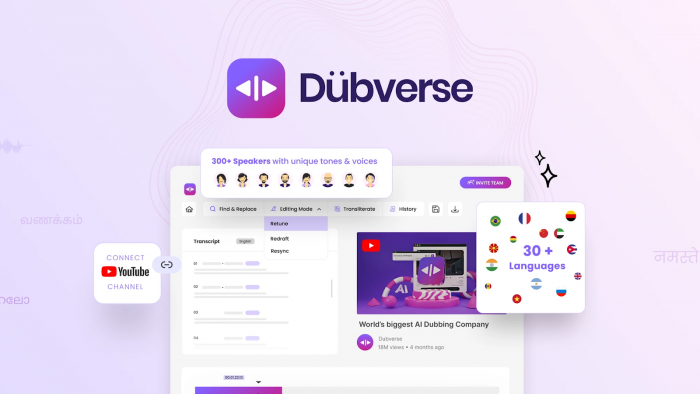
Dubverse is an India‑born AI dubbing platform that has scaled globally, with a strong focus on affordability and multi‑language support. It’s particularly attractive if you work with Indian languages or want cost‑effective dubbing at scale.
Key features
Dubverse offers AI dubbing (DUB), subtitling (SUB), and AI voice generation (SAY), with per‑minute credit consumption (e.g., 1 minute of dubbing uses 4 credits). Plans include access to premium speakers, GPT‑3.5 or GPT‑4 powered translations, voice cloning, lip sync, and multi‑speaker support on higher tiers. Enterprise options add human review and AI model customization.
Pros
Dubverse’s edge is pricing relative to features: it’s consistently cited as a budget‑friendly but capable AI dubbing solution. Support for multiple Indian and global languages plus features like voice cloning and lip sync at mid‑tier prices make it appealing for agencies and YouTubers. Half‑yearly plans further reduce effective monthly cost.
Cons
Like many credit‑based systems, you must track usage closely to avoid running out of credits mid‑project. While quality is strong for most use cases, top‑tier cinematic dubbing or very nuanced performances may still benefit from premium enterprise options or hybrid human workflows.
Best use case
Dubverse fits price‑sensitive creators, agencies, and brands needing multilingual dubbing (especially with Indian languages) across a large volume of short‑to‑medium videos.
Pricing snapshot
● Pro: ₹800/month for 50 credits, fast processing, premium speakers, GPT‑3.5 translations, no watermark.
● Supreme: ₹1100/month for 50 credits, GPT‑4 translations, voice cloning, priority processing.
● Enterprise: custom, with multi‑speaker support, lip sync, AI customization, human review.
International monthly pricing in USD:
● Pro: $18/month for 50 credits, premium speakers, fast processing.
● Supreme: $30/month for 50 credits, GPT‑4, voice cloning, unlimited downloads.
● Enterprise: custom, with tailored support and model training.
6. Maestra / Smartcat‑style AI Dubbing (Representative “workflow” tools)
Alongside pure‑play dubbing tools, there’s a category of localization platforms like Maestra AI and Smartcat that bundle transcription, translation, subtitles, and AI voiceovers into one end‑to‑end workflow. They are valuable if you want translation plus dubbing plus linguistic QA under one roof.
Key features
Smartcat, for example, offers automated video translation, subtitle generation, and AI voiceovers with adjustable voice settings (gender, pitch, timbre, speed) while integrating with a marketplace of human linguists. Maestra AI provides realistic AI voices and multi‑language voiceover tools tightly integrated with transcription and captioning. Both aim to create a single localization pipeline rather than a one‑off dubbing widget.
Pros
These platforms shine when you need both automation and human quality control, especially for corporate, product, or educational content that must be linguistically accurate. Built‑in translation memory and terminology features make them efficient for ongoing localization programs.
Cons
They can feel heavier than lightweight creator‑first tools and may be overkill if you just need quick social clips dubbed in a couple of languages. Pricing structures are often more enterprise‑oriented and may require more setup.
Best use case
Maestra/Smartcat‑style solutions work best for teams running continuous localization across many assets, where translation consistency and workflow automation matter more than flashy UI.
Pricing snapshot
Both Maestra AI and Smartcat offer tiered SaaS pricing and often custom enterprise quotes; exact costs depend on volumes, languages, and whether you engage human linguists.
Quick Overview Table
| Tool | Standout strength | Ideal user/type | Indicative pricing* |
| HeyGen | Lip‑sync + realistic multilingual dubbing | YouTube, marketing, talking‑head content | Free; paid from ~$29/month, teams higher |
| Rask AI | Simple multi‑language localization | Training, onboarding, explainer teams | From low tens of $/month; Pro around ~$99/month |
| Deepdub | Emotion‑rich, broadcast‑grade dubbing | Broadcasters, streamers, film/TV | Custom enterprise pricing |
| Kapwing | In‑browser editing + dubbing | Creators, educators, social teams | Free tier; paid SaaS plans for higher usage |
| Dubverse | Affordable, multilingual (incl. India) | Price‑sensitive creators, agencies, brands | India: from ₹800/month; Intl: from $18/month |
| Maestra / Smartcat | End‑to‑end localization workflow | Teams needing translation + dubbing + QA | Tiered SaaS and custom plans |
Conclusion
AI video dubbing has quietly become one of the most powerful growth hacks for any video strategy, whether you’re a solo YouTuber, a training team, or a global media brand. From creator‑first tools like HeyGen, Rask AI, Kapwing, and Dubverse to enterprise‑grade platforms such as Deepdub and workflow systems like Maestra or Smartcat, you now have options at every budget and quality level. The real advantage comes when you match the tool to your use case: quick browser editors for social clips, affordable credit‑based plans for high‑volume multilingual content, and premium solutions when you need broadcast‑ready emotion and consistency. If you define your priorities quality, speed, price, or workflow control you can choose the right AI dubbing stack today and start turning every video into a global asset instead of a single‑language bet.
Comments