

Wava AI is positioning itself as a “shortcut to viral shorts” for creators who want fast, faceless TikTok, Reels, and YouTube content without opening a traditional editor. In reality, it’s a focused production automation tool that works brilliantly for some creators and feels limiting for others who expect full creative control.
What Is Wava AI, Really?
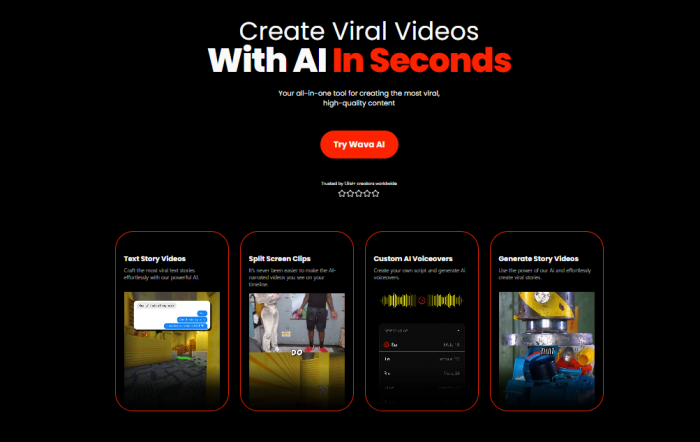
Wava AI is an AI‑powered short‑video generator built to turn scripts or prompts into ready‑to‑publish, faceless clips in minutes. It combines AI script generation, stock/background clips, ElevenLabs‑powered text‑to‑speech, auto‑captions, and a simple timeline editor in a single browser‑based workspace.
The platform is clearly optimized for short‑form vertical content on TikTok, Instagram Reels, and YouTube Shorts, rather than long‑form or cinematic projects. You can think of it as a conveyor belt for “talking‑text” or slideshow‑style videos with AI voiceovers and split‑screen visuals, not a replacement for Premiere Pro or DaVinci Resolve.
How the creation workflow looks
A typical Wava AI project flows like this:
1. You paste a script or prompt, or use its AI story tools to generate one.
2. You pick or tweak an AI voice (via ElevenLabs integration or custom voice import).
3. Wava AI auto‑matches background clips and layouts from its stock library.
4. It auto‑adds captions and syncs them with the voiceover.
5. You adjust timing, text, or visuals on a simple timeline, then export in vertical format.
This pipeline is what allows solo creators and small teams to ship large volumes of simple videos very quickly, especially for faceless channels and niche pages.
Deep Dive Into Features
Wava AI’s appeal comes from how its features slot together into an end‑to‑end workflow rather than any single “wow” feature.
Script and story generation
Wava AI lets you:
● Generate stories and scripts from prompts for listicles, explainers, or commentary‑style shorts.
● Import your own script and skip the writing, using Wava only for visuals and narration.
● Re‑use or tweak scripts for multiple variations (great for A/B testing hooks and intros).
The AI writing is decent for hooks and simple explainers, but creators who care about unique angles and brand tone will still want to manually refine or fully write scripts themselves.
Visual layer and editing tools
On the visual side, Wava AI offers:
● A stock/background clip library for B‑roll and faceless visuals.
● Split‑screen and text‑heavy layouts suitable for TikTok‑style explainers.
● A simple timeline interface to tweak the order and duration of scenes.
● Auto‑captions aligned with the voiceover.
The editing interface is intentionally minimal, which makes it friendly for non‑editors but can feel restrictive for advanced users who want keyframes, complex transitions, or fine‑grained visual control.
Audio: AI voiceovers and custom voices
Audio is one of Wava’s stronger pillars:
● Text‑to‑speech via ElevenLabs, which is known for more natural‑sounding AI voices.
● Custom voice import so you can train or upload a voice closer to your brand.
● Automatic sync between voiceover and on‑screen captions.
For English and popular languages, the voices sound clean and modern enough for most niche channels; for very specific accents or languages, creators may still prefer external voice tools.
Automation and speed
The real value lies in how much production time you can cut:
● Once you understand the interface, a basic 30–60 second short can be assembled in minutes.
● Background clip selection and caption generation are automated, so you spend more time on concept than on manual editing.
● Batch creation is possible by cloning projects and swapping scripts or hooks.
This positions Wava AI as a “volume engine” for content farms, agencies, and multi‑channel operators who need consistency and speed more than bespoke editing.
Pricing, Plans, and Value for Money
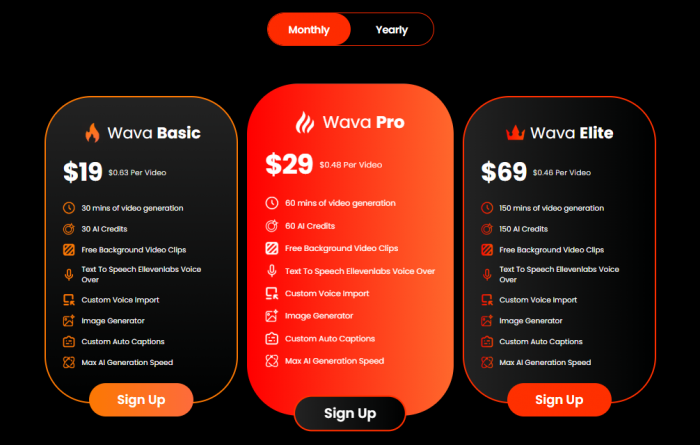
Wava AI uses a minute/credit‑based pricing model that’s easy to understand once you see it tabled out.
Current paid plans
According to the official pricing page, major plans look like this:
Free and freemium access
Wava AI offers limited free access so new users can test the workflow and output before committing. The free tier is constrained in minutes and exports but is enough to feel the rendering speed, voice quality, and captions.
Because pricing and caps can change, it’s smart to treat any numbers in your review as indicative and advise readers to verify the latest offers on the official pricing page.
Is Wava AI worth the price?
● For solo creators running one or two channels, the Basic or Pro tiers make sense if you publish consistently and rely heavily on templates.
● For agencies and “content farms”, Elite and above can be cost‑effective because the limiting factor becomes scripts and ideas, not editing time.
● Hobbyists who upload occasionally may be better off using the free tier plus manual tools like CapCut until they outgrow them.
UX, Learning Curve, and Everyday Use
From a user‑experience perspective, Wava AI leans towards simplicity and speed.
Onboarding and interface
● Signup and onboarding follow a standard SaaS pattern with email‑based accounts and a clean dashboard.
● The first‑project experience is guided enough that non‑editors can assemble a basic video on day one.
● The timeline and layout options are intentionally minimal, which reduces overwhelm but also limits experimentation.
Learning curve and production workflow
Most users report that the core workflow i.e. script in, AI voice plus visuals out is easy to grasp. The learning curve mainly appears when you start pushing for:
● Very specific pacing or timing for jokes and hooks.
● Brand‑consistent visual identity beyond generic stock clips.
● Complex story structures or non‑linear narratives.
For many creators, Wava works best as a first‑draft machine that gets you 70–80% of the way, followed by light adjustments either inside Wava or in a traditional editor.
Performance and reliability in daily use
Performance is generally acceptable for a cloud video tool, but like most fast‑growing SaaS, it isn’t perfect.
● Rendering times are reasonable for short clips, especially at lower minutes.
● Occasional export issues and minor glitches are reported, especially during busy periods, which may require re‑tries.
● The tool is best suited to self‑sufficient users who can troubleshoot or work around hiccups rather than those who need hand‑holding support.
Output Quality and the “Virality” Question
Wava AI markets itself heavily around “viral” short videos, which deserves a clear breakdown.
Visual and audio quality
● Visuals: For typical B‑roll‑plus‑text shorts, the quality is more than adequate; videos look clean and modern but can feel template‑driven and similar across channels.
● Audio: ElevenLabs‑powered voices and custom imports provide crisp, modern narration that feels good enough for most niche audiences.
● Captions: Auto‑generated captions are clear and sync well, which is crucial for silent‑scrolling platforms.
For creators in competitive niches, the main weakness is sameness: if many channels in your niche rely on similar templates and stock, differentiation depends entirely on your scripts and ideas.
Does Wava AI actually help you go viral?
Wava AI improves your odds of success indirectly by enabling:
● Higher posting frequency (more shots on goal).
● Faster testing of hooks, topics, and formats.
● Consistent audio and caption quality.
But virality itself still depends heavily on:
● The strength and originality of your script and hook.
● Niche selection and content‑market fit.
● Timing, trends, and platform algorithms.
So a fair framing is: Wava AI is a virality multiplier for creators who already understand content fundamentals, not a magic button that makes any script blow up.
Trust, Legitimacy, and Reviews
Given how aggressively it’s promoted on TikTok and other social channels, many creators understandably ask whether Wava AI is legit or risky.
Is Wava AI legit?
Independent analyses and in‑depth trust reviews consistently classify Wava AI as a real, operational SaaS product rather than a fake demo or abandoned project. There is no evidence of disappearing accounts, bait‑and‑switch behavior, or fake front‑end demos masking a non‑existent backend.
Mixed external trust‑scores
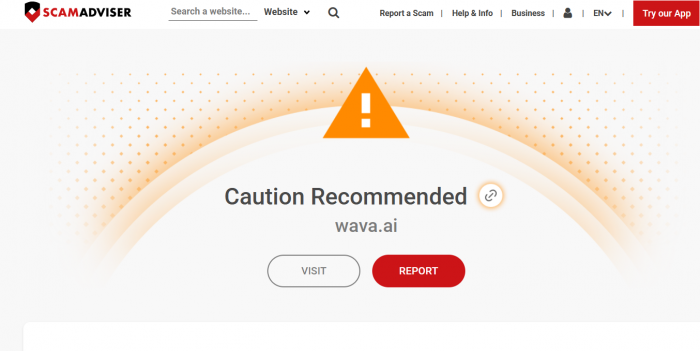
Automated trust‑score platforms show more cautious ratings for wava.ai, in some cases labelling it “high‑risk” based on technical and meta‑data signals, not on user scam reports. These tools often flag:
● Relatively young domains.
● Rapid promotion or traffic spikes.
● Limited traditional corporate footprint information.
Where negative sentiment comes from
Most negative comments and reviews cluster around expectation mismatch and billing UX rather than fraud:
● Advanced users expecting a full creative editor feel constrained by templates and limited control.
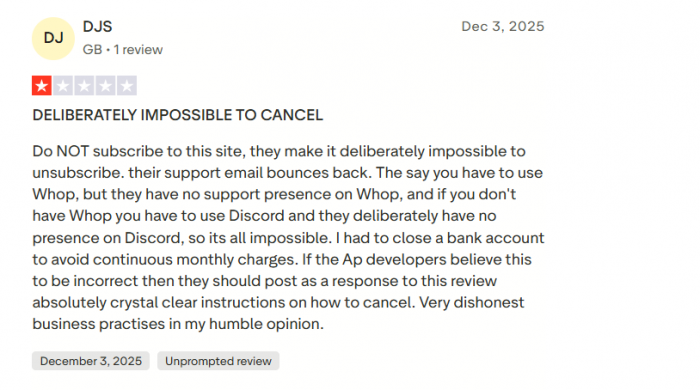
● Some users complain about subscription management or cancellation friction, which is common in fast‑growing SaaS ecosystems.
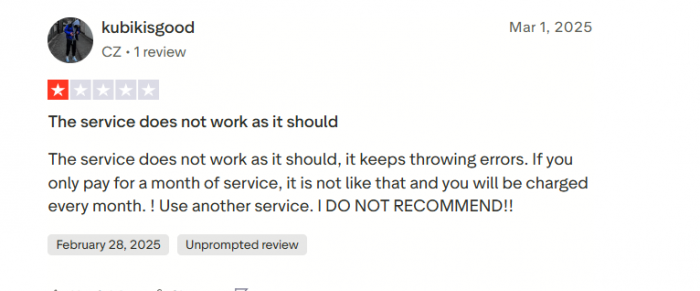
● Others blame the tool for under‑performing videos and mentioned the service does not work as it should and keeps getting error.
A balanced takeaway is: Wava AI is safe to use for general content creation if you treat it as a specialized production automation tool and apply standard SaaS hygiene (strong passwords, no sensitive uploads, close monitoring of billing).
Who Wava AI Is (and Isn’t) For
Clarifying the ideal user profiles helps readers decide quickly.
Best‑fit users
Wava AI is particularly well‑suited to:
● Faceless TikTok/Shorts channels that publish several times per week or daily.
● Agencies handling multiple small clients who need simple, consistent video output.
● Educators or info‑creators who rely on text‑driven explainers more than cinematic visuals.
● Solo creators who hate editing but enjoy writing scripts and ideas.
Poor‑fit users
Wava AI may not satisfy:
● Filmmakers or editors who want deep visual control, layered storytelling, or advanced transitions.
● Strong brands with strict visual guidelines that cannot be met with generic templates and stock.
● Creators who publish rarely and prefer to craft each video individually in tools like CapCut, VN, or Premiere.
You can think of Wava AI as a factory line: it’s fantastic if you want many similar products with minor variations, and frustrating if you insist every piece be artisan‑handcrafted.
Wava AI vs Alternatives
| Tool | Main use case | Automation | Strengths | Best for |
| Wava AI | Faceless TikTok/Shorts/Reels videos | Medium | Script → voice → stock clips → captions in one flow; good balance of control and speed | Solo creators, faceless channels, small agencies |
| Korpi AI | Fully automated Shorts campaigns | High | “Set and forget” campaigns, many viral‑style templates | People scaling whole Shorts channels with minimal manual work |
| Clippie AI | Fast faceless viral‑style shorts | High | Strong templates for short‑form, virality‑focused workflows | Creators chasing trends and fast test cycles |
| Runway | Creative / cinematic AI video | Medium | Advanced visuals, more artistic and experimental output | Brands and creators wanting standout, cinematic clips |
| Fliki‑type tools | Simple script‑to‑video explainers | Medium | Many voices, easy slideshow‑style conversions | Bloggers, educators, basic marketing videos |
Final Verdict: Should You Use Wava AI?
Wava AI is a solid production engine for faceless short‑form videos, but it only shines for creators who value output and speed over perfect, handcrafted edits. It reliably turns scripts into watchable TikTok/Shorts/Reels content with integrated voices, visuals, and captions, yet its template‑driven style and limited fine‑grained control will frustrate filmmakers and highly visual brands.
If you run or plan to run faceless channels, manage multiple small clients, or simply want to ship more short videos without getting buried in editing, Wava AI is worth testing on a focused, one‑month sprint. Treat it as infrastructure for consistent content, not a magic virality switch: your ideas, hooks, and niche understanding will still decide whether a video takes off.
Comments