

At first glance, Gimkit looks like just another classroom quiz game.
But after a few sessions, most teachers realize something different is happening: students stop racing for speed and start thinking strategically. That shift isn’t accidental. Gimkit was built around an in-game economy, not just right-or-wrong answers.
This guide explains what Gimkit really is, how it’s used in real classrooms in 2026, and how to create Kits and Creative worlds step by step, without wasting prep time.
Core Identity and Platform Snapshot
Gimkit is a game-based learning platform that blends quizzes with strategy, upgrades, and reinvestment mechanics.
Founding story:
- Founded in 2017, launched publicly in 2018
- Created by Josh Feinsilber, originally as a high school project
- Later joined by Jeff Osborn
- Based in Seattle, Washington
This origin explains Gimkit’s design philosophy: it’s built from a student’s point of view, not an edtech sales deck.
Platform scale
- Used by millions of students and educators
- Over 3 million games played regularly
- Most popular in middle and high school, but used across K–12
- Teacher satisfaction consistently high (~4.5/5)
- Student reviews are polarized (more on that below)
How Gimkit Actually Works
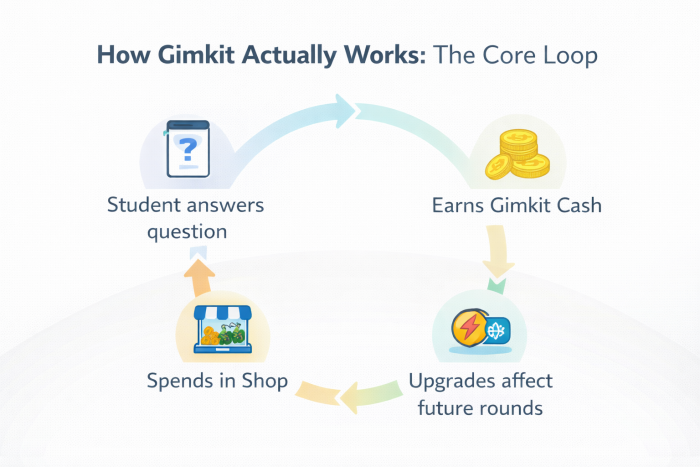
Unlike Kahoot-style games where speed dominates, Gimkit revolves around earning and spending.
The Core Loop
- Students answer questions
- Correct answers earn Gimkit Cash
- Cash is spent in an in-game Shop
- Purchases affect future earnings, risk, and power
This loop encourages:
- Strategic thinking
- Risk management
- Long-term planning
Students who understand the system outperform those who just click fast.
The Built-In Economy
Key mechanics students interact with:
Multipliers – earn more per correct answer
Insurance – lose less money when wrong
Power-ups – temporarily freeze or slow opponents
Reinvestment – smarter spending compounds over time
This is why Gimkit doesn’t feel repetitive as quickly as other quiz tools.
Popular Game Modes Teachers Actually Use
Gimkit isn’t one game, it’s a game framework.
Most-used modes in classrooms
Trust No One – social deduction (Among Us-style)
Fishtopia – calm, quest-based progression
The Floor Is Lava – cooperative class-wide challenge
Don’t Look Down – platforming + problem-solving
Each mode changes how students interact with the same questions.
Gimkit Creative (2025–2026 Shift)
Gimkit Creative transformed the platform from a quiz tool into a world-building system.
Think less “quiz app” and more:
Roblox or Fortnite Creativ—butt for learning objectives.
Teachers and students can now:
- Build 2D maps
- Place logic-driven devices
- Trigger events with conditions
- Design escape rooms, quests, or simulations
This is where Gimkit separates itself from competitors.
Pricing and Access
Gimkit’s pricing is refreshingly transparent.
| Plan | Price | What You Get |
| Free | $0 | Basic Kits, small groups, featured modes |
| Gimkit Pro | $59.88/yr or $9.99/mo | Unlimited Kits, all modes, assignments, media uploads |
| Season Ticket | $5 (optional) | Cosmetics, XP boosts, Creative slots |
| School / Dept | ~$650–$1,000/yr | Bulk licenses for teams or schools |
No demos. No sales calls. No upsell pressure.
MASTER GUIDE: HOW TO CREATE IN GIMKIT
Part 1: Import from Quizlet (The 60-Second Method)
Don’t rewrite questions.
Step-by-step
Open your Quizlet set
Click ⋯ → Export
Set:
- Tab between term/definition
- New Line between rows
- Copy text
In Gimkit:
Click + New Kit
Choose Create with Flashcards
Select Import Flashcards
Paste → Create → Finish
Your Quizlet content is now a live economy.
Part 2: Build Your First Gimkit Creative World
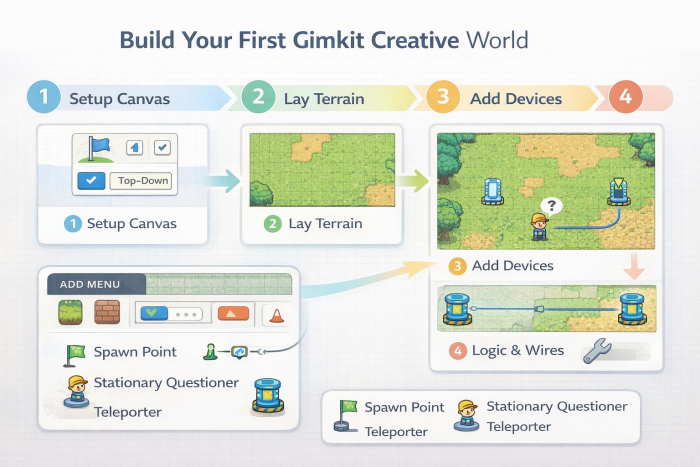
Gimkit Creative works like a logic sandbox.
Step 1: Start the Project
Dashboard → Creative
Choose:
- Top-Down (adventure style)
- Platformer (side-scroller)
- Set win conditions via Map Options.
Step 2: Lay the Terrain
Press E to open Add Menu
Use:
- Floor tiles for ground
- Wall tiles for collision and boundaries
This defines movement and challenge.
Step 3: Add Devices (The “Brain”)
Essential devices:
Spawn Point – player entry
Stationary Questioner – triggers your questions
Teleporters – link areas together
Devices turn maps into systems.
Step 4: Logic & Wires
- Select Wire Tool
- Connect triggers to actions
Example:
Button pressed → Door opens
This is how escape rooms and puzzles work.
Pro Tips for Classrooms
- Turn on Grid Snap for clean layouts
- Playtest constantly (broken jumps kill motivation)
- Let students co-build using Edit Links
- Reset economies mid-game if gaps get too large
Final Takeaway
Gimkit isn’t just a quiz platform.
It’s a learning economy where strategy matters as much as knowledge. When used well, it turns review sessions into something students argue about after class, which is usually a good sign.
If Kahoot is a sprint, Gimkit is a strategy game.
Comments