

Choosing a DNS provider is one of those decisions that often feels trivial, until something breaks. DNS rarely gets attention when everything works, but when it fails, it can take down websites, APIs, email, and revenue in one stroke.
When comparing Amazon Route 53 and GoDaddy, it’s important to understand that these tools were built for very different users, even though they appear to solve the same problem on the surface.
This article goes beyond surface-level feature lists. It looks at how these services behave in production, how costs actually accumulate over time, and which kinds of projects each platform quietly favors.
The Fundamental Difference Most Comparisons Miss
At a conceptual level, Route 53 and GoDaddy are not competing products in the same category.
GoDaddy’s DNS exists primarily to support its role as a domain registrar. DNS is bundled, simplified, and designed to “just work” for the majority of small sites.
Route 53, by contrast, is an infrastructure-grade DNS service that happens to also offer domain registration. DNS is not an accessory, it’s a core component of distributed systems inside AWS.
This difference in intent affects everything:
- pricing models
- UI complexity
- automation support
- reliability guarantees
- learning curve
If you understand this distinction early, most of the rest of the comparison becomes intuitive.
Domain Registration vs DNS Hosting: Untangling the Confusion
A common misconception is that you must use the same provider for both domain registration and DNS hosting. You don’t.
- Domain registration determines who legally owns the domain
- DNS hosting determines how traffic is routed.
GoDaddy excels at domain registration simplicity. Route 53 excels at DNS control and routing.
Many experienced teams deliberately use:
- GoDaddy for registering domains
- Route 53 for DNS management
This hybrid approach is common in AWS-centric architectures and avoids vendor lock-in while still benefiting from Route 53’s strengths.
Pricing Reality: Why “Cheap” and “Expensive” Are Misleading Labels
GoDaddy Cost Structure (What You Actually Pay Over Time)
GoDaddy’s pricing looks attractive initially:
- DNS is included with the domain
- first-year domain discounts are aggressive
But the long-term reality looks different:
- renewals typically jump to full price
- add-ons like Premium DNS increase recurring costs
- multi-domain portfolios become expensive over time
For a single personal site, this is rarely an issue. For agencies or portfolio owners, costs accumulate quietly.
Route 53 Cost Structure (Why It Feels Complicated)
Route 53 uses a usage-based pricing model:
- hosted zones billed monthly
- DNS queries billed per million
- optional health checks billed separately
This scares beginners, but for predictable workloads, it can be surprisingly efficient.
For example:
- low-traffic sites often cost under $1/month
- high-traffic global sites benefit from per-query pricing without “premium DNS” tiers
The key difference is transparency: Route 53 charges you for exactly what you use.
DNS Performance and Global Reliability in Practice
Route 53: Built for Global Scale
Route 53 runs on AWS’s global Anycast network, meaning:
- DNS queries are answered by the nearest available location
- traffic is distributed automatically
- failures are isolated quickly
This matters when:
- users are geographically distributed
- latency affects conversions
- uptime is revenue-critical
Route 53 also supports health checks that automatically reroute traffic when endpoints fail, something GoDaddy DNS does not do natively.
GoDaddy DNS: Sufficient, Not Exceptional
GoDaddy DNS is stable for most small to medium sites, but:
- it lacks advanced routing logic
- failover must be handled manually
- performance optimization options are limited
For a local business website, this is rarely noticeable. For SaaS platforms or APIs, it becomes a bottleneck.
Routing Capabilities: Where Route 53 Pulls Far Ahead
This is where the two services truly diverge.
Route 53 supports:
- latency-based routing
- geo-location routing
- weighted traffic splitting
- failover routing
- alias records (AWS-specific advantage)
These features allow sophisticated scenarios:
- blue/green deployments
- regional disaster recovery
- A/B testing at the DNS layer
- multi-region architectures
GoDaddy DNS supports:
- basic record types (A, CNAME, MX, TXT)
- manual changes only
For simple hosting, that’s fine. For modern distributed systems, it’s limiting.
Automation, APIs, and Infrastructure as Code
Modern teams increasingly treat DNS as code.
Route 53 in DevOps Workflows
Route 53 integrates cleanly with:
- Terraform
- CloudFormation
- CI/CD pipelines
- automated certificate issuance (DNS-01 challenges)
This allows DNS to evolve alongside infrastructure, reducing human error.
GoDaddy’s API Limitations
GoDaddy does offer APIs, but:
- access is restricted
- rate limits are tight
- features vary by plan
- automation is not first-class
For DevOps teams, this becomes a friction point quickly.
Security, Control, and Blast Radius
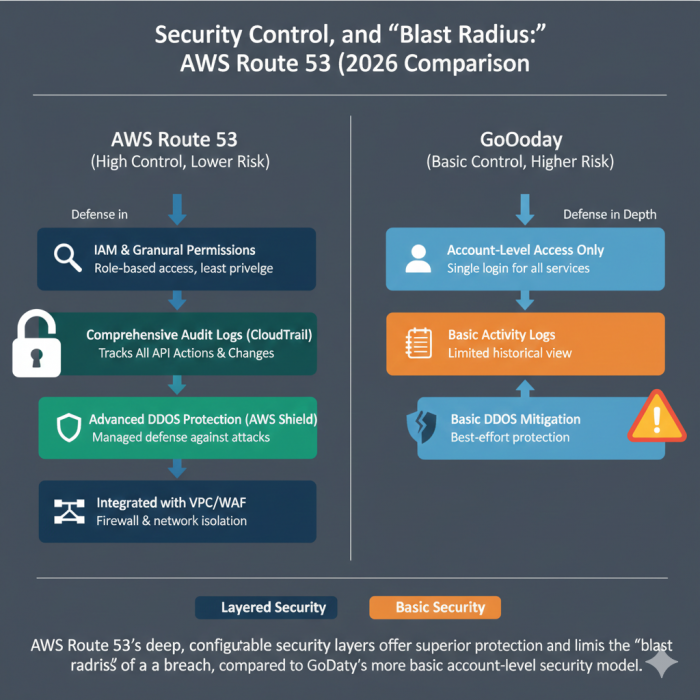
DNS is a high-impact attack surface.
Route 53 benefits from AWS’s security model:
- IAM-based access control
- fine-grained permissions
- audit logs
- integration with AWS Shield
GoDaddy relies more on account-level controls:
- fewer permission layers
- less granular auditability
For enterprises or regulated environments, this difference is significant.
User Experience: Simplicity vs Precision
GoDaddy UX: Optimized for Non-Technical Users
GoDaddy’s UI is:
- approachable
- visual
- forgiving
It’s ideal for users who:
- rarely touch DNS
- want guardrails
- prefer guided workflows
Route 53 UX: Built for Engineers
Route 53’s console:
- assumes DNS knowledge
- exposes raw configuration options
- prioritizes control over clarity
For non-technical users, it can feel intimidating. For engineers, it feels honest.
Migration Experience: Moving from GoDaddy to Route 53
Migrating DNS from GoDaddy to Route 53 is common, and usually painless if done correctly.
Typical steps:
- Export existing DNS records
- Create a hosted zone in Route 53
- Recreate records
- Update name servers at GoDaddy
Downtime is avoidable if TTLs are managed properly.
What surprises many users is how much cleaner DNS management feels after migration, especially for multi-service setups.
Who Should Use GoDaddy DNS
GoDaddy DNS makes sense if:
- you have one or two domains
- traffic is low
- uptime requirements are modest
- you don’t automate infrastructure
- you want minimal learning curve
It’s not “bad”, it’s intentionally simple.
Who Should Use Route 53 (And Why)
Route 53 is a better fit if:
- you run cloud infrastructure
- you expect to scale globally
- uptime is business-critical
- you automate deployments
- you want DNS as part of your system design
It rewards technical maturity.
The Hybrid Strategy Many Professionals Choose
One of the most practical setups is:
- register domains with GoDaddy
- host DNS on Route 53
This balances:
- GoDaddy’s registrar convenience
- Route 53’s DNS power
It’s also reversible and avoids lock-in.
Final, Honest Takeaway
This isn’t a battle of “better” vs “worse.”
GoDaddy DNS is designed to stay out of your way.
Route 53 is designed to become part of your architecture.
If your project is small and static, GoDaddy is enough.
If your project is growing, automated, or global, Route 53 becomes hard to replace.
The real mistake isn’t choosing the “wrong” provider, it’s outgrowing your DNS without realizing it.
Comments