

Imagine if you treated your coding course like a product, not a timetable. You’d ask: where do learners get stuck, where do they drop off, what parts of the “experience” leak time and motivation? Coding Rooms is built as the infrastructure for those questions less a “coding site,” more a system that keeps the whole workshop running.
1. What problem is Coding Rooms really trying to solve?
Short answer: It tries to eliminate three invisible cost centers in programming education:
● Environment chaos (setups that never match).
● Visibility gaps (teachers can’t see what’s happening on student screens).
● Assessment overload (too much grading, too little feedback).
Instead of adding “one more app,” Coding Rooms positions itself as the operational backbone for a programming class, where students code, teachers watch progress live, assessments run themselves, and all of that still talks to your LMS.
2. Who is Coding Rooms designed around?
You can technically use it for solo learning, but the design clearly assumes:
● A teacher or trainer owns a course.
● A group of learners moves through a sequence of lessons.
● An institution (school, university, bootcamp, company) cares about consistency and scale.
That’s why so much of the platform is about classes, roles, auto‑grading policies, dashboards, and LMS integrations rather than “pick a random exercise and play.”
3. What does a typical day on Coding Rooms look like?
Think of a single unit, say: “Intro to loops in Python.”
Before class
The instructor creates a learning unit with:
● Explanation (text, slides, or embedded video).
● A coding task in the browser IDE.
● Tests that express what “understanding loops” means in code (correct outputs, handling edge cases, etc.).
During class
● Students join via a link or LMS and land directly inside that unit—no installs, no configuration.
● As they type, each run, pass, or failure of a test becomes data: who’s progressing, who’s stuck, who hasn’t started.
● The instructor’s view is a live map of the class: they can dive into any workspace, comment, or briefly take over a student’s editor to demonstrate a fix.
After class
● Auto‑grading finishes the routine checks.
● Dashboards show patterns (e.g., 70% failed a particular test).
● The teacher uses those patterns to plan follow‑ups instead of reading 40 submissions from scratch.
4. How does the browser‑based IDE change the dynamic?
Instead of “everyone install X” at the start of the course, Coding Rooms gives you a standardized coding environment in the browser.
Key shifts:
● Same stack for everyone: you don’t debug OS differences; you debug code.
● File‑based projects: you can teach multi‑file structures, not just single‑file scripts.
● Embedded pedagogy: the “editor” becomes part of the lesson—starter code, comments, steps, all sit next to the exercise.
Some setups also use code playback to replay how a student typed their way to a bug or solution, turning the IDE into a kind of “flight recorder” for learning.
5. What makes the auto‑grading different?
You’re not just asking “Did they pass?”; you’re designing how understanding is checked.
Three main modes:
● I/O based tests : compare program output to expected output. Great for early CS or simple exercises.
● Unit tests : use frameworks like JUnit to check deeper behavior, multiple cases, and edge conditions.
● Custom script/Bash tests : simulate real environments: command‑line tools, files, multi‑step tasks.
Crucially, you attach hints and messages to these tests. So auto‑grading becomes a structured conversation: “Your code fails when the list is empty” instead of silent red crosses. This is where it scales: hundreds of learners can still get nuanced, immediate feedback without hundreds of hours of marking.
6. How does it handle live classes and collaboration?
Remote coding classes are usually like teaching in the dark. Coding Rooms tries to turn the lights on.
What you get:
● A live dashboard showing who’s typing, who’s idle, and who’s passing tests.
● The ability to open any student’s workspace, add comments, or temporarily control their editor.
● Built‑in video, audio, and chat so you can, in theory, run everything in one place.
User feedback highlights:
● Many teachers say this is what finally makes remote labs and code‑along sessions feel manageable.
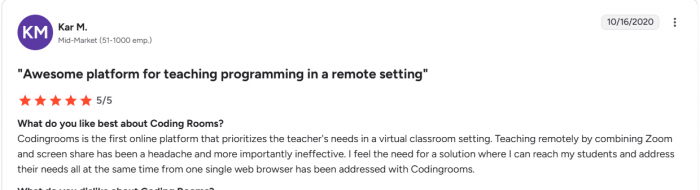
● Others point out that integrated video can lag or crash under load, and that breakout‑room style group work still needs improvement so some pair it with dedicated video tools for heavy sessions.
7. What data and analytics does Coding Rooms surface?
Instead of “Did they submit?”, you see:
● Who started an assignment and who never touched it.
● How many tests each student passed or failed.
● How long they spent on tasks and when they were last active.
● Which questions/tests are tripping up large portions of the cohort.
For instructors, that’s the difference between guessing and responding. For program leads, it scales into overviews of multiple classes and instructors, exposing where curricula or support structures are failing.
8. What do real users actually say?
Instead of paraphrasing, it’s more useful to look at the themes that keep showing up.
Common praise from instructors:
● “I can see and modify all my students’ code from one place in real time.”
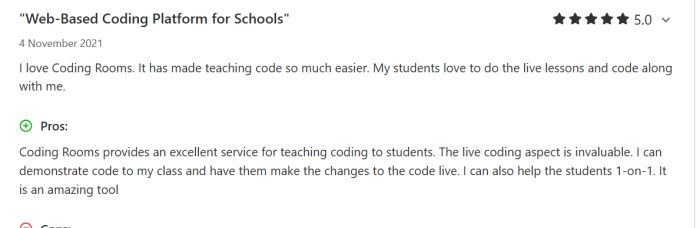
● “Grading time dropped dramatically once I set up auto‑graded tasks.”
● “Live code‑along sessions are smoother because everyone’s in the same environment.” G2
Teachers also report that students enjoy live lessons more when they can see tests pass and get quick help, rather than silently failing on their own.
Common complaints:
● Performance: lag or occasional crashes during heavy use.
● Learning curve: the platform feels dense at first; onboarding is important.

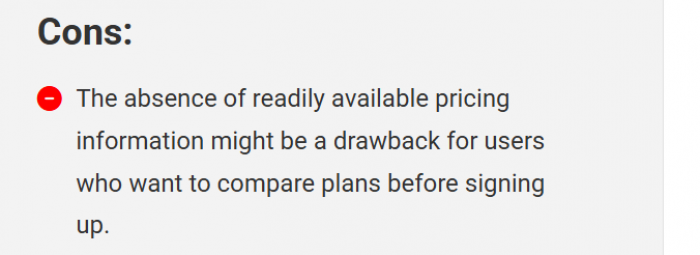
● Pricing transparency: people don’t like having to chase sales for clear numbers or discovering free options have changed.
● Collaboration: more robust breakout/group features are still on wish lists.
The pattern is clear: once configured, the platform delivers strong classroom value—but you pay with initial setup effort and some tolerance for rough spots.
9. How does it plug into an LMS and institutional tech?
Most institutions already use Canvas, Moodle, Blackboard, or Brightspace. Coding Rooms doesn’t replace those; it plugs into them using LTI 1.1 and 1.3.
Practical effects:
● Students log in through the LMS and are automatically recognized.
● Coding Rooms activities appear as standard assignments/modules.
● Grades sync back into the LMS gradebook.
That makes it easier to pilot: you can insert a Coding Rooms assignment into an existing course, see how it performs, and only later decide to rebuild more of your teaching around it.
10. What about roles, sections, and admin control?
Once you move beyond a single teacher, you need structure.
Coding Rooms supports:
● Multiple roles (instructor, TA, observer) with controlled permissions.
● Multiple sections sharing content but keeping separate rosters and grades.
● Admin views to manage licenses, access, and overall usage.
This matters for departments, bootcamps, and corporate academies where one platform must serve several cohorts and instructors without becoming unmanageable.
11. What does pricing look like in reality?
This is one of the more contentious topics.
What users see:
● Official sites and listings often push you toward demos and quotes, not full price sheets.
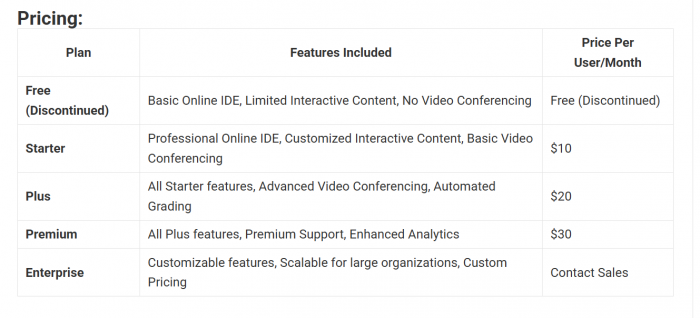
● Historically, there were free or lighter tiers; some sources now note those as discontinued or heavily limited.
What third‑party sites suggest:
● A tiered model (Starter, Plus, Premium, Enterprise) with progressively more advanced features: better video, auto‑grading depth, analytics, support, and organizational controls.
● Indicative per‑user pricing in the ~10–30 USD/month range in some listings, with enterprise pricing on request.
The real decision isn’t “Is Coding Rooms cheap?” but “Does it replace enough grading hours, tech headaches, and fragmented tools to justify the cost at our scale?” For many serious programs, the answer tends to be yes, especially when compared to juggling multiple disjointed tools.
12. Where does Coding Rooms sit among alternatives?
On a spectrum of tools:
● General cloud IDEs/playgrounds: great for ad‑hoc coding, weak on teaching flows.
● LMS platforms: strong on content and admin, weak on code‑level visibility.
● CS‑specific grading platforms: strong on submissions and tests, less on live teaching and collaboration.
Coding Rooms aims to occupy the middle: a teaching‑first coding environment that handles IDE, classroom, assessments, and analytics in one place and still talks to your LMS.
13. When is Coding Rooms a good decision?
It’s a strong fit if you:
● Run recurring, structured programming courses with multiple cohorts.
● Feel crushed by manual grading or one‑by‑one debugging in remote labs.
● Already rely on an LMS and want a deeper “coding layer,” not a second LMS.
● Are willing to invest up front in designing good auto‑graded activities and flows.
In that context, Coding Rooms behaves like infrastructure: once it’s in place, you reuse it across cohorts and instructors, and it keeps paying off.
14. When might another route be better?
You might skip Coding Rooms if you:
● Just need a light sandbox for occasional coding practice.
● Teach very small, informal groups that are fine with GitHub + email + spreadsheets.
● Want a self‑hosted, open‑source stack and don’t mind doing your own plumbing.
● Focus on hiring assessments or interviews rather than long‑form teaching.
In those scenarios, Coding Rooms’ structure and admin features can feel like overkill.
15. The decision in one question
The most useful framing isn’t “Is Coding Rooms a good platform?” It is: Do I want my programming course to behave like a system observable, repeatable, and data‑driven?
● If yes, Coding Rooms gives you a single room where environment, teaching, feedback, and analytics live together, with the LMS as a front door.
● If no, and you prefer a lighter, more improvised toolkit, then its biggest strengths like structure, integration, standardization will feel like constraints rather than advantages.
That’s the real trade: not one feature versus another, but one philosophy of running a coding classroom versus another.
Comments