

I didn’t start using Slidesgo with the intention of reviewing it. It gradually became part of my workflow because I needed to produce presentations quickly, and repeatedly, without spending hours fixing layouts, fonts, or slide structure.
Over time, Slidesgo went from being “a place to grab templates” to something I relied on for first drafts, internal decks, and educational slides. I used it under real constraints: incomplete briefs, last-minute edits, mixed collaboration environments, and the constant pressure to make slides look professional without overengineering them.
What follows isn’t a feature checklist or a sales pitch. It’s an account of how Slidesgo behaves when you actually depend on it, where it saves time, where it quietly introduces friction, and how each major feature holds up after sustained use in 2025.
How I Actually Used Slidesgo
Over several weeks, I used Slidesgo for:
- Business-style decks (strategy, comparisons, internal reviews)
- Educational slides (structured explanations, summaries)
- Quick “first draft” presentations created under time pressure
- Both Google Slides and PowerPoint exports
I used:
- Free templates
- Premium templates
- The AI Presentation Maker
- PDF-to-PPT conversion
- Manual editing inside Google Slides
That matters, because Slidesgo feels very different depending on how deep you go.
Feature-by-Feature Ratings
1. Template Quality & Visual Design
Rating: 4.6 / 5
This is Slidesgo’s strongest area.
What worked well
- Consistent spacing and typography
- Clear visual hierarchy (titles, sections, data)
- Templates rarely feel “broken” or amateurish
- Easy to adapt to brand colors without redesigning everything
Where it falls short
- Some popular templates are too recognizable
- After a while, you start spotting Slidesgo designs in other decks
- Not ideal if visual uniqueness is critical
Reality check:
If your priority is clarity over originality, Slidesgo does its job extremely well.
2. AI Presentation Maker (Text-to-Slides)
Rating: 3.8 / 5
This is where expectations need to be managed.
What it does well
- Creates a logical slide structure quickly
- Saves time on layout decisions
- Good for outlining and flow
Where it struggles
- Content depth is shallow
- Industry-specific accuracy is inconsistent
- Sometimes overuses generic phrasing
- Requires manual rewriting for anything technical
My takeaway:
It’s a draft generator, not a thinking partner.
Useful for momentum, not for final content.
3. PDF to PPT Converter
Rating: 4.0 / 5
I tested this with:
- Long articles
- Dense documents
- Mixed text + headings
What worked
- Clean slide segmentation
- Reasonable summarization
- Visual structure saved time
Limitations
- Nuance gets lost
- Complex arguments are flattened
- You still need to re-insert context manually
Best use case:
Turning long content into presentable slides, not preserving full meaning.
4. Editing Experience (Google Slides & PowerPoint)
Rating: 4.8 / 5
This part impressed me more than expected.
Why
- Slides behave normally inside Google Slides
- No weird locked elements
- Easy collaboration
- No learning curve
What this means practically
You’re not learning “Slidesgo’s editor” — you’re just using Slides.
That alone removes a lot of friction compared to AI-only platforms.
5. Asset Integration (Icons, Images, Graphics)
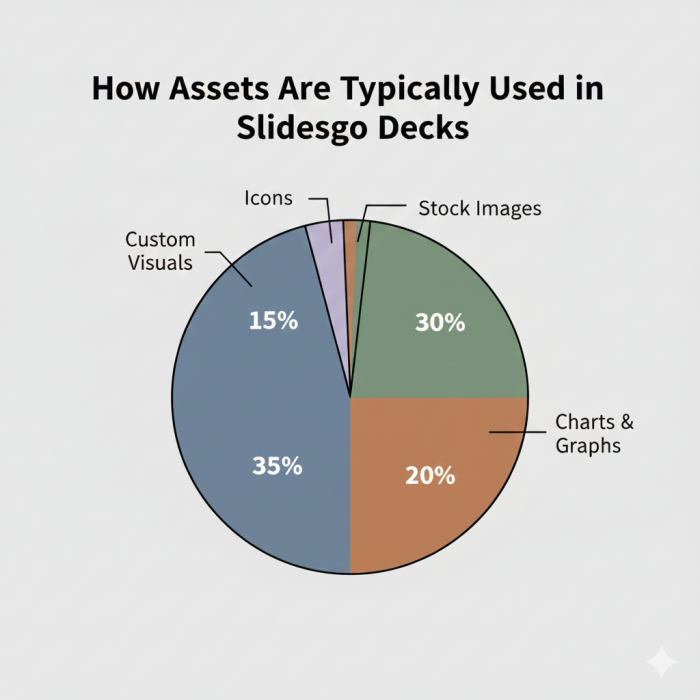
Rating: 4.5 / 5
Because Slidesgo is tied into the Freepik ecosystem, assets are plentiful.
Strengths
- Icons and visuals feel consistent
- Easy to swap visuals without breaking layouts
- Good coverage for business and education
Weak spot
- Advanced data visualizations still need manual work
- Not ideal for highly custom infographics
6. Speed & Workflow Impact
Rating: 4.7 / 5
This is where Slidesgo quietly shines.
Using Slidesgo:
- I reached a usable draft much faster
- I spent less time fixing alignment issues
- I focused more on content clarity than slide mechanics
It doesn’t make you smarter, it makes you faster.
7. Free vs Paid Experience (Reality-Based)
Free plan
- Usable, but limiting
- Attribution requirement is annoying for serious work
- Download cap is strict
Paid plan
- Removes friction
- Makes Slidesgo feel like a utility instead of a gated demo
This isn’t unique to Slidesgo, but it’s worth stating clearly.
Where Slidesgo Clearly Falls Short
After extended use, a few limitations stand out:
- AI content still needs heavy human review
- Overused templates reduce uniqueness
- Not built for highly animated or interactive decks
- Doesn’t replace storytelling or subject expertise
If you expect it to “think” for you, you’ll be disappointed.
My Overall Rating (After Real Use)
| Category | Score |
| Design Quality | 4.6 |
| AI Tools | 3.8 |
| Editing Experience | 4.8 |
| Speed & Efficiency | 4.7 |
| Flexibility | 4.5 |
| Overall | 4.5 / 5 |
Final Verdict
After using Slidesgo deeply, I’d describe it like this:
Slidesgo doesn’t create great presentations.
It removes everything that slows you down before a presentation becomes great.
It’s best for:
- People who want structure without rigidity
- Users who value speed and clarity
- Teams that already know what they want to say
It’s not ideal if:
- You want radical visual originality
- You expect AI to replace thinking
- You rely heavily on motion-heavy storytelling
Used with realistic expectations, Slidesgo earns its place as a reliable, time-saving tool, \not a magic solution, but a very practical one.
Comments