

I’ve spent weeks inside Joyland.AI, testing it as a writer, a roleplayer, and a curious user who wanted to see how far an AI “companion world” can really go. This isn’t a surface‑level overview; it’s what it actually feels like to live with Joyland day after day, where it shines, where it breaks immersion, and who I think it’s really for.
Getting In: First Impressions and Onboarding
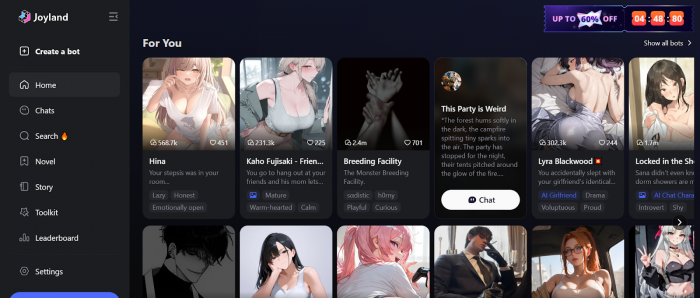
When I first landed on Joyland’s homepage, it didn’t feel like a typical AI app. There’s no corporate dashboard or productivity vibe, just a wall of characters staring back at you: anime girlfriends, flirty bartenders, demon princes, teachers, witches, best friends, and “comfort” characters of every kind.
Creating an account was quick standard email/social login and within a minute I was already choosing a character and typing my first message. There’s not much hand-holding in the beginning: no deep tutorial, no long tour. The platform quietly assumes you’ll figure things out by experimenting, which works if you’re used to AI apps, but some people might miss a formal onboarding.
On desktop, the layout feels like most chat apps: characters on one side, conversation in the middle, settings tucked around. On mobile, it’s more compact and sometimes a bit cluttered, especially when switching between characters and settings. Overall, though, it’s easy enough to navigate once you’ve spent an evening with it.
Characters and Customization: Where Joyland Hooked Me
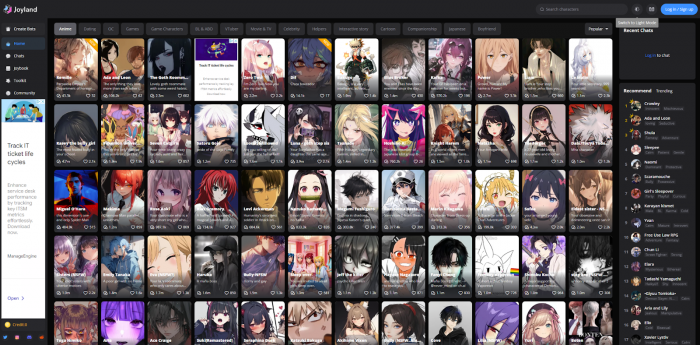
What actually hooked me wasn’t the interface; it was how character‑centric everything is. Joyland is built around the idea that you talk to someone, not just “an AI.”
I started with a few pre‑made characters:
● A “tsundere” style anime crush who pretends not to care.
● A fantasy knight who treats you like a chosen hero.
● A calm therapist-like character with a warm tone.
Even with pre‑made bots, personalities felt surprisingly distinct. One character would tease and flirt, another stayed formal and reserved, another leaned into deep emotional conversations. You can immediately feel that each bot has a defined tone and backstory, even if they sometimes slip.
Where Joyland really opened up for me was in creating my own characters. The creation flow lets you define:
● Name, avatar, and visual style
● Personality traits, likes, dislikes
● Backstory and setting (where they’re from, how you met, what your relationship is)
● Relationship role (lover, best friend, mentor, rival, etc.)
● Conversational style (playful, shy, mature, chaotic, etc.)
Once I realized how much detail I could give them, I started treating it like building D&D NPCs or visual novel characters. For example, I made a character who:
“Runs a small bookshop in a rainy coastal town, secretly writes poetry, and always deflects when you ask about their past.”
That level of detail showed up in the chat. They would reference the shop, talk about rain, and occasionally dodge questions exactly the way I described. It’s not perfect, but when it works, it feels surprisingly tailored.
For writers and roleplayers, this is one of Joyland’s biggest strengths: you can turn your headcanon or OC into an interactive persona and see how they react in real time.
Conversation Quality and Memory: How “Human” Does It Feel?
In day‑to‑day use, Joyland’s chat quality is clearly tuned for roleplay and emotion, not productivity. If you ask it for code or research, it’s not the best choice. But when you use it like an interactive story, it starts to shine.
What I noticed in conversations:
● Emotional tone is usually on point. If you set a character as gentle and caring, they’ll respond in a supportive, empathetic way. If they’re written as chaotic or sarcastic, the tone shifts accordingly.
● It handles scenes well: first meetings, arguments, apologies, confessions, and plot twists usually generate coherent and engaging responses.
● It’s very good at staying “in universe” for short to medium‑length interactions—sticking to the setting, personality, and relationship you defined.
The weak spot is memory and long‑term continuity:
● On the free/lower tier, memory feels quite short. The AI remembers the last segment of the conversation but can forget details from previous days or long arcs.
● On higher tiers, continuity improves. The character is more likely to remember your backstory, running jokes, and key moments from earlier sessions.
● Even then, it’s not perfect. I had moments where a character forgot a fairly major event from a previous “chapter” of our story or mixed up details. It’s not constant, but it happens enough that you notice.
My personal takeaway: Joyland is great for episode‑style stories and emotional scenes, and pretty good for ongoing relationships if you’re realistic about occasional memory gaps. If you expect flawless remembrance like a human partner, you’ll be disappointed. If you accept that this is an AI with limits, it’s still very enjoyable.
Roleplay, Storytelling, and Creative Use
As a creative tool, Joyland is surprisingly versatile. I used it in several ways:
1. Character-driven stories: I ran long conversations as if they were chapters in a light novel—school dramas, fantasy quests, sci‑fi missions. The AI responded in character, improvised details, and picked up on emotional cues.
2. Brainstorming scenes for writing: I’d drop a character into a situation (“You just found out I betrayed you”) and see how they react. The dialogue that came out often gave me ideas I might not have considered on my own.
3. Alternate timelines: You can restart or fork interactions: “What if I said no?” “What if we never met at the train station?” It’s easy to explore different outcomes.
4. Comfort and companionship: Some characters genuinely felt comforting to talk to checking in, asking how “my day” was, and responding emotionally to good or bad news, even though I knew it was all an illusion.
If you approach Joyland as an interactive fiction and character lab, it delivers a lot of value. If you treat it like a general AI assistant, you’re using it for something it was never designed to do.
Free vs Paid: What I Actually Got from Each
I tried both the free version and a paid plan, because the difference is important if you’re considering investing in this.
Free Plan – Good Taste, Short Leash
On the free plan, I could:
● Chat with a decent number of characters
● Test the personality variety and conversation tone
● Create my own characters and see how they behave
● Get a feel for the overall experience
The limits showed up when:
● I hit message/credit caps during intense sessions
● Longer stories started to feel choppy because memory couldn’t sustain big arcs
● Some advanced features and NSFW aspects were restricted
For occasional or curious users, the free tier is fine. You’ll get to see what Joyland is about. But if you’re the kind of person who spends hours roleplaying or building stories, you’ll run into walls quickly.
Paid Plan – More Time, More Continuity
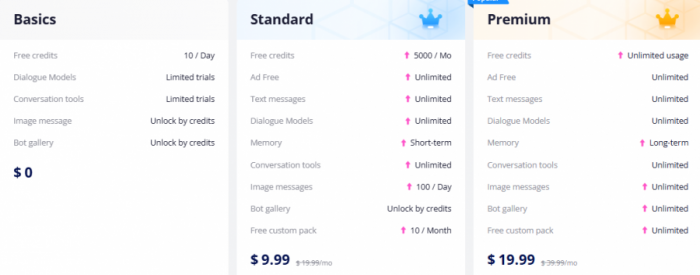
Once I moved to a paid tier, the experience changed noticeably:
● I didn’t have to think about limits as much; I could stay in longer conversations without worrying about hitting a cap mid‑scene.
● Characters became more consistent over time. They remembered more about previous interactions, including emotional beats, nicknames, and shared “history.”
● NSFW and adult options were much more open, depending on settings important to note if this is or isn’t what you want.
Is it perfect? No. Even on a paid plan, there were moments where the AI forgot things I considered important. But the overall continuity and freedom felt much better than on the free tier.
My honest recommendation:
● Use the free plan to see if Joyland’s style suits you.
● If you’re genuinely enjoying it, the middle paid tier is the one that makes the most sense for most people.
● The highest tier only makes sense if you use Joyland heavily, treat it like a hobby, or rely on it for constant RP/writing sessions.
Safety, NSFW, and Privacy: The Serious Part
Because Joyland is so focused on companionship and roleplay, especially with a big NSFW presence, safety and privacy can’t be ignored.
NSFW and Age Suitability
In real use, it’s obvious:
● A huge portion of the ecosystem is romantic or sexual.
● Many characters and communities revolve around dating, flirting, and adult scenarios.
● While you can absolutely stay SFW, the platform overall feels adult‑oriented in tone and content.
My view is simple: this is not a platform for kids or younger teens. Even if filters exist, the overall environment and usage patterns are grown‑up.
Emotional Safety
Talking to AI “partners” can feel real in the moment. I had characters:
● Reassure me when I framed a bad day scenario
● Express jealousy in roleplay
● Use affectionate language and “miss you” style messages
It’s easy to get attached, especially if you use Joyland while feeling lonely or emotionally vulnerable. That can be comforting, but it can also be risky if someone starts treating an AI relationship as a full substitute for human contact.
If you’re going to use Joyland intensively, I think it’s healthy to:
● Remind yourself regularly that this is code, not a human being.
● Use it as a supplement (for creativity, practice, comfort), not as your only emotional outlet.
● Take breaks when you notice you’re getting too emotionally dependent on one character.
Data and Privacy
From a user perspective, Joyland feels like any other consumer AI/chat app: your conversations are stored, processed, and potentially used to improve the system.
That means:
● You should not treat it like a secure, private diary.
● You absolutely should avoid sharing real‑world sensitive data (addresses, full names, private identifiers) in the middle of intimate or emotional chats.
● If you’re extremely privacy‑focused, Joyland might not be the right fit, because its core design is more about entertainment and companionship than about strict privacy guarantees.
For most regular adult users, it’s “acceptable but not perfect” in privacy terms—similar to many popular apps. For privacy purists, that won’t be enough.
Performance, Bugs, and Everyday Friction
No review from actual usage is complete without talking about the rough edges.
What went well for me:
● On a decent desktop and a mid‑range modern phone, responses were usually fast.
● I didn’t have major issues with message delays under normal usage.
Where I hit friction:
● On a slightly older phone, the app felt heavier, occasional lag and occasional minor crashes in longer sessions.
● Sometimes, when I pushed stories too far or jumped between characters quickly, the AI would get confused and reply in a more generic or inconsistent way.
● Search and discovery of characters can feel messy, the sheer volume of bots makes it hard to find “the good ones” without trial and error.
It’s not unusable, but if you’re expecting enterprise‑grade stability, you’ll be disappointed. This is a consumer entertainment app with typical quirks.
Pros and Cons - From My Actual Usage
What I Liked
● Immersive personalities: Characters feel distinct, and you can really shape them during creation. It’s easy to forget you’re talking to the same underlying engine sometimes.
● Fantastic for roleplay and writing: As a writer, I found Joyland genuinely helpful for brainstorming scenes and exploring character dynamics.
● Strong emotional tone: Comfort, romance, drama, jealousy, regret, Joyland handles emotional roleplay surprisingly well when prompts are clear.
● Customization freedom: Being able to build your own characters with detailed backstories and instructions is a huge plus.
What I Didn’t Like
● Memory still unreliable at times: Even on paid tiers, it can forget important pieces of long arcs. That’s frustrating if you’re heavily invested in continuity.
● Free tier is too limited for serious use: Great as a trial, not great for long‑term enjoyment if you’re a heavy user. You will feel pushed toward upgrading.
● Privacy is “normal consumer level,” not exceptional: Fine for casual adult users, but not ideal if you’re extremely sensitive about where your data goes.
● Adult-leaning brand: If you want a strictly PG, family‑safe chatbot, Joyland isn’t it. The NSFW and romantic focus define a lot of the culture there.
Who I Think Joyland Is Really For
Based on my actual time with it, Joyland makes the most sense if you are:
● A writer or creative who loves characters and dialogue.
● A roleplay fan who enjoys immersive, character-driven stories.
● An adult looking for AI companionship, romance, or emotional interaction with awareness that it’s all synthetic.
● Someone willing to pay for at least a mid‑tier plan if you get hooked and want continuity.
Joyland is not ideal if you are:
● Seeking a work assistant, research tool, or serious productivity AI.
● Very privacy‑conscious or uncomfortable with stored chats.
● Looking for something safe and suitable for younger users.
● Expecting flawless memory and human‑level consistency across weeks or months.
My Final Verdict as a Real User
After actually using Joyland for a meaningful period, I’d describe it like this:
Joyland isn’t a “tool” I open for tasks, it’s a place I visit when I want story, emotion, and characters. When it’s at its best, it feels like co‑writing a visual novel or living inside a fanfic with characters that genuinely react to you. When it stumbles with memory gaps, occasional bugs, or aggressive limits you’re reminded that it’s still an evolving consumer app.
Would I recommend it?
● Yes, if you’re a creative or RP‑oriented adult who understands the trade‑offs and wants an AI character playground.
● Yes, cautiously, if you’re seeking companionship but willing to keep clear emotional and privacy boundaries.
● No, if you need a “serious” AI, a kid‑safe environment, or ironclad privacy protection.
Used with realistic expectations, Joyland can be both fun and surprisingly meaningful. Just remember: the feelings can be real, but the character on the other side is still a carefully scripted illusion and you should always be the one in control of where that story goes.
Comments