

1. What Is Krea AI?
Krea AI is an AI-powered creative platform that allows you to generate, enhance, and edit visual content including images, video, and 3D assets using text prompts or real-time interactive tools. It’s designed to be accessible via web browser, meaning no heavy software install is required. The platform combines multiple generative engines and custom features to help users create high-quality visuals quickly.
2. Core Features of Krea AI
a) Real-Time Image Generation
Krea’s standout feature is its real-time latent consistency engine; you can sketch or modify visuals and see high-fidelity results instantly. This is excellent for brainstorming designs or iterating on concepts visually.
b) High-Quality Upscaling
The platform supports robust image upscaling, enabling you to transform low-resolution visuals into detailed, high-resolution output. This is useful for printing or designing at larger scales.
c) Custom Model Training (LoRA)
Advanced users can train custom styles using their own images (a feature known as LoRA training), allowing the AI to create visuals that match a specific aesthetic or brand identity.
d) Video Support & 3D Expansion
Krea has expanded into AI-based video tools and supports 3D asset generation, broadening its creative capabilities beyond static images.
e) Node-Based App Builder
An innovative update lets creators turn AI workflows into no-code apps that others can use a powerful feature for automation or team workflows.
f) Infinite Canvas
This feature allows artists to generate artwork on an unbounded, zoomable workspace, making expansive or iterative creative projects easier.
3. How Krea AI Works: Step by Step
1. Enter your prompt describing what you want to create (e.g., “futuristic cityscape in neon colors”).
2. Choose a model Krea offers multiple engines (Flux, Nano Banana, etc.).
3. Real-time preview watches the tool render visuals instantly.
4. Refine & edit tweak prompts or add training data for style consistency.
5. Export save your images, videos, or 3D assets.
This workflow makes Krea AI especially useful for creative ideation and rapid prototyping.
4. Pricing Overview
Krea AI typically offers tiered plans:
● Free / trial tier: Basic access with generation limits.
● Pro & Max plans: Higher generation credits, more advanced models, and priority support.
● Business / Enterprise: Custom plans for teams and agencies.
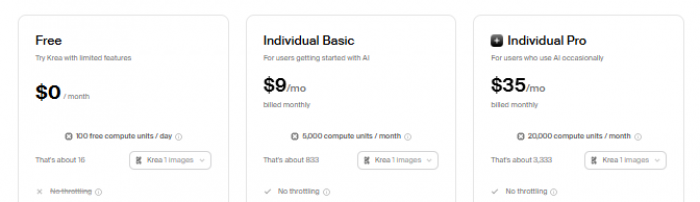
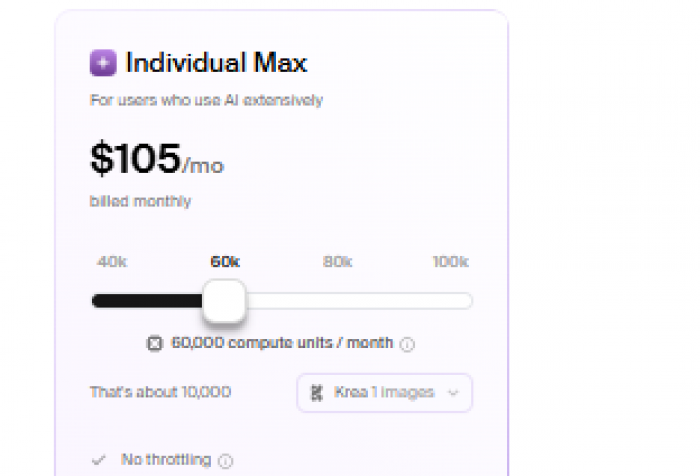
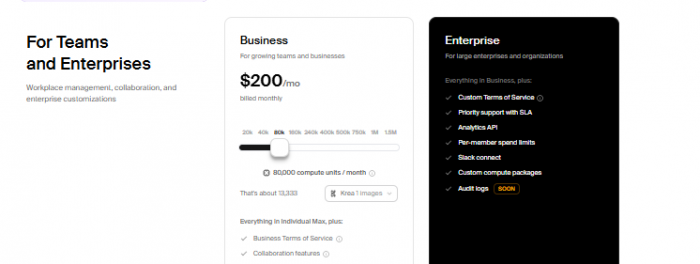
Unlike some competitors that cap free use tightly, the free tier on Krea often runs out quickly and pushes users toward paid plans something mentioned repeatedly by reviewers.
5. User Reviews & Feedback
Trustpilot Reviews
Krea’s Trustpilot profile shows a mixed to negative TrustScore around ~2.7/5, with many complaints about billing, support, and reliability but some users do praise certain features.
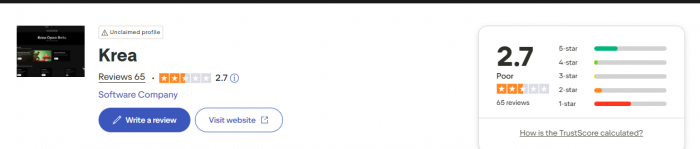
Common Positive Experiences
● Some users report good AI generation quality and powerful editing control.
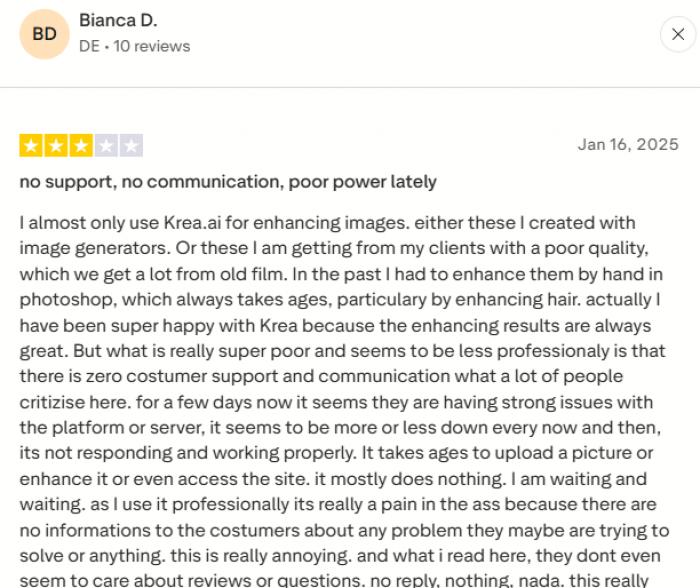
● Certain customers praised responsive support and issue resolution.
Common Complaints
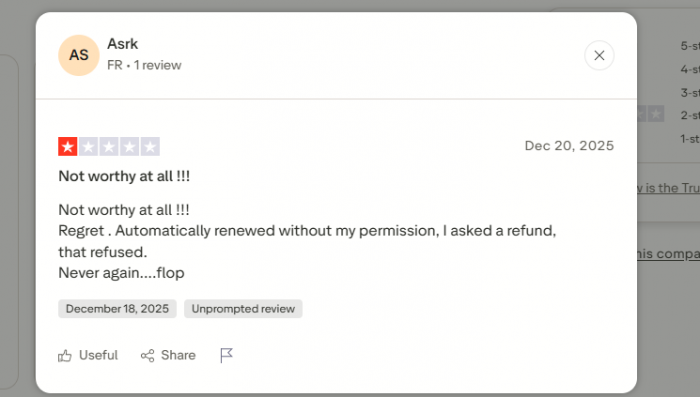
● Unauthorized or hidden charges, even after account cancellation.
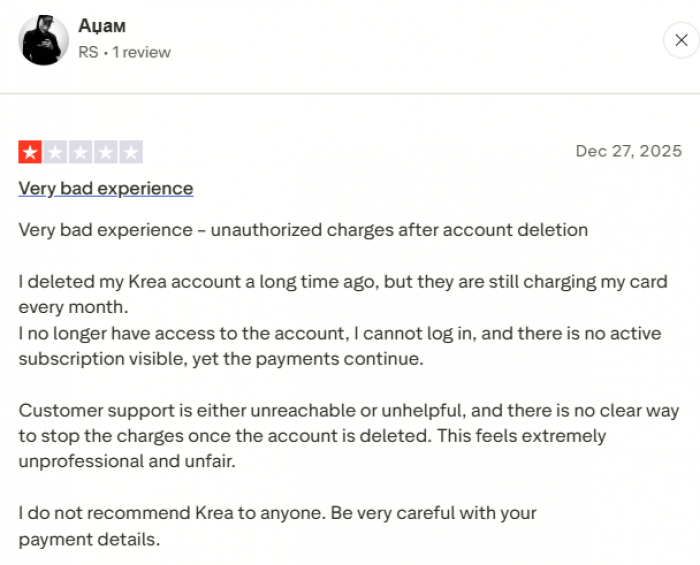
● Issues with subscription billing transparency.
● Users describe buggy features, freezes, and service downtime.
● Customer support unresponsiveness reported multiple times.
Reddit Community Feedback
The Reddit community also provides unfiltered opinions:
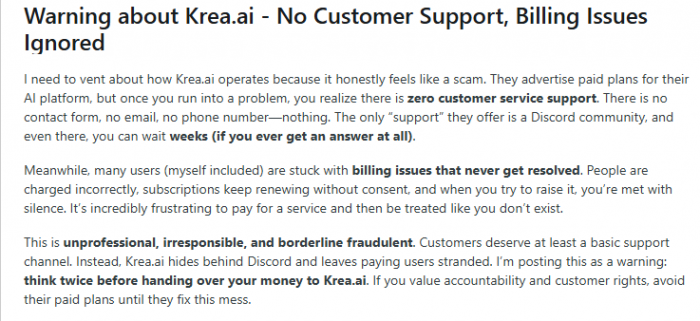
● Complaints about billing problems and lack of dedicated support channels, with users calling the experience unprofessional.
● Some creatives note that certain tools (like realistic upscalers) were better in older versions, suggesting feature instability.
● A positive thread highlighted the Node App Builder as a game-changer, helping creators turn workflows into apps without code.
6. Pros and Cons
Pros
✔ Strong real-time generation and upscaling tools.
✔ Custom model training capability (LoRA).
✔ Unique workflow tools like Infinite Canvas & App Builder.
✔ Browser-based (no heavy installation).
Cons
✘ Trustpilot shows low overall satisfaction (~2.7/5).
✘ Frequent billing and subscription issues reported.
✘ Bugs, downtime, and slow response times mentioned.
✘ Some users find creative results inconsistent.
7. Who Should Use Krea AI?
Best Suited For:
● Creatives and designers exploring rapid idea generation.
● Social media or marketing teams needing fast visual drafts.
● Users who want both image and video AI tools in one platform.
Not Ideal For:
● Users demanding exceptional reliability or strong support infrastructure.
● Beginners seeking ultra-simple experiences without subscription surprises.
● Those who want fully professional-grade art generation without limitations.
8. Is Krea AI Legit and Safe?
1. The Platform Itself Is Legitimate
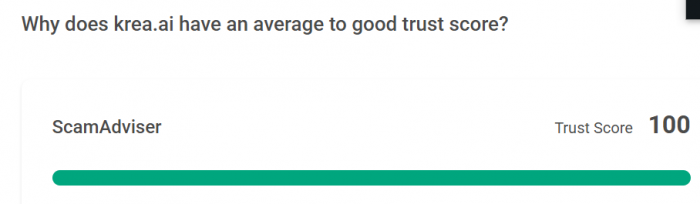
Independent website safety checkers like ScamAdviser assess krea.ai as very likely safe and not fraudulent. It scores well for things like:
● Valid SSL encryption your connection to the site is secure.
● The domain isn’t flagged as malicious or phishing.
● The site has been around for multiple years, which usually indicates a real business rather than a scam startup.
Another site, ScamMinder, also gives Krea a high trust score, noting that the use of SSL and clear service descriptions make it appear legitimate.
In short: Krea AI appears to be a real company offering real services. It's not a “scam” in the sense of a fake site designed to steal your data or malware.
2. Safety and Data Security, Mostly Standard, But With Caveats
Krea’s privacy policy states that they use encryption and access controls to protect your information and don’t sell your personal data to third parties. They also outline clear practices for cookies and payment data handling.
However, no online service can guarantee 100% security, and Krea’s policy acknowledges this so always be cautious with especially sensitive data.
For enterprise users, there are no-train or data isolation policies that prevent proprietary files from being used to train general models, a big plus for businesses concerned with confidentiality.
Bottom line on safety:
✔ Data is encrypted and handled in line with modern standards.
✔ Privacy policy is transparent about how data is managed.
✘ It isn’t the most detailed or reassuring for extremely sensitive use cases (e.g., legal or medical data).
3. User Experiences: Safety vs. Reliability
While the platform is legitimate and mostly safe, many users report problems related to service quality not fraud. For instance:
● Billing issues: Multiple reviewers say unexpected charges continued even after canceling their accounts, or subscriptions were hard to manage or cancel.
● Poor or delayed support: Many customers say support is slow, unresponsive, or only available through community channels like Discord, which can be frustrating when trying to resolve problems.
● Service bugs and instability: Some users report downtime, freezes, or features not working as advertised (though others report good experiences).
These issues don’t mean the site is unsafe but they do affect the overall user experience and can feel “scam-like” when losing money or not receiving interactions you expected. It’s real-world frustration rather than technical illegitimacy.
So: Is Krea AI Really Safe & Legit?
Yes with context:
Legit: The platform is real, with secure web infrastructure and standard data protection.
Safe: Basic security is good, but you should still be cautious about what you upload and how you manage your account.
User trust: Many customers are unhappy with billing transparency and customer support that’s quality and reliability, not necessarily safety.
9. Final Verdict
Krea AI is a promising generative AI platform with ambitious tools that span image generation, video, upscaling, custom training, and workflow automation. Its real-time visual tools and no-code app features make it attractive for creative professionals and teams.
However, the mixed user sentiment, billing transparency issues, and occasional technical instability mean it may not be the most reliable choice for everyone right now. If you’re experimenting with AI visuals and don’t mind navigating support challenges, it might be worth trying just to be cautious with subscription commitments.
Comments