

When I first stumbled upon Lenso AI, I wasn’t entirely sure what to expect. As someone who spends a lot of time online, I had used reverse image search engines before, tools that help you find where an image is used across the web. However, Lenso AI promised something different: it used advanced artificial intelligence to offer a more accurate and personalized search experience. With so much hype surrounding AI these days, I figured I’d give it a shot to see if it could truly live up to its claims.
In this blog, I’m going to walk you through everything I’ve learned about Lenso AI, from the amazing features to the drawbacks that I’ve personally experienced. Let’s dive in!
What Is Lenso AI?
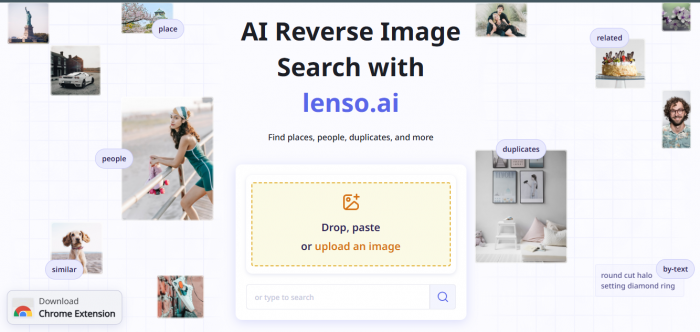
At its core, Lenso AI is an AI-powered reverse image search tool. If you’re familiar with Google Images, you might already have an idea of how reverse image search works. But Lenso AI takes it a step further by integrating facial recognition technology and leveraging advanced AI to provide more tailored results. Whether you're looking for duplicates of an image, trying to track down where a face appears online, or just curious to see similar images, Lenso AI does all that with stunning speed.
Here’s what really caught my attention: Lenso AI doesn’t just give you random search results. It categorizes your image into people, places, duplicates, or similar content, so you can narrow down your search to exactly what you need.
My Experience with Lenso AI: The Good
I’m not going to sugarcoat everything, but I have to admit, Lenso AI impressed me in many areas.
Speed and Accuracy
One of the things that stood out immediately was how fast it worked. I uploaded a few random images, and within seconds, Lenso AI began pulling up matches. It was faster than other reverse image search tools I had used in the past. And the accuracy? Remarkably good, especially for faces and well-known landmarks.
I tried searching for a photo of a celebrity, and Lenso AI quickly found links to the image on news websites, blogs, and even social media accounts. It was spot-on and even showed me links where that same image was used in articles, something that traditional search engines often struggle with.
User Interface: Clean and Simple
As someone who isn’t super tech-savvy, I was relieved to find that Lenso AI’s interface is simple and intuitive. There are no confusing menus or unnecessary steps. You just upload an image, choose the type of search (face, object, duplicate), and hit "search." Within moments, results start pouring in. The dashboard is clean and easy to navigate, and I didn’t feel overwhelmed or lost at any point.
Reverse Image and Face Search
The face search feature was a highlight for me. When I uploaded a random image of a person, Lenso AI didn’t just show me links to that image; it actually found other instances of that person across different platforms. I was able to track down their social media profiles and even articles they had been featured in. For someone who’s always curious about people’s digital footprints, this was fascinating.
What Needs Improvement: My Lenso AI Limitations
However, no tool is without its flaws, and Lenso AI is no exception. While it does a great job at some things, there are definitely areas where it can improve.
Not Always Perfect with Obscure Photos
I tried uploading a low‑quality, non‑popular image, a picture I took on my phone of a street in my neighborhood. The results were disappointing. Lenso AI wasn’t able to find any similar or exact matches. It seems that Lenso AI excels when searching for popular faces or widely shared images, but it doesn’t handle obscure or blurry photos as well.
Limited Free Version
Lenso AI’s free version lets you perform basic searches, but you don’t get access to full features unless you opt for a paid subscription. The free tier was enough for my casual needs, but once I started wanting to unlock more detailed search results, like exact image locations or deeper analytics, I hit a paywall.
Unlocking Results Can Be a Hassle
Even with a paid account, unlocking results isn’t always straightforward. Some users, including myself, have found that you need to spend credits or use a paid tier to view certain results. It felt like a bit of a bait and switch, especially when results didn’t always include useful information, or didn’t unlock everything I thought I’d see.
How Much Does Lenso AI Cost?
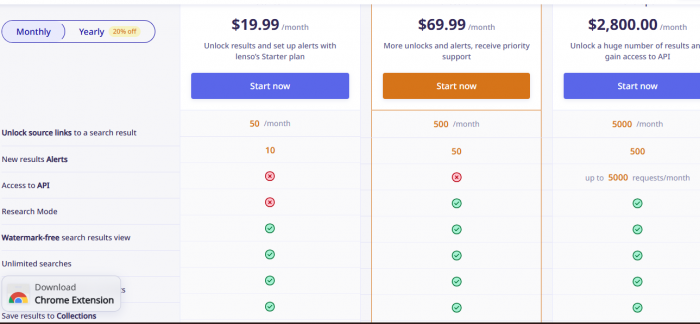
If you're planning to use Lenso AI regularly, you’ll need to know about its pricing structure. Here’s what I found:
- Free Version: Offers basic image searches with limited features.
- Starter Plan (~$15.99/month): Allows more searches and gives access to detailed results.
- Professional Plan (~$69.99/month): Best for heavy users, unlocking advanced features and more search capabilities.
- API and Developer Plan (~$2,800/month): Aimed at businesses needing bulk access to reverse image and facial recognition services.
Honestly, I found the paid plans to be quite reasonable for what the tool offers, but they can add up if you're searching frequently.
Is Lenso AI Safe to Use?
As someone who values privacy and security, I was a bit wary when I first uploaded an image. But after researching and looking into Lenso AI’s policies, I feel comfortable using it.
Encryption: Lenso AI uses SSL encryption, ensuring that your connection to the platform is secure.
No Permanent Image Storage: The platform claims that it doesn’t store uploaded images permanently. Images are processed, then discarded after use.
Face Recognition Compliance: Lenso AI adheres to privacy regulations and states that it follows laws for facial recognition in different regions.
So, based on this information, Lenso AI is generally safe, especially if you're cautious about the images you upload. (
User Reviews: What Are People Saying?
After exploring Lenso AI myself and reading through user reviews, I found that the platform has received a mix of positive and negative feedback. Here's a summary of what real users are saying:
What Users Like About Lenso AI
1. Fast and Accurate Reverse Image Search
Many users love how quickly Lenso AI pulls up relevant results, especially for popular images or faces. Several reviewers mentioned that it was faster and more accurate than other tools they’ve tried.
Example:
“I’ve tried other reverse image search tools, but Lenso AI is much faster and finds results that others miss.”, User on Trustpilot
2. User-Friendly Interface
Lenso AI’s simple interface is often praised. Users say it’s easy to navigate, even for those who aren't tech-savvy. You just upload an image, and the tool takes care of the rest.
Example:
“Lenso AI is incredibly easy to use. I don’t have to deal with any confusing menus, and it’s quick to find results.”, User on Capterra
3. Excellent for Face Recognition
The face recognition feature stands out. Many users were impressed by its ability to identify people in images and find other instances of those faces across the internet.
Example:
“The face search feature works wonders. It helped me trace a celebrity’s public photos I had never seen before.”, User on SoftwareSuggest
What Users Don’t Like About Lenso AI
1. Limited Free Version
While the free version of Lenso AI lets you upload and search images, many users feel that it’s too restricted. To access detailed results or unlock more matches, you’ll need to upgrade to a paid plan.
Example:
“The free version is fine, but you quickly run into limits. I had to upgrade to see full results.” — User on Reddit
2. Struggles with Low‑Quality Photos
Some users mentioned that Lenso AI doesn’t perform as well with low‑resolution or obscure images. If your photo isn’t widely circulated or is blurry, the tool may not return accurate results.
Example:
“It works great for clear photos but struggles with anything blurry or unclear. It didn’t find anything when I uploaded a low‑quality image.”, User on Trustpilot
3. Confusing Credit System
A few reviews pointed out that the credit system can be confusing. After purchasing credits, some users weren’t sure how many they had left or how they were being used.
Example:
“The credit system isn’t very clear. You don’t always know how many credits you need to unlock results, and it feels restrictive.”
My Rating and Final Thoughts
After using Lenso AI for several weeks, I would rate it 4 out of 5 stars. Here's why:
Pros: Fast results, accurate for popular faces/objects, user‑friendly interface.
Cons: Struggles with obscure images, paid tiers can get expensive, and unlocking results is sometimes cumbersome.
Would I recommend it? Absolutely, if you're someone who needs a quick and accurate reverse image search tool, especially for faces or objects that are widely shared. However, if you need results for random or low‑quality images, you might want to consider alternative tools.
Frequently Asked Questions (FAQs)
What does Lenso AI do?
Lenso AI allows you to perform reverse image searches using advanced AI to find duplicate images, identify faces, and search for similar content online.
Is Lenso AI safe?
Yes, Lenso AI uses SSL encryption and doesn’t store images permanently, ensuring your searches are secure.
How much does Lenso AI cost?
Lenso AI offers a free version with limited features. Paid plans start at $15.99/month for basic features, with professional and developer plans available.
Who owns Lenso AI?
Lenso AI was founded by Lukasz Kowalczyk and is based in Wroclaw, Poland.
In conclusion, while Lenso AI has its limitations, it’s still a fantastic tool for those who need to track down images, verify sources, or identify people online. If you’re curious or need it for specific tasks, I highly recommend giving it a try.
Comments