
Leonardo AI has slowly become one of my “go‑to” creative tools, especially when I need fast but polished visuals for blogs, thumbnails, and concept ideas. I didn’t fall in love with it on day one, but the more I pushed it like a real production tool (not just a toy), the more it started to replace my usual mix of stock sites and manual design work.
First Impressions: What Leonardo AI Felt Like to Use
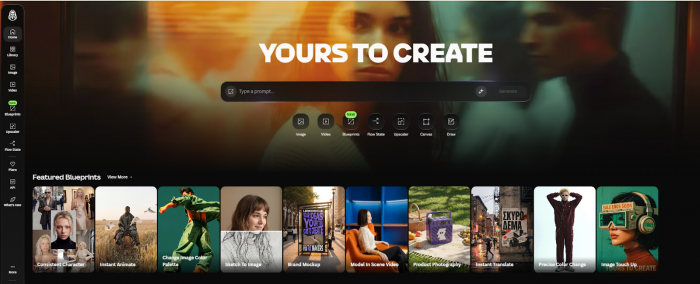
When I first logged into Leonardo AI, it felt closer to a serious creative dashboard than a gimmicky AI toy. There’s a proper workspace with models, recent creations, and clear “Create” buttons instead of a single text box and a big “Generate” button.
Onboarding was simple: I signed up, picked a couple of suggested models, and within minutes I had my first usable images. For a basic prompt, the results were already good enough to drop into a blog or social post. But it was also obvious that this tool hides a lot of power under the surface, there are many settings, models, and an entire Canvas editor waiting once you’re ready to dive deeper.
How I’d Summarize Leonardo After Using It
| Aspect | My Take |
| What it is | A creative workstation for AI images, textures, and short motion clips |
| Best for | People who need consistent, on‑brand visuals, not just random art |
| Platforms | Web and mobile (handy when an idea hits on the go) |
| Pricing | Free to start; paid plans if you’re serious or heavy‑volume |
| Verdict | Powerful and flexible, but you’ll get the most if you learn its tools |
Generating Images: From “Type a Prompt” to “This Could Be a Real Asset”
My Experience with Text‑to‑Image and Image‑to‑Image
The first thing I did was the obvious: type prompts and see what happens. I tried prompts like “hyper‑realistic product photo on clean white background, soft shadows” and “dramatic cinematic sci‑fi city skyline at dusk, ultradetailed, volumetric light.”
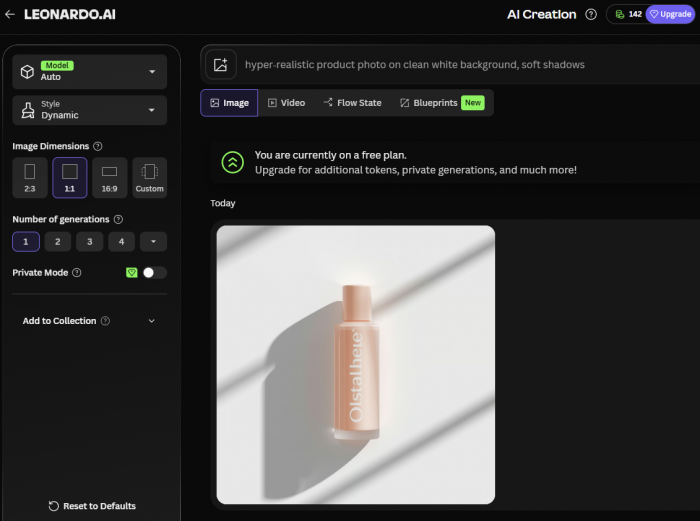
What stood out:
● The images didn’t look like random AI mush; they were quite sharp and usable with minimal tweaking.
● Changing models made a huge difference, one model made things look like game concept art, another like polished 3D renders.
When I switched to image‑to‑image, the tool really started to feel production‑ready. I could upload a generic stock‑like product shot, tweak the prompt, and get variations in different environments and lighting styles while still keeping the main subject intact. That felt like having a mini art department on call.
The Controls I Keep Coming Back To
I found myself relying on a few controls over and over:
● Negative prompts to ban things like text, extra limbs, or weird artifacts.
● Batch generation to get several options in one go and pick the best.
● Quality sliders to decide whether I want quick drafts or more polished outputs.
At first, the interface felt a bit dense, but after a few sessions, I started treating it like a “pro mode” instead of something intimidating.
Style Control: How I Got Consistent Looks Instead of One‑Offs
One of my biggest tests for any AI image tool is: can it keep a consistent style across multiple images? That matters a lot when you’re doing a whole article series or working on a brand.
With Leonardo, the different models and presets are like curated style packs. Once I found a model that matched the look I wanted for example, a slightly stylized but professional “tech illustration” feel I could reuse it with similar prompts and get images that looked like they belonged in the same family.
I especially liked:
● Switching models to jump between photoreal, 3D, and illustrated looks without starting from scratch.
● Using presets when I didn’t want to think too much, just “give me something that looks like this example.”
Custom models (trained on your own images) are where it gets really interesting for brands and recurring characters. Training takes some preparation of your dataset, but once it’s set up, you get much better consistency. If you work with the same brand or persona across content, this can be a game changer.
The AI Canvas: Where I Really Started Treating It Like Photoshop + AI
The AI Canvas is where Leonardo went from “cool generator” to “actual work tool” for me.
How I Actually Use the Canvas
My typical workflow:
1. Generate a base image that’s “almost there.”
2. Open it in the Canvas.
3. Use inpainting to fix specific areas (hands, faces, objects that look off).
4. Use outpainting to widen the scene for blog hero images or banners.
5. Tweak composition and then regenerate only the parts I changed.
For example, I once generated a nice cyberpunk city scene, but the foreground character’s face was off. Instead of regenerating the entire image, I masked just the face area, wrote a mini‑prompt describing the facial features I wanted, and let Leonardo redraw just that portion. It saved time and preserved the background I already liked.
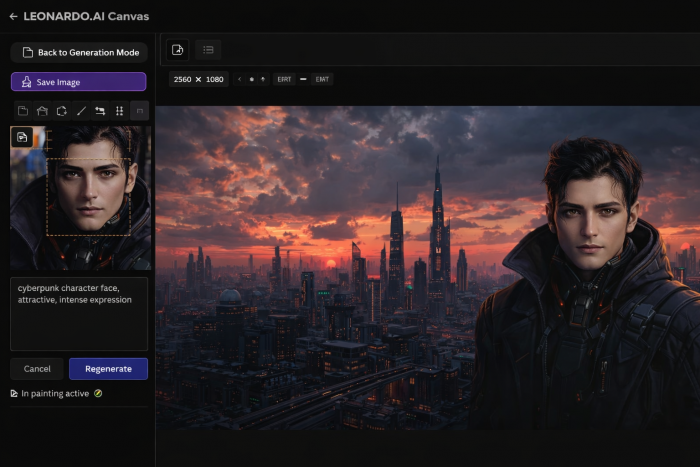
It took me a couple of sessions to get comfortable with the Canvas, but once it clicked, it felt like having Photoshop, but with an AI assistant that actually understands prompts.
Motion Features: Good Enough for Social, Not a Full Video Studio
I didn’t adopt Leonardo as a “video creation” tool, but I did play with its motion options. Turning static images into short animated clips with gentle camera moves or slight motion worked well for reels and story intros.
Realistically:
● It’s not something I’d use to produce fully scripted videos.
● It is something I’d use to spice up an otherwise static thumbnail or hero image.
For social‑heavy workflows, that little bit of motion goes a long way in catching attention.
Day‑to‑Day Usability: Smooth Enough to Actually Use in a Real Workflow
Onboarding and Learning Curve from My Perspective
On day one, Leonardo was easy enough to use for simple prompts, but you can feel there’s depth. The basic flow: pick model → type prompt → generate takes minutes to learn. The advanced stuff like Canvas tricks, custom models, careful prompt/negative prompt balancing takes longer but pays off.
If you like tools that grow with you, this is a plus. If you want something ultra‑simple with minimal options, you might feel it’s “too much.”
Interface and Navigation
The layout made sense to me pretty quickly. Side menus, a big central generation area, and clear buttons to jump into the Canvas. There’s a slight learning curve in understanding where every option lives, but nothing unreasonable if you’re used to modern creative apps.
I do recommend spending a dedicated session just clicking through the Canvas tools and experimenting. Once you know what’s possible, you start planning your prompts and edits differently.
Quality, Speed, and Reliability: What I Actually Saw
Quality of Results
Across dozens of tests, Leonardo produced:
● Very usable tech, product, and environment images.
● Strong game‑style and concept art visuals, this is where it really shines.
● Occasional weirdness with hands, text in images, or overly complex scenes (quite standard for AI image tools).
The big difference versus simpler tools is that I rarely had to accept “almost right” images. I could go into the Canvas, refine, and push things closer to what I had in mind.
Speed and Tokens
On a decent connection, images arrived in seconds. High‑detail runs took slightly longer, but nothing that broke my workflow. For serious experimenting, the free tokens disappear quickly, which is expected with this kind of tool.
Once you start doing multiple variations per prompt, Larger resolutions and frequent Canvas regenerations, it becomes obvious that a paid plan is less about “premium perks” and more about being able to create without constantly watching your token counter.
Stability
I didn’t experience major crashes, but there were occasional moments where things felt slower, which I’d expect during high‑traffic times. Overall, it felt reliable enough to use for real client‑facing or blog‑facing work.
Pricing and Value: When Free Is Enough and When It Isn’t
From my usage, I’d describe the tiers like this:
| Plan Type | How It Felt in Practice |
| Free | Great for testing and light use, but tokens run out fast |
| Mid‑tier | “Comfort zone” for regular content creators |
| High‑tier | Overkill for casuals, worth it for agencies and studios |
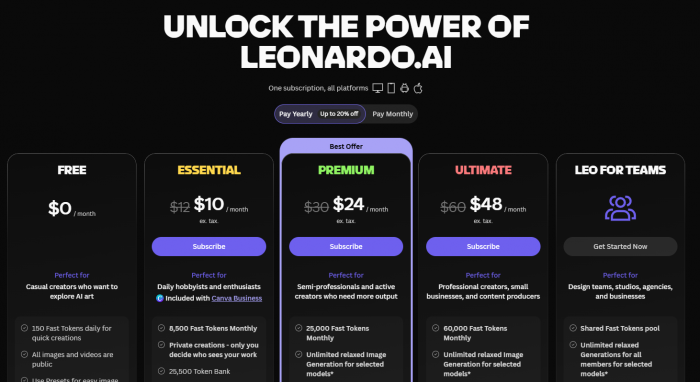
On the free plan, I could comfortably test prompts, models, and workflows, but I had to be strategic. Once I started using Leonardo as part of my regular content production especially when generating multiple variations per asset a paid plan felt less like a luxury and more like a requirement.
Compared to juggling multiple separate tools (generator + editor + extras), having everything in one place actually improved the overall value for me.
How I See Privacy, Licensing, and Ethics as a User
Privacy in Real Use
I’m careful with client material, so I paid attention to how data is handled. As with most AI platforms, you need to assume that on lower plans your content can help improve the service. For anything sensitive or proprietary, I’d only use it under settings or plans clearly marked as privacy‑focused and still avoid uploading the most confidential assets.
Commercial Use
For general blog visuals, marketing content, and personal projects, Leonardo feels comfortable to use commercially assuming you stay aligned with their latest terms. For big campaigns or highly visible brand work, I’d always double‑check the current licensing and keep an eye on any changes.
Ethical Concerns from a Creator’s Lens
As someone who respects artists, I’m aware of the broader ethical debate. Training data transparency is limited, and stylistic mimicry is a gray area. I personally avoid explicitly copying living artists’ styles and use the tool more for generic aesthetics or brand‑specific looks I control.
For me, “just because I can generate it” isn’t enough, I also ask whether I should.
What Real Users Are Saying (Trustpilot Snapshot)
To cross‑check my own experience, I also looked at recent Trustpilot reviews from everyday creators using Leonardo AI. Overall sentiment is generally positive, but with some very real frustrations mixed in.
Many users praise the image quality and creative control, mentioning that Leonardo helps them produce game assets, product visuals, and social media graphics much faster than traditional design routes. Others like the flexibility of the models and the Canvas, saying it feels closer to a “real” creative tool than a simple AI toy.
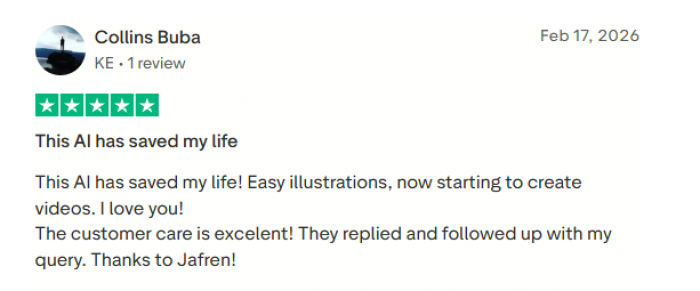
At the same time, there are recurring complaints. Some reviewers feel the free tier is too limited, saying they burn through credits quickly and feel pushed toward paid plans sooner than they’d like. A few mention occasional bugs, slowdowns, or glitches, especially during heavier usage, and some note concerns around data use and the usual AI‑art ethical questions.
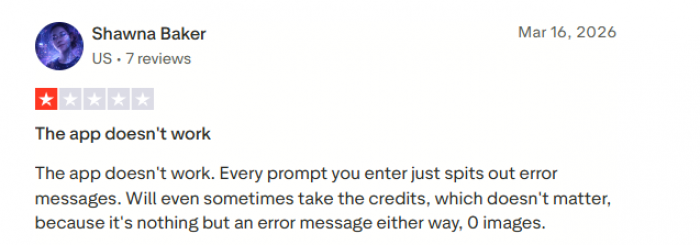
Taken together, Trustpilot feedback largely echoes my own verdict: Leonardo AI is powerful and genuinely useful when you treat it as a serious tool, but you should go in expecting a learning curve, token constraints on the free plan, and the occasional technical hiccup rather than a flawless, one‑click magic solution.
My Personal Pros and Cons After Real Use
Here’s how Leonardo stacks up in my day‑to‑day:
| Aspect | What I Liked | What Bothered Me |
| Quality | Strong results, especially for tech, game, and concept visuals | Occasional anatomy/text issues that need fixing |
| Control | Canvas, inpainting, outpainting, custom models give deep control | Takes time to learn and can overwhelm early on |
| Workflow | One place for generate → refine → export | You need a bit of a “power user” mindset to maximize |
| Pricing | Free to start; paid feels fair for heavy use | Free tokens vanish quickly with serious exploration |
| Ethics/Legal | Paths to commercial use, privacy options on higher tiers | Same unresolved AI‑art debates as other tools |
Leonardo feels like it was built for people who treat content creation seriously: game devs, marketers, designers, and creators who want cohesive, consistent visuals instead of random one‑offs.
Where It Fits Next to Midjourney and DALL·E (From My Usage)
When I compare my actual habits:
| Tool | When I Reach for It |
| Leonardo AI | When I need a full workflow: series of assets + editing |
| Midjourney | When I want the most artistic single image and don’t mind Discord |
| DALL·E | When I want simple, conversational prompting and fast results |
If I’m planning a full blog series, a campaign, or a batch of branded assets, I naturally gravitate toward Leonardo because of the Canvas and the consistency I can get.
If I want a quick, pretty one‑off image, I might grab DALL·E or Midjourney. But when the work feels “production level,” Leonardo is usually my first stop.
Final Verdict
After using Leonardo AI for real projects, I see it less as a toy and more as a serious creative workstation. It’s powerful, flexible, and capable of producing assets that can go straight into blogs, marketing campaigns, or even game prototypes with some care and iteration.
It does ask something from you in return: time to learn its features, attention to tokens, and a bit of ethical awareness about how you use it. But if you’re a creator who wants control, consistency, and an integrated “generate + edit” flow, Leonardo AI is absolutely worth adding to your toolkit.
Comments