

When I first encountered Muke AI, it didn’t present itself as controversial. On the surface, it looked like just another browser-based AI image tool, simple interface, fast processing, no downloads, and a promise of automated visual transformations. But as I dug deeper into how the platform is actually used, discussed, and reviewed across the web, it became clear that Muke AI occupies a far more complicated space in the AI ecosystem.
This is not a general-purpose creative tool like mainstream image editors. Muke AI is a highly specialized platform, and much of the discussion around it is shaped not by its interface or speed, but by how its technology is applied and the ethical questions that follow.
This article breaks down what Muke AI actually does, how it works, who uses it, how it’s priced, and why it continues to attract scrutiny alongside traffic.
Positioning and Core Identity of the Platform
Muke AI is a web-based SaaS platform, meaning it runs entirely in the browser. There is no desktop application, no mobile app, and no installation process. Everything happens online.
Technically, it markets itself as an AI-powered image transformation and visual editing tool. In practice, however, it is most widely known for a narrow category of automated image alterations that are not commonly supported by mainstream AI platforms.
This gap between marketing language and public perception is one of the defining characteristics of Muke AI.
Unlike large creative platforms that emphasize productivity, design workflows, or artistic control, Muke AI emphasizes:
- automation over precision
- speed over manual editing
- minimal user input
The platform is not built for professional designers. It is built for instant results with minimal friction.
How Muke AI Actually Works Under the Hood
From a technical standpoint, Muke AI relies on machine learning models focused on visual pattern recognition and neural rendering. The system analyzes uploaded images, identifies shapes, textures, and contextual visual elements, and then generates modified outputs based on predefined transformation modes.
The workflow is intentionally simple:
- Upload an image
- Select a transformation mode
- Let the AI process the image
- Download the result
There are no layer controls, no brushes, no sliders for fine-grained adjustments. The user does not guide the transformation in a creative sense, the model does.
This design choice makes the platform extremely accessible, but also removes user control over how results are generated.
Feature Set and User Experience
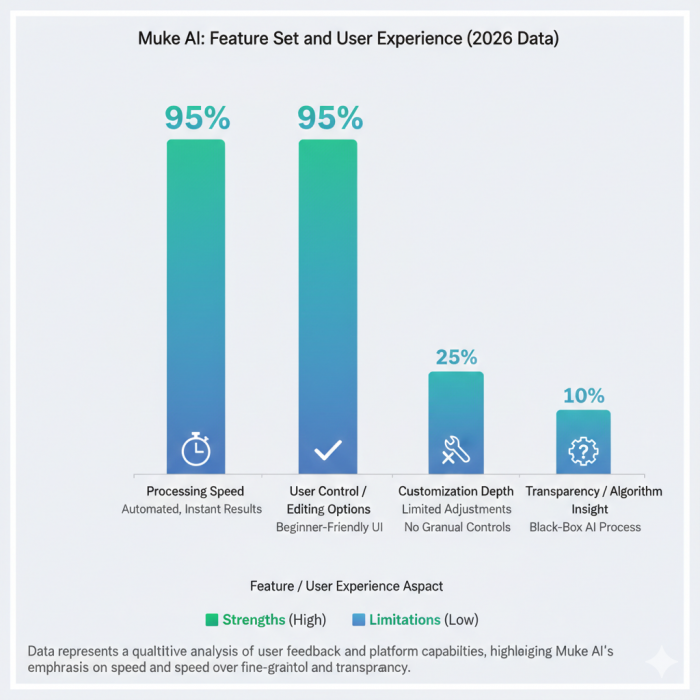
Muke AI’s feature set is narrow but optimized for speed and ease of use.
Key characteristics include:
- Automated transformation pipeline with minimal configuration
- Multiple predefined modes, each producing different styles of output
- Beginner-friendly interface designed for users with no technical background
- Session-based processing, where uploads are handled within temporary user sessions
- Cross-device browser access, functioning on both desktop and mobile
The interface follows a strict “upload → process → download” logic. This is deliberate. It lowers the barrier to entry and reduces friction, which partly explains why the platform attracts a younger, digital-native audience.
However, this simplicity also means there is no transparency into how the transformation is achieved, what data the model relies on, or how outputs are generated internally.
Traffic Patterns and User Demographics
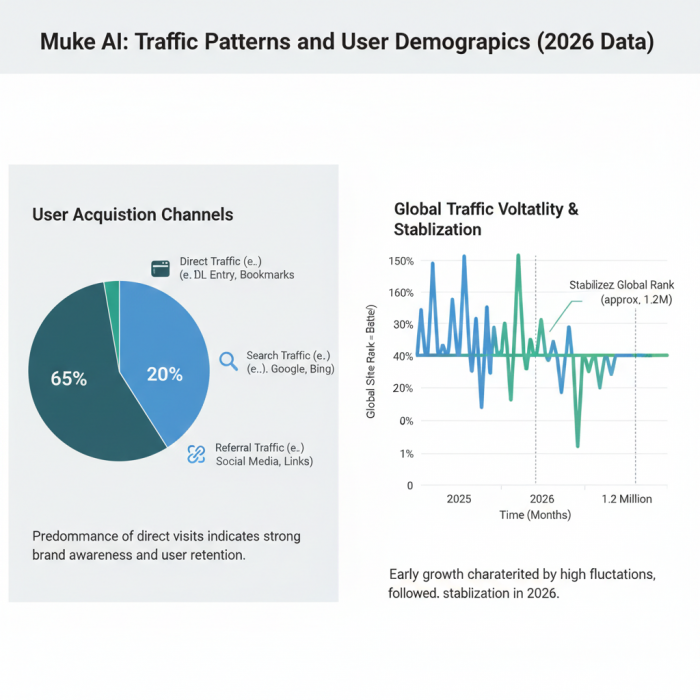
Based on traffic analytics from multiple sources, Muke AI has experienced volatile visibility over time, with rankings rising and falling sharply before stabilizing in the early-2026 period.
Notable observations:
- Global ranking has hovered around the ~1.2 million range
- Approximately 65% of traffic comes from direct visits, not search
- The primary audience appears to be Gen Z and Millennials
- Usage patterns suggest curiosity-driven or experimental behavior rather than long-term professional reliance
High direct traffic usually indicates that users are either returning intentionally or arriving via private sharing rather than public search discovery.
This is often seen with tools that exist on the edges of mainstream platforms, where discoverability through traditional channels is limited.
Pricing Model and Access Structure
Muke AI operates on a freemium, credit-based model.
The structure typically looks like this:
- Free access is available intermittently, often dependent on server load
- Free outputs are usually lower resolution and slower to process
- Paid tiers unlock higher resolution, faster processing, and access to advanced modes
- Credits are consumed per transformation, especially for premium modes
While exact pricing is not always transparently listed, tools in this category typically fall within:
- $5–$15 per month for basic premium usage
- Higher costs for heavy or frequent use
The lack of long-term subscription clarity can make it difficult for users to understand how much they will spend over time.
Privacy Claims vs Practical Risk
Muke AI states that:
- Image processing occurs in temporary sessions
- Uploaded images are not permanently stored
While these claims are common across AI SaaS tools, independent security analysts consistently warn that uploading personal or sensitive images to any third-party AI service carries inherent risk, regardless of stated policies.
Important realities:
- Users have no direct visibility into backend storage practices
- There is no way to independently verify deletion
- Any browser-based upload introduces exposure risk
This doesn’t make Muke AI uniquely dangerous, but it does mean users should treat it with the same caution they would apply to any platform handling sensitive content.
Ethical and Consent-Related Concerns
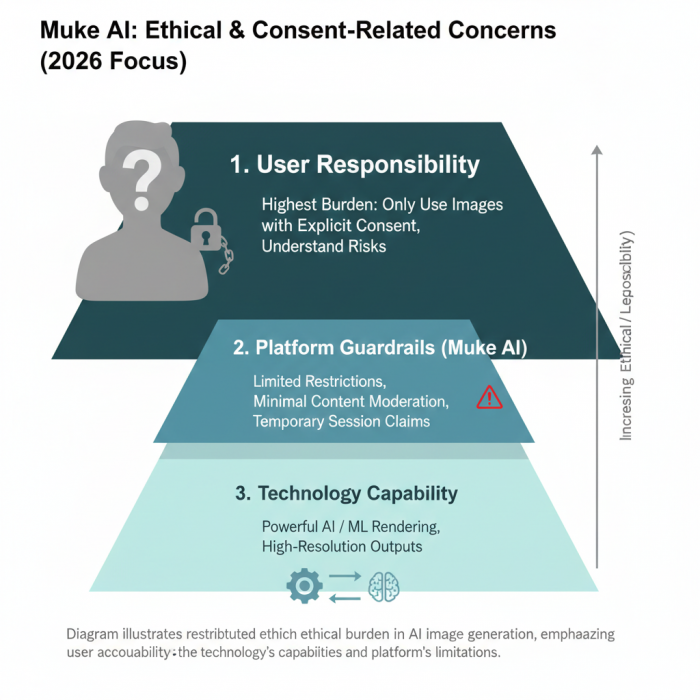
This is where discussion around Muke AI becomes unavoidable.
Unlike mainstream AI platforms (such as Adobe or Google), Muke AI is known for fewer content restrictions. This has made it a focal point in broader conversations about:
- digital consent
- image misuse
- ethical boundaries of automated visual AI
Most responsible commentary around the platform emphasizes a simple but critical rule:
Only upload images you have explicit permission to use.
Industry experts repeatedly note that misuse of AI image tools, regardless of platform, can cause real-world harm. The absence of strong content guardrails increases the responsibility placed on users themselves.
This is not a legal gray area; it is an ethical one, and it’s a key reason why Muke AI remains controversial despite technical competence.
Trust Signals and External Reputation
Third-party trust and safety services paint a mixed picture:
- No confirmed evidence of malware distribution
- Some warning flags related to content category and user reports
- Reviews focus less on performance and more on risk and appropriateness
This reinforces an important distinction:
Muke AI is not widely criticized for being technically broken, it is questioned for how and why it is used.
How Muke AI Fits Into the Broader AI Tool Landscape
Muke AI does not compete directly with:
- professional image editors
- enterprise creative tools
- ethical-by-design AI platforms
Instead, it exists in a niche category of automated, low-friction image transformation tools that prioritize speed and accessibility over control, governance, or creative nuance.
This positioning explains both its popularity and the scrutiny it receives.
Final Perspective: A Tool Defined More by Use Than Technology
After reviewing traffic data, features, pricing, and external commentary, one conclusion becomes clear:
Muke AI is not controversial because of how it’s built.
It’s controversial because of how easily it can be misused.
Technically, it is a fast, accessible, browser-based AI image platform.
Practically, it demands a high level of user responsibility.
For users who value ethics, consent, and privacy, caution is essential.
For observers of the AI landscape, Muke AI serves as a case study in how capability without constraint can reshape public trust in AI tools.
Understanding Muke AI requires looking beyond the interface and asking a harder question, not what can this tool do, but how should it be used.
Comments