

The first week feeling: “Finally, everything is in one place”
When I started spending real time around Petpooja (not just demo browsing), the first relief was psychological: orders, bills, and basic reports stopped feeling scattered. Petpooja’s whole pitch is speed and operational control, and you feel that immediately because the system is built around fast billing + KOT + reporting, not “pretty dashboards.”
That said, the comfort doesn’t come on Day 1. It comes after you repeat the same flows enough times that your brain stops searching for buttons.
Step 1: Logging in (what’s actually happening)
A) Owner / back-office login (web)
You’ll typically log in through Petpooja’s web login endpoints (you shared billing.petpooja.com/users/login). Some Petpooja products also use a separate business login endpoint (business.petpooja.com/login) for billing products.
What it feels like in real life:
The login step itself is easy, but the “what am I logging into?” confusion is common because Petpooja has multiple product surfaces (POS, owner dashboard, tasks dashboard, billing, etc.). If you’re switching between links, it can feel like you’re entering different “rooms” of the same building.
B) Staff login (POS terminal / captain app / etc.)
In most restaurant setups, staff aren’t logging into the owner dashboard. They’re logging into the POS terminal or ordering app, while owners check reports separately. Petpooja supports multi-device usage (POS + captain app style workflows) and mentions offline usage for order capture in some contexts.
Step 2: The first “must-do” setup before the dashboard becomes truthful
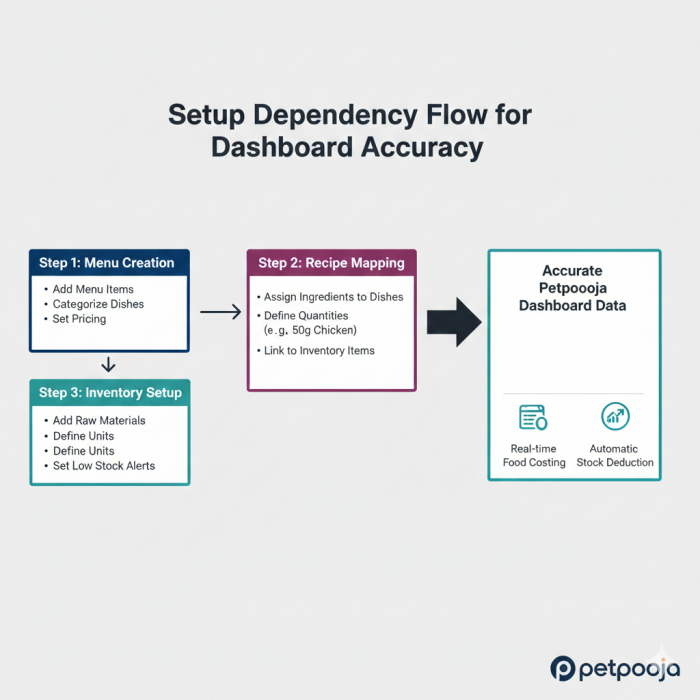
This is where emotions change. Week 1 usually feels smooth. Week 2 is where reality hits: dashboards don’t create truth, they reflect configuration.
A) Menu structure (the calm part)
Categories
Variants/add-ons
Taxes/charges
This is straightforward and feels like normal POS setup.
B) Recipe + inventory mapping (the part that tests patience)
If you want inventory tracking to feel real (not “guessy”), Petpooja’s inventory model relies heavily on recipe management and ingredient deduction logic.
Human feeling here:
This is the moment people get irritated because it’s tedious. It doesn’t feel like “running a restaurant,” it feels like “doing data entry.” But if you skip it, later reports feel less trustworthy, especially food cost and low-stock behavior.
Step 3: Daily use, the way it actually plays out in a restaurant
Morning: checking if the system is “ready”
What you end up doing daily:
- Confirm terminal is synced / online (if internet is unreliable)
- Confirm printers/KDS are reachable
- Confirm menu items that should be OFF are OFF (especially for online orders)
Petpooja positions a lot of value around unified operations for orders + reporting.
Emotion:
When everything is synced, you feel in control. When something small breaks (printer, mapping, menu toggle), you feel that “uh oh” tension because restaurants don’t have downtime.
Rush hours: the “3-click billing” promise gets tested
Petpooja emphasizes quick billing / high-volume suitability.
Where it feels strong:
- Fast order punching + KOT flow
- Splitting/merging tables (useful when seating changes)
- High-volume rhythm (the system feels built for speed)
Where it can feel stressful:
- If staff permissions aren’t configured, the wrong person can void/edit things
- If cancellations aren’t monitored, you get blind spots (cash leakage risk is a real restaurant-world fear)
End of day: the dashboard becomes an “owner comfort tool”
This is where the dashboard pays off emotionally: closure.
Petpooja’s reporting module emphasizes downloadable reports, daily sales tracking, item-wise consumption, staff info, and visibility via POS/owner dashboard.
What you check at closing (typical habit stack):
- Gross vs net sales
- Cash vs card vs UPI split
- Discounts given (and by whom)
- Cancelled/modified bills count
- Best sellers (quick sanity check)
- Online order totals (if you run aggregators)
Emotion:
This is where you either feel “okay, today made sense” or “something feels off.” A dashboard is mostly a reassurance machine when you’re not physically present.
Step 4: Online orders + “control feeling” (when it works, it’s a relief)
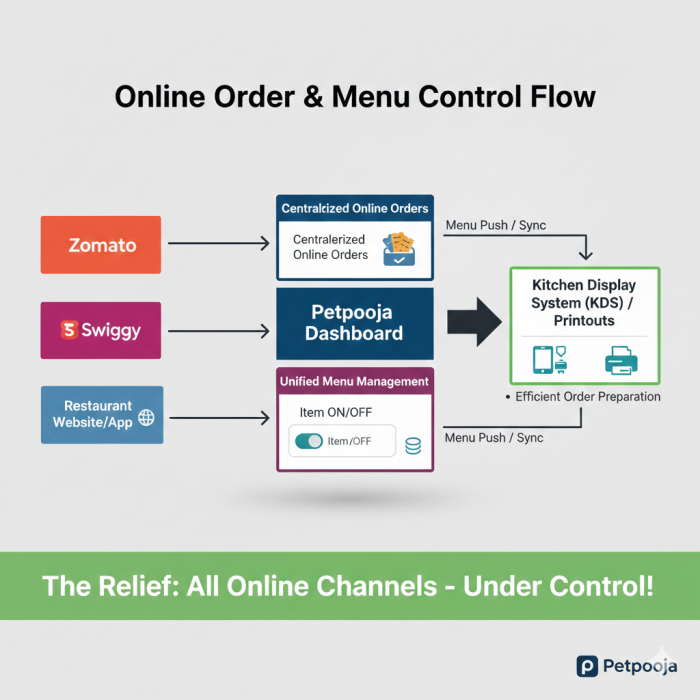
If your restaurant relies on aggregators, the biggest operational pain is having multiple order sources and mismatched menu states. Petpooja markets itself as a unified restaurant POS and talks about reporting and online orders being part of the reporting ecosystem.
In real life, the win looks like:
- Fewer “why did we accept this item?” mistakes
- Fewer cancellations caused by stock confusion
- Less staff panic juggling multiple panels
But this only feels good if the menu sync and inventory discipline are real.
Step 5: The strengths you notice only after weeks
1) Operational rhythm is the real feature
The system is built around restaurant cadence: punch → KOT → settle → report. You stop thinking about software and start thinking about service.
2) Reporting is where owners feel value
Petpooja explicitly highlights report downloads and visibility of sales/payment status through reporting and owner dashboard.
3) Support/training presence is part of the product
Petpooja promotes 24x7 support, ticketing, and staff training. When you’re running a restaurant, that matters more than fancy UI.
Step 6: The gaps that become obvious with time
1) Setup debt never disappears
If recipes and inventory weren’t set carefully, you’ll keep paying for it:
- “theoretical stock” vs “physical stock” mismatches
- low-stock alerts that don’t match reality
- food cost reports that feel unreliable
Inventory and reports depend on the underlying mapping.
2) Too many surfaces can confuse teams
There’s POS, owner dashboard, tasks dashboard (separate product), billing products, and other portals. Tasks dashboard exists as its own tool and website.
Human impact:
Staff get confused: “Which login do I use?” Owners get annoyed: “Why isn’t everything under one roof?”
3) UI practicality over polish
This is a vibe issue, but it matters for adoption. Some systems feel “utilitarian,” which is fine when speed matters, but it can feel dated compared to modern SaaS.
The “if you want it to feel good” weekly routine
This is the routine that makes dashboards feel trustworthy:
Daily: check cancelled/modified bills + payment split
Twice a week: inventory spot-check (2–3 high-use items)
Weekly: reconcile online orders vs settlements (if aggregator-heavy)
Monthly: tax/GST reporting prep + discount pattern review
Emotion:
When you follow this, the dashboard becomes calm. When you skip it, the dashboard becomes noise.
Final takeaway
Petpooja Dashboard is at its best when you treat it like an operational habit, not a piece of software. It shines in speed + rhythm + reporting, and it struggles when setup is rushed or when teams don’t maintain inventory discipline.
Comments