

1. What Is a Quishing Attack?
A quishing attack is a type of phishing scam where criminals use QR codes to trick people into visiting malicious websites or fraudulent payment pages.
Instead of sending you a suspicious clickable link (as in traditional phishing), attackers give you a QR code and rely on one key weakness:
QR codes hide the destination link until after you scan them.
Once scanned, the QR code may:
● Take you to a fake login page (bank, email, social media)
● Redirect you to a fake payment page
● Prompt you to download malicious software
● Harvest personal information silently
This makes quishing harder to detect, both for users and for automated security filters.
�� Key fact:
QR codes themselves are not dangerous — what they link to can be.
2. Why is Quishing Growing So Fast?
2.1 Explosion of QR Code Usage
QR codes are now used for:
● Payments (UPI, Paytm, Google Pay)
● Restaurant menus
● Parking meters
● Delivery confirmations
● Event tickets
● Two-factor authentication
● Banking login verification
Consumers are conditioned to trust QR codes.
2.2 Security Blind Spot
● Email security tools inspect text links
● QR codes appear as images
● Most scanners cannot analyze embedded URLs
This creates a detection gap.
3. How a Quishing Attack Works?
Stage 1: QR Code Creation-
The attacker:
1. Creates a fake website (bank login, parking payment, courier portal)
2. Encodes the malicious URL into a QR code
3. Designs it to look legitimate (logos, official wording)
Stage 2: Distribution-
Attackers place QR codes in places where scanning feels normal:
| Location | Why It Works |
| Emails | Users expect QR codes for login/verification |
| Parking meters | People expect QR payments |
| Restaurants | QR menus are common |
| Packages | “Track your delivery” lures |
| Posters & flyers | Looks official |
Stage 3: Scan & Redirection-
The user:
● Scans the QR code
● Gets redirected instantly
● Rarely checks the URL carefully
Stage 4: Exploitation-
Depending on the attack goal:
● Credentials are stolen
● Payments are redirected
● Malware installs
● Identity data is collected
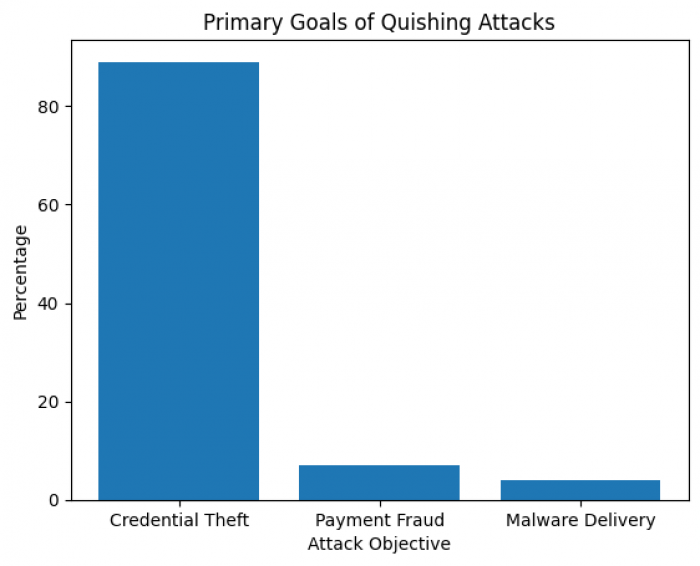
�� Most quishing attacks (≈89%) focus on credential theft, not malware.
4. Real-World Quishing Statistics:
4.1 How Common Are Malicious QR Codes?
| Metric | Verified Data |
| Malicious QR scans | ~2% of all QR scans |
| QR codes in phishing | ~22% of campaigns |
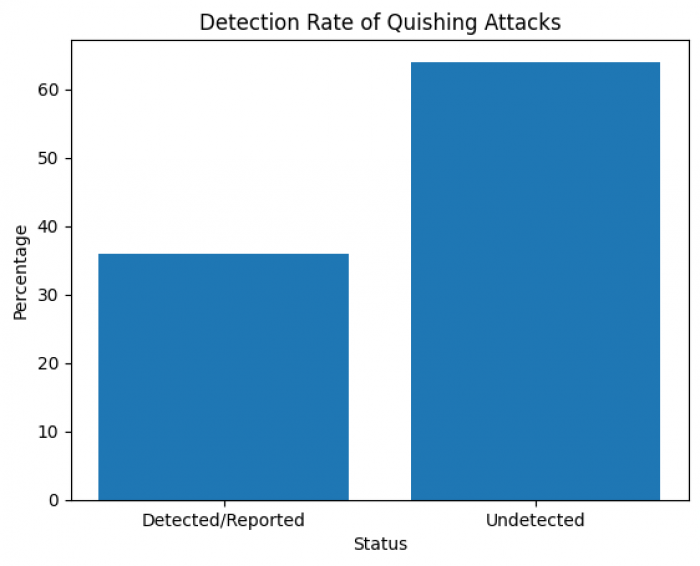
| Detection/reporting rate | Only ~36% |
| Primary attack goal | Credential theft (≈89%) |
4.2 Who Is Targeted Most?
| Group | Risk Level |
| Executives & senior staff | Very high (42× exposure) |
| Mobile-first users | High |
| Payment app users | High |
| Tourists | High |
| Elderly users | High |
Executives are targeted heavily because:
● They have access to sensitive systems
● They use QR login frequently
● They often bypass normal scrutiny due to urgency
5. Real Cases & Government Warnings:
5.1 FBI & Law-Enforcement Alerts
● FBI warned of North Korean threat actors using QR-based phishing to steal Microsoft 365 and VPN credentials.
● QR codes used in “brushing scams” (unsolicited packages with QR links).
5.2 Public Infrastructure Attacks
● Fake QR stickers placed over parking meters in the UK and Europe
● Users paid “parking fees” directly to criminals
● Victims had no indication of fraud until bank statements arrived
5.3 India-Specific Patterns
● Altered UPI QR codes pasted over legitimate ones
● Funds diverted instantly to scammer wallets
● Difficult recovery due to real-time payment rails
6. Types of Quishing Attacks:
| Type | Example |
| Email Quishing | Scan to verify your account |
| Physical Overlay | Fake QR pasted on real sign |
| Payment Redirection | Altered UPI QR |
| Brushing Scam | QR in unsolicited package |
| Social Media Quishing | QR for fake giveaways |
7. What Exactly Do Attackers Steal?
7.1 Credential Theft
● Bank logins
● Email passwords
● Corporate credentials
7.2 Financial Theft
● Card details
● Direct payment redirection
● Subscription fraud
7.3 Device Compromise
● Malware installation
● Spyware
● Persistent access
7.4 Identity Theft
● Name, phone, address
● Used later for loan fraud or SIM swaps
8. Why Consumers Fall for Quishing
This is not due to carelessness.
| Psychological Factor | Explanation |
| Familiarity | QR codes feel routine |
| Urgency | Account will be locked |
| Authority | Banks, parking, delivery |
| Convenience | Faster than typing URLs |
| Visual trust | No visible suspicious link |
9. How Consumers Can Protect Themselves :
9.1 Before Scanning
✔ Ask: Why am I being asked to scan this?
✔ Avoid QR codes in unsolicited emails or packages
✔ Inspect physical QR codes for stickers or overlays
✔ Prefer official apps or typed URLs
9.2 While Scanning
✔ Use default camera apps (show URL preview)
✔ Check domain spelling carefully
✔ Avoid shortened or unfamiliar domains
9.3 After Scanning
✔ Never enter credentials via QR-opened pages
✔ Do not download files prompted by QR pages
✔ Exit immediately if unsure
10. What To Do If You’ve Already Scanned a Malicious QR Code :
| Scenario | Immediate Action |
| Only scanned | Monitor accounts |
| Entered login | Change password, enable 2FA |
| Entered payment | Contact bank immediately |
| Downloaded app | Run security scan |
| Persistent issues | Factory reset device |
Frequently Asked Questions (FAQ) :
Q1: Can a QR code install malware automatically?
A: Not directly by scanning, but QR codes can link to websites that trigger malicious downloads.
Q2: Are all QR codes dangerous?
A: No — most are safe, but you must verify untrusted sources before scanning.
Q3: How widespread is quishing today?
A: QR phishing is growing — accounting for ~22% of phishing attacks.
Key Takeaways :
● Quishing is not rare and not theoretical
● QR codes do not show destination links
● Fraud happens after scanning, not during scanning
● Payment QR manipulation is increasing
● Prevention relies on user awareness, not technology alone
Comments