

Skipit.ai does not introduce itself politely. It walks straight into the chaos of 2‑hour webinars, 3‑hour podcasts, and 12‑hour “I’ll watch this later” YouTube epics and says: this is now a searchable, explorable knowledge object. The entire premise is simple but ambitious - turn long, passive video (and other content) into something that can be skimmed, queried, and revisited like a living notebook.
From Endless Timelines to Compressed Insight
The current internet runs on video timelines, not tidy PDFs. Lecturers talk for hours, conference speakers wander off script, and creators tuck crucial explanations somewhere after the 47‑minute mark. Skipit.ai steps into that mess with a clear mandate: compress the sprawl into structured, navigable understanding.
It treats a video less like a movie and more like a book chapter. A chapter needs a table of contents, a set of key ideas, and the ability to jump to the parts that matter. That is the mental model Skipit pushes: each long video becomes a summarized, question‑friendly “chapter” in a personal learning library rather than an intimidating, unplayed thumbnail.
What Sits at the Heart of Skipit.ai
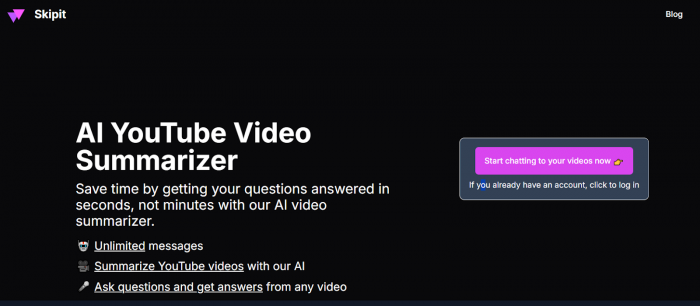
Strip away the branding and Skipit is essentially three layers stacked neatly on top of each other:
1. An ingestion layer that pulls in long YouTube videos (and, increasingly, other digital formats like articles, websites, and PDFs).
2. A summarization layer that distills those sources into coherent overviews instead of raw transcripts.
3. A conversational layer that treats every processed item as something that can be interrogated in natural language.
The result is a tool that does not ask for a new habit. It meets existing behavior, open YouTube, paste link, suffer length and quietly swaps “suffer length” with “scan summary, explore by asking questions.”
Long Videos Without the Long Pain
Skipit’s most striking promise is quantitative: videos up to roughly 12 hours long are fair game. That covers entire lecture series, full‑day conference recordings, epic podcasts, and multi‑part tutorials.
Once a video is processed, Skipit produces a condensed view of what actually happens across those hours, the main arguments, the shifts in topics, the conclusions that previously lurked behind a progress bar. Structured content shines here: courses, formal talks, and technical deep dives convert particularly well into readable, logically arranged summaries.
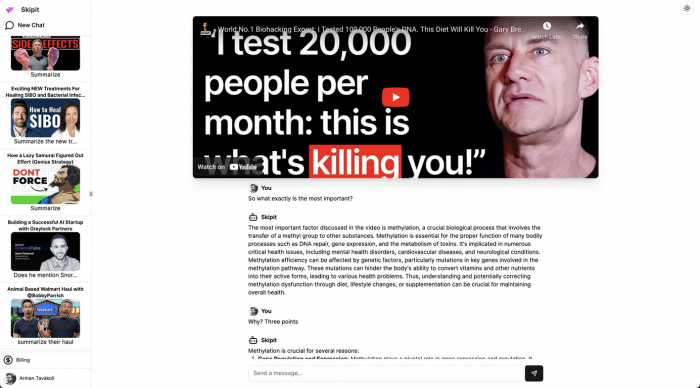
It turns the “I might watch this someday” list into something closer to “I know what this contains and whether it’s worth my deeper time.”
A Video That Answers Back
The summary is not the end of the story. The defining trick of Skipit is what happens after the summary lands. Each video essentially becomes an entity that can be questioned.
Requests such as “Collect all the advantages mentioned,” “Explain the limitations section in simpler terms,” or “Outline the step‑by‑step workflow described” can be directed at the AI sitting on top of that specific content. Instead of manually scrubbing through the timeline, the questions carve through the material for the user.
This is the subtle shift: the video stops being a strictly linear experience. It turns into an on‑demand explanation engine, anchored to the original but no longer constrained by the play button.
Beyond YouTube: The Wider Content Field
Skipit may wear the “YouTube companion” identity visibly, but the ambition stretches further. Articles, websites, and certain documents can also be pulled through the same summarize‑then‑ask pipeline.
That means a long blog post, a dense report, or an in‑depth written guide can be treated similarly to a video lecture. The medium changes; the approach remains the same: compress the content, then interrogate it until the important parts are surfaced.
In practice, this turns Skipit into a cross‑format layer for serious consumption – not just a plugin for one platform.
Limits, “Unlimited,” and the Fine Print
The marketing pitch around Skipit is bold: unlimited messages, generous video lengths, and “zero rate limits.” In everyday use, that combination translates into sessions where conversation can continue as long as needed. A single lecture can be mined for clarifications, rewrites, lists, and summaries without bumping abruptly into usage walls.
Of course, such language always sits against the unspoken backdrop of fair usage, infrastructure cost, and abuse prevention, even if those boundaries are not front and center. Still, for students deep into exam preparation or professionals dissecting hours of material each week, the promise is clear: the tool will likely give up later than attention does.
A Library That Remembers What Was Asked
Every processed piece of content and its associated conversation can be kept for later. Over time, this persistence is where Skipit becomes more than a “summarize this once” button.
The account turns into a personal archive: videos that have been distilled, documents already broken down, questions that proved useful when first exploring a topic. Coming back months later to a complex lecture or webinar does not mean starting over; it means reopening the previous conversation and continuing from the last meaningful question.
In other words, Skipit does not just remember the content; it remembers the curiosity applied to that content.
Speed as a Design Principle
The engine behind Skipit aims for a conversational cadence. After the initial processing phase, responses to questions arrive within seconds, keeping the interaction alive and fluid.
This speed matters more than it may first appear. Delayed answers invite distraction; quick responses keep a learner anchored to the material, even when jumping across questions and angles. When scanning multiple videos in a row, that responsiveness is the difference between a smooth research session and a fragmented one.
A curated prompt library further reduces friction: learners do not need to invent the perfect phrasing each time, because standard patterns for extraction, simplification, and comparison are readily available.
The Experience of Using Skipit
The surface of Skipit is intentionally understated. Paste a URL, watch the interface switch from idle to processing, then see the result appear: summary and chat woven together.
Sections for saved content and history quietly build up over days and weeks. The overall feeling is closer to a research dashboard than an entertainment app. There are no fireworks, no gamified streaks, just a steady accumulation of processed material.
Friction appears mostly around access rather than usability. An account is expected, and the deeper power of the tool is tightly joined to paid plans, especially when it comes to very long videos and heavy usage. The message is clear: this is a professional‑grade assistant, not a completely free toy.
The Money Question: Pricing and Value
The economic side of Skipit follows a familiar pattern: a limited free tier, a full‑power monthly subscription, and a more cost‑efficient annual plan.
The broad structure can be read like this:
● A free entry point that allows basic experimentation with shorter content and restricted daily usage.
● A monthly plan around the mid‑teens in USD that unlocks extended video lengths, unlimited messages, persistent history, and higher performance.
● An annual option that lowers the per‑month cost for those who know they will be leaning on the tool for the long haul.
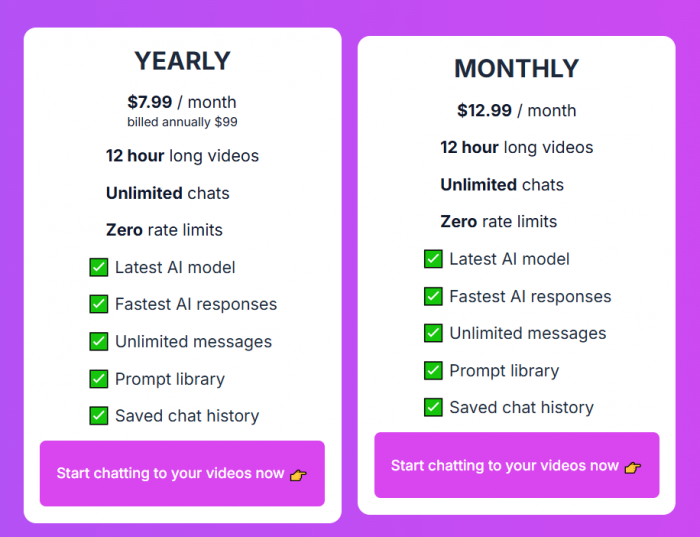
The crucial lens for evaluating these numbers is not the nominal price but the hours reclaimed. When regular weeks involve 20, 30, or 40 hours of long‑form content, even a modest compression of that time delivers a noticeable return.
How Well Does Skipit Hold Up Under Pressure?
Performance is a blend of coverage, correctness, and resilience to messy inputs. When audio is clear and the narrative is structured, a typical university lecture, a conference keynote, a step‑by‑step tutorial, Skipit tends to capture the backbone of the material reliably. Critical definitions, main arguments, and closing insights carry over into the summaries and into the answers surfaced during Q&A.
As the source becomes noisier tangents, jokes, sudden topic changes, background noise, the job becomes harder. Summaries grow more general, and fine nuance can blur. This is not unique to Skipit; it is a function of automated summarization in general.
The practical takeaway: Skipit excels at triage and structured understanding. It points clearly at what a video covers and whether deeper viewing is justified. For mission‑critical or legally sensitive details, the original source still remains the final authority.
Trust, Opacity, and Due‑Diligence
Any tool that ingests content, especially internal recordings or documents must be examined through a trust lens. Skipit is no exception.
The service operates with a visible paywall structure and strong language around “unlimited” usage, while the detailed boundaries of fair use are not always highlighted upfront. Access to the tool’s best capabilities generally requires a subscription, which means deep evaluation often happens after some level of commitment is already made.
Public information about the company and its data practices exists but does not always dominate the product narrative. For typical learners, this mix usually feels acceptable. For organizations operating in regulated sectors, it naturally triggers a need for closer review of privacy policies, retention rules, and compliance posture before large‑scale rollout.
What the Crowd Keeps Saying
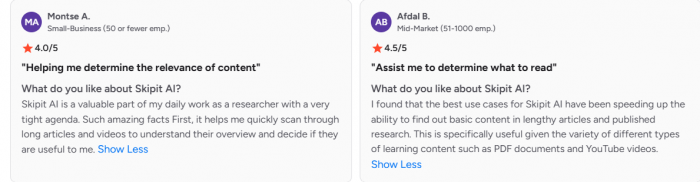
Across tool directories like G2, blog reviews, and platform listings, certain patterns repeat.
On the positive side, Skipit is often described as a genuine time‑saver, especially for students and professionals immersed in long educational or informational content. The simplicity of the interface and the power of the chat layer are consistently highlighted. Long‑video support in particular is regarded as a standout feature relative to basic browser summarizers.
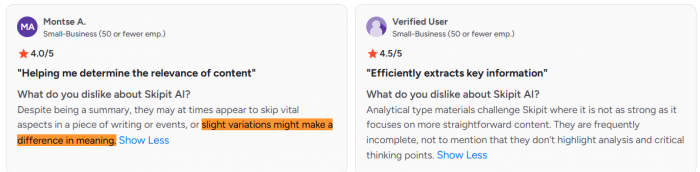
On the negative side, the constrained free tier and early encounter with subscription prompts leave some users with the impression of a tool that reveals its full potential only after payment. There is also an acknowledgement that summarization can flatten complex discourse, and that this flattening is an inherent limitation, not a bug that can be fully engineered away.
Where Skipit Sits Among Its Rivals
The broader summarization ecosystem is crowded, but not uniform. Browser add‑ons handle short pages and shorter videos. General‑purpose conversational models can glance at URLs and draft quick summaries. Enterprise tools focus on internal corpora and compliance.
Skipit carves out a clear position:
● Optimised for length, not just convenience, handling videos that many tools refuse to touch.
● Built around a stable, reusable conversational context for each piece of content, instead of one‑off, disposable summaries.
● Backed by a simple, focused interface geared towards learning and research, not general‑purpose AI chatter.
This makes Skipit less of a “Swiss army knife” and more of a precision instrument. The trade‑off is deliberate: depth in one area instead of breadth across many.
Who Gets the Most Out of Skipit?
Certain profiles map almost perfectly to what Skipit is designed to do.
Students working through lecture archives find in it an ally that can strip away repetition and surface the structure of the syllabus content. Independent learners navigating a stack of online courses and expert talks gain a way to keep momentum without drowning in runtime.
Researchers, analysts, and consultants use it as a filter for conferences, interviews, product demos, and market briefings, extracting frameworks and critical signals from hours of material. Knowledge workers facing internal town halls, training sessions, or updates can lean on summaries and Q&A to capture the essence in the gaps between meetings.
The fit is weaker for casual consumers, infrequent long‑video viewers, and environments where every byte of processed content demands tight governance and contractual clarity.
Final Take on Skipit.ai
Skipit.ai is not trying to reinvent AI. It is trying to reinvent the relationship with long‑form content. It takes the modern reality of endless video and dense digital material and provides a disciplined, structured way to turn it into something manageable.
The strengths are distinctive: real support for very long videos, a persistent conversational layer bound to each source, cross‑format aspirations, and a UX that stays out of the way. The weaknesses are equally clear: limited free access, subscription dependency, and the inherent limitations of any summarizer facing nuance‑heavy material.
For learners and professionals whose schedules are defined by the weight of long videos and dense resources, Skipit functions as a serious leverage multiplier. For those whose content diet is lighter, or whose constraints revolve more around cost and compliance than time, it is best treated as a specialized instrument to deploy when the volume and stakes of long‑form content justify it.
Comments