

Your YouTube “Watch Later” list probably looks like everyone else’s—overflowing with lectures, deep-dive interviews, three-hour tutorials, and webinars you swear you’ll watch on the weekend… but never actually do. Video is the default format for modern learning, yet few people have time to sit through everything they want to absorb.
This is the problem Summarize.ing claims to solve. Instead of watching a full video, you paste a YouTube link, wait a few seconds, and get a multi-layer breakdown: highlights, chapter summaries, mind maps, even auto-generated questions and answers.
It sounds powerful—but is it actually useful? Or is it just another AI shortcut that sounds better on paper than in practice?
Let’s break it down.
What Actually Happens After You Paste a YouTube Link?
One of Summarize.ing’s biggest strengths is its simplicity. You don’t need an account, onboarding, or any technical knowledge.
You just:
1. Copy a YouTube link
2. Paste it into the Summarize.ing textbox
3. Tap the “Summarize” button
4. Wait about 30–60 seconds
Behind the scenes, the platform uses Claude 3.5 Sonnet—the same advanced model powering many enterprise AI systems—to analyze speech, identify topics, segment chapters, and extract key insights.
For the user, the experience feels almost effortless: instant clarity instead of hours of passive watching.
What Summarize.ing Gives You Beyond Just a Simple Summary
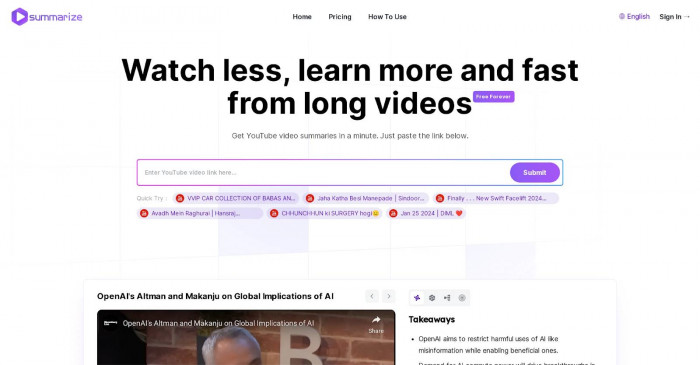
Summarize.ing doesn’t behave like a typical summarizer that spits out a paragraph of text. Instead, it delivers a surprisingly rich, multi-format breakdown that matches different learning styles.
Below are the features that make the tool more than a “shortcut”—they make it a legitimate learning companion.
Your 30-Second “Should I Even Watch This?” Snapshot
The first output Summarize.ing gives you is a short, bulleted highlight section.
It’s the equivalent of someone saying:
“Here’s what this video is basically about. Here’s what matters. Here’s what you’ll learn.”
If you’re deciding whether a video is worth 45 minutes of your time, this preview alone can save your whole afternoon.
The Chapter-by-Chapter Breakdown That Saves You from Scrubbing Through Timelines
This is, without question, Summarize.ing’s strongest feature.
The AI splits the video into logical sections—almost like it has watched the video with you—and creates a clear summary for each chapter. Each section links directly to the timestamp, so you can:
● Jump to the part you need
● Skip irrelevant sections
● Revisit important moments
● Gather specific insights without rewatching the whole thing
For research-heavy videos like tutorials, lectures, or expert interviews, this feature alone feels worth paying for.
A Bird’s-Eye View of the Entire Video in One Visual
The mind map generator is one of the most impressive parts of the platform.
It takes the entire structure of the video and turns it into an easy-to-understand visual map, with the main idea at the center and topics branching outward.
This helps you:
● Understand the “big picture” without getting lost
● See how ideas connect
● Identify which sections matter most
● Review your learning at a glance
Students especially love this feature because it becomes instant study material.
Can You Actually Trust the AI’s Interpretation of the Video?
This is where Summarize.ing gets interesting. The accuracy isn’t just “good”—it’s eerily good… until it isn’t.
Accuracy depends almost entirely on one thing: audio quality.
Where Summarize.ing Shines — and Where It Starts to Slip
Summarize.ing performs best when videos have:
● Clear audio
● One speaker
● Well-structured content
● Minimal background noise
● Logical progression of ideas
Think TED Talks, professional tutorials, and university lectures.
But it struggles when videos include:
● Overlapping voices
● Thick accents
● Fast-paced dialogue
● Poor microphones
● Slang, humor, or sarcasm
The AI can understand what is said, but not always how it is said. Nuance, tone, and emotional context are not its strengths.
If you feed it a chaotic podcast with three people talking at the same time, expect mistakes.
If you feed it a clean, well-delivered educational video, expect near-perfect accuracy.
Who Gets the Most Value Out of Summarize.ing (And Who Probably Won’t)

Summarize.ing isn’t just a tool—it’s a time-saver for specific types of users.
Ideal Users
Professionals:
People using YouTube for market research, competitor analysis, product demos, or industry talks.
Students:
One lecture becomes an entire study kit—summaries, mind maps, revision notes, and quick Q&A.
Researchers and Analysts:
Skip hours of filler content and jump directly to relevant insights.
Content Creators:
Get fast breakdowns of trending videos, interviews, or niche topics.
Who Might Not Benefit Much
● People wanting summaries of emotional or narrative content
● Viewers who prefer podcasts or live streams (Summarize.ing doesn’t support these)
● Anyone expecting the tool to understand sarcasm, tone shifts, or storytelling nuance
It’s a tool for efficiency, not a tool for interpretation.
How Much You’ll Pay — and Which Plan Makes Sense for You
Summarize.ing uses a simple freemium model, broken down as follows:
| Plan | Summary Limit | Max Video Length | Mind Maps | Price |
| Free | Limited (3–5 summaries) | ~20 minutes | No | $0 |
| Basic | ~40 summaries | ~90 minutes | Yes | ~$7/month |
| Pro | ~100 summaries | 3+ hours | Yes | ~$15/month |
Best value: The Basic Plan.
It offers enough monthly summaries for students and professionals without paying premium rates.
The Free Plan is great for light or occasional use.
The Pro Plan makes sense only for researchers, analysts, or heavy users.
The Clear Wins… and the Annoying Trade-Offs
What’s Great
● Saves hours of watching time
● Extremely easy to use
● Chapter summaries with timestamps are incredibly powerful
● Mind maps help visualize complex ideas
● Works in seconds
● Uses advanced AI for accurate breakdowns
● No login needed for short videos
● Free tier lets you test everything first
What’s Not So Great
● Accuracy depends heavily on audio quality
● Doesn’t understand tone, sarcasm, or emotional nuance
● No support for private videos or live streams
● Free plan is fairly limited
● Requires registration for longer content
● No dedicated mobile app yet
So Is Summarize.ing Worth It in 2025—or Just Another Speed-Reading Gimmick?
Here’s the honest verdict:
Yes, Summarize.ing is absolutely worth using—if you use it for the right purpose.
It’s not meant to replace watching important videos.
It won’t give you emotional nuance, debate tone, or the “feel” of a conversation.
But if your goal is to:
● Extract key ideas
● Navigate long videos quickly
● Preview content before committing time
● Turn lectures into instant study kits
● Jump straight to the useful parts of a tutorial
…then Summarize.ing is one of the best productivity tools available in 2025.
Think of it as your personal “video triage system.”
It helps you decide what is worth watching—and where the gold is buried inside every video.
For anyone who uses YouTube to learn, research, or gather insights, Summarize.ing is not a gimmick.
It’s a genuine time-saver that delivers real value.
Comments