

Tensor Art AI is trying to be more than “just another AI art site.” It wants to be the place where you generate images, train your own models, host them, and even build a small creator business around them. In this in‑depth review, we’ll look at Tensor Art from every angle: experience, features, pricing, use cases, trust, and competition.
What Exactly Is Tensor Art AI?
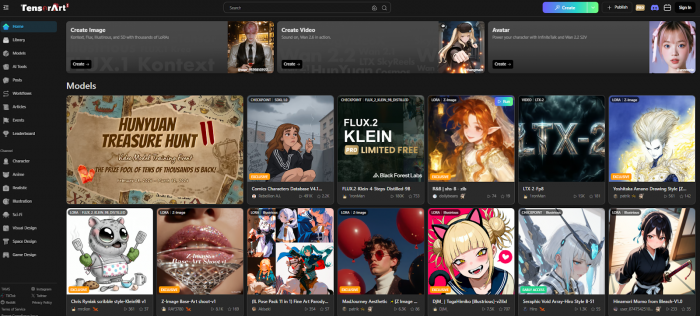
Tensor Art (often written as Tensor.Art) is a browser‑based and mobile AI creativity platform built primarily on Stable Diffusion and related open models. It combines three big things under one roof:
● A text‑to‑image and image‑to‑image generator.
● A massive model hub where you can browse and use community models (checkpoints, LoRAs, embeddings, ControlNets).
● Cloud training tools to create and host your own LoRA or video models.
So instead of being a single closed model like Midjourney, Tensor Art behaves like an open “lab” on top of the SD ecosystem: you pick the model, the style, the control tools, and in many cases, you can also train the model you wish existed.
For creators who are hitting the ceiling of simple one‑click tools, this is a very different value proposition.
How Tensor Art Works: The Product Layers
To understand Tensor Art, it helps to peel it into four layers: generation, control, models, and platform.
1. Core Generation: Images and Video
The first thing you see after logging in is the generation interface. Here’s where Tensor Art feels familiar if you’ve used Stable Diffusion UIs before:
● Text‑to‑image: You type a prompt (e.g., “cinematic portrait of a cyberpunk detective in neon Tokyo, volumetric lighting”) and Tensor Art generates images using your chosen model.
● Image‑to‑image: You upload an existing image and guide the AI to transform it changing style, lighting, era, or details while preserving composition.
● Video‑related features: Depending on the model and current feature set, you can also explore text‑to‑video or image‑to‑video options, especially using integrations with newer video‑capable models.
Behind the scenes, Tensor Art leans on Stable Diffusion (SD 1.5, SDXL, and newer variants), as well as other community and proprietary models that creators upload to the platform. For you, this means one UI, many different “engines” and styles.
What’s particularly interesting is that Tensor Art is gradually supporting more workflow‑style interfaces that feel closer to node‑based tools like ComfyUI—while staying in the browser. That gives advanced users a lot of flexibility without local setup.
2. Control & Editing Toolbox
Tensor Art is not just “prompt → image → download.” The control surface is broad enough to support serious workflows:
● ControlNet: You can guide generations using poses, depth maps, scribbles, or edges from your reference images. This is critical for consistent compositions, character poses, and layout‑specific designs.
● Upscaling: After generating, you can upscale images to higher resolutions for printing, thumbnails, or detailed digital art.
● Background removal and expansion: Need a transparent subject for a thumbnail or ad? Tensor Art can help isolate subjects and expand backgrounds beyond the original bounds.
● Inpainting / eraser tools: You can “mask” parts of an image and regenerate only that region—useful for fixing hands, adding objects, or editing faces.
● Face swap and portrait tools: These options allow you to replace faces or tune portrait elements, a common need for marketers and creators.
The combination of prompt control, negative prompts, and tools like ControlNet and inpainting means Tensor Art is closer to a full creative workstation than a toy generator. Beginners can still just type prompts and click “generate,” but the platform clearly leans toward users who want granular control.
3. Model Hub and Training: The Real Differentiator
Where Tensor Art really separates itself from the average AI art generator is its model layer.
Huge Model Library
Tensor Art hosts a large and constantly growing repository of:
● Checkpoints (full models),
● LoRAs (Lightweight models that fine‑tune style or subject),
● Textual inversions / embeddings,
● ControlNet models and other utilities.
Creators upload their models to the platform, attach sample images and prompts, and other users can select those models in the generator UI or sometimes download them for local use. Practically, this means:
● If you need a very specific anime style, there’s probably a LoRA for it.
● If you want photorealistic 3D renders, isometric game assets, or specific illustration styles, there’s likely a model tuned for that niche.
● If you’re a model creator, Tensor Art can be your hosting, discovery, and monetization layer.
The scale of this model hub is a key reason many users move from closed systems to Tensor Art.
LoRA and Model Training in the Cloud
Tensor Art doesn’t stop at hosting models; it lets you train your own LoRAs in the cloud.
A typical LoRA training workflow on Tensor Art looks like this:
1. You gather a set of images (for a character, product, or style) and upload them.
2. You configure training parameters (number of steps/epochs, resolution, learning rate, etc.).
3. Tensor Art runs the training on its side, and after some time you get a new LoRA model.
4. You can then apply this LoRA in the generator to produce images in that consistent style or character.
5. Optionally, you publish the LoRA so others can use it, and in some setups you can monetize access.
For video, there are emerging workflows to train video‑oriented models or apply certain kinds of video generation, though this area is still evolving quickly across the industry. The main takeaway: Tensor Art is not just for consuming models—it’s for creating them.
This makes Tensor Art particularly attractive if you want to build a signature style, brand mascot, or recurring character for your channel or campaign.
4. Platform & Ecosystem
On top of generation and models, Tensor Art is a “place” with its own ecosystem:
● Web app: Full‑featured, works in a modern browser, no local installs.
● Mobile apps: Available via app stores so you can browse, generate, or review models on the go.
● Profiles and galleries: Users can maintain profiles, share their outputs, and showcase models.
● Community interactions: Likes, comments, prompt sharing, model pages, and follow features make Tensor Art feel like a social network for AI art rather than a static tool.
For creators who care about visibility, this community layer is almost as important as the features. A model that gains traction on Tensor Art can become a mini‑brand by itself.
Pricing, Credits, and Real‑World Value
Tensor Art uses a credit‑based system with a free tier and multiple paid options. While the exact numbers can change over time, the structure typically looks like this:
Free Tier
● Daily free credits: You get a limited number of credits per day (often enough for dozens of generations at standard resolutions).
● Access to many models: Free users can try a wide range of models, though some features or higher resolutions may be restricted.
● No or minimal watermarking: In many cases, free outputs are not heavily watermarked, making the free tier genuinely usable.
For casual users, this alone can be enough to experiment and generate content regularly.
Paid Plans
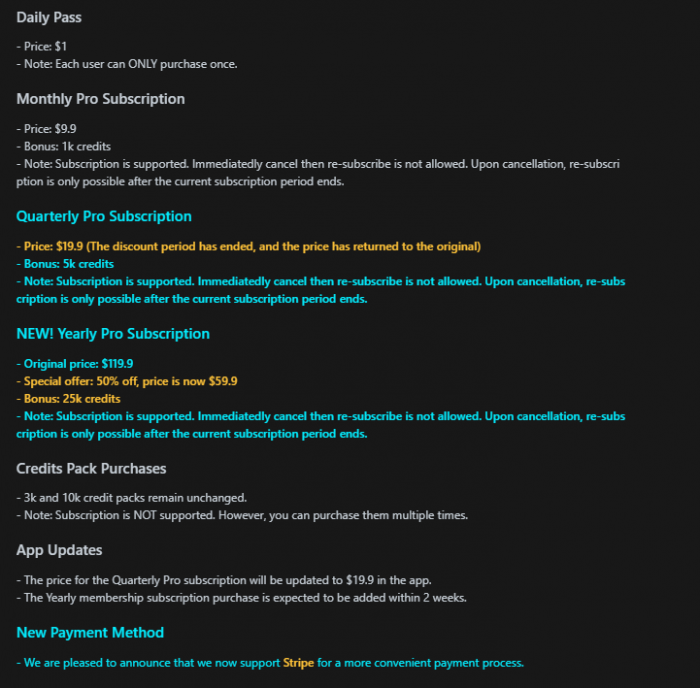
For professionals using it weekly, the paid tiers can be cheaper than maintaining a local GPU rig or subscribing to multiple closed tools just to get similar coverage.
Who Actually Needs Tensor Art? Use Cases by Persona
Instead of saying “it’s good for creators,” let’s break down realistic personas and why they might choose (or avoid) Tensor Art.
1. Solo Creator / YouTuber
Use cases:
● YouTube thumbnails in a consistent style.
● Characters for channel art, banners, intros.
● Short storyboards or keyframes for video stories.
Why Tensor Art works:
You can train a LoRA of your face or avatar and reuse it consistently across thumbnails and story scenes, which helps maintain a cohesive visual identity. Using image-to-image allows you to refine and iterate on a thumbnail idea instead of starting from scratch each time, saving both time and effort. Additionally, the model hub provides access to thousands of styles you can experiment with until you find the one that best aligns with your brand.
Potential downside: The learning curve might feel steep compared to “type prompt in app X, get output” tools and you need to understand credits and manage usage carefully during busy months.
2. Agencies and Brand Marketers
Use cases:
● Generating multiple ad variations for A/B testing.
● Creating concept visuals for campaigns before committing to full design.
● Product visualization in different scenes and moods.
Why Tensor Art works:
ControlNet and image-to-image help you stay aligned with brand guidelines and layouts by giving more precise control over outputs. You can also create internal LoRAs for brand mascots, product silhouettes, or specific illustration styles to maintain consistency. In many agencies, a credit-based model is more flexible than a strict “one seat, one subscription” setup..
Potential downside: Content policy and safety: you must check whether Tensor Art’s moderation and data practices align with your brand guidelines. Monitoring usage and access across teams may require extra discipline.
3. Game Developers, Concept Artists, and 3D/Architecture Teams
Use cases:
● Environment concepts and mood boards.
● Character and enemy design sketches.
● Architectural visualizations and interior design ideas.
Why Tensor Art works:
The model hub offers a wide range of specialized styles for game art, isometric renders, anime, and architectural concepting. With image-to-image, artists can input rough sketches, generate polished concepts, and then refine them manually. Training LoRAs on a project’s internal art style also helps maintain visual consistency across large asset libraries.
Potential downside: Production pipelines still need manual polishing, Tensor Art is best used as a concept acceleration tool, not a replacement for skilled artists. It’s also important to review licensing and usage rights carefully before using generated assets in commercial game releases.
User Experience, Performance, and Safety
Interface & Learning Curve
Tensor Art’s interface reflects its ambition: it’s powerful, but not minimalistic.
Strengths:
● Lots of options are visible without deep menu hunting.
● Model switching and browsing are integrated into the generation experience.
● Community content and examples help you learn from others.
Challenges:
● New users can feel overwhelmed by the number of toggles, sliders, and model types.
● The balance between beginner and pro UX is tricky—Tensor Art naturally leans toward users who already know Stable Diffusion basics.
● Some advanced workflows (e.g., complex ControlNet setups or node‑style flows) are best suited to technically comfortable users.
For someone migrating from Midjourney or a very simple mobile app, expect a few sessions of trial and error to become comfortable.
Speed and Reliability
Performance depends on: Time of day and server load, Model complexity and Resolution and steps.
In general:
● Standard image generations are reasonably fast, especially on paid tiers or with priority access.
● Heavy workflows (high resolution, multiple ControlNets, or certain video workflows) take longer but are still practical for most use cases.
● The platform’s cloud‑first nature means you don’t have to worry about your local hardware, but you are tied to network connection quality.
Safety, Content Policy, and Trust
Because Tensor Art hosts user‑generated models and content, there are a few dimensions to consider:
● NSFW and adult content: Check the platform’s policy; many community models may produce adult or borderline content. This can be a red flag for brands, educators, or younger users.
● Moderation and reporting: Community moderation tools, reporting options, and visibility settings matter if you are publishing public models or images.
● Data usage and privacy: Before uploading sensitive or proprietary assets for LoRA training (e.g., unreleased product photos or client assets), you should read the platform’s data and training policies carefully to ensure they are not reused in ways you don’t intend.
For personal creative experimentation, these are less severe concerns. For professionals and brands, they are critical.
Reddit Community Sentiment on Tensor Art
Reddit discussions about Tensor Art tend to focus on three themes: model access, safety, and recent policy shifts. Early posts in r/StableDiffusion praise the platform’s large anime and SDXL model library, easy hosted LoRA use, and fast, low-friction web UI that often outperforms local setups. reddit
However, power users frequently criticize the inability to download many models (unlike on Civitai), along with occasional artifacts, blur issues, and stricter filters that can affect image quality. Some threads also question whether all hosted models have proper permissions, warning of potential legal and ethical risks for commercial use.

From late 2025 onward, sentiment becomes more negative after Tensor Art adopts a much stricter SFW stance and heavily censors borderline content. Posts in r/TensorArt_HUB and related subs describe users leaving for alternatives or moving sensitive workflows back to local tools to avoid sudden policy or credit changes. reddit
Where Tensor Art Stands Among Competitors
| Tool | Models & Training | Control & Workflow | UX & Speed | Best For |
| Tensor Art | Open SD hub; huge LoRA library; native cloud LoRA training | Strong ControlNet, inpaint, face tools; SD‑style UI | Moderate learning curve; good speed overall | Power users, custom styles, model creators |
| Midjourney | Closed proprietary model; no custom model hosting/training | Few explicit controls; prompt‑driven iterations | Very smooth UX; fast, beautiful defaults | Quick, high‑quality general images with minimal setup |
| Leonardo | SD‑based; supports custom models/LoRAs, more curated than open | Rich tools, templates, assets; project‑oriented | Cleaner, design‑tool‑like experience | Designers/marketers needing structured, branded work |
| SeaArt | Multiple SD models; strong style presets, lighter on training | Solid controls, less deep than Tensor Art | Accessible, mobile‑friendly | Everyday creators and anime/art fans wanting variety |
Pros, Cons, and Who Should (or Shouldn’t) Use Tensor Art
Key Strengths
1. Generous free tier: Enough daily credits for repeated experimentation and casual use.
2. Deep model ecosystem: Huge library of SD‑based models, LoRAs, and other assets, many from active community creators.
3. Serious control tools: ControlNet, inpainting, face swap, upscaling, and more, suitable for professional workflows.
4. Cloud LoRA training: Ability to train your own models without owning GPUs, then deploy and share them.
5. Community‑driven platform: Profiles, galleries, and model pages help you build an audience or discover trends.
Key Limitations
1. Learning curve: Beginners may feel overwhelmed by the interface and options.
2. Cloud dependency: No offline use; you rely on servers and internet connection.
3. Policy & brand safety: The presence of NSFW or sensitive content in the ecosystem may conflict with some organizations’ policies.
4. Complexity for casual users: If all you want is a quick, one‑click art generator, Tensor Art might feel like overkill.
Who Tensor Art Is Ideal For
Tensor Art is a strong match for:
1. Creators who have outgrown simple AI art apps and want more control and custom styles.
2. YouTubers, streamers, or writers who need consistent characters or worlds via LoRAs.
3. Agencies and marketers who want to prototype campaigns and concepts quickly, with control over layout and style.
4. AI enthusiasts and model makers who want to train, host, and share models without managing their own infrastructure.
Who Should Probably Look Elsewhere
You might be better served by a simpler or more narrowly focused tool if:
1. You want a zero‑learning‑curve, app‑like experience with minimal settings.
2. Your organization requires strictly curated content and tight control over what models and outputs are allowed.
3. You are unwilling to manage credits or subscriptions and prefer a fixed flat fee for unlimited usage (common in some enterprise contracts or specific tools).
Final Verdict: Is Tensor Art Worth It?
Tensor Art isn’t the smoothest or most beginner-friendly AI art generator and that’s exactly what makes it stand out. While some tools are closed and frictionless, Tensor Art sits on the open, modular end of the spectrum, giving you control over models, LoRAs, and tool chains.
It rewards curiosity and patience. Casual users who just want quick, pretty images will find easier options. But for serious creators, marketers, developers, or model builders who want deep Stable Diffusion access, custom LoRA training, an experimentation-driven community, and flexible pricing that scales from free to pro use, Tensor Art is well worth exploring.
Comments