

AI email assistants in 2026 go far beyond “smart replies” – they summarize long threads, draft human‑sounding responses, clean clutter, and even automate follow‑ups and workflows. Below is an article‑style breakdown of the top 10 tools, with short descriptions, pros, cons, best‑for, and a closing conclusion.
Introduction
Managing email in 2026 is a constant battle against overflowing inboxes, scattered conversations, and repetitive replies. AI email assistants promise a way out by combining natural language generation, smart prioritization, and workflow automation directly inside Gmail, Outlook, and modern email clients.
The tools below were chosen because they consistently appear in independent tests, expert round‑ups, and real‑user reviews as the most capable assistants for drafting, organizing, and managing email. Each one is distilled into what it does, its strengths and weaknesses, and who it is best suited for.
1. Lindy AI
Lindy is an automation‑first email assistant that not only drafts and triages messages, but can also drive entire workflows like follow‑ups, routing leads, and updating external tools. It connects to Gmail and other apps, then uses powerful models plus custom workflows to decide when to answer, escalate, or nudge you.
Pros:
● Automates triage, replies, and follow‑ups using complete thread context and your knowledge base.
● 4,000+ integrations and highly customizable “if‑this‑then‑that” workflows for sales, support, and ops.
Cons:
● Setup and workflow design can feel overwhelming for casual users.
● Pricing and complexity make it better suited to serious professionals and teams.
Best for:
● Small businesses, revenue teams, and power users who want end‑to‑end automation rather than just faster replies.
2. Superhuman Mail
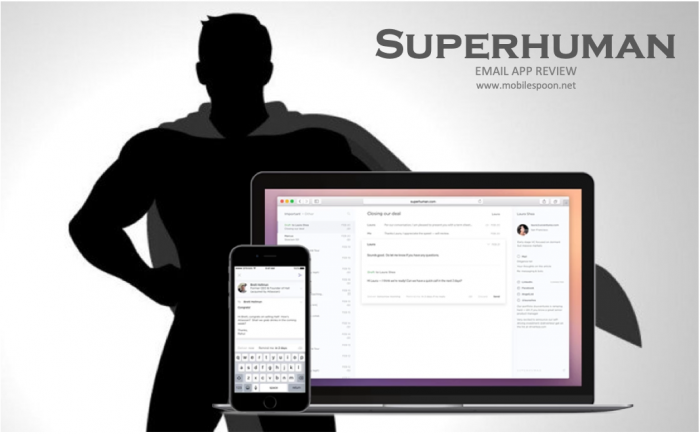
Superhuman is a premium AI‑powered email client designed around speed, keyboard shortcuts, and deep focus, now paired with an AI writer and summarizer. It replaces your Gmail or Outlook interface with a streamlined client that trims seconds from every interaction and generates context‑aware drafts.
Pros:
● Extremely fast, keyboard‑first interface plus features like Instant Reply, Auto‑Summarize, and read receipts.
● Strong collaboration with @mentions and CRM integrations for sales and leadership teams.
Cons:
● Premium pricing aimed at heavy email users, not casual inbox checks.
● Requires some time to learn shortcuts and commit to its workflow.
Best for:
● Founders, executives, and sales leaders who live in their inbox and want maximum speed and polish.
3. Shortwave
Shortwave is a modern Gmail‑based client that leans heavily on AI search, summaries, and intelligent bundling to make inbox zero realistically achievable. It automatically groups similar messages, turns emails into to‑dos, and lets you search using natural language instead of exact keywords.
Pros:
● Powerful AI search and thread summarization that quickly surface the information you need.
● Bundling of newsletters and notifications plus triage workflows to reach inbox zero faster.
Cons:
● Focused on Gmail; not ideal if you rely heavily on other providers.
● Best productivity gains appear after you adapt to its triage methodology.
Best for:
● Busy professionals and teams on Google Workspace who want AI‑driven search and organization without changing providers.
4. Microsoft Copilot for Outlook
Microsoft Copilot is embedded into Outlook and Microsoft 365, providing AI summaries, suggested replies, and task extraction directly inside your existing enterprise tools. It is especially useful in long corporate threads where decisions and action items are buried across dozens of replies.
Pros:
● Deep integration with Outlook, Teams, and the rest of the Microsoft 365 ecosystem.
● Smart summarization, tone‑adjusted suggestions, and automatic identification of tasks and follow‑ups.
Cons:
● Real value appears when your company is already fully invested in Microsoft 365.
● Advanced features often sit behind higher‑tier Copilot or enterprise plans.
Best for:
● Enterprises and SMBs on Microsoft 365 who need AI while staying within strict security and compliance boundaries.
5. Gemini for Gmail (Google Workspace)
Gemini brings Google’s generative AI into Gmail so you can ask for summaries, have it “help me write,” and retrieve information across mail and Drive in natural language. It sits natively in your Gmail compose box and side panel, making it easy to adopt for non‑technical users.
Pros:
● Native Gmail integration for drafting, rewriting, shortening, or formalizing emails in one click.
● Can surface old threads, attachments, and context using conversational queries.
Cons:
● Works best only if your workflow lives inside Google Workspace.
● Capability and rollout can vary by region, account type, and admin settings.
Best for:
● Freelancers, creators, and teams who are already all‑in on Gmail and want built‑in AI rather than another extension.
6. SaneBox
SaneBox is a long‑standing AI‑driven inbox organizer that filters out low‑priority messages into folders like SaneLater while keeping critical emails front and center. Instead of rewriting your emails, it quietly learns what matters to you and hides distractions.
Pros:
● Effective prioritization and automatic filtering for newsletters and notifications across most email providers.
● Nudges and reminders ensure you don’t forget to follow up on important threads.
Cons:
● Focuses more on organization than generative writing or replies.
● Requires a few days of training and corrections for best results.
Best for:
● Anyone drowning in newsletters and low‑value mail who wants a cleaner inbox without changing clients.
7. Mailbutler
Mailbutler is a plug‑in style assistant that layers AI drafting, contact enrichment, and tracking on top of Gmail, Outlook, and Apple Mail. It behaves like a Swiss‑army knife for productivity inside your existing mail client.
Pros:
● Adds AI writing, smart scheduling, follow‑up reminders, and email tracking without replacing your mail app.
● Strong for collecting contact details and managing client communication from one place.
Cons:
● Another subscription on top of your email and other tools.
● UX depends partially on the host email client, so experience can vary.
Best for:
● Freelancers, consultants, and small agencies who manage many client conversations in traditional mail apps.
8. Clean Email

Clean Email uses rules and AI logic to bulk‑clean and continuously maintain large inboxes, with features for auto‑unsubscribe, smart views, and recurring cleanups. It is more of a hygiene and decluttering assistant than a writing companion.
Pros:
● Quickly archives or deletes thousands of old emails and unsubscribes from unwanted senders.
● Ongoing rules keep your inbox clean after the initial “spring clean.”
Cons:
● Limited generative features for writing or summarizing content.
● Some users may be cautious about granting full inbox access for bulk operations.
Best for:
● Users with years of email buildup who need aggressive cleanup plus automated ongoing maintenance.
9. Hiver
Hiver is a Gmail‑based shared inbox platform with AI features aimed at support, operations, and customer‑facing teams. It turns addresses like support@ or info@ into collaborative inboxes with assignments, SLAs, and analytics.
Pros:
● Shared inboxes, collision detection, and analytics tailored for team workflows.
● AI features for summarization, triage, and sentiment analysis on high‑volume queues.
Cons:
● Too heavy for solo users or very small teams.
● Priced and structured more like a helpdesk tool than a personal assistant.
Best for:
● Support, success, and operations teams that rely on Gmail and want AI‑powered shared inbox management.
10. Grammarly (Email‑Focused Use)

Grammarly has evolved from a grammar checker into an AI communication assistant that can draft, rewrite, and refine emails directly in your browser or email client. For many users, it is the easiest way to upgrade writing quality without changing their inbox setup.
Pros:
● Strong grammar, tone, and clarity suggestions plus generative rewrites and full‑email drafts.
● Works across webmail, CRMs, docs, and other tools via extensions and desktop apps.
Cons:
● Less focused on inbox organization or automation; it shines mainly in writing assistance.
● Advanced AI rewrite and tone features are locked behind paid plans.
Best for:
● Professionals who send many important emails and want them to sound polished, confident, and on‑brand.
Conclusion
AI email assistants in 2026 fall into three broad camps: full workflow automation (Lindy, Hiver), AI‑first email clients (Superhuman, Shortwave), and assistant layers on top of existing inboxes (Copilot, Gemini, SaneBox, Mailbutler, Clean Email, Grammarly). The right choice depends less on raw “AI power” and more on where you already live—Google Workspace, Microsoft 365, or a mix of tools—and whether your biggest pain is writing, organization, or follow‑up automation.
For solo creators and small businesses, combining a native assistant (Gemini or Copilot) with an organizer like SaneBox or Clean Email often delivers the best ROI, while larger teams benefit from workflow‑heavy platforms like Lindy or Hiver layered into their existing stack. Whatever you choose, treating AI as a co‑pilot—reviewing drafts, tuning workflows, and iterating regularly—will keep your email assistant feeling human, on‑brand, and genuinely productive.
Comments