

Most people don’t go looking for UltraViewer.
They encounter it mid-problem, a PC acting up, a “support” call, a friend trying to help, or a sudden instruction to download a small remote tool “just for a minute.” That context matters more than any feature list, because UltraViewer’s reputation has been shaped less by what it claims to do and more by how people experience it.
This article looks at UltraViewer as it exists in the real world, not as a brochure product.
Where UltraViewer Fits in the Remote Desktop Ecosystem
Remote access software broadly falls into three categories:
- Always-on enterprise tools used by IT teams
- Consumer convenience tools for personal devices
- Session-based support tools meant for quick, temporary access
UltraViewer sits firmly in the third category.
It’s not built to manage fleets of devices, enforce policies, or run silently in the background. Instead, it focuses on one thing: letting one person temporarily access another person’s Windows computer using a simple session handshake.
That narrow scope is both its strength and its weakness.
The First Impression Most Users Have
For someone intentionally downloading UltraViewer to help a relative or client, the experience is usually straightforward:
- Download finishes quickly
- The interface opens without account creation
- An ID and password are immediately visible
- A connection happens within seconds
But a large number of users first see UltraViewer during moments of stress, pop-ups, warning messages, or phone calls claiming urgent technical issues. In those situations, UltraViewer becomes associated with fear, urgency, and loss of control.
This explains why sentiment around the software is so divided:
- Technically competent users often describe it as “simple and effective”
- Non-technical users frequently associate it with scams, even when the software itself is not malicious
UltraViewer doesn’t create this problem, but it doesn’t fully escape it either.
Design Philosophy: Minimalism Over Guardrails
UltraViewer’s interface is intentionally minimal.
There are no dashboards, no complex permission trees, no onboarding tours. The software assumes users understand what remote access means and why they’re using it. That assumption works well in professional or peer-to-peer scenarios, but it leaves gaps when the user lacks technical context.
Notably absent are:
- Strong pre-connection warnings about fraud scenarios
- Mandatory confirmations explaining full access risks
- Session summaries or activity logs visible to the average user
In other words, UltraViewer prioritizes speed and simplicity over education and friction.
That choice makes sense for technicians, but it places more responsibility on users than many alternatives do.
What UltraViewer Does Well Without Drawing Attention to Itself
When UltraViewer works as intended, it’s almost invisible.
Connections are fast, latency is low, and the software doesn’t overwhelm the system. The built-in chat reduces dependency on phone calls, and file transfers are integrated rather than bolted on. These are not flashy advantages, but they matter during actual support sessions.
Another subtle strength is that UltraViewer does not aggressively upsell during use. Paid plans exist, but the free version remains functional enough that casual users aren’t constantly interrupted by upgrade prompts.
This restraint is rare in modern utility software.
Licensing and Monetization: Quiet, But Present
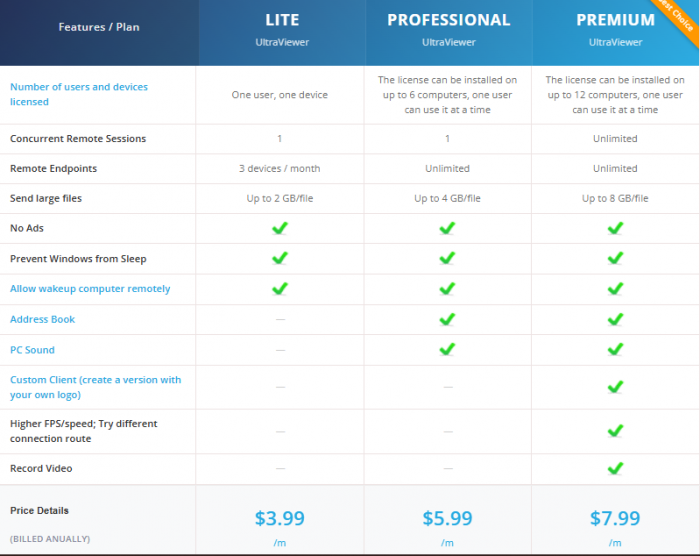
UltraViewer’s pricing model is understated. There are no forced trials, no surprise paywalls, and no “feature cliffs” that suddenly block basic usage.
Paid licenses primarily affect:
- How many machines you can install on
- How many sessions you can run at once
- How large your file transfers can be
For freelancers or small support teams, this makes the pricing feel more like a capacity unlock than a restriction. However, for businesses expecting compliance tooling or auditability, the paid tiers may still feel thin compared to enterprise competitors.
Why Trust Is UltraViewer’s Biggest Challenge
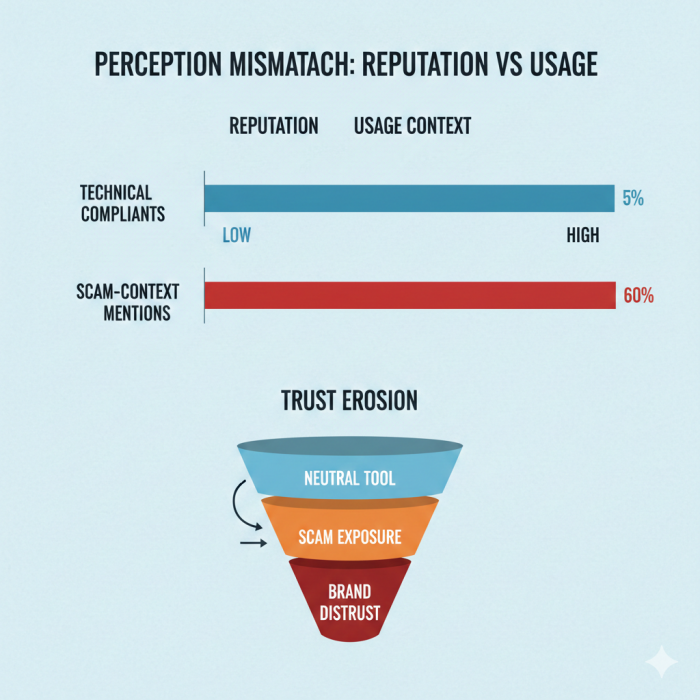
UltraViewer’s technical design isn’t the core issue. Trust is.
Across public forums, help desks, and review platforms, the same pattern appears:
- UltraViewer is rarely blamed for security flaws
- It is frequently mentioned as a tool used during scams
This creates a branding problem that’s difficult to solve. Remote access software is inherently neutral, but repeated association with fraud narratives reshapes perception faster than any marketing can fix.
Unlike larger competitors, UltraViewer doesn’t appear to invest heavily in public education, scam-prevention campaigns, or proactive disclaimers. That silence leaves interpretation up to the user, and in many cases, the user arrives already shaken.
How UltraViewer Compares Conceptually
Rather than comparing specs, it’s more useful to compare intent:
- Tools like TeamViewer emphasize enterprise trust and compliance
- Tools like Chrome Remote Desktop emphasize personal convenience
- UltraViewer emphasizes immediacy — “connect now, solve the problem”
That immediacy is valuable, but it’s also why UltraViewer is often chosen by bad actors. It removes friction at the exact moment when friction might protect inexperienced users.
This doesn’t make UltraViewer unsafe by default, it makes context critical.
Situations Where UltraViewer Makes Sense
UltraViewer works best when:
- Both parties already know each other
- The session is short and task-specific
- The user stays present during the entire session
- The connection is initiated intentionally, not reactively
In these conditions, UltraViewer behaves exactly as advertised, a lightweight, effective remote support bridge.
Situations Where Caution Is Warranted
UltraViewer becomes risky when:
- The user is rushed or pressured
- The instruction to install comes from an unsolicited source
- The user doesn’t understand what “remote control” fully implies
- Financial or personal data is accessible during the session
These aren’t UltraViewer-specific risks, but UltraViewer’s simplicity makes them easier to exploit.
Final Evaluation: A Tool That Reflects Its Environment
UltraViewer is a classic example of software that mirrors how it’s used rather than what it is.
Technically, it’s competent.
Functionally, it’s efficient.
Reputationally, it’s complicated.
For informed users, it’s a practical utility. For uninformed users, it can be a doorway to serious trouble, not because the software is malicious, but because it assumes a level of awareness many people don’t have.
Overall assessment
A capable remote support tool that demands informed usage.
Not dangerous by design, but unforgiving of misunderstanding.
Comments