

The AI roleplay ecosystem has evolved far beyond simple chatbot conversations. As users demand long-term memory, deeper customization, and fewer creative restrictions, a new class of platforms has emerged to meet those expectations. One of the most discussed names in this space today is Venus Chub AI, often referred to simply as Chub.ai.
This article provides a comprehensive, informational deep dive into Venus Chub AI, what it is, how it works, what users say about it, how pricing compares, and why it has become a destination for advanced AI roleplay and storytelling.
What Is Venus Chub AI?
Venus Chub AI is an advanced AI character and roleplay platform designed for high-control, long-context interactions with virtual personas. Unlike casual AI chat sites, it is built for users who want to manage both the interface and the underlying language models that power conversations.
Origins and Background
Venus Chub AI emerged from the merger of two earlier communities:
Venus AI – a popular roleplay chat interface
CharacterHub – a large repository for sharing detailed AI character profiles
The result was a unified platform combining character sharing, roleplay tools, and multi-model AI support under one system.
Core Philosophy: Creative Freedom and Control
One of the defining characteristics of Venus Chub AI is its uncensored design philosophy. Unlike mainstream platforms such as Character.ai, which apply heavy content filters, Venus Chub AI allows users to explore fictional narratives without enforced moderation layers.
This does not mean “anything goes” without limits. The platform still enforces:
- Legal compliance
- 18+ user requirements
- Restrictions around real-world individuals and imagery
But within those boundaries, users are free to define tone, themes, and character behavior themselves.
Key Features That Set Venus Chub AI Apart
1. Lorebooks (World Memory System)
Lorebooks are widely considered the platform’s most powerful feature.
Instead of forcing the AI to remember everything at once, Lorebooks store contextual knowledge, such as:
- World history
- Character relationships
- Magic systems
- Locations and factions
The AI only references a Lorebook entry when specific keywords appear, which:
- Preserves token memory
- Prevents context overload
- Keeps long stories consistent
This system is especially valuable for multi-chapter narratives and persistent worlds.
2. Multi-Model AI Support
Venus Chub AI does not lock users into a single language model.
Users can connect external APIs from:
- OpenAI (e.g., GPT-4-class models)
- Anthropic (Claude models)
- Chub’s own hosted large language models
This flexibility allows users to balance:
- Cost
- Creativity
- Logical reasoning
- Response length
Advanced users often switch models depending on the scene or use case.
3. Character Cards (V2 System)
Character Cards are structured data profiles that define how an AI behaves.
A typical card includes:
- Personality traits
- Physical description
- Speech patterns
- Example dialogues
- Behavioral rules
The V2 system allows very large character definitions, helping bots remain consistent even in long conversations.
4. Group Chats and Stages
Venus Chub AI supports multi-character interactions, where several AI personas can:
- Talk to each other
- React to the user
- Maintain separate personalities
This feature is commonly used for:
- Story ensembles
- Party-based roleplay
- Simulated social environments
Step-by-Step Guide: Set Up Venus Chub AI Properly
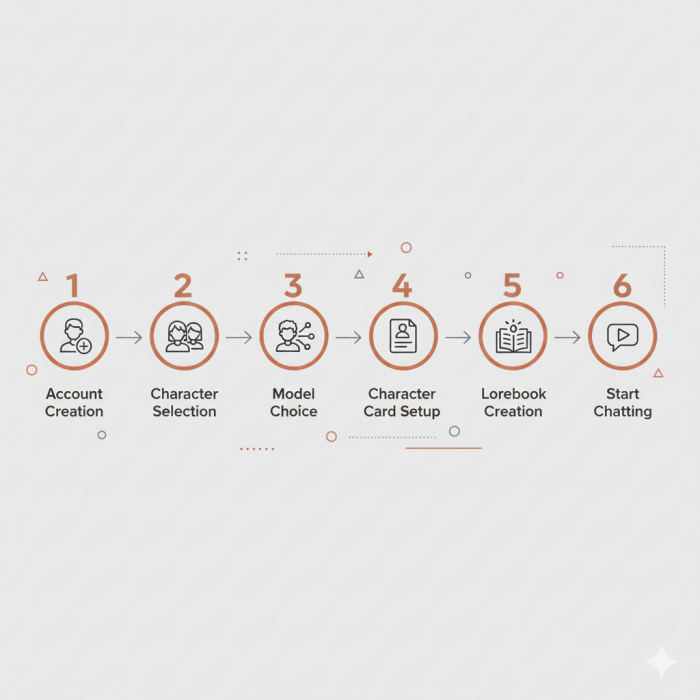
This is the “do it once, do it right” setup so your first chats don’t feel random or inconsistent.
Step 1: Create an Account and Find a Character (or Create One)
Chub’s official docs walk through character creation, after logging in, you’ll see Create Character in the top right, taking you into the Character Creator. Chub AI Guide
If you don’t want to build from scratch, you can browse characters and start a chat. The “Just Chatting” docs show the workflow of choosing a character and using the “Chat with [Character]” button.
Step 2: Decide Your “Brain” (Model Source)
You have two common paths:
Option A: Subscribe to Chub (Simplest)
- Choose Mercury or Mars
- No key management
- Faster onboarding
Option B: Bring Your Own API Key (More Control)
- Connect an API provider via Chub’s API Connections flow
- Costs depend on provider usage
- Output depends on provider model + settings
Practical tip: If you’re writing long stories, prioritize context window size over “smartness” alone.
Step 3: Create or Improve a Character Card
In the Character Creator, focus on:
- Personality anchors (3–6 clear traits)
- Speech style (short vs verbose, formal vs casual)
- Hard boundaries (what the character should never do)
- Example messages (these strongly shape behavior)
Chub’s docs are explicit that character creation is a structured process and is central to your experience.
Rule of thumb: If your character definition is vague, the bot will feel vague.
Step 4: Add a Lorebook (If You Want Consistent Long Roleplay)
Use lorebooks for:
- world rules (magic, tech limits, factions)
- recurring NPCs
- location descriptions
- timeline events
Chub defines lorebooks as keyword-triggered prompt inserts, you’re basically designing “memory that activates only when relevant.”
Best practice:
Create 10–20 short lore entries first. Expand only when the story demands it.
Step 5: Add Stages (Optional, Power-User)
Stages can add capabilities to chats. Chub’s stage docs describe them as components that can add functionality like expression packs or custom prompt handling.
Start simple:
- add one stage
- test it
- keep only what improves consistency or UX
Step 6: Start a Chat and Tune Settings
The “Just Chatting” docs cover the chat interface and settings.
Basic tuning ideas:
If replies are chaotic → lower creativity settings
If replies are dull → raise creativity slightly
If it forgets details → reduce clutter + rely on lorebooks + choose larger context model
Pricing and Subscription Plans Explained
Venus Chub AI can be used for free if users bring their own external API keys. For those who prefer an all-in-one solution, Chub offers internal models via subscription.
| Plan | Approx. Price | Key Features |
| Mercury | ~$5/month | 7B–13B models, ~8K token memory |
| Mars | ~$20/month | 70B+ models, improved reasoning |
| Jupiter | $20+/month | Experimental ultra-large models, early access |
Pricing is considered mid-range compared to competitors, especially given the larger context windows.
Safety, Privacy, and Data Handling
Because of its uncensored reputation, safety and privacy are frequent user concerns.
Privacy Policy (User-Reported)
Conversations are private by default
Developers state chats are not read manually
Private chats are not used for public model training
Content Guidelines
Platform is 18+ only
Fictional content allowed
Real-world individuals and illegal material prohibited
This balance aims to provide freedom without violating platform or legal boundaries.
User Reviews and Community Sentiment
Across Reddit, Discord, and AI roleplay forums, Venus Chub AI is often described as a “power-user platform.”
Commonly Praised
- Long-term memory stability
- Lorebook system
- Character consistency
- Model flexibility
Common Criticisms
- Steeper learning curve
- Overwhelming settings for beginners
- Requires setup time to reach best results
Overall sentiment skews positive among experienced roleplay users, while beginners may take time to adapt.
Why Users Are Switching to Venus Chub AI
Many migrations come from platforms like:
- Janitor AI
- Character.ai
Key reasons cited include:
- Larger context windows (less “forgetting”)
- Greater parameter control (temperature, penalties)
- More stable infrastructure during peak usage
- No sudden policy-driven content restrictions
For users focused on long-form storytelling, these factors matter more than ease of entry.
How Venus Chub AI Fits the AI Roleplay Market
Venus Chub AI occupies a specific niche:
- Not a casual chatbot
- Not a writing assistant
- Not a general productivity AI
Instead, it functions as a modular roleplay engine, where users control:
- The characters
- The world
- The AI brain
This positioning explains both its growing popularity and its learning curve.
Final Thoughts: Who Is Venus Chub AI For?
Venus Chub AI is best suited for:
- Advanced roleplayers
- Writers building persistent fictional worlds
- Users frustrated by strict content filters
- Those willing to trade simplicity for control
It is less ideal for:
- First-time AI chat users
- People looking for plug-and-play experiences
- As AI roleplay platforms continue to diverge, Venus Chub AI represents the high-control, high-freedom end of the spectrum.
Comments