

VidMate is a widely talked-about Android app that lets users download videos, music, and movies from multiple online platforms. From YouTube and Facebook to TikTok and Instagram, it promises to save media offline for free.
I personally tested VidMate to understand how it works, whether it’s safe, and if it’s legal. This review gives you a complete, realistic overview so you can decide whether using VidMate is worth it.
What Is VidMate?
VidMate is an Android-only app that allows you to download online media. It doesn’t host content itself but locates the video or audio files from supported platforms and lets you save them to your device.
Supported platforms include:
● YouTube
● TikTok
● Free movie streaming sites
It’s popular because it seems simple, fast, and free but safety and legality are concerns you should understand before using it.
Key Features of VidMate
● Multi-platform downloads: Works with YouTube, TikTok, Facebook, Instagram, and more.
● Built-in browser: No need to switch between apps to find content.
● Quality & format options: Save videos in low to HD resolution or extract audio in MP3.
● Batch downloads: Download multiple videos at once.
● Extra tools: Status saver, basic media player, and live TV (in some versions).
These features make it versatile, especially for users who want offline access to videos and music.
Step-by-Step Guide: How to Use VidMate
1. Download VidMate APK from a trusted source.
2. Enable Install from Unknown Sources in Android settings.
3. Install and open the app.
4. Browse sites using the built-in browser or paste a video link.
5. Tap the Download button.
6. Choose format (MP4/MP3) and quality.
7. Wait for the download to complete access files in the Downloads folder.
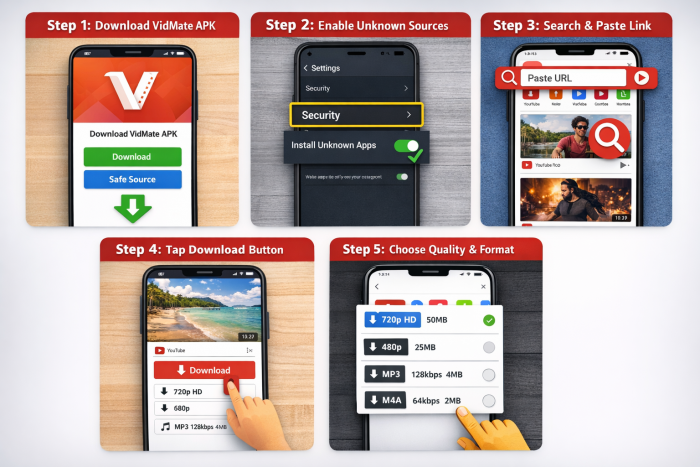
⚠️ Always be cautious, only use official or reputable APK sources.
Is VidMate Safe?
While VidMate works, safety is a concern:
● Many APK files from third-party websites may contain malware or adware.
● Some versions request unnecessary permissions like contacts or SMS access.
● Frequent ads and pop-ups may appear even in legitimate versions.
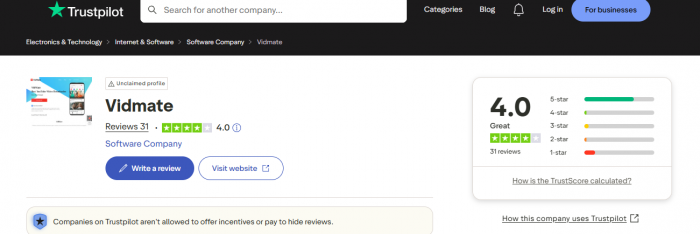
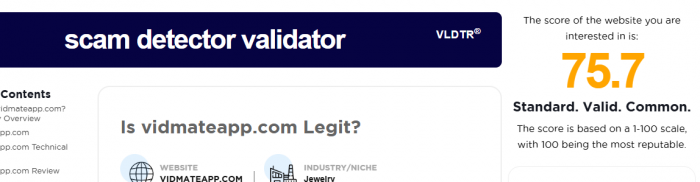
Trust scores from verified sources:
● Trustpilot: 4.0/5 (users like features, complain about ads and reliability)
● Scam Detector: 75.7/100 for the domain
● Security research warns: unofficial APKs may have hidden malware or cryptocurrency miners.
Is VidMate Legal?
VidMate itself is a tool, but downloading copyrighted content is usually illegal:
● YouTube, Netflix, Amazon Prime, Disney+ Hotstar downloads are against their terms of service.
● Legal consequences depend on your country’s copyright laws.
In India and most countries, downloading paid or copyrighted content without permission is considered illegal.
Pros of VidMate
● Free to use
● Supports multiple platforms
● Allows offline access
● Flexible quality and format options
● Lightweight for older devices
Cons of VidMate
● Not on Google Play Store must install APK
● Legal grey zone for copyrighted content
● Security risks from fake APKs
● Intrusive ads and pop-ups
● Unnecessary permission requests
● Android-only
Common Problems Users Face
1. Fake APKs: Can contain malware, adware, or spyware.
2. Intrusive advertisements: Pop-ups interrupt downloads.
3. App instability: Crashes or stalled downloads reported.
4. Permission misuse: Requests for access beyond storage.
5. Storage & battery drain: HD downloads can consume space and power quickly.
VidMate vs Legal Alternatives
| Feature | VidMate | YouTube Premium / Netflix / Spotify |
| Legal Content | No | Yes |
| Security | No (depends on APK) | Yes |
| Offline Access | Yes | Yes |
| Cost | Free | Paid subscription |
| Ads | Heavy | Controlled |
Who Should Use VidMate?
Good fit for:
● Tech-savvy users aware of APK risks
● People with limited internet who need offline access
Not recommended for:
● Users who value privacy
● Phones with banking/work apps
● Those unfamiliar with malware/permissions
FAQ
Q: Is VidMate free?
Yes, all features are free, but the app shows ads.
Q: Can VidMate harm my phone?
Only if you install fake APKs or ignore permissions real APKs still carry minor risk.
Q: Is VidMate on the Play Store?
No, it’s removed due to policy and copyright violations.
Q: Is VidMate legal in India?
Downloading copyrighted content without permission is illegal; use at your own risk.
Final Verdict
I used VidMate myself and it does what it promises: fast downloads, selectable quality, and offline access.
However:
● Frequent ads, security warnings, and the potential for malware make it risky.
● Legal grey areas make downloading paid content unsafe.
My honest conclusion:
VidMate works, but the risks outweigh the benefits for most users. For safe, legal alternatives, YouTube Premium, Spotify, Netflix, and Amazon Prime are better options.
Comments