

What Is Lulubox?
Lulubox is an Android-only game utility app that allows users to apply plugins (also called patches) to compatible games. These plugins can modify visual elements (like skins), unlock in-game items, or change performance parameters such as FPS and graphics quality.
Important clarification:
Lulubox does not modify the original game files permanently. Instead, it launches games inside a controlled environment where changes are applied temporarily at runtime.
Core Features of Lulubox
1. Skin & Cosmetic Unlocking
Lulubox is best known for enabling premium skins and cosmetic items in popular games such as:
- Free Fire / Free Fire Max
- Mobile Legends
- 8 Ball Pool
In many cases, these skins are client-side only, meaning:
- You can see the skin on your device
- Other players may still see the default appearance
2. In-Game Currency (Offline Games Only)
For offline or single-player games, Lulubox plugins may unlock:
- Unlimited coins
- Unlimited gems
- Free character unlocks
Common examples include:
- Subway Surfers
- Temple Run
- Candy Crush
These patches do not work reliably for online games due to server-side checks.
3. Game Booster & Performance Tools
Lulubox includes performance-oriented utilities such as:
- Do Not Disturb (DND) gaming mode
- RAM cleanup before launch
- FPS unlock (60 / 90 FPS on supported devices)
- GFX tweaks for low-end phones
This makes Lulubox appealing even to users not interested in hacks, but in smoother gameplay.
4. No Root Required
Unlike older patching tools (e.g., Lucky Patcher), Lulubox:
- Does not require root access
- Works on stock Android devices
- Uses overlay and virtualization techniques instead
This significantly lowers the barrier to entry.
5. Interface & Theme Customization
Some plugins allow:
- Custom backgrounds
- UI theme changes
- Modified in-game HUD elements
These are cosmetic and do not affect gameplay balance.
How Lulubox Works
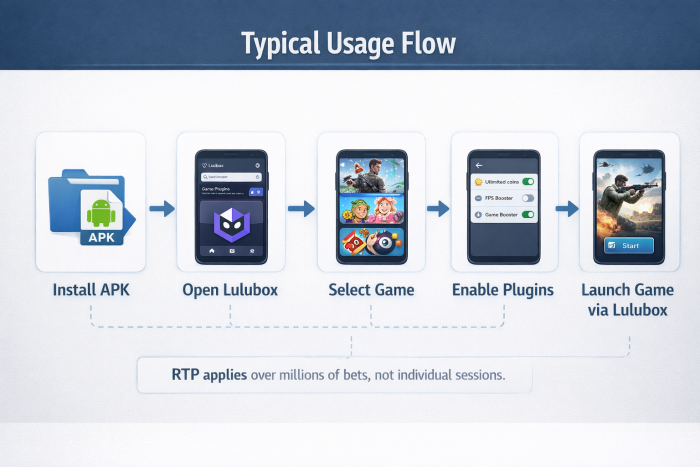
Lulubox operates by creating a virtual or parallel environment for games.
Typical Usage Flow
- Install Lulubox APK
- Open the Lulubox app
- Select a supported game
- Enable desired plugins (skins, FPS, etc.)
- Launch the game from inside Lulubox
The original game remains installed on your phone, but:
- You do not launch it directly from the home screen
- All modifications are injected at runtime
64-Bit Architecture and Compatibility
Most modern Android versions (Android 12–15) and games now run on 64-bit architecture.
64-Bit Support Plugin
To remain compatible, Lulubox requires a 64-bit support plugin, which:
- Allows hooking into 64-bit game processes
- Is often requested automatically on first launch
- Is mandatory for newer games
Without this plugin, many modern games will fail to start inside Lulubox.
Lulubox Versions Explained
Lulubox (Standard)
- Basic patching features
- Mostly for offline games
- Limited plugin availability
- Ads present
- Best for casual users experimenting with offline mods.
Lulubox Pro
- Adds advanced plugins
- Includes GFX tools and FPS unlockers
- Better support for Free Fire and Mobile Legends skins
- More aggressive overlays
- Popular among competitive mobile gamers.
Lulubox Super
- Latest and most modified variant
- Claims compatibility with Android 14/15
- Reduced ads or “no-ads” interface
- Attempts to bypass newer security checks
This version carries higher detection and ban risk, especially in online games.
Popular Games Supported by Lulubox
Offline / Low-Risk Games
- Subway Surfers
- Temple Run
- Candy Crush
Risk level: Low
Online Competitive Games
- Free Fire / Free Fire Max
- Mobile Legends
- 8 Ball Pool / Carrom Pool
Common plugins:
- Skin injection
- Extended guidelines
- Antenna / ESP hacks
Risk level: High to Extreme
Client-Side vs Server-Side Reality
A critical concept when understanding Lulubox:
Client-Side Changes
- Visual skins
- UI modifications
- FPS tweaks
- Harder to detect, but still risky.
Server-Side Validation
Modern games verify:
- Purchase history
- Inventory consistency
- Match data integrity
If the server detects mismatches, consequences include:
- Temporary bans
- Permanent bans
- Hardware / IMEI bans
Security and Privacy Considerations
Permission Usage
Lulubox often requests:
- Full file access
- Overlay permission
- Background activity permission
Some versions also request unnecessary permissions (contacts, location), which raises privacy concerns.
Account Linking Risks
Logging into:
Inside a modified environment increases the risk of:
- Token leakage
- Account compromise
- Third-party access
Fake APK Problem
Due to its popularity, many websites distribute:
- Fake Lulubox APKs
- Trojanized builds
- Adware-infested clones
These may cause:
- Battery drain
- Persistent pop-ups
- Background data usage
Detection, Ban Waves and Enforcement
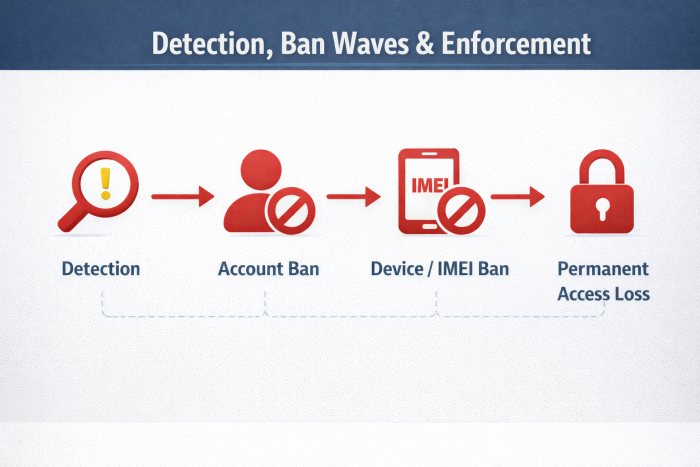
Modern Anti-Cheat Systems
Game developers now rely on:
- Server-side validation
- Behavior analysis
- Hardware ID tracking
Consequences
- Account bans
- Device bans (IMEI / hardware hash)
- Permanent access loss
Once a device is hardware-banned, creating a new account does not help.
Risk Assessment Summary
| Feature / Use Case | Risk Level | Typical Outcome |
| Offline game patching | Low | Minimal consequences |
| FPS / GFX tools | Medium | Possible warning or flag |
| Online skin injection | High | Temporary or permanent ban |
| Currency hacks (online) | Extreme | Instant termination |
Safety: How to Reduce Risk If You Still Use Lulubox
If you decide to try Lulubox despite the risks, follow these basic safety boundaries to avoid the most common problems:
1. Never Use It on Your Main Account
Create a separate test account for any game you launch through Lulubox. Never link:
- your main Google account
- your Facebook gaming profile
- or an account with real-money purchases
Once an account is flagged, recovery is extremely rare.
2. Avoid Online Currency & Competitive Hacks
Do not use:
- unlimited coins / diamonds in online games
- rank-affecting hacks
- ESP / antenna / wall-view plugins
These are the fastest ways to get banned, often within days.
3. Be Extremely Careful With APK Sources
Only download from well-known APK mirrors. Fake Lulubox files are common and often contain:
- background adware
- battery-draining services
- hidden trackers
If an APK asks for contacts, SMS, or location access, that’s a red flag.
4. Expect Detection, Not Immunity
No version of Lulubox (including Pro or Super) is “undetectable.”
Modern games use:
- server-side validation
- behavior analysis
- hardware ID tracking
Delaying a ban is not the same as avoiding one.
5. Uninstall Cleanly After Use
If you stop using Lulubox:
- remove the app
- revoke overlay & file permissions
- clear related cache folders
Leaving mod environments installed can continue triggering flags.
Bottom Line on Safety
If losing the account would upset you, don’t use Lulubox on it.
That single rule will save most users from regret.
Final Takeaway
If you’re someone who enjoys experimenting with offline games, testing visual skins, or squeezing a bit more performance out of a low-end Android phone, Lulubox can feel tempting. In those limited cases, especially for single-player or offline titles, the risk remains relatively low, and the experience is mostly about fun and customization.
However, if you care about:
- your long-term game account,
- your Google / Facebook login security, or
- fair competition in online multiplayer games,
Then Lulubox is not worth the trade-off.
Most problems don’t appear immediately. They show up weeks later, during a ban wave, a sudden login lock, or when a game account you invested time or money into is permanently disabled. That’s the real cost most users underestimate.
In short: Lulubox is a modding sandbox, not a safe upgrade tool.
Treat it as an experiment, not something to build progress, rank, or reputation on.
Comments