

AI has transformed how visual content is created online. Tasks that once required design skills, expensive software, and hours of editing can now be completed in seconds using AI tools. Features like background removal, image enhancement, AI headshots, and text-to-image generation are becoming common in modern creative workflows.
AI Ease is a platform that combines several of these AI tools into a single browser-based interface. The idea is simple: upload an image, describe the changes you want, and let AI handle the editing.
I tested AI Ease across multiple tasks, including image generation, background removal, photo enhancement, and AI headshot creation. This review focuses on how the platform performs in real use cases, the quality of the results, and whether it can realistically replace traditional editing methods.
AI Ease Overview
| Category | Details |
| Platform | AI Ease |
| Type | AI image editing and generation platform |
| Access | Browser based |
| Core Tools | Image generator, background remover, enhancer, AI headshots |
| Best For | Creators, marketers, small businesses |
| Free Version | Available with limited usage |
| Pricing Model | Credit based system |
| Website | https://aiease.ai |
The platform positions itself as an AI powered creative toolkit rather than a single purpose editing tool. Instead of focusing only on image generation or only on editing, it tries to combine several AI functions in one place.
First Impressions and Setup Experience
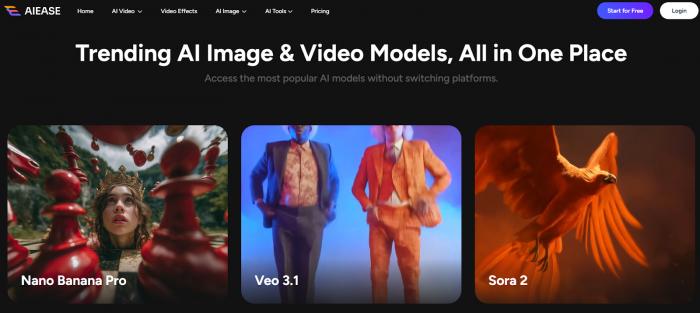
Getting started with AI Ease is surprisingly simple. The platform runs entirely in the browser, so there is no software installation required. After opening the website and creating an account, the dashboard presents a collection of AI tools grouped by category.
What immediately stood out during the first session was how minimal the interface feels. Many AI creative tools overwhelm users with complex parameters and technical settings. AI Ease takes the opposite approach. Most tools require only a few inputs before generating results.
The typical workflow looks like this:
1. Choose a tool from the dashboard
2. Upload an image or type a prompt
3. Adjust optional settings
4. Generate the result
This simplicity makes the platform very beginner friendly. Within a few minutes I was already testing multiple features without needing tutorials.
However, the simplicity also hints at one limitation. The platform prioritizes speed and convenience over deep customization, which becomes more noticeable when compared with advanced AI image tools.
Exploring the Core Tools
AI Ease offers a wide range of features, but during testing four tools stood out as the most relevant for everyday use.
AI Image Generator
One of the main attractions of the platform is its text to image generator. The tool allows users to enter prompts describing scenes, objects, or artistic styles, and the AI produces generated images based on those instructions.
To test the generator, I tried several different prompt styles. Some prompts focused on realistic photography such as product images and portraits, while others described creative scenes and digital art.
In most cases the AI generated images within about 15 seconds. Simple prompts produced decent results with clear subjects and recognizable elements. However, more complex prompts sometimes introduced visual inconsistencies or unrealistic details.
Compared with high end AI art generators like Midjourney, the output quality is slightly less refined. Still, for tasks like blog illustrations, social media graphics, and general creative visuals, the generator performs well enough to be useful.
Background Removal Tool
The background remover quickly became one of my most frequently used features during testing. The process is extremely simple: upload a photo and the AI automatically separates the main subject from the background.
I tested this tool using several different types of images including portraits, product photos, and complex scenes with multiple objects.
For most images the AI performed surprisingly well. Product photos with clear contrast were processed almost perfectly. Portrait images also worked well, although very detailed hair edges occasionally required small corrections.
In practical terms this tool alone could save a lot of time for users who regularly edit product images or create marketing visuals.
AI Image Enhancer and Upscaler
Another useful feature is the AI image enhancer. This tool improves the resolution and clarity of images, particularly those that appear blurry or compressed.
To test the enhancer, I uploaded several older images and low resolution screenshots. The AI increased sharpness and restored some detail that had been lost due to compression.
The results were not miraculous, but the improvement was noticeable. Images that previously looked soft or pixelated became clearer and more usable.
This feature is especially helpful for:
● improving images downloaded from social media
● restoring older digital photos
● enhancing small product images
AI Headshot Generator
Professional headshots are often required for LinkedIn profiles, websites, and professional portfolios. AI Ease includes a tool that transforms casual selfies into more polished portrait style images.
I uploaded a few standard phone selfies to test this feature. The AI applied background adjustments, lighting corrections, and subtle facial enhancements to produce more professional looking portraits.
The results were generally convincing, although some outputs appeared slightly stylized. While it may not replace a professional photoshoot, it offers a fast alternative for users who need a presentable profile image.
My Real Testing Experiments With AI Ease
To better understand how AI Ease performs in real situations, I conducted several testing experiments using common creative tasks.
Experiment 1: AI Image Generation Test
Prompt used
“A futuristic city skyline at sunset with flying vehicles and glowing skyscrapers.”
Generation time was approximately 15 seconds.
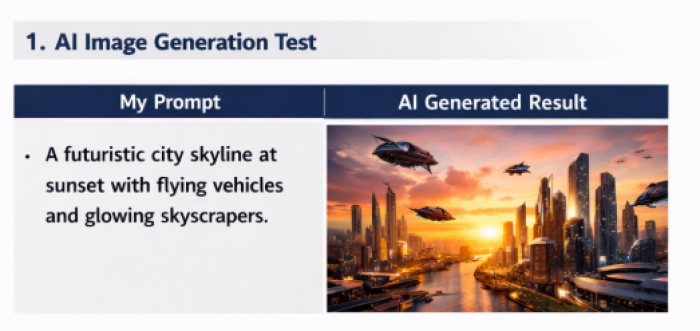
The AI successfully created a futuristic city environment with flying vehicles and dramatic sunset lighting. While some details appeared slightly unrealistic, the results were visually appealing and suitable for blog graphics.
Result Evaluation
| Factor | Result |
| Prompt accuracy | Good |
| Visual realism | Moderate |
| Generation speed | Fast |
| Content usability | Suitable for blogs and social media |
Experiment 2: Background Removal Test
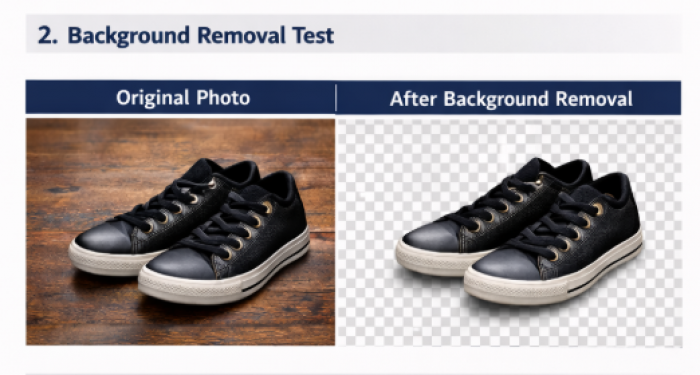
For this experiment, I uploaded a product photo of sneakers placed on a wooden surface.
The AI removed the background in about five seconds and produced a clean transparent image of the shoes.
Result Evaluation
| Factor | Result |
| Subject detection | Very accurate |
| Edge quality | Good |
| Processing time | Very fast |
| Editing required | Minimal |
This tool proved extremely practical for preparing product images.
Experiment 3: AI Headshot Generation Test
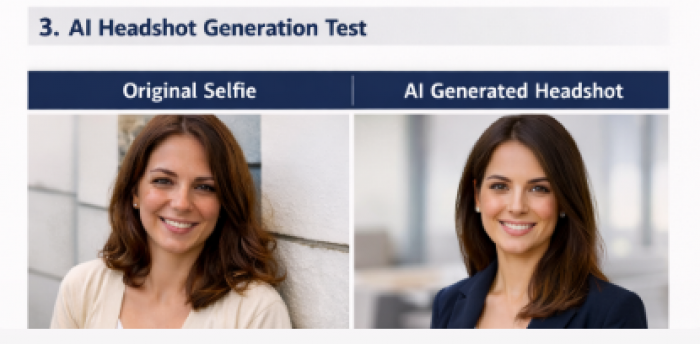
For the final test, I uploaded a casual smartphone selfie and generated an AI enhanced headshot.
The platform improved lighting, simplified the background, and refined facial features to create a polished portrait.
Result Evaluation
| Factor | Result |
| Portrait realism | Good |
| Lighting improvement | Strong |
| Professional appearance | Suitable for profiles |
| Processing speed | Fast |
Output Quality Analysis
AI generated results vary widely across platforms, so evaluating output quality is essential.
| Tool | Performance |
| Image Generator | Good for simple prompts, mixed results for complex scenes |
| Background Remover | Reliable and accurate in most tests |
| Image Enhancer | Effective for moderate improvements |
| AI Headshots | Useful but sometimes slightly stylized |
The background remover and enhancement tools consistently produced the most reliable results. Image generation quality was decent but occasionally unpredictable depending on prompt complexity.
Overall, the platform produces visuals that are suitable for online content creation, marketing materials, and social media graphics.
Speed and Performance
Because AI Ease operates as a cloud service, all processing occurs on remote servers. This means users do not need powerful hardware to run the platform.
In most cases generation times ranged between 10 and 20 seconds. Editing tasks such as background removal were even faster.
Performance remained stable during testing, although occasional delays can occur when server demand increases.
Pricing and Plans
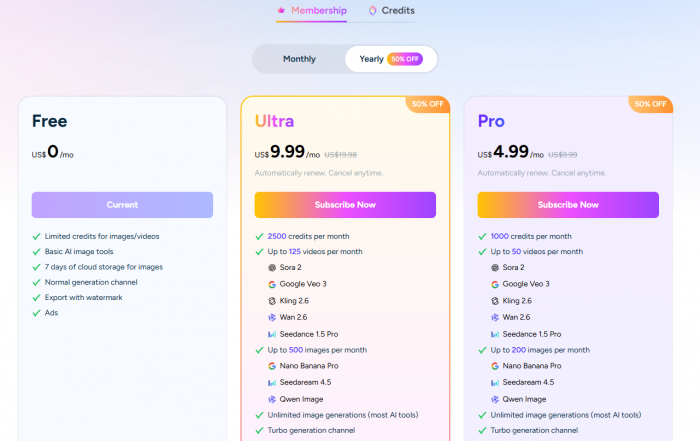
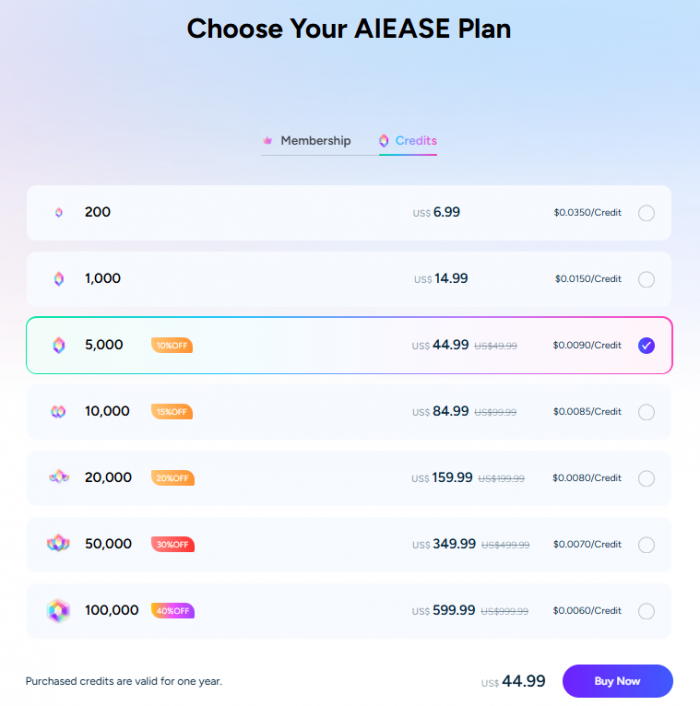
AI Ease offers a free plan that allows users to test the platform with limited usage. Paid plans expand the number of generations and editing operations available.
| Plan Type | Access |
| Free Plan | Limited usage and credits |
| Paid Plans | Higher limits and additional features |
| Credits System | Some tools consume credits |
The free plan is sufficient for experimentation and occasional use. However, creators who generate images regularly may eventually need a paid subscription.
Real User Feedback and Community Sentiment
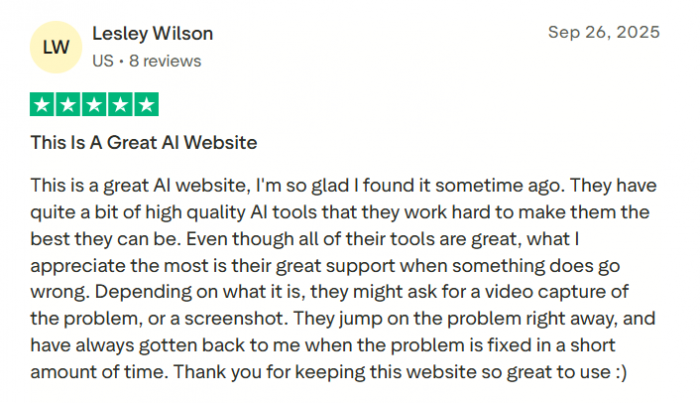
Looking beyond personal testing, I also explored user feedback across online discussions and Trustpilot review.
Many users appreciate the simplicity of the interface and the convenience of having multiple AI tools in one place. Beginners often describe the platform as easy to learn compared with more complex AI design tools.
However, advanced users sometimes note that the platform lacks deeper customization options. Compared with specialized AI art generators, AI Ease provides fewer controls over prompt structure and image generation parameters.
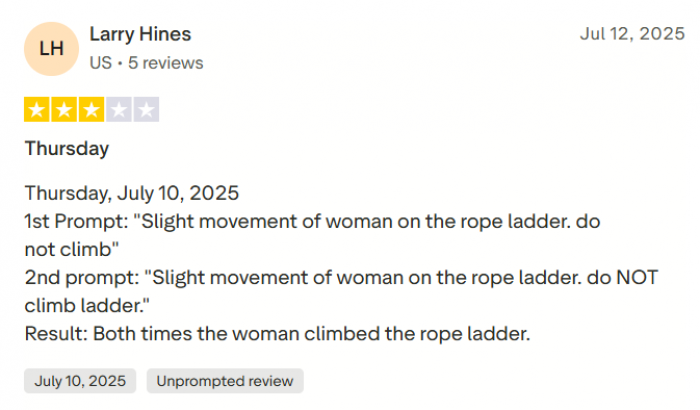
This feedback aligns closely with my own experience during testing.
Security, Trust, and Reliability
As with any AI platform that processes uploaded images, privacy and data handling are important considerations.
AI Ease operates as a cloud based service where images are uploaded to servers for processing. Users should review the platform’s privacy policy to understand how uploaded data may be stored or processed.
Public information about the company behind the platform appears limited compared with major technology providers, although the tool itself functions reliably.
For casual creative use this may not be a major concern, but organizations handling sensitive content should always review data policies carefully.
Advantages and Limitations
Strengths
● Beginner friendly interface
● Multiple AI tools in one platform
● Fast processing speed
● Useful automation for everyday editing tasks
Limitations
● Image generation quality can vary
● Limited advanced customization
● Credit based usage system
AI Ease vs Other AI Creative Tools
| Platform | Main Strength | Best Use |
| AI Ease | Fast editing tools | quick visual content |
| Canva AI | design templates | marketing graphics |
| Leonardo AI | advanced image generation | creative art |
| Midjourney | photorealistic results | professional visuals |
AI Ease focuses on convenience and accessibility, while some competitors prioritize artistic control or advanced generation capabilities.
Who Should Use AI Ease
Based on testing, the platform is most useful for users who want quick results without learning complex design tools.
Typical users may include:
● bloggers and content creators
● social media managers
● small business owners
● marketers creating quick visuals
● individuals needing profile images
For these use cases the platform provides a fast and accessible solution.
Final Verdict
After spending time testing AI Ease across multiple workflows, the platform feels like a practical addition to the growing ecosystem of AI powered creative tools. It does not attempt to replace professional editing software entirely, but it successfully simplifies several tasks that used to require significant manual effort.
The strongest features are the background remover, image enhancer, and the overall ease of use. These tools can significantly speed up everyday editing work for creators and marketers.
The image generator is capable but not as powerful as specialized AI art platforms. Users who need advanced control over prompt generation or highly detailed visuals may still prefer tools like Midjourney or Leonardo AI.
For most casual creators, however, AI Ease offers something valuable: a simple environment where multiple AI editing tools work together with minimal effort.
Frequently Asked Questions
Is AI Ease free to use?
Yes. The platform offers a free plan with limited credits for generating images and editing photos.
Can AI Ease replace Photoshop?
For quick edits and automated tasks it can be useful, but professional designers may still prefer traditional software for advanced control.
What are the best alternatives to AI Ease?
Popular alternatives include Canva AI, Leonardo AI, Midjourney, and Runway ML.
Comments