

Picture this: it’s 11:47 PM, your exam is in three days, and your Google Drive looks like a digital landfill PDFs, lecture slides, screenshots, “Final_Notes_v3_REAL_this_time.pdf”. You know flashcards work, but the idea of turning all that mess into something you can actually revise with? Instant burnout.
Flashka AI exists exactly in that gap between “I know what I should do” and “I will never actually do it.”
What Exactly Is Flashka AI?
Before we go deeper, let's actually define the thing. Flashka AI is an AI-powered study tool built by Flashka OÜ that takes your raw study material : PDFs, lecture slides, handwritten notes, screenshots, even photos and turns it into flashcards, quizzes, and spaced-repetition decks automatically.
Think of it as a layer that sits on top of whatever you're already studying. You bring the mess; it brings the structure.
At its core, Flashka is built around four ideas:
● Import anything: Notes, PDFs, photos, and slides all go into the same place.
● Generate automatically: AI drafts the cards and questions so you're not typing them out by hand.
● Study smart: Spaced repetition and active recall are baked in, not bolted on.
● Ask freely: "Professor Ka," the built-in AI tutor, explains answers and concepts in plain language and in almost any language you prefer.
It runs as a progressive web app, which means it installs on your phone, laptop, or desktop and works across all of them without a clunky download. With 500,000+ students already on board and a 4.5–4.8 rating on the App Store, it's no longer a scrappy experiment, it's a real contender in the AI study space. The rest of this review is about whether it actually earns that reputation.
The Night I Stopped Pretending I’d Make My Own Flashcards
Let’s start with the fantasy we all have.
You tell yourself you’ll:
● Read every chapter.
● Make perfect flashcards for each concept.
● Build spaced repetition decks like a productivity YouTuber.
Then reality shows up: most of us never make it past chapter two.
Flashka’s entire pitch is: “You keep learning. I’ll do the boring part.” It takes your PDFs, notes, slides, and even diagrams and turns them into flashcards, MCQs, and spaced‑repetition decks without you having to manually craft every single card.
This isn’t just “another flashcard app.” It’s an AI layer sitting on top of your existing study material, automating everything you procrastinate on and leaving you with the part you actually need to do: think.
You + Your Messy Study Material + Flashka: What Actually Happens
Forget feature checklists for a second. Imagine a real session.
You log into Flashka on your laptop or phone, there’s a web app, an iOS app, and a desktop wrapper, so it’s pretty much wherever you study.
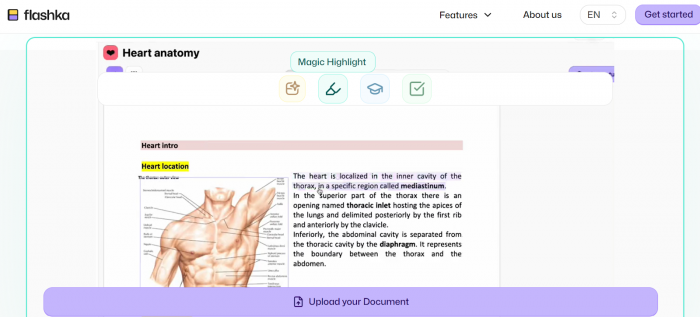
You drag in a PDF, maybe 100 slides of physiology or that 40-page exam guide your teacher dropped at 10 PM on a Sunday. Then you start highlighting, not everything, just the parts you’d normally want to remember.
Flashka quietly turns those highlights into flashcards, complete with front-and-back formatting and surprisingly well-structured phrasing. Using the same content, you can instantly spin up a quiz with MCQs, test mode, and clear explanations for any questions you miss.
One reviewer uploaded five PDF pages and walked away with 74 flashcards using only the daily free credits. That’s the kind of multiplier effect that makes the tool interesting: the time you used to spend creating cards is now spent checking and refining them.
Is it perfect? No. But it’s fast enough to flip the script from “I don’t even have cards” to “I now need to decide which cards matter most.”
The AI That Doesn’t Want to Replace You (But Will Absolutely Replace Your Busywork)
Flashka’s AI doesn’t pretend to be your professor, but it does behave like an obsessive teaching assistant.
It does three big things for you:
● Reads for you: It ingests PDFs, notes, and slides and surfaces what looks flashcard‑worthy.
● Questions you: It turns content into MCQs, quizzes, and tests, complete with explanations when you get answers wrong.
● Explains things: Through its AI tutor persona (“Professor Ka”), it lets you ask, “Explain this again, simpler,” or “Why is this answer correct?” using your own material as context.
Used well, this is powerful. You’re no longer alone with a giant PDF at 1 AM; you have a system that can turn that PDF into an interrogation, a test series, and a mini tutor.
Used lazily, it’s dangerous because yes, the AI can be confidently wrong.
One Reddit user testing wording found that for the word “engender”, the “medium” quiz difficulty produced distractors that were all antonyms. That means students could guess the right answer by pattern, without having a clue what “engender” actually means. It’s a subtle failure but it matters.
So the right mindset is: Flashka is a very smart assistant, not an oracle. You still need to drive.
The Single Feature Medical and Visual Learners Will Talk About
Most flashcard apps worship text. Flashka pays unusual attention to images.
If you study medicine, biology, geography, or anything full of diagrams, you know the pain: you don’t just need to remember definitions—you need to recall labels on structures. That’s where Flashka’s image occlusion matters.
You can:
● Take a screenshot or pull an image from a PDF.
● Mask labels or zones on the diagram.
● Turn each masked area into a “What is this?” flashcard.
This is built‑in, not a nerdy extension you have to dig up from a forum. For many med students, that alone might justify trying it over generic flashcard tools.
Getting Started with Flashka: From Sign-Up to Your First Deck
The nice thing about Flashka is that there's almost no learning curve. If you've ever uploaded a file and clicked a button, you already know how to use it. Here's what the first run actually looks like.
● Sign up and pick your platform: Create a free account on the web, install the PWA on your phone, or open the desktop version, your decks sync across all three.
● Upload your material: Drag in a PDF, snap a photo of handwritten notes, or paste in slides. Messy is fine; that's the whole point.
● Highlight what matters: Instead of dumping the entire document, highlight the sections you'd actually want to remember. This single habit dramatically improves card quality.
● Let the AI generate: Flashka turns your highlights into flashcards and can instantly spin the same content into MCQs or a mock quiz.
● Organize into folders: Sort decks into folders and subfolders by subject or exam so you're not scrolling through chaos a week later.
● Review and refine: Delete the weak cards, tweak the awkward phrasing, and start your first spaced-repetition session.
The entire flow from "I have a PDF" to "I'm reviewing cards" takes a few minutes, not an evening. That low friction is exactly why people who bounced off manual tools tend to stick with this one.
Study Science Under the Hood: Not Just Pretty UI
Underneath the shiny interface, Flashka is quietly enforcing two old‑school, research‑backed practices:
● Spaced repetition: Cards come back over time, with harder cards resurfacing more often and easier ones fading into the background.
● Active recall: You’re pushed to retrieve, not just reread, which is where the learning actually sticks.
Anki die‑hards will argue they’ve had this for years—and they’re right. The difference is that Anki expects you to wire all of it up manually, while Flashka says, “Upload, highlight, and I’ll handle the structure for you.”
Think of it this way: Anki is the lab; Flashka is the finished product on the shelf.
The Price of Outsourcing Your Suffering
Let’s talk about money and limits, because this is where a lot of opinions get formed.
The Free Taste
Flashka’s free tier gives you roughly 50 AI credits per day. These credits are your fuel for:
● Generating flashcards.
● Generating quizzes and MCQs.
● Asking the AI tutor questions.
● Using image occlusion.
In real terms: 50 credits in one test produced 74 flashcards from five PDF pages. That’s not a full semester, but it’s enough to get a real feel for the workflow.
An update added the ability to earn an extra 50 credits for one day via simple tasks, giving you burst capacity when you want to stress‑test the tool.
When You Start Paying
Independent breakdowns put Flashka’s entry paid plans somewhere around 4 USD per month, with mentions of tiers up to roughly 7.90 USD/month or 48 USD/year, depending on promotions and plan specifics.
On paid plans, the main psychological barrier disappears:
● Credits become effectively unlimited or significantly more generous.
● AI tutor, image occlusion, and card generation stop feeling like “I must ration this” and start feeling like “default”.
Is that worth it? If you were already spending 4–5 hours a week writing cards, then yes anything that gives you those hours back most likely pays for itself quickly.
The downside: the credit model itself confuses some users. People struggle to track which actions cost what, and how quickly they’ll hit the ceiling on the free plan.
The Unfiltered, Human Voice: What Users Actually Say
Tools can market anything. User reviews are where reality leaks out.
Trustpilot: “Great Idea, Some Rough Edges”
Flashka’s Trustpilot page shows a few number of reviews averaging close to 4/5, landing it in “Great” territory.
● Fans rave about time saved and how the app made flashcards finally feel doable.
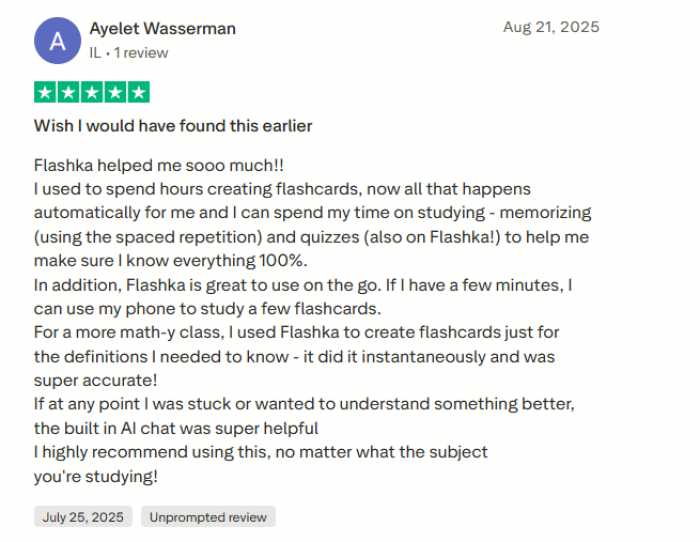
● Critics highlight glitches, occasional wrong answers, and frustration with credit rules.
It’s a familiar arc for young, fast‑moving AI apps: vision gets a 10/10, details land somewhere lower.
App Store and Tech Reviews: “Game‑Changer, Within Limits”
On the App Store and independent review blogs, Flashka is often called a “game‑changer” or “very fast” compared to manually building decks.
One in‑depth analysis rates it 8.6/10 and explicitly describes it as a “fast, reliable, student‑first AI flashcard generator with minor maturity and credit‑model issues.”

Another reviewer notes that the free plan is “moderately generous” but best seen as a trial rather than a full‑season solution for heavy exam prep.
Reddit: Where the Love and the Skepticism Coexist
Reddit is more blunt.
● In r/flashka and broader study subs, you’ll find students genuinely excited about how quickly they can convert lecture slides into usable decks; some say it’s the first time they’ve consistently stuck with flashcards. reddit
● You’ll also find posts like the teacher who dissected the “engender” multiple‑choice question and concluded that the distractors were pedagogically wrong. reddit
One meta‑analysis that looked at Trustpilot, Reddit, and App Store feedback summarized it neatly: Flashka can massively improve your efficiency, but only if you remain the adult in the room and verify what the AI throws at you.
Who Should Use Flashka AI (And Who Should Probably Avoid It)
Flashka is not for everyone, and that’s actually a good thing. It shines for certain types of learners and falls short for others.
Who Will Love Flashka AI
1. Students drowning in PDFs and slides: If your semester looks like a pile of unread PDFs and half‑baked notes, Flashka is almost made for you. It turns that chaos into flashcards, quizzes, and image‑based questions far faster than you ever will manually.
2. Visual and medical learners: If your world is full of anatomy diagrams, pathways, charts, and labeled images, the built‑in image occlusion feature is a huge win. Being able to hide labels and quiz yourself visually is something many “pretty” flashcard apps still ignore.
3. Busy exam aspirants and multi‑subject learners: If you’re preparing for competitive exams or juggling multiple subjects at once, the time saved on card creation is significant. You can focus on prioritizing and revising instead of spending weekends typing question–answer pairs.
4. Students who hate “configuring tools”: If Anki’s settings, add‑ons, and card types made you close the app, Flashka’s guided, modern interface is a relief. You get spaced repetition and active recall without having to be a settings nerd.
5. Learners who like AI as a study buddy, not a guru: If you want an assistant that can generate cards, suggest questions, and explain answers but you’re still willing to double‑check and edit, Flashka fits that mindset well.
Who Should Be Cautious or Avoid It
1. Perfectionists and power‑users who want total control: If you live for tuning intervals, customizing every field, and building elaborate templates, Anki (or similar power tools) will still feel more satisfying. Flashka gives you control, but not the “hand‑tuned engine” experience that hardcore users love.
2. People who won’t review AI output critically: If you know you’ll accept whatever the AI generates without reading or editing, Flashka can actually hurt you. Occasional wrong answers, weak distractors, or shallow cards can slip through if you’re on autopilot.
3. Learners on a strict “zero‑spend” mindset: The free plan is decent for light use or testing, but serious, long‑term heavy usage will push you toward a paid plan. If you’re determined never to pay and need a fully unlimited solution, a manual tool like Anki will suit you better.
4. Those who rely heavily on massive community decks: If your entire strategy is “import a deck someone else made and grind it,” Flashka’s still‑growing ecosystem might feel limited compared to Anki’s huge community library.
5. Privacy‑sensitive or locked‑down environments: If your materials contain sensitive, proprietary, or confidential content and you are not comfortable uploading them to any external service, Flashka’s cloud‑based model will be a blocker. In that case, offline, fully local tools are a safer choice.
Flashka vs Anki vs “Yet Another Flashcard App”: The Real Trade
A lot of students won’t replace Anki with Flashka but they might use Flashka to generate the first draft of their cards, then either stick with it or port over and refine.
The Ethics of Outsourcing Your Memory
There’s a quiet but important conversation here: what happens when AI doesn’t just explain content, but chooses what you end up revising?
Some writers experimenting with Flashka found that when they leaned too hard on “generate, accept, and move on,” their learning became shallow: they could recognize but not fully explain concepts later.
The most responsible way to use Flashka is to let the AI generate first, then deliberately review, edit, and prune what it creates. Each flashcard should be treated like a mini contract something you consciously approve by asking yourself, “Yes, this is worth remembering.” That small moment of judgment is what keeps the learning process active and intentional rather than passive.
It’s also wise to maintain export options and local copies of your most important decks so your learning never becomes trapped inside a single system. In other words, Flashka should function as a tool that accelerates your thinking and streamlines your workflow, not something that replaces your own understanding and critical review.
Getting the Most Out of Flashka: Tips Most People Miss
Most users unlock maybe half of what Flashka can do. A few small habits separate the people who call it a "game-changer" from the ones who shrug and go back to Anki.
● Highlight selectively, not greedily: The AI is only as good as what you feed it. Twenty sharp highlights beat an entire chapter dumped in raw, you'll get tighter cards and waste fewer credits.
● Ration your free credits wisely: On the free plan, spend your ~50 daily credits on your hardest material first, then do the easy stuff manually. Don't forget you can earn an extra 50 for a day by completing simple tasks.
● Actually use Professor Ka: When a card confuses you, ask "explain this simpler" or "why is this answer correct?" instead of just memorizing blindly. That's where shallow learning turns into real understanding.
● Lean on image occlusion for anything visual: Diagrams, anatomy, maps, chemical structures, mask the labels instead of writing text cards. It's the feature most people forget they have.
● Audit your MCQs: Flashka's distractors can occasionally be guessable or just wrong. Glance over generated quizzes before trusting them for exam prep.
● Export your important decks: Keep local copies of your most valuable material so your studying never gets trapped inside one app.
None of this is complicated. But treat Flashka like a smart assistant you manage rather than a vending machine you trust blindly, and it pays off far more.
So, Is Flashka AI Worth Inviting Into Your Study Routine?
If your study life is already neat, disciplined, and fully Anki‑fied, Flashka will feel like a luxurious convenience rather than a necessity. But if you’re like most learners drowning in materials, short on time, long on guilt, Flashka can quietly become the tool that finally closes the gap between “I wish I had cards” and “I actually do.”
It doesn’t remove the need to review. It doesn’t absolve you from understanding. It does something simpler and more honest:
It takes the most boring part of serious studying and makes it fast, almost frictionless, and surprisingly enjoyable while still leaving you in charge of what goes into your memory.

Sam Peterson
Oct 9, 2026Flashka gets you from zero to "I have cards" fast but the cards are rough. Maybe 70% are usable and the rest need editing. Huge head start but if you're expecting polished decks to just grind, you'll be let down. I generate with it, then clean up manually, in that workflow it's genuinely useful.
Login To Reply ↪