

My first Morph Studio clip looked convincing for about three seconds. Then the camera accelerated, the speaker changed shape slightly, and a reflection appeared across its surface without being requested. The result was not useless, but it showed me how the platform needs to be approached: as a production workspace built around iteration, not a one-prompt shortcut.
I used Morph Studio to create a short cinematic product sequence. The process moved from text-to-video to image-to-video, followed by a prompt-based edit of the strongest clip. It revealed which feature offered the most control, where the platform saved time and why the finished footage still needed human judgement.
What Morph Studio Offers
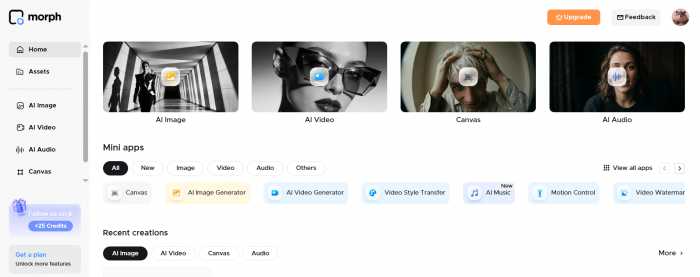
Morph Studio is an online image and video creation platform that provides access to several generation models through one interface. Its current video selection includes models from Kling, Veo, Sora, Seedance, Wan, Hailuo, Luma and Morph, although availability varies between subscription plans.
The platform covers text-to-video, image-to-video, video style transfer, motion control, upscaling, lip sync and prompt-based video editing. It also includes supporting image and audio tools. Instead of opening every feature and treating each button as a separate test, I concentrated on the three tools that fitted the project I was making.
The Project I Created
I wanted to produce a short advertisement for a fictional premium desk speaker. The sequence needed an atmospheric opening, a controlled product close-up and an alternative version with a darker studio background.
Product footage is a useful test for generative video because small inconsistencies are easy to notice. A cloud changing shape in a landscape might pass unnoticed. A speaker gaining another button or losing part of its grille immediately makes the footage unreliable.
| Stage | Input | Intended result |
| Text-to-video | A written description of a studio scene | An original cinematic opening |
| Image-to-video | A clean speaker image | A controlled close-up with subtle motion |
| AI video editor | The generated close-up | A darker background and stronger lighting |
This setup gave each tool a genuine purpose. I was not using Morph Studio simply to examine its features. Each step responded to a problem or opportunity in the previous result.
Getting Started
The generation screen was easy to understand. The prompt field, model selector and output settings were close together, so I could begin without working through a lengthy tutorial.
Choosing a model required more thought. Morph Studio brings several systems into one workspace, but those systems have different strengths, controls and credit costs. A new user must decide more than what the video should show. They must also judge which model is suitable and whether its cost leaves enough room for revisions.
The interface simplified access to the models, but it did not remove the need to understand them. That became more important as I moved from a broad visual concept to a product shot where consistency mattered.
Creating the Opening
I started with text-to-video because I wanted the scene to be created without a prepared reference. Morph Studio allows prompts to describe the subject, action, setting, lighting, camera behaviour and visual style. Users can then select a model and adjust the available format and output controls.
My first prompt was:
A premium matte-black wireless speaker resting on a dark walnut desk in a modern studio at night. Warm light from the left, soft blue city lights in the background, shallow depth of field. The camera slowly moves from right to left while dust particles drift through the light. Cinematic commercial photography, realistic materials, controlled movement, no text, no hands.
I selected a landscape format and kept the speaker stationary. The camera and lighting were meant to provide movement without requiring the product itself to animate.
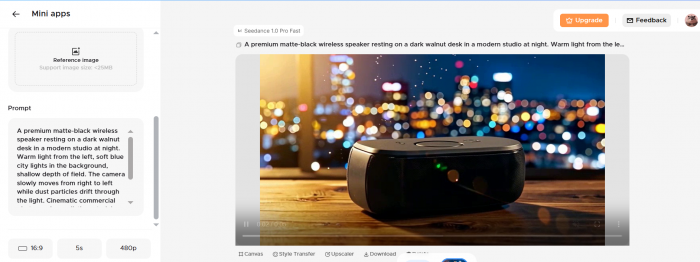
The result understood the broad direction. The dark desk, night setting and contrast between warm foreground light and cool background light were clearly visible. Its opening frame looked close to a polished advertising still.
The weaknesses appeared during playback. The camera travelled faster than requested, the speaker became narrower near the end, and a reflective strip appeared across the front. The clip was visually attractive, but it could not be used as accurate product footage without trimming.
My prompt had also given the model several things to control at once: moving dust, city lights, shallow focus, directional lighting and camera movement. I removed the decorative instructions and made the product-preservation request more direct.
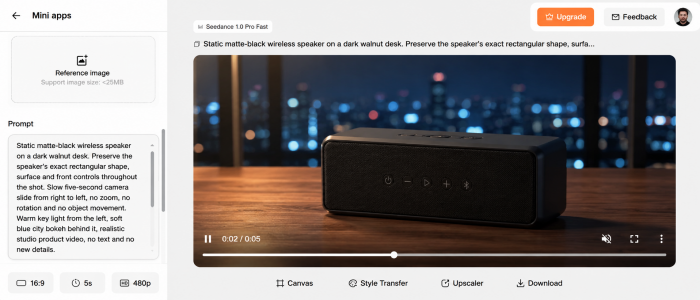
The second prompt was:
Static matte-black wireless speaker on a dark walnut desk. Preserve the speaker’s exact rectangular shape, surface and front controls throughout the shot. Slow five-second camera slide from right to left, no zoom, no rotation and no object movement. Warm key light from the left, soft blue city bokeh behind it, realistic studio product video, no text and no new details.
The revised clip was less dramatic, but it was more usable. The product remained stable for most of the shot, while the camera movement looked measured rather than automatic. Some texture softening remained in the final frames, so I would still trim the ending.
Text-to-Video Verdict
Text-to-video delivered the strongest atmosphere and the most original composition. It allowed me to establish a visual direction without preparing a photograph, render or storyboard frame.
Its weakness was product accuracy. Even a stationary object could change slightly as the camera moved. I would therefore use this feature for opening shots, fictional locations, B-roll, campaign concepts and scenes where small variations will not undermine the subject.
For this project, text-to-video scored 7.5 out of 10. It generated a convincing idea, but prompt simplification and selective trimming were necessary before the footage became usable.
Animating a Still Image
For the second shot, I moved to image-to-video. Morph Studio accepts photographs, illustrations, artwork and product images under 25MB. The uploaded image provides the composition, while the prompt controls movement, camera behaviour and environmental changes.
I uploaded a clean front three-quarter image of the same speaker. The product filled most of the frame, the edges were sharp and the neutral background contained no distracting objects.
My first prompt was:
Preserve the speaker’s exact shape, colour, grille pattern and button placement. Add a very slow camera push towards the product while the background becomes slightly darker. A soft highlight travels gently across the top edge. The speaker remains completely still. Realistic premium product commercial, subtle movement, no added objects and no text.
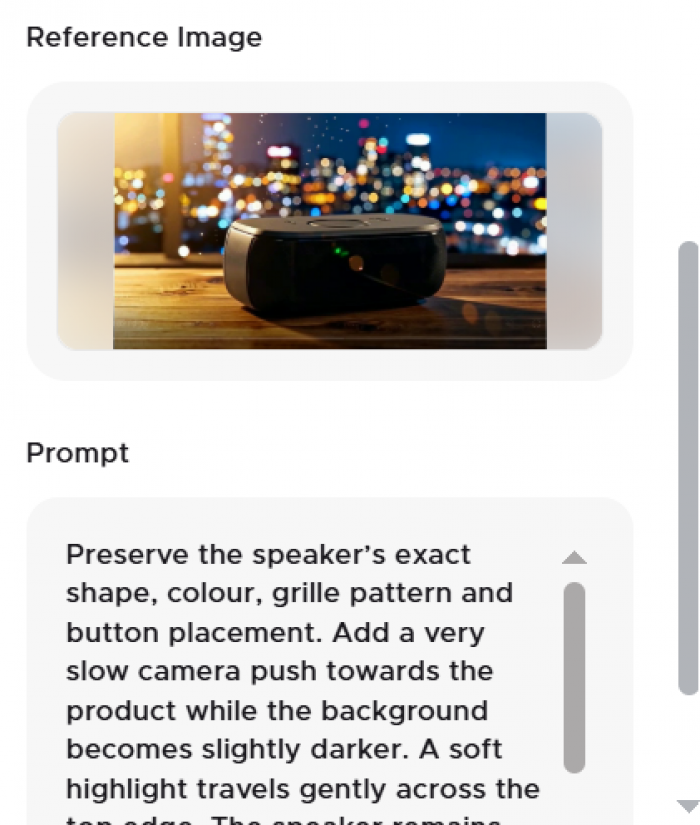
The difference in control was immediate. Morph Studio did not need to invent the speaker, its angle and the surrounding composition at the same time. Its proportions stayed closer to the uploaded image, and the grille remained more consistent than it had in the text-generated clip.
The forward camera movement was smooth, and the highlight added enough activity to stop the result from looking like a simple digital zoom. Fine details were less stable. The buttons softened as the camera approached, while the darker background reduced separation around the product’s right edge.
I reduced the requested movement:
Keep the original image composition and product details unchanged. Apply only a subtle two per cent forward camera movement. Maintain sharp edges and visible top buttons. Darken the background without darkening the product. Keep the highlight fixed and soft. No shape changes, rotation, added reflections or additional objects.
The second version was more restrained, but the product remained clearer. Since the purpose of the shot was to present the speaker rather than demonstrate an effect, I preferred the controlled version.
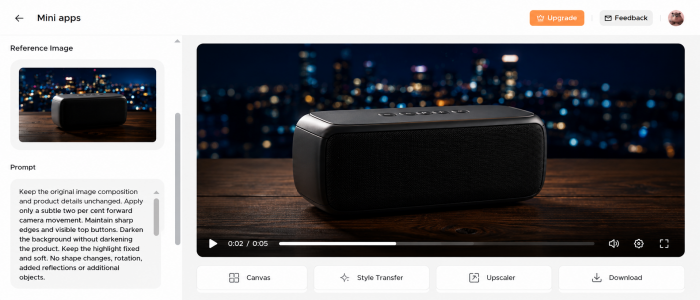
Image-to-Video Verdict
Image-to-video produced the strongest result in the project. The source image acted as a visual anchor, limiting how freely the platform could reinterpret the product.
It did not preserve every fine detail. Small controls still softened during movement, particularly as the virtual camera came closer. Even so, the changes were less severe and easier to correct than those in the text-generated clip.
I would begin with image-to-video for product shots, portraits, artwork and any scene where the subject must remain recognisable. Separating composition from movement gave me more control and made each revision easier to diagnose.
This feature scored 8.5 out of 10. It offered the best balance between motion and consistency and produced the clip I was most comfortable using.
Changing the Background
The third stage used Morph Studio’s AI video editor. This tool takes an existing MP4 or MOV clip and applies written changes to backgrounds, lighting, objects, colours or scene details. It creates a modified video rather than making a conventional timeline edit.
My image-to-video result had suitable movement, but the background was too evenly lit. I wanted to add a dark charcoal wall and a soft pool of light behind the speaker while retaining the original framing.
My edit instruction was:
Keep the speaker, camera framing and forward movement unchanged. Replace the plain studio background with a dark charcoal wall and a soft circular light behind the product. Preserve the speaker’s exact shape, controls and surface texture. Do not add props, text or reflections. Keep the result realistic and understated.
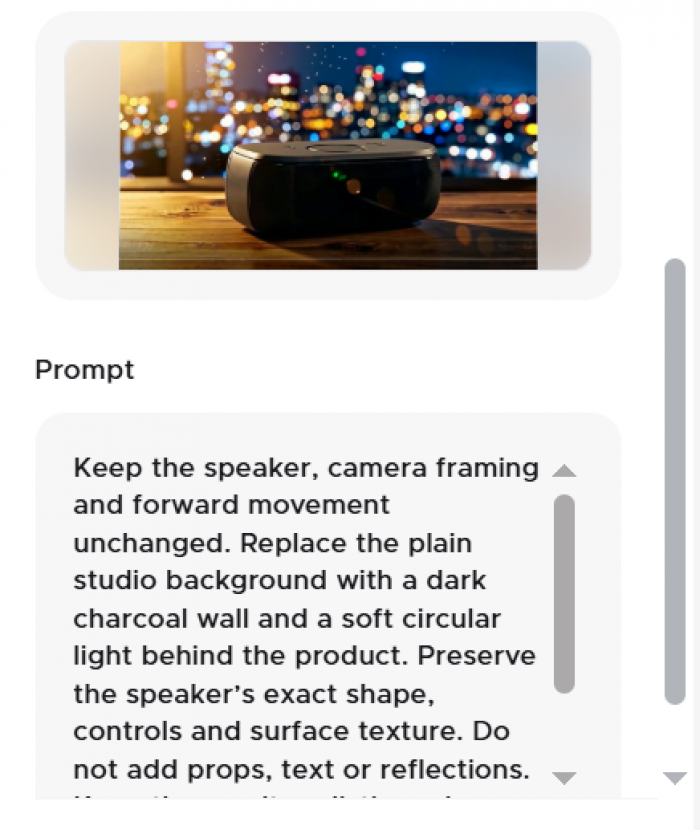
The background gained depth, and the light made the speaker’s outline easier to read. The original forward movement was also recognisable.
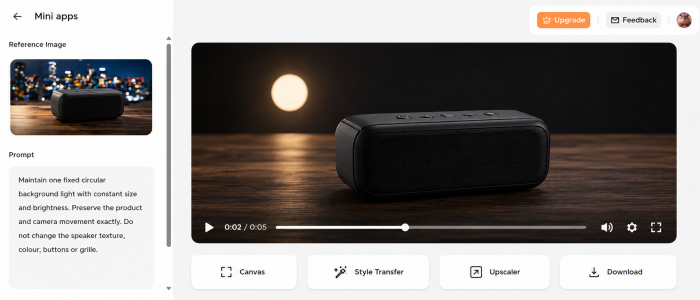
The edit was not perfectly isolated. Parts of the product appeared to have been regenerated, its texture changed slightly, and the circular light varied in size during the shot. It looked like a new interpretation of the clip rather than the original footage with one neatly replaced element.
I narrowed the instruction:
Maintain one fixed circular background light with constant size and brightness. Preserve the product and camera movement exactly. Do not change the speaker texture, colour, buttons or grille.
The second version reduced the movement in the light, although the product surface still differed slightly from the source. I kept it as an alternative social asset but preferred the original animation where product accuracy was more important.
AI Editor Verdict
The video editor was useful for exploring another creative direction without rebuilding the shot. It allowed me to test a different background and lighting treatment quickly, which could be valuable for campaign variations or client concepts.
Its limitation was precision. The editor did not protect every part of the speaker while changing only the background. I would use it for scene variations, styling, location changes and creative experiments, but not for edits requiring exact masking or frame-level control.
It scored 7 out of 10. The feature was fast and creatively useful, but every output needed close inspection.
What Improved the Results
The three features worked best when each had one clearly defined task. Text-to-video created the original scene, image-to-video protected the product, and the editor tested a new visual direction.
Longer prompts did not automatically provide more control. The outputs improved when I separated fixed elements from variable ones:
● The speaker’s shape, colour and controls were explicitly marked as details that should not change.
● Only one camera movement was requested in each generation.
● Background changes were separated from product movement.
● Follow-up prompts corrected one visible problem instead of rewriting the entire scene.
This made the relationship between each prompt and its result easier to understand. It also reduced the temptation to spend credits generating several vague alternatives.
Other Available Tools
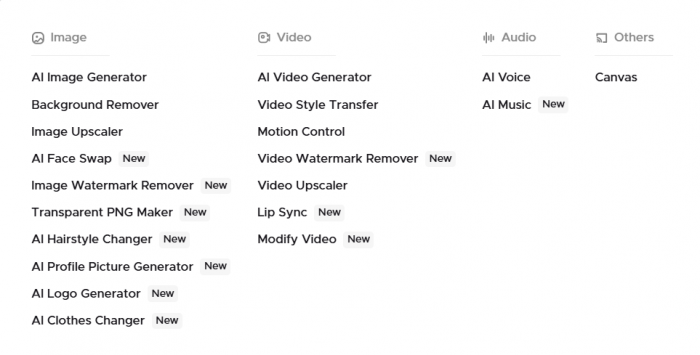
Morph Studio also includes video style transfer, motion control, lip sync, video upscaling, image generation, background removal, voiceover and music tools. Style transfer is intended to apply treatments such as animation, painting, pixel art or claymation while retaining the source motion. Motion Control combines a character image with a reference video to guide movement.
I looked through these areas but did not include them in the scored project. Adding character animation or a stylised transformation to the speaker advert would have changed its purpose rather than improved it.
The feature I would explore next is video upscaling. Generative clips often look acceptable at normal size but expose soft surfaces and unstable details when enlarged. Upscaling may improve presentation, although it cannot accurately recover information that was never generated.
Workflow and Usability
Morph Studio’s main usability advantage is continuity. I could generate a scene from text, animate a reference image and create a modified version without transferring assets across several unrelated platforms.
The visual workspace also became useful once I had multiple generations. Keeping the prompts, source image and selected clips together made the development of the sequence easier to follow.
The project became less organised after several revisions because similar outputs were difficult to distinguish from their thumbnails. Clear naming and separating selected clips from rejected attempts helped. For a longer project, I would divide the workspace into references, active scenes and final outputs.
The platform earned 8 out of 10 for usability. Starting a generation was straightforward, but choosing the right model and managing credits required more attention than the interface itself.
Plans and Credit Value
Morph Studio uses a monthly credit system. As of 27 July 2026, the Free plan provides 75 credits. Basic costs $12 per month with 3,000 credits, Pro costs $35 with 12,000 credits, and Premier costs $90 with 40,000 credits. Annual billing is advertised at a 30 per cent discount.
Paid plans include commercial use and unlimited asset retention, while files created on the Free plan are retained for 90 days.
| Plan | Monthly price | Credits | Suitable for |
| Free | $0 | 75 | Learning the interface and making a few tests |
| Basic | $12 | 3,000 | Occasional product, concept and social work |
| Pro | $35 | 12,000 | Regular production across several models |
| Premier | $90 | 40,000 | Higher-volume use of standard and premium models |
Credit totals need context. The official usage table estimates that Basic can produce 150 clips with Seedance 1.0 Pro Fast but only eight with Kling 3.0 Pro. Veo 3.1 is unavailable on Basic and is listed at three generations on Pro. Failed generations do not consume credits, but a technically successful result that cannot be used still reduces the balance.
The Free plan is enough to see how the platform works, but not enough to compare its main models properly. Basic is a more realistic starting point for occasional creators. Pro becomes relevant when several revisions and premium models are part of the normal workflow.
What Other Users Say
Independent feedback remains thin. Trustpilot currently shows a score of 2.6 based on four reviews, all rated one star. The sample is too small to represent the broader user base, and one review appears to discuss an unrelated Roblox game rather than Morph Studio’s video platform. Trustpilot itself states that the company has not invited reviews and that the results may not be representative.
The relevant complaints mention slow processing, inconsistent outputs, rejected generations, credit usage, subscription charges and poor support. These are individual user allegations rather than independently verified findings, but they raise reasonable questions about billing and support that prospective subscribers should consider.
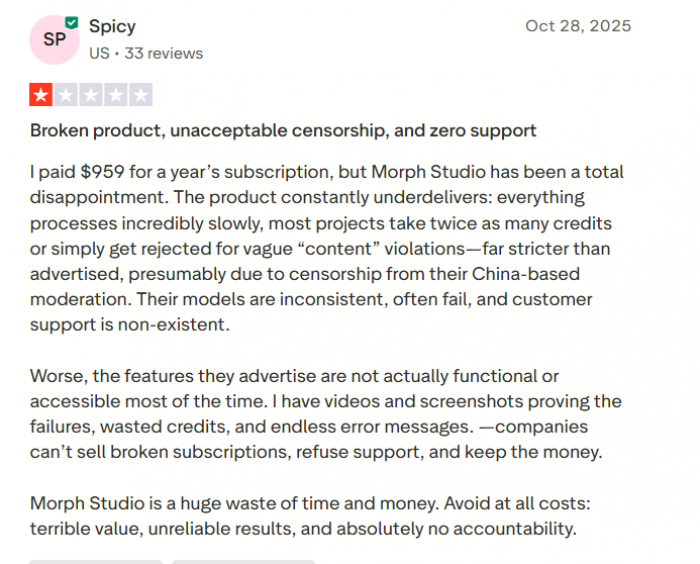
There is not yet enough reliable review data to calculate a meaningful consensus. I would place more weight on direct monthly testing than on the current Trustpilot score, while still reading the billing terms carefully before subscribing.
Advantages
Morph Studio delivered several practical benefits:
● Multiple models were available in one place. I could change generation methods without recreating the project across separate services.
● The tools formed a connected workflow. The product image became the basis of an animation, which could then be edited inside the same platform.
● Reference-led generation improved control. Image-to-video reduced the shape changes that appeared in the text-generated result.
● Prompt-based editing made variations faster. It was not precise enough for final compositing, but it provided a quick way to test another visual direction.
● The platform suited short, shot-based projects. Individual clips could be created and refined before being assembled in a conventional editor.
These advantages matter most to creators who already plan videos as separate shots. Morph Studio is less convincing when treated as a system that should produce an entire advertisement from one instruction.
Limitations
The biggest issue was inconsistency inside clips that looked polished in their opening frames. Product proportions, textures and reflections could change once movement began.
Credit usage also varied sharply between models. A large monthly allowance did not always translate into many premium generations, particularly after prompt corrections and alternative attempts.
The AI editor regenerated parts of the footage instead of making a perfectly isolated edit. That makes it useful for creative variation but risky for branded products, recognisable faces or footage requiring exact continuity.
Morph Studio also did not replace a full editor. I would still use conventional software for trimming, captions, sound mixing, colour correction, transitions and final export.
Morph Studio Alternatives
| Alternative | Strongest area | Main difference | Best choice when |
| Runway | Generation and video-to-video editing | Provides a broader production and editing environment | You need deeper control over existing footage |
| Adobe Firefly | Timeline editing and Creative Cloud integration | Combines generative tools with layered video and audio editing | Your work already uses Adobe applications |
| Kling AI | Motion and subject consistency | Gives direct access to Kling’s own models and controls | Character or subject consistency is the priority |
| Luma Dream Machine | Video modification | Focuses on transforming footage while preserving its motion | You already have a recorded performance or scene |
| Pika | Short-form visual effects | Places more emphasis on quick transformations and social content | You need fast, effect-led clips |
Runway combines generation from text, images and video with prompt-based editing. Adobe Firefly adds a layered timeline, audio tools and the ability to generate new clips within an editing project. Kling 3.0 supports storyboard controls and element binding, while Luma’s Modify workflow is built around transforming footage while retaining its performance and camera dynamics.
Morph Studio remains appealing when access to several models and connected generation tools matters more than deep control over one ecosystem.
Who Should Use It?
Morph Studio makes the most sense for social creators, designers, AI filmmakers and marketing teams producing short concepts, product mood shots, storyboards and campaign variations.
It is particularly useful for creators who already have strong still images. In my project, animating a prepared product image was more dependable than asking the platform to create every visual detail from text.
It is less suitable for long-form editing, projects requiring strict continuity across many scenes or businesses that cannot tolerate small changes to a real product. Those workflows will still need close review and conventional post-production.
My Final Verdict
Morph Studio was most effective when I gave it a strong reference image and one clearly defined movement. Image-to-video produced the most usable result, text-to-video delivered the strongest original idea, and the AI editor worked best as a variation tool rather than a precision editor.
My overall rating is 8 out of 10. Its main value lies in connecting multiple video models and creation methods inside one workspace. It shortened the distance between an idea and a usable shot, but it did not remove the need for prompt revisions, output inspection and final editing.
I would use Morph Studio again for product mood shots, short social assets and visual concepts. I would start with a monthly plan, keep the requested movement controlled and use reference images whenever consistency matters.
Comments