

VidMage AI is not a normal video editor. It is an AI face swap and media creation platform built for people who want quick photo swaps, video face swaps, GIF edits, multi-face replacements, and simple AI media outputs without opening heavy editing software. The platform now covers web tools, AI image and video tools, audio tools, effects, and a Mac app for local face swapping.
I tested VidMage from a creator’s point of view, not as a technical deepfake lab. I wanted to see how it behaves with real social-media style content: a clean portrait, a short talking-head clip, a group photo, a GIF-style edit, and a more difficult video with movement. The result was useful, but not perfect. VidMage is fast and beginner-friendly, but the quality depends heavily on the source file, lighting, angle, and how much movement appears in the clip.
What VidMage AI Is Built For
VidMage is best understood as an AI face swap tool first and a wider AI media toolkit second. Its main tools include photo face swap, video face swap, multi-face photo swap, multi-face video swap, batch face swap, GIF face swap, face morph, gender swap, head swap, and meme-style face swap. It also lists AI video tools, AI image tools, effects, audio tools, and Mac-exclusive features such as facial feature swap and local Mac face swap.
That makes the tool useful for creators who want fast visual edits rather than manual timeline control. The web version feels made for quick experiments. The Mac app is positioned for users who care more about local processing, larger files, 4K export, and private workflows. VidMage says the Mac app runs on Apple Silicon Macs and processes files locally without uploading them to a server.
The tool is mainly useful for:
● Creators who want fast face swaps for TikTok, Reels, Shorts, memes, and casual video ideas.
● Social media editors who need quick visual tests before creating a polished version elsewhere.
● Mac users who want local face swapping instead of uploading every file to a browser tool.
● Small teams that need quick mockups, campaign variants, GIFs, or creator-style assets.
● Users who want simple AI media tools in one place instead of separate tools for every task.
It is not built for professional VFX editing, frame-by-frame masking, advanced compositing, or high-control film work.
My Test Setup
I tested VidMage with five types of files so the review would not depend on one perfect demo. A face swap tool can look impressive with a clean studio portrait, but the real test starts when the source media is less controlled.
| Test File | Why I Used It | What I Wanted to Check |
| Clean portrait | Best-case input | Face blending, skin tone match, and edge quality |
| Short talking-head video | Most common creator use | Tracking, expression movement, and flicker |
| Group photo | Multi-face use case | Detection accuracy and consistency across faces |
| GIF-style clip | Meme and casual content | Speed, recognizability, and shareability |
| Difficult moving clip | Stress test | Head turns, shadows, blur, and quality drop |
This test setup helped me separate two things: what VidMage does well when the input is clean, and what it struggles with when the footage has motion, compression, or uneven lighting.
First Impression: Simple, Fast, and Clearly Beginner-Friendly
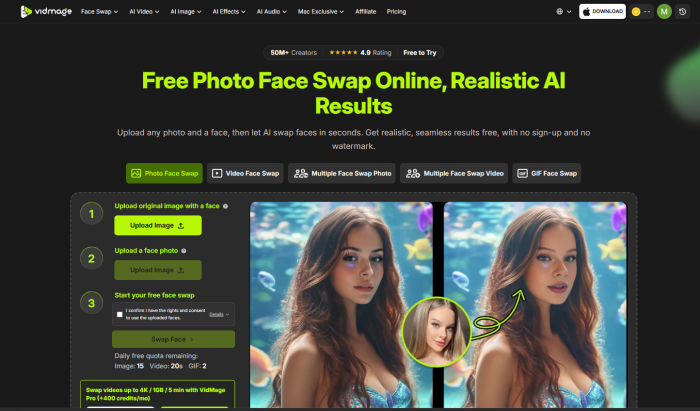
The first thing I noticed is that VidMage does not behave like a traditional editing app. There is no complicated workspace, no timeline, no masking panel, and no layer-based editor. Most tools follow the same pattern: upload the original file, upload the face image, confirm consent, start the swap, preview the result, and download.
For beginners, that is the biggest advantage. VidMage’s web video face swap page says users can upload a video, add a face photo, and generate a face swap without sign-up or watermark on the free version. It also says the tool supports MP4, MOV, and M4V files.
The workflow feels quick because the tool removes most manual decisions. You do not have to crop the face, outline facial areas, or choose tracking points. VidMage automatically detects the face and handles the swap. That makes it easy to use, but it also means you have less control when something goes wrong.
Photo Face Swap Test
The photo face swap was the easiest part of the test. I used a clean portrait with good lighting and a visible face. VidMage handled this kind of input well because there was no motion, no frame tracking, and no changing expression to manage.
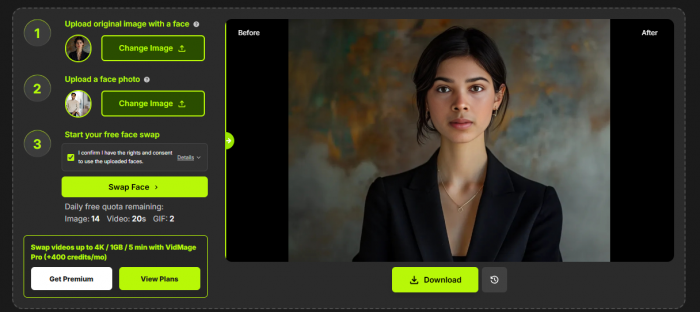
The result looked strongest around the central face area. The eyes, nose, and mouth placement stayed fairly natural. Skin tone blending was also decent when the original image and target face had similar lighting. The area that needed the closest check was the border of the face, especially around the jawline, hairline, and side of the cheeks. That is common with AI face swap tools because the tool has to blend identity while keeping the original head shape and lighting.
For simple profile-style edits, joke images, and meme assets, the output was usable. For professional use, I would still zoom in and check the face edges before publishing. VidMage is fast, but the best results still come from choosing a clean front-facing source image.
Video Face Swap Test
The video face swap test was more important because this is where face swap tools usually show their real limits. A photo only needs one good frame. A video has to keep the face stable across motion, expression changes, lighting shifts, and compression.
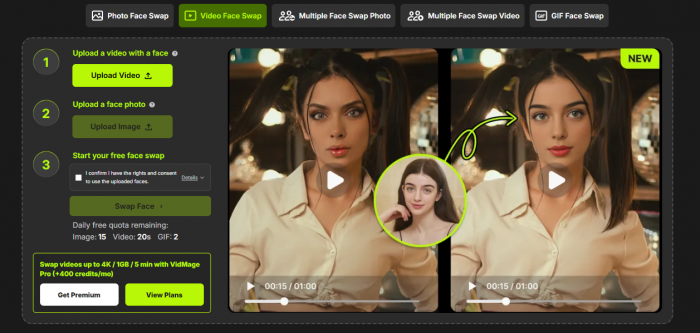
VidMage says its video face swap tracks faces frame by frame, keeps expressions and motion natural, and uses 478 facial landmarks across frames. It also says the free plan gives 20 seconds of video face swap per day with no watermark.
In my short talking-head test, the result was good when the subject faced the camera. Small head movements were handled better than expected, and the face did not look completely pasted on. The tool kept the mouth and expression reasonably aligned, which matters for creator videos where the face is the main focus.
The weaker moments appeared when the subject turned slightly or moved faster. The face still tracked, but the edges became easier to notice. The output was good enough for short social content, reaction clips, parody-style edits, and quick tests. I would not use the video output blindly for a polished brand campaign without reviewing every second.
The best way to get a cleaner result is to use a short clip where the face stays visible, the lighting is even, and the subject does not move too aggressively. VidMage can handle movement, but it is not magic. A bad source clip still produces a weaker swap.
Multi-Face Swap Test
The multi-face feature is one of the more useful parts of VidMage because it saves time when working with group content. VidMage says it can swap up to four faces in the same clip, with each face tracked independently.

In a group photo, the tool was helpful because I did not have to process each face separately. It detected visible faces quickly and made the workflow feel simple. The quality, however, was not equal across every person. Larger, clearer, front-facing faces looked better. Smaller faces or faces at an angle showed more blending issues.
This is where the tool feels practical but not perfect. For birthday edits, group memes, office jokes, short skits, or casual creator content, the multi-face workflow is useful. For professional group shots where every face needs to look clean under close inspection, I would treat VidMage as a first draft rather than a final editor.
GIF and Meme Output
GIF-style content is where VidMage makes sense even when the result is not flawless. A meme does not always need cinematic realism. It needs to be recognizable, fast, funny, and easy to share.
VidMage includes GIF face swap among its face swap tools, and the pricing page says the free plan includes limited daily GIF use.

In this test, the result felt more useful for casual sharing than realistic editing. If the GIF had fast motion or a low-resolution face, the output looked more AI-made. But for reaction GIFs, short jokes, and creator posts, that may not matter. VidMage works well when the goal is speed and entertainment rather than perfect realism.
AI Image, Video, Effects and Audio Tools
VidMage is not limited to face swap. Its tool menu includes AI video generator, text-to-video, image-to-video, video-to-video, video upscaler, video enhancer, video extender, video background remover, subtitle generator, lip sync, AI image generator, image-to-image, clothes changer, hairstyle changer, object remover, talking photo, photo dance, cartoon generator, voice clone, voice design, and text-to-speech.
This makes the platform broader than a single-purpose face swap site. However, I would still say the core strength is face swap. The extra tools are useful if you want one place for quick AI media experiments, but they do not all feel equally important to the product. VidMage’s clearest identity remains photo, video, GIF, and multi-face swapping.
For a user-first review, this distinction matters. A platform can list many tools, but the review should judge what it does best. VidMage is strongest when it is replacing faces quickly. The other tools are helpful additions, not the main reason most people will visit the site.
Output Quality: Where It Looks Real and Where It Looks AI-Made
VidMage’s output quality depends more on input quality than anything else. The cleaner the face, the better the result. The worse the video, the more visible the AI becomes.
The best results came from:
● A clear front-facing target face with sharp facial details and no heavy shadows.
● A short video where the subject stayed mostly facing the camera.
● Source media with even lighting, decent resolution, and limited blur.
● Clips where hair, hands, glasses glare, or objects did not cover the face.
The weaker results came from side angles, fast movement, low-resolution clips, harsh light, and moments where the face was partly hidden. In those cases, the face could still appear in the output, but the swap looked less stable.
This is why I would not describe VidMage as a full replacement for professional face replacement work. It is better described as a fast AI face swap tool that can produce convincing results under the right conditions.
Control: Easy Workflow, Limited Manual Editing
VidMage is easy because it removes complexity. That is also its biggest limitation.
There is no deep manual correction system inside the browser workflow. You do not get frame-by-frame control, advanced masks, timeline editing, keyframe tools, or detailed correction sliders. Most of your control happens before generation: choosing a better source video, choosing a clearer face image, keeping clips short, and regenerating if the result is not clean.
The Mac app changes the workflow slightly because VidMage positions it as a local tool with offline processing, 4K output, no file size limit, no watermark, batch processing, and live virtual camera support on Apple Silicon Macs.
That makes the Mac version more interesting for creators who need privacy or heavier production use. Still, even the Mac app is built around simple AI automation rather than professional compositing control.
Pricing and Credits
VidMage has a free plan, monthly plan, yearly plan, and extra credit options. As of the current pricing page, the free plan includes 15 image face swaps per day, 20 seconds of video face swap per day, 2 GIF swaps per day, watermarked live swap for 5 minutes per day on Mac, and 15 seconds of preview time per video on Mac.
The monthly plan is listed at $14.99 per month with 400 credits per month. The yearly plan is listed at $8.33 per month with 400 credits per month.
| Plan | Price | Included Usage | Best For |
| Free | $0 | Daily limits for image, video, GIF, and Mac preview use | Testing the tool before paying |
| Monthly | $14.99/month | 400 credits/month plus premium advantages | Short-form creators using it regularly |
| Yearly | $8.33/month | 400 credits/month with lower monthly cost | Users who already know they need it often |
The important thing is not only the monthly price. It is how fast credits are used. Photo swaps are easier to manage, but video and GIF use is more sensitive because seconds matter. If you only create short clips, the pricing is reasonable. If you want to process longer videos every week, the credit system becomes a major part of the decision.
Privacy, Consent and Safety
This section is not optional for a face swap tool. VidMage deals with faces, videos, and identity-based media, so privacy and consent matter more than they would in a normal image editor.
VidMage says users should only upload images and videos they own or have explicit permission to use. It also says sexual, explicit, misleading, non-consensual, or harmful content is prohibited and can lead to account termination.
For web video face swaps, VidMage says uploaded videos and face photos are deleted within two hours, are not used to train AI models, and are transferred through encrypted connection. The same page says the Mac app processes files locally, so nothing is uploaded during processing.
That local Mac option is one of the better privacy points in VidMage’s favor. If someone is working with private client footage, internal team content, or sensitive media, local processing is safer than uploading files to every browser-based AI tool.
Still, users need to be careful. Face swap tools can be misused for impersonation, fake endorsements, harassment, and non-consensual media. A 2026 safety audit of face swap apps found that many tools in the wider category lacked strong safeguards against harmful misuse, which shows why consent and moderation should be taken seriously in this space.
Advantages
VidMage’s biggest advantage is that it removes the technical barrier from face swapping. A beginner can create a photo or video swap without learning masking, tracking, or editing software.
Its second advantage is format coverage. Photo, video, GIF, multi-face, batch, and Mac workflows make it more complete than a basic one-image face swap tool.
Its third advantage is the Mac app. The local workflow, 4K export, offline processing, batch work, and live face swap support make VidMage more useful for privacy-focused Mac users than many cloud-only tools.
The free plan is also useful for testing. It is limited, but it gives enough access to check whether the tool works for your content style before paying.
Limitations
VidMage’s main limitation is control. It is simple because the AI handles most of the process, but that means users cannot easily fix difficult frames manually.
The second limitation is output consistency. Clean photos and stable videos can look good, but side angles, fast movement, bad lighting, and low-quality source files can expose blending problems.
The third limitation is review depth. There are not enough verified public reviews yet to judge customer support, refund experience, billing satisfaction, or long-term reliability.
The fourth limitation is cost predictability for video users. The monthly price is clear, but credit usage depends on how much video you generate. A casual photo user and a daily video creator will experience the same plan very differently.
Best Use Cases
VidMage makes the most sense for short, visual, creator-style work. It is especially useful when speed matters more than manual editing depth.
The best use cases are social media clips, memes, GIF reactions, short skits, birthday edits, group face swaps, thumbnail concepts, character-style experiments, and quick campaign mockups. It also makes sense for Mac users who want local face swap processing without dealing with open-source setup.
I would not recommend it as the main tool for long-form video editing, serious film production, political content, celebrity impersonation, or any content involving someone’s face without clear permission.
Best Alternatives to VidMage AI
| Alternative | Better For | Where VidMage Still Wins |
| DeepSwap | Users focused mainly on paid face swap workflows | VidMage has stronger Mac-local positioning |
| Remaker AI | Simple online image and video face swaps | VidMage feels broader with Mac and live swap tools |
| Reface | Mobile-first meme and entertainment content | VidMage is better for browser and Mac workflows |
| Akool | Business videos, avatars, marketing use cases | VidMage is simpler for quick face swap tasks |
| FaceFusion | Technical users who want open-source local control | VidMage is much easier for non-technical users |
| Magic Hour | Broader AI video creation and animation | VidMage is more focused on face swap workflows |
The right alternative depends on what the user wants. For ease, VidMage is strong. For deep control, local open-source tools are better. For business avatars and campaign video, Akool may fit better. For casual mobile entertainment, Reface is easier.
Final Verdict
VidMage AI is a useful face swap and AI media tool when used for the right kind of content. It is fast, easy to understand, and strong with clean inputs. The photo face swap and short video face swap tools are the most important parts of the platform. Multi-face and GIF tools add more practical value, while the Mac app makes VidMage more interesting for users who care about privacy, offline processing, and 4K export.
The tool is not perfect. It does not give professional editing control, and the output can break down when the footage has fast motion, side angles, shadows, blur, or covered faces. Public review volume is also still limited, so buyers should test the free plan before committing to a paid subscription.
My overall view is simple: VidMage is a strong choice for creators who want quick, realistic-looking face swaps without learning editing software. It is best for short-form content, memes, GIFs, group edits, and controlled video clips. It is not the tool I would choose for long, complex, high-stakes, or legally sensitive face replacement work.
Overall rating: 3.8 out of 5
VidMage is impressive when the input is clean and the goal is fast creator content. It becomes less reliable when the footage is messy or when the user expects professional-level control. For casual creators, social editors, and Mac users who want simple local face swap options, it is worth testing. For professional editors, it is better treated as a fast draft tool rather than a final production system.
Comments