

PromptSeen does not create AI images. It gives you the words used to create them elsewhere.
That distinction became clear within a minute of opening the site. There was no upload box, generation button or editing workspace. Instead, I found a large collection of visual examples with prompts designed for ChatGPT, Gemini and other image generators. I explored the library, examined how the workflow operates and tested three very different prompt styles to see whether they were truly ready to copy or still needed substantial correction.
What PromptSeen Really Is
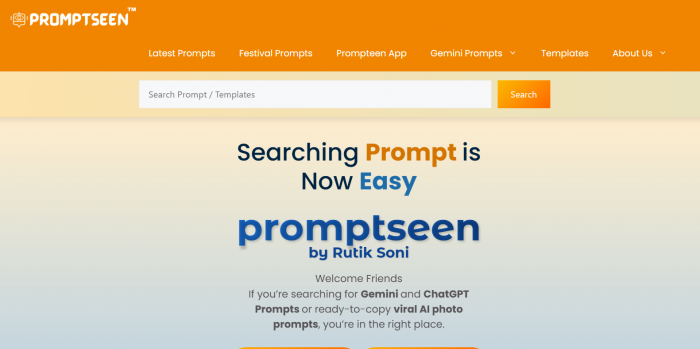
PromptSeen is best described as a visual prompt library with a blog-style website and an Android companion app. It publishes ready-made instructions for AI portraits, couple photos, festival designs, cartoons, travel posters and social-media edits.
The platform handles the first part of the creative process: finding an idea and describing it. A separate AI service handles everything after that, including the uploaded photograph, generation, processing and final image.
This means PromptSeen does not control:
● How accurately a face is preserved after changing the pose or clothing.
● How long an image takes to generate inside ChatGPT or Gemini.
● Whether names and captions appear with the correct spelling.
● What resolution, download format or commercial rights are available.
● How an external AI service stores or processes an uploaded photograph.
The website makes this division easy to miss because its preview images are presented prominently. Once a prompt is selected, however, the user must copy it, open another service, upload a reference image and generate the result there.
PromptSeen also has an Android app called Prompt Seen: AI Photo Prompts. The app is still a discovery tool rather than an editor. It helps users search, save and copy prompts, then opens ChatGPT or Gemini for the generation stage. The Google Play listing describes it as an ad-supported prompt library and shows more than 100,000 downloads.
Quick Verdict
Overall Rating: 3.6/5
PromptSeen is a genuinely useful idea library for AI photo prompts, but not a source of copy-perfect instructions. The previews make choosing a style easy, while the prompts themselves often need cleaning before they work well in ChatGPT or Gemini.
| Pros | Cons |
|---|---|
| Free to browse without an account | Prompts often contain typos and broken sentences |
| Strong Indian cultural and festival content | No filters for generator, difficulty or aspect ratio |
| Frequently updated with trending styles | "100% face match" claims overpromise |
| Good composition ideas for beginners | Generation still requires an external AI service |
| Android app adds one-tap creation links | Privacy policy retains template wording |
Best for: Social-media users and beginners who want a visual starting point.
Not for: Designers who need repeatable, brand-safe or commercial-grade output.
A Look Inside the Collection
PromptSeen’s homepage is built like an active publishing site. New prompt articles appear in a feed, supported by categories for latest prompts, festival prompts, Gemini prompts, couple prompts, unique prompts and templates.
The collection is broader than the name initially suggests. Alongside standard portrait prompts, I found:
● Cinematic beach and rainy-weather portraits.
● Fashion collages with multiple images of the same person.
● Romantic couple scenes and pre-wedding concepts.
● Traditional clothing, saree and Bollywood-inspired portraits.
● Religious, spiritual and Indian festival compositions.
● Chibi characters, anime edits and cartoon transformations.
● Birthday posters, invitation videos and social-media designs.
● CapCut and VN templates that sit outside AI image prompting.
The latest section was being updated frequently when checked. Posts dated July 2026 included beach portraits, cinematic colour grading, cartoon invitation videos, birthday prompts and portrait collages. The archive extended across dozens of pages, showing that PromptSeen is not a small collection of ten or twenty examples.

That quantity is useful, but the organisation is fairly basic. Categories separate broad content types, while search helps locate a subject. There are no filters for aspect ratio, number of people, supported generator, realism level or prompt difficulty.
A user searching for “couple” may therefore find a simple outdoor portrait beside a complex wedding poster requiring two face references, generated typography and several background elements. Both are labelled as ready-made prompts even though they demand very different levels of work.
How It Works: From Preview to Final Image
The website workflow is uncomplicated:
1. Browse the homepage or open a category related to the image you want to create.
2. Choose a preview image that resembles the intended style.
3. Open the article and locate the prompt displayed under the example.
4. Copy the prompt using the site’s copy function.
5. Open ChatGPT, Gemini or another image generator.
6. Upload a suitable reference photograph when the prompt requires one.
7. Paste the prompt and change any fixed details that do not match the person or occasion.
8. Generate the image and refine the instruction when the result misses important elements.
The Android app reduces some of that movement. PromptSeen says users can tap “Create with ChatGPT” or “Create with Gemini” to open the selected service with the prompt already prepared. The app also provides search, categories, favourites and sharing without requiring an account for basic browsing.
The process is easy enough for a beginner. The more important question is whether the copied prompt is usable without correction.
Three Prompts, Three Challenges
I chose three prompts that required different skills from an image model.
The first involved a multi-frame fashion collage using one person in several poses. The second involved a romantic couple scene that needed two faces to remain consistent. The third transformed a normal photograph into a chibi-style composition surrounded by miniature cartoon versions of the subject.
This was a more useful test than choosing three cinematic portraits with different backgrounds.
| Test | Prompt style | Main challenge |
| Test one | Editorial portrait collage | Repeating the same identity across multiple panels |
| Test two | Cinematic couple scene | Preserving two faces while changing pose, clothing and setting |
| Test three | Chibi cartoon edit | Combining a realistic subject with several stylised miniatures |
I examined the idea shown in the preview, the structure of the prompt, how much personal information needed changing and whether the text was clean enough to use as published.
Test One: The Multi-Frame Portrait Test
The first prompt described a vertical fashion collage. Four rounded panels in the background contained black-and-white photographs of the same woman in different poses. A larger full-colour cutout appeared in the foreground, wearing a pink top, wide-leg jeans, platform sandals and a shoulder bag.
This was one of the more visually organised prompts I found. It established the background layout, subject placement, clothing, colour treatment and 9:16 format. A user could picture the finished composition without relying entirely on the preview image.
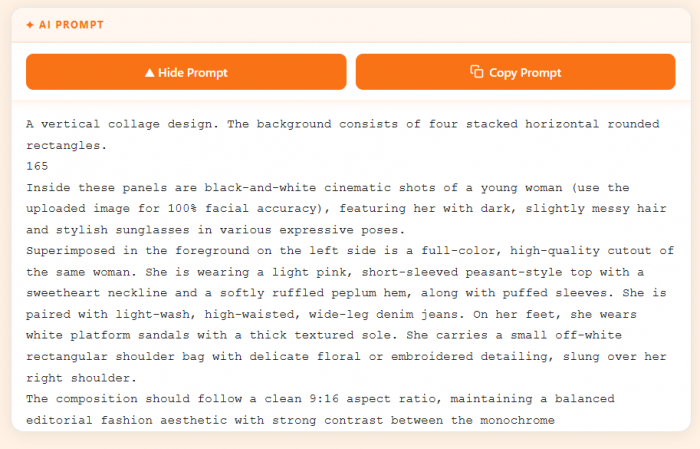
The prompt still had several practical problems.
It included a stray number in the middle of the text and ended with an incomplete sentence. It also requested “100% facial accuracy,” even though the model was expected to create the same person in five separate positions.
That is a difficult identity-consistency task. The foreground face might remain recognisable while one or more background portraits drift toward a different appearance. A prompt can request facial accuracy, but it cannot activate a reliable face-lock feature in every external generator.
The clothing description was also extremely specific. Anyone uploading a full-body reference in different clothing would need to decide whether the AI should preserve the original outfit or replace it completely.
Before using the prompt, I made three changes:
● I removed the stray text and completed the broken composition instruction.
● I replaced the fixed clothing description with a shorter outfit request.
● I reduced “100% facial accuracy” to a realistic instruction asking the model to preserve recognisable facial structure across all panels.
After cleaning it, the prompt had a strong concept and sensible visual hierarchy. It was not ready to paste exactly as published, but it gave me a much better starting point than an empty prompt box.
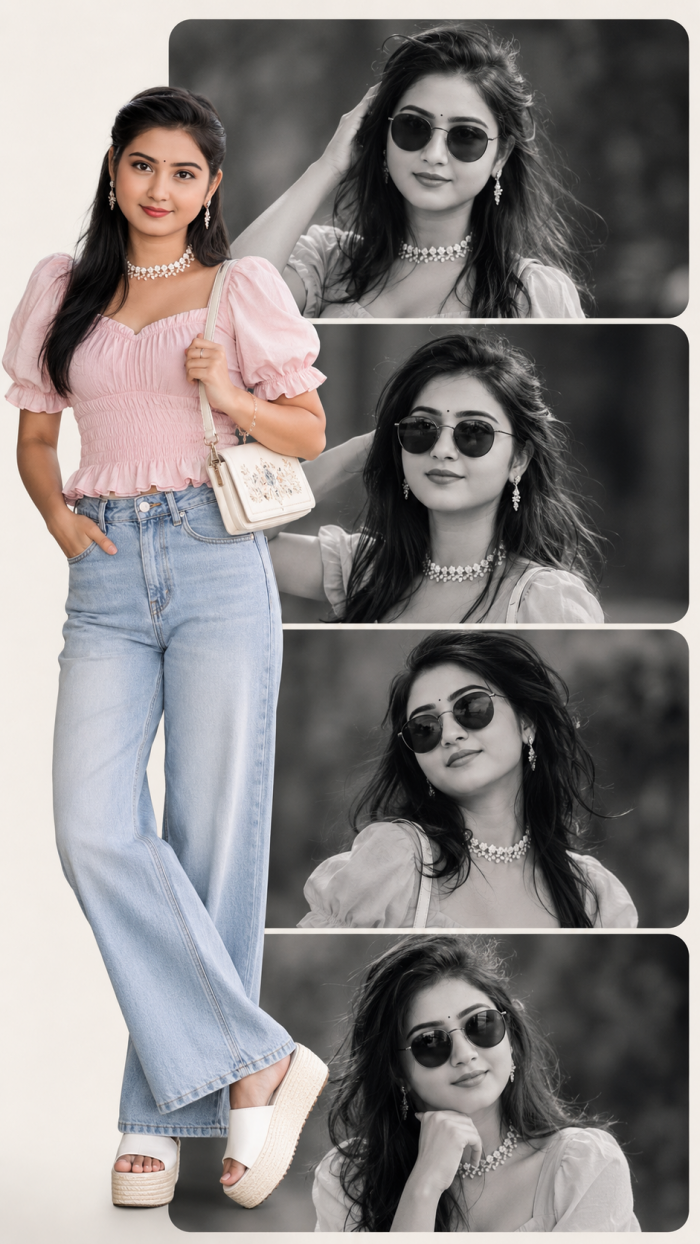
Experience: This prompt saved time at the concept stage, particularly in describing the foreground and background arrangement. Most of my effort went into reducing instructions rather than adding new ones.
Test Two: Cinematic Couple Scene
For the second test, I chose a couple prompt built around a lakeside bicycle scene during golden hour.
The prompt described a man riding at the front, a woman seated with him, warm sunlight, lake reflections, distant hills and a nostalgic romantic atmosphere. It also specified clothing for both people and asked the generator to keep both faces identical to the uploaded photographs.
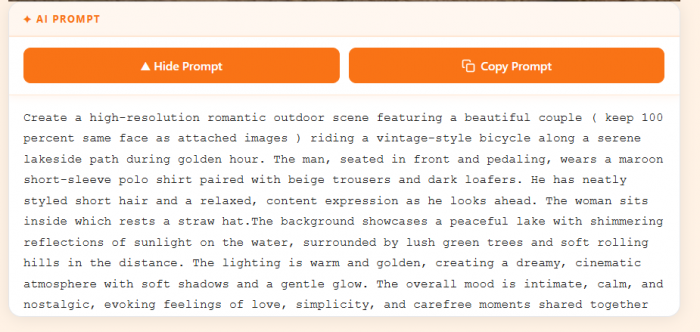
The setting was clear, and the warm lakeside concept was easier to follow than a generic instruction such as “create a romantic couple image.” The prompt provided a location, activity, lighting condition, wardrobe and emotional tone.
Those details become even more important when two people share the frame, because pose, interaction and camera direction all influence whether the result feels believable. More structured couple photo prompts can help establish those elements before spending time correcting faces or body positions.

Its sentence construction was less reliable. One line describing the woman and a straw hat was incomplete, making it unclear where she was supposed to sit and how the prop should be positioned.
The identity request was also more ambitious than it looked. The model had to preserve two separate faces while changing their bodies, clothing, poses and camera angle. If the reference photos used different lighting or showed only close-up faces, the generator would need to invent much of the full scene.
I simplified the test prompt by keeping the bicycle, lakeside path and golden-hour atmosphere but removing unnecessary physical descriptions. I also replaced the absolute face-match instruction with separate directions for each person:
● Preserve the man’s facial structure and hairstyle from the first reference image.
● Preserve the woman’s facial structure and hairstyle from the second reference image.
● Do not blend or exchange facial features between the two subjects.
That wording does not guarantee accuracy, but it is more useful than repeating “100 percent same face.”
Typography was not involved in this prompt, which helped. Couple prompts that also request names, wedding dates or countdown text create another point of failure because image generators can still distort lettering.
Experience: The couple scene was easier to customise than the collage, but it depended more heavily on the quality of the reference photographs. The original idea was useful, while the identity language promised more control than a text prompt can reliably provide.
Reference Photo Checklist
The quality of the reference image matters almost as much as the prompt, especially when the generator is expected to preserve a real face. A clear, front-facing photograph with good lighting gives the model more useful information than a heavily filtered, cropped or low-resolution image.
For couple prompts, both reference photos should ideally show the faces at a similar angle and with comparable lighting. Avoid sunglasses, strong beauty filters or images where part of the face is hidden. Full-body scenes also work better when the reference gives some indication of hairstyle and body proportions rather than only a tightly cropped selfie.
A better reference will not guarantee an exact match, but it reduces how much the generator has to invent.
Test Three: Chibi Cartoon Edit
The third prompt used a real photograph as the main image and surrounded the subject with several miniature 3D chibi versions. The smaller characters were meant to jump, wave, sit and hold a drink, while doodled hearts, stars and handwritten words completed the composition.
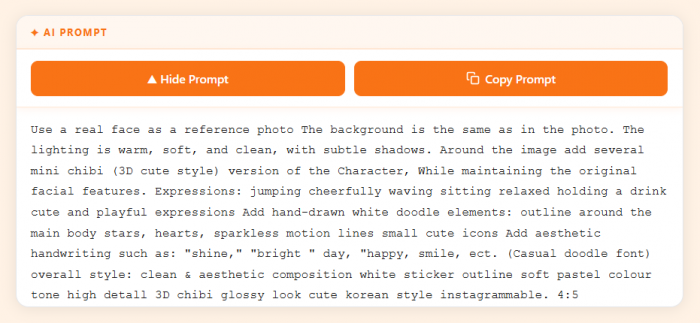
This was the most playful idea of the three. The central structure was easy to understand:
● Keep the main person and original background.
● Add several miniature cartoon versions around the subject.
● Use soft pastel tones, sticker-like outlines and doodle elements.
● Format the result vertically at 4:5.
The published prompt was less polished than the concept. It appeared twice on the same page and contained several spelling mistakes, including incorrect versions of “sparkles,” “etcetera” and “detail.” Much of it was written as one long run-on instruction without separating the main subject, miniatures, doodles and text elements.
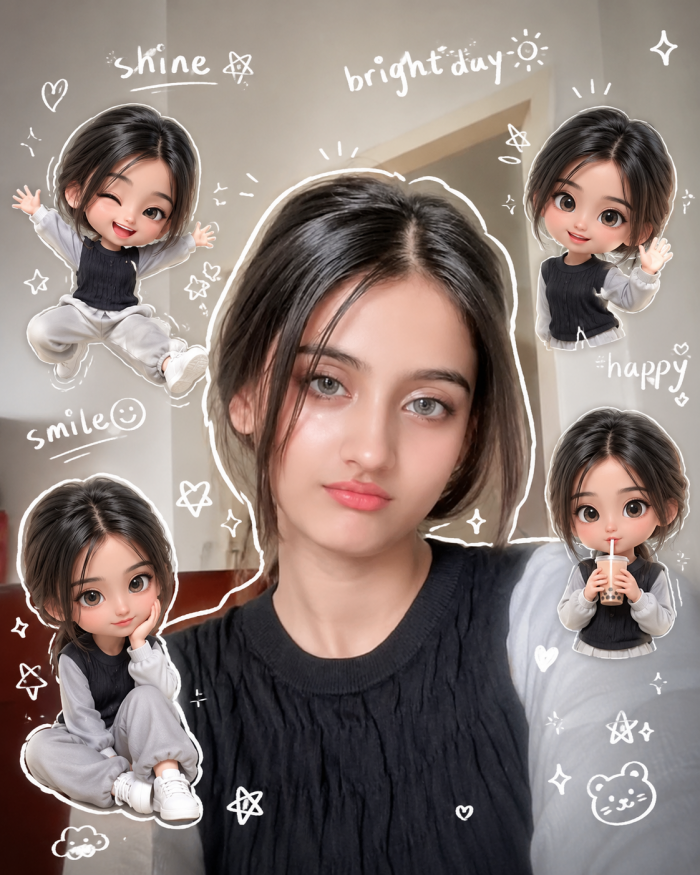
That mattered because this prompt asked the generator to work in two visual styles at once. The main subject had to remain realistic, while the surrounding characters needed rounded proportions, glossy 3D rendering and recognisable facial features.
I separated the prompt into four short sections: main photograph, miniature characters, graphic decorations and final format. I also removed the suggested handwritten words. Generated text was not essential to the concept and could easily be added later with an editor.
Once reorganised, this became the most flexible prompt I tested. The number of chibi figures, their expressions and surrounding doodles could be changed without rebuilding the main composition.
Experience: This prompt contained one of the library’s better ideas but some of its weakest editing. PromptSeen helped me discover the style, while I had to repair the wording before the instruction felt dependable.
What the Tests Showed
The three prompts were not equally polished, but they revealed a consistent pattern.
| Prompt | Idea quality | Copy readiness | Customisation needed |
| Editorial collage | 4.5/5 | 3/5 | Moderate |
| Couple bicycle scene | 4/5 | 3.2/5 | Moderate |
| Chibi cartoon edit | 4.2/5 | 2.6/5 | High |
PromptSeen is strongest at showing people what they could create. It is less consistent at turning that concept into clean final instructions.
The detailed prompts often include useful composition information, but they can also be crowded with clothing descriptions, fixed physical traits and repeated claims about quality. Shorter prompts avoid that clutter, yet some are too vague to explain how the preview should be recreated.
The best results come from treating the prompt as an editable draft.
How PromptSeen Performs Across Different AI Tools
PromptSeen prompts are not equally suited to every image generator. Most are written as long, descriptive instructions, which makes them easier to work with in tools where the prompt can be refined through follow-up requests.
With ChatGPT or Gemini, a PromptSeen prompt can be pasted with a reference photo and then adjusted if the first result misses the clothing, pose or background. That works reasonably well for the portrait and couple styles that dominate the library. More complex prompts still benefit from being shortened before generation, particularly when they combine multiple subjects, precise outfits and strict face-preservation instructions.
Midjourney can also use many of the visual ideas, but the workflow is less direct for prompts built heavily around personal reference photos and conversational corrections. In practice, PromptSeen works best as a source prompt rather than a generator-specific formula. The composition may transfer between tools, while the wording often needs to change depending on where it is used.
Variety With a Clear Bias
PromptSeen has considerable variety within personal and social-media image creation. Users can move from a realistic portrait to a wedding scene, cartoon transformation, travel poster or religious composition without leaving the site.
The collection is less broad outside that area. It is not a general prompt library for writing, coding, research, business tasks or productivity. Almost everything revolves around visual content, particularly images made from personal photographs.
Its strongest identity comes from Indian cultural content. Traditional outfits, Bollywood styling, couple portraits, pilgrimages, regional festivals and spiritual imagery receive far more attention than they do in many international prompt libraries. PromptSeen says it was built with Indian users in mind, and that is visible throughout the catalogue.
The site also follows social-media trends closely. This keeps the homepage active but creates repetition. Cinematic lighting, shallow depth of field, “8K” quality, perfect face matching and viral profile-picture language appear frequently.
These phrases make prompts sound advanced, but several are descriptive rather than technical. Writing “8K” does not force an external generator to provide an 8K file, and asking for an exact face match does not ensure identity preservation.
Does the App Add Anything?
The website is sufficient for occasional use, but the Android app makes PromptSeen easier to use as a regular prompt-discovery tool. Instead of moving through individual blog posts, users can browse more than 1,000 ready-made prompts through categories and search, then save useful ideas for later.
The app also provides HD preview images, one-tap prompt copying, favourites and sharing. Prompts can be taken into Gemini, ChatGPT, Midjourney, DALL-E or another compatible image generator. Basic browsing does not require an account, although the free app contains ads.
What the app does not add is an image-generation or editing layer. PromptSeen explicitly describes it as a prompt library, so the actual photo upload, generation and refinement still happen in another AI tool.
For occasional inspiration, the website does the job. For users who regularly collect and test trending portrait, festival or social-media prompts, the app offers a quicker and better-organised workflow.
The Real Cost of Free Prompts
PromptSeen’s website prompts can be accessed and copied without purchasing a subscription. The Android app is also free to install and does not require sign-up for basic browsing, although it contains advertisements.
The complete workflow may still cost money because generation happens elsewhere. Higher image limits, better reference-image handling or access to more capable models may require a separate ChatGPT, Gemini or Midjourney plan.
PromptSeen supplies the instruction, not the computing power.
Where PromptSeen Actually Saves Time
The biggest time saving happens before generation. Instead of starting with an empty prompt box, PromptSeen gives a composition, setting, lighting direction and general visual style to work from.
That advantage becomes smaller once generation begins. Face consistency, awkward hands, incorrect clothing and missed details still have to be corrected inside ChatGPT, Gemini or another generator. Some PromptSeen prompts also need editing before the first attempt.
For me, the useful part is idea discovery. It can shorten the gap between knowing that I want a new portrait and knowing exactly what kind of portrait to create. It does not remove the trial-and-error that comes afterward.
When PromptSeen Is Better Than Writing From Scratch
PromptSeen is most useful when the idea is clear visually but difficult to describe. A preview can quickly provide the composition, lighting, pose, clothing and background details that might otherwise take several attempts to write from scratch.
That advantage is strongest for beginners and occasional users. Someone already comfortable writing image prompts may spend nearly as much time removing fixed details, correcting awkward wording and adapting the prompt for a specific generator.
In practice, PromptSeen works best as a shortcut to a structured first draft. It saves the blank-page stage, but the final instruction still benefits from a quick edit before generation.
Privacy and Photo Handling
The platform’s privacy situation needs to be considered in two parts.
PromptSeen’s website policy says it may collect information submitted through comments, along with IP addresses, browser information and cookies. It also explains that embedded content may collect data as though the user had visited the third-party website directly.
The policy is not particularly polished. It retains standard WordPress wording such as “Suggested text” and references article editing, login cookies and password resets. This makes it difficult to separate practices that apply to ordinary visitors from generic website-template language.
The personal photograph is normally uploaded to an external image generator, not PromptSeen. Users therefore need to check the image-storage, deletion and model-training settings of ChatGPT, Gemini or whichever service they choose.
A portrait used for casual experimentation may not feel sensitive, but the risk changes with photographs of children, wedding images, private family pictures or documents visible in the background.
Is PromptSeen Legit and Safe?
PromptSeen itself is a legitimate prompt library, not a scam. The website is free to browse, does not force an account, and never asks users to upload a photograph directly. The main risks sit around the brand rather than inside it.
The first issue is imitation. Several lookalike domains publish similar prompt content under nearly identical names, including addresses ending in .co.in and versions with an extra letter in the spelling. These sites are easy to confuse with the original, and their policies and ownership are separate. Anyone following a shared link should check the address before trusting what the page asks for.
The second issue involves subdomains. During research, I found at least one unrelated subdomain carrying the PromptSeen name that has been flagged as questionable by third-party site checkers. It has nothing to do with the prompt library's normal workflow, which is another reason to stick to the main website or the official Android app listing.
The safety picture for photographs remains the one described earlier: PromptSeen never receives the image. The real decision is which external generator to trust with a personal photo, and that choice deserves more attention than the prompt site itself.
In short: the prompt library is safe to browse, the copycat domains are the thing to watch for, and the photo-privacy question belongs to ChatGPT or Gemini rather than PromptSeen.
Copyright and Reuse
PromptSeen encourages users to copy its prompts into image generators, but its terms restrict republishing, reselling, duplicating and redistributing material from the website. The terms describe the content as being available for personal use, subject to the stated restrictions.
This creates an important distinction. Copying a prompt to create an image is part of the intended workflow. Copying an entire PromptSeen article or repackaging its prompt collection as another commercial library is not.
The resulting image is also affected by the terms of the external generator and by what appears in the design. Brand logos, cartoon characters, famous personalities and copyrighted visual styles can create separate commercial-use concerns. PromptSeen places responsibility on users to ensure that prompts and outputs comply with copyright and trademark rules.
What PromptSeen Gets Right
● PromptSeen removes the difficulty of starting from nothing. The previews give beginners a concrete direction before they open an image generator.
● The collection has a recognisable cultural focus. Indian clothing, festivals, relationships and travel locations are not treated as minor categories.
● Some prompts contain strong visual composition ideas. The editorial collage and chibi layout would take time to describe without a prepared reference.
● The library is updated often enough to follow social trends. Users interested in current profile-picture and short-video styles will find recent material.
● The core website remains accessible without payment. Users can inspect a prompt before deciding whether an external AI subscription is worthwhile.
Where the Experience Breaks Down
The biggest weakness is editorial consistency. Some prompts are detailed and carefully structured. Others contain duplicated text, incomplete sentences, spelling mistakes or physical details that need to be replaced.
Preview transparency is also limited. PromptSeen does not consistently state which model produced an example, whether multiple attempts were required or whether the displayed image received manual editing afterward. The platform acknowledges that AI outcomes can differ, but the presentation can still make a preview feel more reproducible than it really is.
The platform also lacks advanced prompt tools. There is no prompt builder, variable system, model comparison, community output gallery or verified result history. Users receive a static block of text rather than an interactive prompt that asks for names, clothing, aspect ratio and preferred generator.
Who Will Actually Find It Useful?
PromptSeen is best for social-media users and beginners who understand the image they want after seeing it but struggle to describe the idea in writing. It is particularly useful for profile photos, festival posts, couple portraits, birthday designs and stylised personal images.
It is less useful for professional designers who need repeatable brand control, precise identity consistency or commercial workflow management. Experienced prompt writers may still browse it for ideas, but they will probably rewrite most entries rather than use them unchanged.
Rating Snapshot
| Area | Rating |
| Ease of browsing | 4/5 |
| Prompt variety | 4.2/5 |
| Cultural relevance | 4.5/5 |
| Prompt originality | 3.5/5 |
| Copy readiness | 3/5 |
| Editorial consistency | 2.8/5 |
| Ease of customisation | 3.8/5 |
| Pricing clarity | 4.4/5 |
| Privacy transparency | 2.7/5 |
| Overall rating | 3.6/5 |
Is PromptSeen Worth Using?
PromptSeen is not an AI image editor. It is a frequently updated prompt library that helps users discover visual ideas and recreate them in tools such as ChatGPT or Gemini.
Its previews make browsing easy, and the multi-panel collage, chibi edits and Indian cultural prompts give the library more personality than many generic prompt sites. The problem begins after copying. Several prompts contain stray text, incomplete sentences or spelling errors, so they often need editing before use.
PromptSeen is most useful as an idea library, not a source of flawless one-click prompts. It can save time when choosing what to create, but the final quality still depends on how well the prompt is cleaned, customised and generated.

Amanda Ross
Aug 31, 2026I actually tried the chibi-style prompt after reading this and it worked surprisingly well. I did have to simplify a few parts but the basic idea saved me a lot of time and gave me a result I probably wouldn’t have thought to create myself.
Login To Reply ↪