

I do not see Wordtune Editor as the tool you open when you have nothing to say. I see it as the tool you open when the idea is already there, but the sentence is not doing its job. That difference matters because Wordtune is strongest as a writing polisher, not as a full writer.
It can make rough writing clearer, shorter, smoother, and more natural. But it can also make weak writing look more finished than it really is. This review looks at Wordtune Editor from that practical angle: where it helps, where it makes sense, where it falls short, and who should actually pay for it.
My Quick Take
Wordtune Editor is useful if your biggest writing problem is expression. It helps when a paragraph feels clumsy, an email sounds too blunt, an essay feels stiff, or an AI-generated draft sounds robotic. It gives you different ways to say the same thing, which is valuable when you know the message but cannot find the right wording.
It is not the best tool if your problem is missing research, weak structure, copied ideas, poor argument, or lack of originality. Wordtune can improve how writing sounds, but it cannot guarantee that the writing is accurate, insightful, or publish-ready.
That is the article’s main argument: Wordtune improves the language layer, but the thinking layer still belongs to the writer.
What exactly is Wordtune Editor?

Wordtune Editor is an AI-powered writing workspace from AI21 Labs. It helps users rewrite, paraphrase, shorten, expand, summarize, correct grammar, adjust tone, ask AI for help, and make writing sound more natural. The Editor is mainly used inside Wordtune’s web app, while its browser extension helps users write and rewrite across websites and online writing spaces.
The important thing is that Wordtune is not only a grammar checker. It is also not exactly a full AI article writer. It sits between those two categories.
A grammar checker usually tells you what is wrong. A full AI writer tries to create content for you. Wordtune mostly works on text that already exists. You bring the draft, highlight the weak sentence, and Wordtune gives you cleaner versions.
That makes it useful for real writing situations, such as:
● A student has the right argument in an essay, but the wording sounds stiff and unnatural.
● A professional wants to make an email sound firm without sounding rude.
● A blogger has written a useful paragraph, but it feels too long and repetitive.
● A non-native English writer understands the idea but wants the phrasing to sound more fluent.
● A content writer has an AI-assisted draft that needs to sound less mechanical and more readable.
This is what Wordtune is trying to do. It is not trying to replace every part of writing. It is trying to improve the way existing writing is expressed.
Why Wordtune Makes Sense
Most writing does not fail because every sentence is grammatically wrong. It fails because the wording creates friction. The point takes too long to appear. The tone does not match the reader. The sentence looks correct, but it does not feel easy to read.
Wordtune works in that middle space between rough draft and final edit. It helps users move from “this is technically correct” to “this is easier to read.” That is useful because many writers do not need an AI tool to invent ideas for them. They need help rewriting the same sentence five different ways until it finally sounds right.
The limitation starts there too. A better-sounding sentence is not always a better sentence. A rewrite can remove nuance, change certainty, or make the writing more polished but less personal. Wordtune should be used like an assistant editor, not an automatic final editor.
How the Features Actually Help
1. Rewrite is the center of Wordtune. It gives alternate versions of a sentence or paragraph. This helps when the idea is clear but the wording feels awkward, repetitive, too formal, too casual, or unnatural. The value is not only correction. The value is choice. You can compare several versions and keep the one that fits your meaning best.
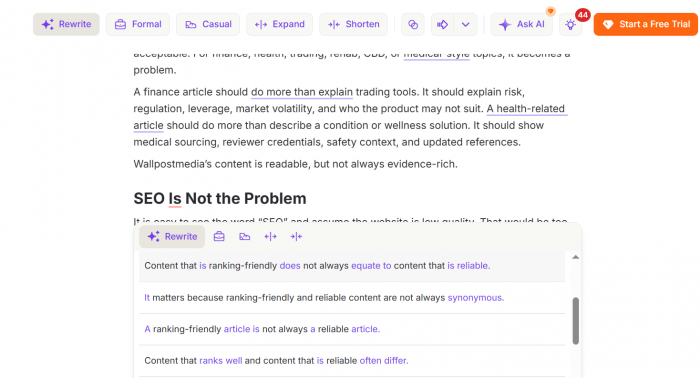
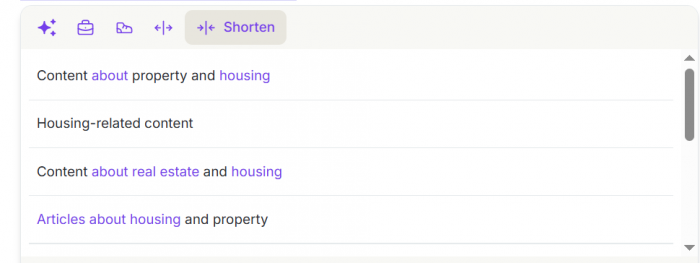
2. Shorten is useful for bloated writing. Many emails, intros, reports, and blog paragraphs become weaker because they take too long to reach the point. Wordtune can cut filler and make the message more direct. The only caution is that shorter does not always mean better. Some details are necessary, so users should check whether the trimmed version still carries the full meaning.
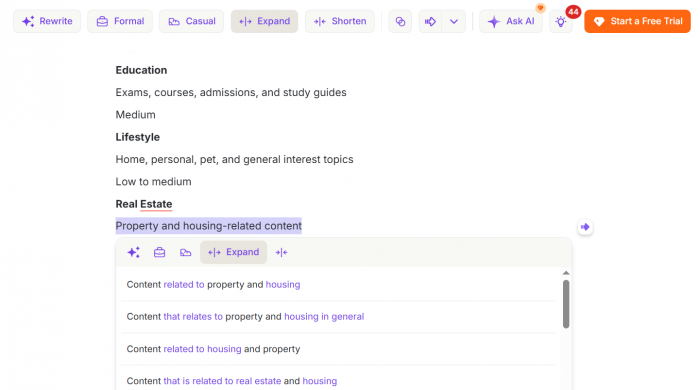
3. Expand is more mixed. It helps when an idea needs a little more explanation, but it can also create padding. If the original point is weak, expanding it does not make it stronger. It only makes it longer. This is where students, bloggers, and SEO writers should be careful because generic filler can enter the draft quickly.
4. Tone control is practical because tone is often the real issue. The same message can sound rude, cold, vague, too casual, or too formal depending on how it is written. Wordtune’s formal and casual options help reshape delivery without rewriting the message from scratch. Used carefully, this is useful for emails, academic writing, business communication, and social content.
5. Grammar and spelling support add convenience. Users can correct basic errors and improve phrasing in one place. However, if grammar checking is the main need, Grammarly may still feel stronger and more complete. Wordtune’s identity is still rewriting-first.
7. The summarizer can help users scan long material quickly. It is useful when you need the main points before deciding whether to read the full source. But summaries should not replace source reading for serious work because details, exceptions, numbers, and context can be missed.
7. Humanize AI is designed to make AI-generated text sound more natural. This helps when a draft feels flat, repetitive, or machine-like. But it does not automatically make content original, valuable, or trustworthy. A humanized paragraph can still lack examples, evidence, and a clear point of view.
The Best Wordtune Workflow
Wordtune works best after the messy draft exists. The tool needs something meaningful to improve. If the input has no clear idea, Wordtune can only polish the confusion.
A practical workflow would look like this:
● Write the rough version first, even if the wording feels weak, because Wordtune performs better when the original idea is already visible.
● Use Wordtune only on the sentences or paragraphs that create friction, instead of rewriting every line and losing your natural voice.
● Compare multiple suggestions before accepting one, because the smoothest version may not be the most accurate version.
● Use the shorten option when the message is buried under filler, but reread the result to make sure the context has not disappeared.
● Use the expand option only when the idea needs clearer explanation, not when the section actually needs research, examples, or data.
● Check every final paragraph manually for meaning, accuracy, originality, tone, and formatting before publishing or submitting it.
This workflow keeps the writer in control. Wordtune should support your judgment, not replace it.
UX and Everyday Experience
Wordtune’s UX is one of its strongest parts because it does not feel heavy. Many AI writing tools now feel like full content dashboards with templates, campaigns, brand voice systems, SEO tools, and long prompt boxes. Wordtune is simpler. You write, select text, choose an action, and compare suggestions.
That simplicity is useful for everyday users. A student does not need to learn a complicated system. A professional can quickly rewrite an email. A non-native English writer can compare natural phrasing. A blogger can clean weak paragraphs without leaving the writing flow.
The Editor is better for focused writing, rewriting, and summaries. The browser extension is better for quick edits across online platforms. This split makes sense because not all writing happens inside one workspace.
The limitation is platform coverage. Wordtune works well through the web app and supported browser extensions, but Safari extension support is not currently available, Android is not yet supported, and there is no standalone Mac desktop app. For desktop Chrome, Edge, Firefox, or Arc users, the experience is stronger. For mobile-heavy or Safari-first users, it may feel less complete.
What the Output Really Feels Like
Wordtune’s output is strongest when the task is small and clear. If the problem is one awkward sentence, it can help quickly. If the problem is a paragraph that needs tightening, it can make the writing easier to read. If the problem is tone, it can give useful alternatives.
Where it struggles is deeper writing quality. It does not automatically know whether the point is original, whether the facts are current, or whether the paragraph belongs in the article. This creates the polished weakness problem. Wordtune can make weak writing look cleaner without making it more useful.
That does not make the tool bad. It simply means users should understand what kind of improvement they are getting. Wordtune improves readability. It does not guarantee depth.
My Personal Scorecard
| Area Reviewed | Score | Why I Would Score It This Way |
| Rewriting quality | 8.5/10 | Wordtune is strong when the task is to improve awkward wording and offer better phrasing options. |
| Clarity improvement | 8/10 | It can make long or stiff writing cleaner, but users still need to check whether nuance has been removed. |
| Tone control | 8/10 | Formal and casual rewrites are useful for emails, essays, workplace writing, and audience-specific communication. |
| Long-form writing support | 6.5/10 | It can improve paragraphs, but it does not deeply fix article structure, weak arguments, or missing research. |
| Humanize AI usefulness | 7/10 | It can soften robotic AI text, but it cannot add real experience, originality, or editorial depth by itself. |
| Accuracy support | 5.5/10 | Wordtune can improve wording, but users still need to verify facts manually. |
| Plagiarism safety | 5/10 | Rewriting can reduce wording overlap, but it does not guarantee originality or plagiarism-checker safety. |
| UX and ease of use | 8.5/10 | The interface is easy because it stays close to selected text and avoids a complicated dashboard. |
| Pricing value | 7/10 | Paid plans make sense for daily writers, but casual users may not need more than the free plan. |
| Overall score | 7.4/10 | Wordtune is a strong writing polisher, but it should not be treated as a complete writing or research system. |
Privacy and Data
Privacy matters because Wordtune processes user text. That text may include personal messages, business emails, student assignments, client drafts, internal reports, unpublished articles, or sensitive professional documents.
Wordtune’s business privacy materials mention security measures and SOC2 compliance, which is a positive signal. But users should still think carefully before pasting sensitive material into any cloud-based AI writing tool.
The practical rule is simple: if the text includes private legal, medical, financial, client, company, or personal information, do not paste it into Wordtune unless your organization, school, or client agreement allows it.
For everyday writing, Wordtune can be convenient. For confidential writing, privacy rules matter more than convenience.
Accuracy and Fact-Checking
Wordtune can make a sentence sound more confident. It cannot guarantee that the sentence is true.
This is important for bloggers, students, journalists, marketers, finance writers, health writers, legal writers, and technical writers. A polished sentence can still be wrong. A cleaner rewrite can also change the level of certainty.
For example, “may help some users” and “helps users” are not the same claim. One is cautious. The other is more direct. If Wordtune changes that tone, the text may become more readable but less accurate.
The safest approach is to separate editing from fact-checking. Use Wordtune to improve wording. Use official sources, product pages, research papers, documentation, interviews, or trusted references to verify facts.
Plagiarism and AI Detection
Wordtune can paraphrase, but paraphrasing is not the same as originality. This is one of the biggest misunderstandings around tools like this.
If a user copies the same idea structure, paragraph order, examples, and argument from another source, changing the wording does not automatically make it original. The content may still be too close to the source. Wordtune also does not guarantee that suggestions will avoid plagiarism-checker flags.
AI detection is also not simple. Humanize AI may make a draft sound more natural, but it should not be treated as a guaranteed way to avoid AI detectors. Schools, clients, and workplaces may have their own rules about AI assistance. Users should follow those rules instead of relying on rewriting tools to hide the process.
Formatting Issues
Formatting is not the most exciting part of Wordtune, but it matters in real work. Some users have reported formatting friction when working with documents or browser-based editing spaces.
This is not a dealbreaker, but it is worth knowing. If you use Wordtune inside structured documents, check the final layout before sending or publishing. Headings, bullet spacing, numbered lists, paragraph breaks, links, tables, and document structure may still need a final look.
Wordtune can improve the text, but it should not be trusted as the final formatting checker.
Pricing and Value
Wordtune has a free Basic plan and paid Advanced and Unlimited plans. The free plan is useful for testing, but regular writers will probably hit the limits quickly.
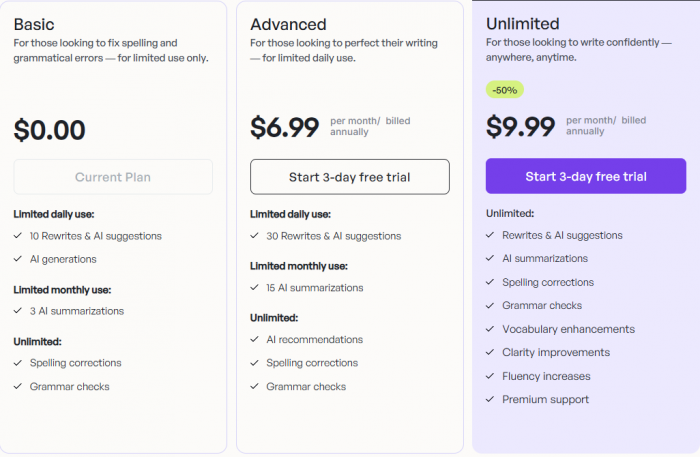
The pricing is not expensive compared with many AI writing tools, but the real question is frequency. If you write every day, Wordtune can justify the price because it saves editing time. If you only rewrite text occasionally, the free plan may be enough.
The refund policy is also important. Wordtune says it does not offer refunds, although users can cancel before the next billing cycle. That makes the free plan and trial more important. Users should test the tool properly before paying.
Real User Reviews
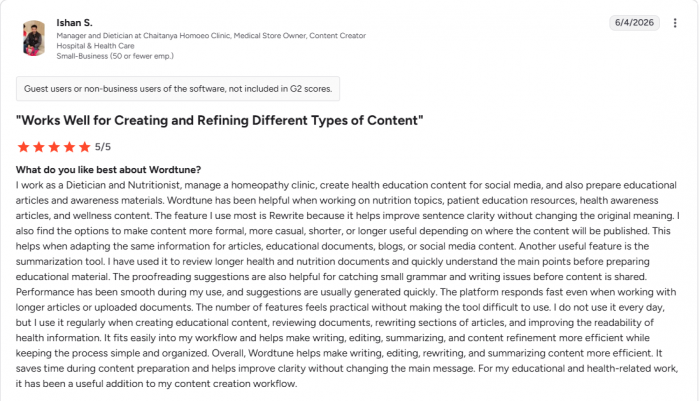
Public user reviews show a clear pattern. Users usually praise Wordtune for rewriting, clarity, ease of use, academic support, and professional communication. This matches the tool’s strongest area: improving existing writing.
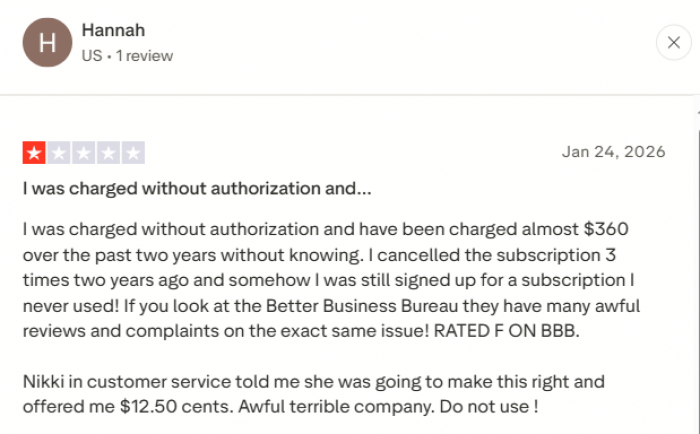
The complaints also reveal useful limitations. Some users mention free-plan limits, subscription or billing concerns, repetitive suggestions, formatting issues, and cases where output feels too polished or mechanical. These complaints do not make Wordtune a poor tool, but they show where expectations need to be realistic.
The user-review pattern is simple: Wordtune satisfies people who want faster polishing. It disappoints people who expect a complete writing platform, unlimited free access, perfect originality, or zero manual editing.
Pros and Cons
Wordtune’s biggest strengths are practical, not flashy.
Its main pros are:
● It helps users rewrite awkward sentences without forcing them to rebuild the entire draft from scratch.
● It gives multiple versions of the same idea, which helps users compare tone, clarity, and sentence flow.
● It is simple to use because the workflow stays close to selected text instead of depending on complex prompts.
● It is especially useful for non-native English writers who want more natural phrasing and better fluency.
● It works well for emails, essays, reports, social posts, summaries, blog paragraphs, and AI-assisted drafts.
● It can save time when users need quick summaries or fast language cleanup.
Its main cons are:
● It does not replace research, fact-checking, citation work, or original analysis.
● It can make weak content sound smoother without making it more valuable.
● Some rewrites may slightly change meaning, certainty, or tone.
● The free plan is too limited for users who write or edit every day.
● It does not guarantee plagiarism safety or AI-detection safety.
● Users still need to check formatting after editing structured documents.
● Sensitive or confidential text should not be pasted without privacy and policy review.
Alternatives Worth Considering
| Alternative | Where It Beats Wordtune | Best For |
| Grammarly | It offers stronger broad proofreading, grammar checks, workplace tone support, and writing correctness features. | Professionals, teams, email-heavy users, and business communication. |
| QuillBot | It is more focused on paraphrasing, citation tools, summarizing, and student-friendly writing utilities. | Students, researchers, and users who mainly want paraphrasing support. |
| ProWritingAid | It gives deeper style reports, long-form writing analysis, and manuscript-level editing support. | Authors, editors, fiction writers, and long-form content creators. |
| Jasper | It is stronger for marketing campaigns, brand voice, content templates, and team workflows. | Agencies, marketers, and businesses producing branded content at scale. |
| Hemingway Editor | It is better for cutting complex writing, improving readability, and making sentences shorter and sharper. | Writers who want simple, direct, readable prose. |
Wordtune sits in the middle. It is more expressive than a basic grammar checker. It is faster for sentence-level polishing than many larger AI tools, but weaker for full content planning.
Who Should Use Wordtune?
Wordtune is a good fit for users who already write but want help improving delivery. Students can use it for essays and assignments, as long as they still cite sources and follow academic rules. Professionals can use it for emails, reports, proposals, and workplace messages. Bloggers can use it to polish intros, simplify paragraphs, and improve weak transitions.
Non-native English writers may get the most consistent value because Wordtune helps with fluency and natural phrasing. Content writers can also use it as a final editing layer, but they should not depend on it for SEO strategy, facts, or originality.
The best Wordtune user is someone who often thinks: “I know what I want to say, but I want to say it better.”
Who Should Skip It?
Wordtune is not ideal for users who need a complete content system. If you want keyword research, competitor analysis, search intent mapping, plagiarism checking, citation management, or full article generation, Wordtune will feel incomplete.
It may also not be worth paying for if you only need occasional paraphrasing. Casual users should start with the free plan and upgrade only if they regularly hit the limits.
Users who work with confidential material should also be careful. Wordtune can be useful, but privacy rules matter more than convenience when sensitive content is involved.
Final Verdict
Personally, I would not use Wordtune Editor as my main writing tool. I would use it as my final polishing layer. That is where it makes the most sense.
It is good at taking a sentence that almost works and giving it a cleaner shape. It can make emails softer, essays smoother, reports clearer, and AI drafts less robotic. For daily writing, that kind of support can save real time.
But I would not trust it to do the thinking for me. It does not replace research, fact-checking, originality checks, privacy judgment, or final editing. It can make a sentence easier to read, but it cannot guarantee that the sentence is true, useful, or worth publishing.
Wordtune Editor is worth using when the draft already has something valuable inside it. It can sharpen that value and make it easier for readers to understand. But if the draft has no evidence, no original point, or no clear direction, Wordtune will not fix the deeper issue. It will only make the weak parts sound smoother.
Comments