

Social Catfish looks useful in one very specific moment: someone online has given you a name, a photo, a number, and a story that does not quite line up, and you want to know who you are really dealing with. I put its search tools through a controlled test to answer three plain questions. How does the process actually work, how much do you see before you pay, and are the final results solid enough to verify a person or just interesting enough to keep you guessing?
The searches themselves were easy to run. Reading the results was the hard part. Social Catfish surfaced plenty of possible connections, but a fair number were old, loosely related, or simply too uncertain to lean on.
My Social Catfish results at a glance
| Area tested | What happened |
| Reverse-image search | Returned several possible matches; only a few were visually relevant |
| Phone lookup | Correct general location, but older ownership information |
| Email search | Linked the address to plausible usernames and public profiles |
| Username search | Worked far better with a distinctive handle than a common one |
| Name search | Largest report, and also the most unrelated records |
| Address lookup | Revealed possible residents and historical connections |
| Pricing | Most of the useful detail stayed hidden until payment |
| Best use | Gathering identity clues you then verify somewhere else |
How I tested it
I did not start with a random name and hope for a dramatic report. I built a simple test using details where I already knew what a correct result should look like. That one decision changed everything, because it let me spot wrong records instead of assuming every line in the report was true.
I used a photo that had been posted publicly, an active phone number, an older email address, a username that had shown up on more than one platform, and a full name attached to a known city. With familiar inputs, a false match stands out immediately. With unfamiliar ones, you have no way of knowing whether the tool is helping you or misleading you.
The test ran in this order:
1. I started with reverse-image search, to see whether it could find an existing copy of a photo I knew was already online.
2. I ran the phone number and compared the location and owner it listed against what I already knew to be true.
3. I entered the email address, looking for the usernames, profiles, and older references I knew were tied to it.
4. I tested the username on its own, to see how cleanly it mapped to accounts across platforms.
5. I finished with name and address searches, which produced by far the widest spread of public-record possibilities.
Each search returned a different kind of result, and that alone taught me something: Social Catfish should not be judged as a single tool. The image search, the phone lookup, and the people reports have genuinely different strengths and different failure modes, and lumping them into one verdict does the reader a disservice.
Running the first search
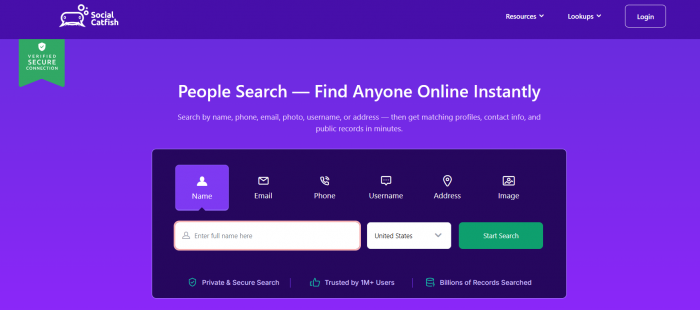
The homepage puts all the options in front of you at once: name, email, phone, username, address, and reverse-image lookup. I began with the image tool because that is where most people land first and it is the feature the marketing leans on hardest.
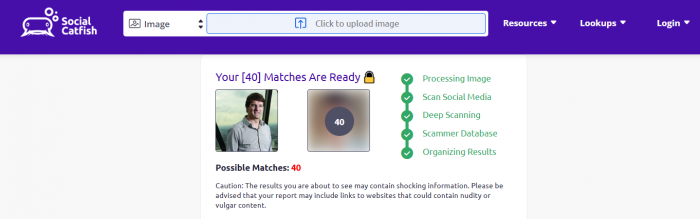
Uploading was painless. I picked a clear photo, confirmed the search, and watched it move through a run of progress screens announcing that it was checking images, scanning social profiles, and searching other sources. The whole pre-payment sequence took a little under a minute.
Those progress screens are built to look thorough, but they hand over very little you can use. I could see that possible results existed. The names, the links, and the actual matches stayed locked. That is the first real thing to understand about Social Catfish: the free stage lets you begin a search, but it deliberately shows you too little to judge whether the result is worth paying for.
When I reached checkout, the offer during my test was a short introductory window of $5.73 for five days, which then rolls into a recurring monthly plan of roughly $3 if you leave it running. Before going further I checked whether that charge bought a single report or an ongoing subscription, and the answer matters, because the image-search plan and the broader social-search tools are not always presented as one combined product.
The reverse-image result
The image search returned six possible matches. A couple showed faces that genuinely resembled the photo I uploaded. The rest were clearly unrelated. This was not a clean page pairing one original photo with one confirmed identity. It was a scatter of visual possibilities that still needed checking by hand.
I opened the strongest-looking results and worked through a short mental checklist for each one:
● Was this the exact same photograph, or just a similar-looking person caught at a similar angle?
● Did the face, the clothing, the background, and the crop all line up, or only the general impression?
● Did the linked profile carry a different name or a different location from the one I was checking?
● Did the page look older than the profile in question, which would suggest the photo was lifted from somewhere earlier?
● Was the source a real profile at all, or a stock-image library or some unrelated site that happened to reuse the picture?
My closest result was a social profile using the same photo under a slightly different display name, which is exactly the kind of lead this tool is supposed to surface. But sitting right beside it were results that were plainly a different person entirely, plus one stock-photo page. That mix is the whole point to grasp: the image tool is a lead generator, not an identity detector. A visually similar face proves nothing on its own.
It also has a built-in ceiling. The search can fail when a photo has been cropped, mirrored, filtered, heavily compressed, pulled from a private account, or posted only recently. An AI-generated face may have no older source anywhere to find. So the honest read on my image test is mixed. It pointed me toward places the photo might live, but I had to open and inspect every single match myself before any of it meant anything.
Following the phone number
Next I entered a number where I already knew the current owner and location. The report came back with a name, a city and state, and a short address history. The location was correct. The ownership detail was only partly right.
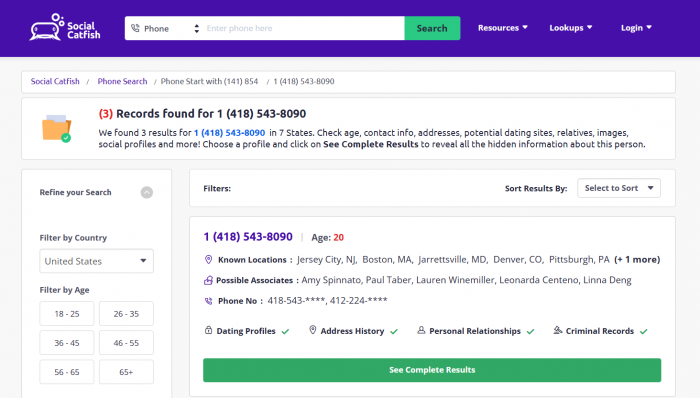
One name in the report did not match the person actually using the number now. Checking the address history, it looked like that record belonged to a previous subscriber, or to someone tied to an older account on the line. This is exactly where Social Catfish results can quietly mislead you. Numbers get reassigned, sit under family plans, and get registered through employers or businesses. A name attached to a number can be historically accurate and still tell you nothing about who is holding the phone today.
I checked the phone result against four things:
● The state and city the number was tied to, which I could confirm.
● The date on the listed address, which told me how current the record really was.
● Any email addresses attached to the record, to see if they cross-referenced the email test.
● Whether the listed surname matched a known relative or a former owner rather than the current user.
The search gave me a solid direction but not a single confirmed answer. The location held up well. The ownership details did not, and treating them as fact would have pointed me at the wrong person.
Searching the email address
For the email test I used an address with a bit of public history, so I knew there was something real for the tool to find. The report returned four possible profiles or connections, and among them were a couple of usernames and a public profile I recognised.
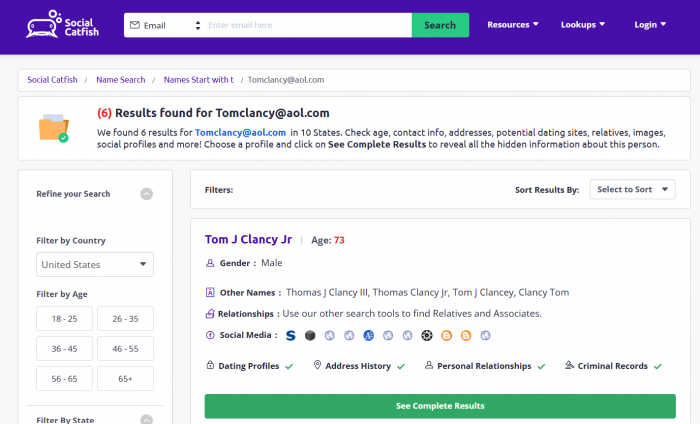
The most useful result matched information I already knew, tying the address to a username and a location that were correct. Other results were much weaker, sharing a similar name but showing no visible link to the exact email. I did not count those as confirmed.
I sorted the email results into three buckets:
| Result type | How I treated it |
| Exact connection | The email appeared directly on the profile or page |
| Probable connection | Several details matched, but the email itself stayed hidden |
| Weak connection | Only a common name, location, or broad similarity showed up |
This worked better than the name search, because an email address is far more specific than a name. But it still could not reveal every account a person owns. People keep separate addresses for work, social media, dating, shopping, and private messages, and disposable addresses or privacy relay services leave almost no trail at all.
Testing the username search
Then I entered a username that had been reused across several public platforms. Social Catfish returned five possible accounts. Some were genuine matches; others belonged to unrelated people who had simply chosen the same handle.
The real matches shared a clear pattern:
● The same or a very similar profile photo showed up across the accounts.
● The bios carried matching location or interest details.
● The writing style and the recurring topics were consistent from one account to the next.
● One account linked directly to another using the same username.
The unrelated results usually shared only the handle itself. The photos, the countries, the interests, and the posting histories were completely different. The lesson was clear: username search is at its best with a rare, distinctive handle. A common one built from a first name and a few numbers pulls in too many strangers to be worth much. A few of the links were also dead or led to deleted accounts, which hinted that a profile had once existed but left too little behind to confirm ownership.
The name search produced the biggest, messiest report
The name search asked for more up front. I entered the full name and narrowed it with a city and an approximate age. The report that came back listed possible addresses, relatives, phone numbers, email addresses, aliases, and public-record references. It looked far more detailed than anything the image or email searches produced.
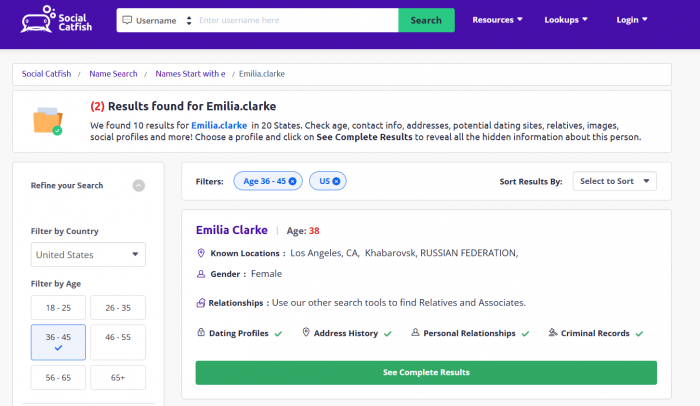
It was also the messiest part of the entire test. Several records clearly belonged to other people who happened to share the name. Some addresses were years out of date, and a handful of the listed relatives seemed connected through old shared households rather than to the person I was actually searching for.
Of roughly eighteen records in the report, about seven matched things I already knew. The rest were outdated, uncertain, or attached to a different person with the same name. Adding the city and age sharpened the report, but it did not scrub out every false match.
This was the moment I stopped judging the tool by how much it displayed. A long report looks impressive, but the page count says nothing about how accurately the records underneath have been connected to the right human being.
Checking the address history
The address lookup returned possible residents, relatives, phone numbers, and older connections to the property. The current-resident information was partly accurate, and the tool also listed a couple of former residents and relatives drawn from older records.
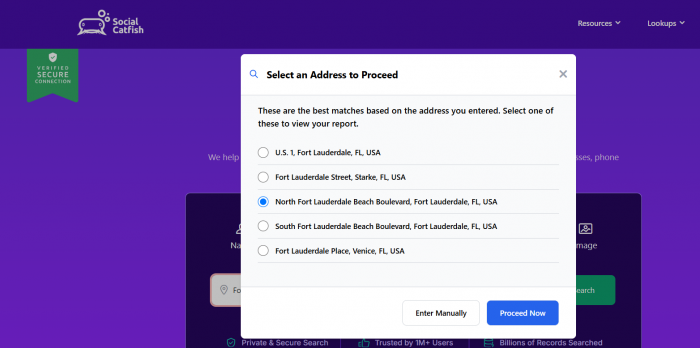
Some of this was genuinely useful, because it backed up details from the name and phone searches. Other parts came from stale records that no longer reflected who lives there now. Address data always has to be read with dates in mind. Someone may have lived at a property years ago, shared it with family, or simply appeared in a record because mail once reached them there.
The address search also made the privacy problem impossible to ignore. It laid out how much personal information can be assembled about a person who has never so much as heard of Social Catfish, let alone created an account.
How I read the final report
Once every search was done, I refused to treat all the matches as equal. I sorted them by how much evidence actually stood behind each one, and that single habit stripped a huge amount of noise out of the report.
Strong results were the ones backed by several matching details at once, where the same photo, an unusual username, a city, and an email pattern all pointed to one person. Useful leads were the older addresses, possible relatives, or profiles that shared a few details but still needed an independent check. Weak results leaned on a single thread: a similar face, a common name, a reused handle, or an out-of-date phone record.
The biggest mistake a user can make here is grabbing the first familiar name or photo and assuming the tool has confirmed an identity. It has not. Social Catfish produces possibilities. Confirming them stays your job.
Pricing and the subscription experience
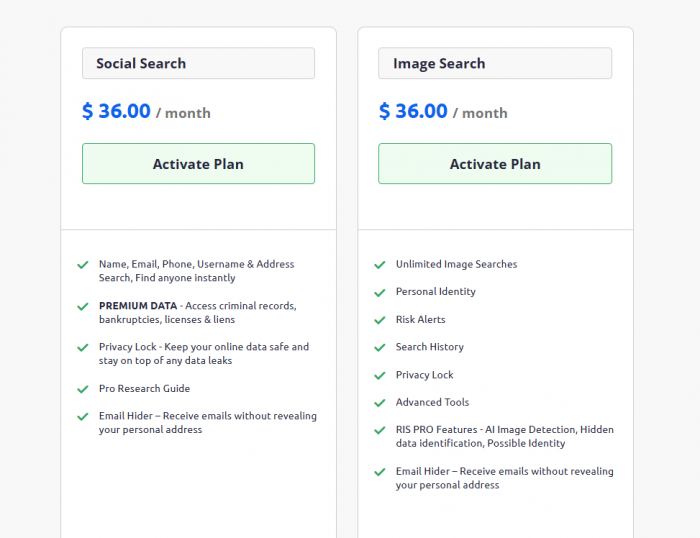
Social Catfish keeps the meaningful detail behind a payment screen. At checkout my test showed the $5.73 five-day introductory window, which then renews into a monthly plan at roughly $36 unless you stop it. I read the terms carefully, because the wording around reports, trials, and recurring access changes what you genuinely end up paying.
Before paying, it is worth confirming every one of these:
● Whether the charge covers a single report or renews automatically on a cycle.
● Whether image lookup and people searches are bundled into the same plan or billed apart.
● The exact date and amount of the next charge, not just the intro price.
● Whether any refund is available once you have opened the report.
● Whether cancelling cuts off access immediately or only at the end of the billing period.
The value comes down to how many searches you actually need. Paying for one uncertain image match feels steep. The subscription starts to make sense only when several phone, email, username, and name searches all need running inside a short window.
I also checked the cancellation process
After the searches, I went into the account settings to find the subscription controls. Cancelling lived under Account, then Plan Details, and it took three steps to complete. The account stayed active until the end of the paid period rather than cutting off the moment I cancelled, and a confirmation email did land afterwards.
Do not skip this step. Anyone testing Social Catfish should screenshot both the checkout terms and the cancellation confirmation, because that record is your only defence if another charge turns up later. And keep one distinction firmly in mind: cancelling your subscription and removing your data are two entirely separate actions. Ending payment does nothing to pull your information out of the search database.
Searching for my own information
The most uncomfortable part of the whole test was turning the searches on myself. The report pulled together past addresses, phone numbers, email addresses, and relatives. Some of it was correct; other parts were several years old. Seeing it all assembled in one place genuinely changed how I felt about the tool.
Social Catfish can help you investigate a suspicious profile, but the exact same machinery can expose the details of people who never agreed to be searched. There is an opt-out process, but removing a report does not delete the underlying information from court files, property databases, public social profiles, or the other data brokers feeding the system. Records can also reappear when those databases refresh, so a self-search is worth repeating from time to time.
Privacy and Data Exposure
The privacy side of Social Catfish became much clearer when I searched my own information. The report pulled together details that existed across different sources, including such as previous addresses, phone numbers, relatives and email accounts.
The concern was not one record appearing online. It was the way several separate details were combined into a single profile. An old address, possible relative, phone number, and email account can reveal far more together than they do individually.
Social Catfish provides an opt-out process, but removing a report does not erase the original information from property records, court files, public profiles, or other databases. Records may also return when those sources are updated.
This makes privacy one of the service’s biggest trade-offs. The same system that helps verify a suspicious identity can also make an ordinary person’s personal history easier for strangers to find.
What worked well
Social Catfish was at its best when I had several details to compare rather than one lonely clue to chase.
● The range of search options let me come at the same identity from several directions at once, which is genuinely hard to do with ordinary web searching.
● The email and username searches connected accounts that a normal Google search would never have surfaced.
● The phone report delivered useful location and history, even with the owner details needing a second look.
● Reverse-image lookup handed me real places to inspect, as long as I did the inspecting myself.
● Searching my own information gave me an honest, slightly unsettling picture of how much of my data was already public.
Its strongest results never closed the case on their own. What they did was show me where to look next, which is a smaller claim than the marketing makes but a genuinely useful one.
Where the results fell short
The core weakness was the absence of a clear line between confirmed information and mere possible association. Everything arrives looking roughly equally credible, and the work of separating the two is left entirely to you.
● Similar faces showed up in image results with no strong identity link behind them.
● Previous phone owners and old addresses were easy to mistake for current information.
● Common names generated reports quietly containing several different people.
● Some profile links were outdated, private, or simply dead.
● The free search revealed too little to judge whether paying was worthwhile in the first place.
● The pricing structure needed careful reading, especially once different search types entered the picture.
None of this makes the tool useless. It makes independent verification non-negotiable.
Who Social Catfish is best for
It suits someone checking a suspicious online identity who already holds several details to work with. If you have a photo, a phone number, a username, an email, and a claimed location that can all be weighed against one another, this is the situation the tool is built for.
It is a poor fit for anyone expecting guaranteed access to private dating accounts, a full criminal background check, or hard proof that a partner is lying. And it should never be the sole basis for a decision about employment, housing, credit, insurance, or anything legal, which is not just my caution but a limit the service itself states.
Final verdict
Social Catfish gave me useful identity clues, but it never handed me a clean confirmed answer. The image search returned possibilities rather than one definitive source. The phone lookup nailed the location but muddied the ownership. Email and username searches were convincing only when several details lined up. The name report held the most information and demanded the most filtering.
Where it earns its place is as a starting point for an investigation. It pulls scattered photos, contact details, usernames, addresses, and public records into one screen, and that genuinely saves time when several clues need checking together. Where it becomes actively unreliable is the moment a single possible match gets treated as proof.
I would use it again to look into a suspicious online profile, as long as I had enough surrounding information to cross-check whatever it returned. I would not use it to accuse anyone, or to make a serious decision, without confirming the findings somewhere independent first.
Comments