

I started Monica AI expecting a simple browser chatbot. It turned out to be something broader. Monica is built around different AI models, browser actions, writing tools, PDF summaries, translation, image tools, video tools, coding support, and agent-style features.
That makes it more useful than a basic AI extension, but also more complicated. Monica works best when you treat it as a browser-based AI workspace, not as one perfect tool for every AI task.
Monica AI Is Built Around More Than Chat
Monica AI is an all-in-one AI assistant for chat, search, writing, summarizing, translating, document work, image generation, video generation, and coding. The important part is that Monica does not rely on only one model experience. It gives users access to different AI models inside one workspace.
That changes how the tool feels. You are not only asking Monica to answer a question. You are choosing how to complete a task. A writing task may need one model. A coding question may need another. A PDF summary may need a stronger long-context model. A creative image prompt may use a completely different image model.
This model-first setup is one of Monica’s strongest points. Many AI tools hide model access behind a simple chat interface. Monica makes model variety part of the product experience.
| Monica Layer | What It Means in Actual Use |
| Text model access | You can use Monica for chat, writing, rewriting, summaries, explanations, research questions, and document-based answers. |
| Browser assistant | You can summarize pages, translate selected text, rewrite content, and ask questions while staying on the same webpage. |
| File and PDF tools | You can upload or read longer documents, ask follow-up questions, and turn dense material into working notes. |
| Creative model access | You can test image generation, image editing, video generation, and animation-style features without opening a separate creative platform. |
| Coding support | You can use Monica for code explanation, snippets, debugging help, and technical questions when you need quick assistance. |
| Agent and automation tools | You can access heavier features such as Deep Research, Browser Operator, and slide creation, though these matter more for advanced users. |
This is the right way to understand Monica. It is not just a chatbot with extra buttons. It is a browser assistant wrapped around a model hub.
The First Experience Feels Busy, but There Is a Reason
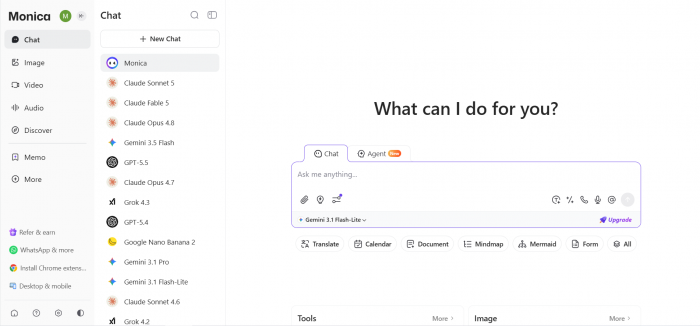
Monica does not feel minimal when you first open it. There are many tools, shortcuts, model choices, writing options, document tools, creative features, and browser actions. If someone wants one clean chat box, Monica may feel crowded at first.
But the design starts making sense once you use it during a normal work session. Most users do not work in one place. They move between Google search, articles, emails, PDFs, YouTube videos, product pages, social platforms, and notes. Monica is built for that scattered workflow.
The browser extension is the best example. Instead of copying text from a page, opening a separate AI tool, pasting the text, and writing a prompt, Monica lets you work directly on the content in front of you.
The early experience is best described like : Monica AI feels crowded at first because it opens with many tools, model choices, and browser actions. But once you use it on real webpages, the layout starts to make more sense. It is best suited for people who switch between reading, writing, research, translation, and documents during the day. The interface is heavier than ChatGPT or Claude, but it gives more AI browsing actions in one place.
The Model Switcher Is Not a Small Feature
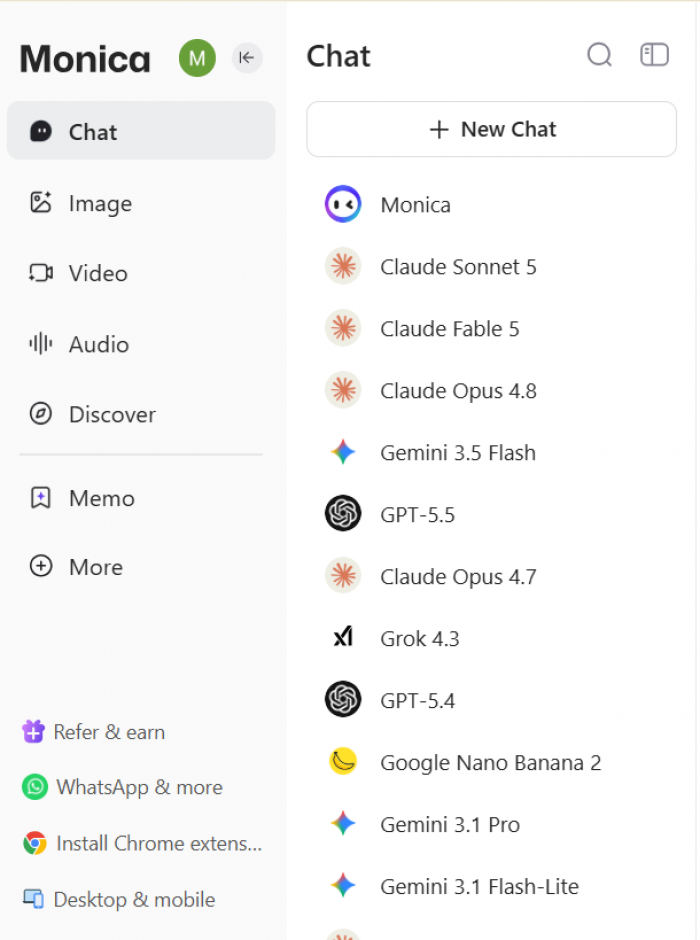
The different AI models inside Monica deserve a proper section because they are central to the user experience. Monica is not only about asking a question and getting one answer. It lets users choose models depending on the task.
This matters because different models produce different results. A fast model may be enough for a quick summary. A stronger reasoning model may be better for research or technical explanations. A writing-focused model may produce cleaner article sections. A coding model may handle programming questions better. Image and video models are used for creative tasks rather than text work.
The model switcher gives Monica a different feel from a normal browser extension. It turns the tool into a small AI control panel.
A practical model workflow can look like this:
● Use a faster model when you only need a quick page summary, short explanation, or simple rewrite.
● Use a stronger text model when you are working on long-form writing, detailed research, or a complex document.
● Use a coding-focused model when you need help with scripts, errors, SQL, Python, or technical explanations.
● Use an image model when you want a quick blog visual, thumbnail idea, concept image, or creative direction.
● Use a video model only after testing it carefully because video generation can use more credits and may not always produce polished results.
This is useful, especially for people who already use multiple AI tools. Monica reduces the need to keep switching between separate platforms.
But model access also creates one important caution. Advanced models and heavier tools can use advanced queries or credits. So the model switcher is powerful, but it is not the same as unlimited access to every model at all times.
Browser Use Is Still Monica’s Best Daily Feature
Even with all the model options, Monica’s strongest everyday use case is still the browser workflow.
This is where the tool feels most natural. You are already reading a page, checking a source, writing a reply, or translating a paragraph. Monica appears beside that work and gives you quick actions.
The best Monica moments are small but frequent. It helps when you are reading something long and want the main point. It helps when a paragraph is too technical. It helps when you want to rewrite an email without opening another app. It helps when you want to translate a section quickly.
For normal users, this is more valuable than flashy features. A tool that saves five minutes many times a day can become more useful than a tool with one impressive demo.
Monica’s browser assistant works best when you are already doing something online, such as reading a long article, checking a competitor page, writing a reply, simplifying technical content, translating a foreign-language page, or collecting research notes. Instead of making you copy text into a separate chatbot, it brings AI help directly into the browsing flow. That is where Monica feels most useful: it supports the work you are already doing without forcing you to leave the page.
Writing Quality Depends on the Model and the Prompt
Monica can help with emails, outlines, article sections, captions, product descriptions, marketing copy, replies, grammar checks, and rewrites. The writing tools are useful, but they are not magic.
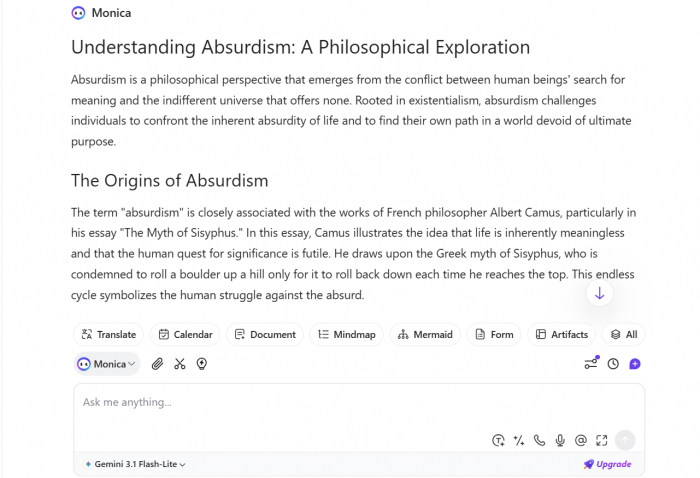
The output depends on two things: the model you choose and the prompt you give. If you give Monica a weak prompt, the result can sound like standard AI writing. If you give it a clear task, audience, tone, and purpose, the output becomes much more useful.
For example, asking Monica to “write a blog intro” may produce a generic result. Asking it to “write a short, direct intro for a hands-on review of Monica AI, focused on browser workflow and model access, without hype” will usually give a better result.
Monica is most useful for writing when you already have rough notes, page summaries, PDF points, or a basic idea that needs to be shaped into cleaner content. It can help rewrite weak paragraphs, reduce repetition, suggest titles and intro angles, create caption variations, draft quick email replies, and turn research notes into a usable outline. It is also helpful when a technical section needs to sound simpler without losing its original meaning.
The weaker side appears when you expect Monica to create a full polished article without direction. The structure may look fine, but the voice can feel flat. The wording may be correct, but not personal enough. The article may need stronger examples, better transitions, and manual fact-checking.
My writing verdict is simple. Monica is good for drafts, rewrites, outlines, and short copy. It is not a replacement for editing, judgment, or a human writing style.
Research Is Helpful, but Verification Still Belongs to You
Monica can summarize pages, answer web-related questions, compare information, and support deeper research workflows. For early research, this is useful. It helps you understand a topic faster and decide what needs deeper reading.
For writers, Monica can be helpful during the messy first stage of research. You can ask it to summarize a page, identify key claims, explain a concept, or turn information into notes. For students, it can explain difficult material. For marketers, it can compare product pages or collect content angles.
But Monica should not be treated as final proof. This matters for pricing, laws, health topics, finance, product policies, software features, and news. AI summaries can miss dates, conditions, exceptions, and small details that change the meaning.
A better research workflow with Monica looks like this:
● Use Monica to understand the broad topic before reading the original source in detail.
● Ask Monica to separate main claims from supporting details so you know what needs checking.
● Use Monica to find possible content gaps, but verify every important fact manually.
● Let Monica help you create research notes, but do not treat those notes as final evidence.
● Check official pages, pricing pages, policy pages, and original sources before publishing.
This is the right balance. Monica can make research faster, but it should not make the user careless.
PDF, YouTube and Long Documents Feel Practical
Monica becomes more valuable when the source material is long. PDFs, reports, tutorials, policy pages, and long videos take time to process. Monica can help turn them into summaries, notes, and follow-up answers.
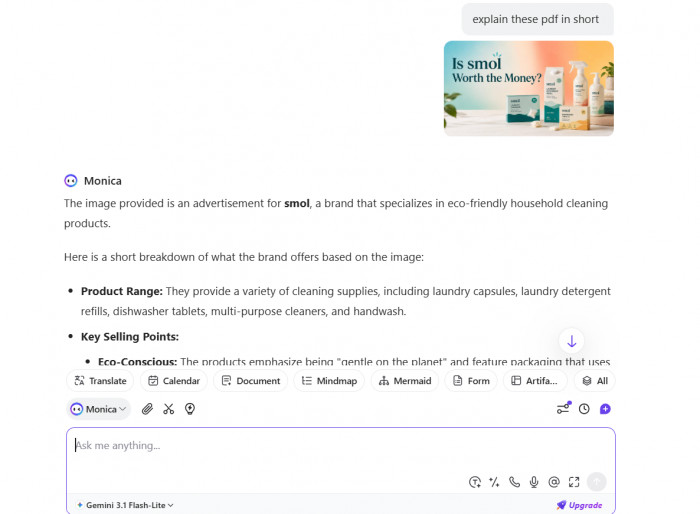
This is one of the most practical areas of the tool. A student can summarize study material. A content writer can extract points from a report. A marketer can turn a video into notes. A professional can scan a long document before deciding which section needs attention.
The quality depends on how the user asks. A general summary is useful, but a targeted instruction is better.
Better long-content prompts work best when they ask Monica to explain the main argument clearly, pull out useful numbers and claims, and identify which parts are relevant for an article, review, or comparison. You can also ask it to turn a PDF or YouTube video into structured notes, then flag any points that should be verified before using them publicly.
That style gives better results because Monica is not only compressing content. It is reading with a purpose.
Still, summaries can miss context. Tables, footnotes, pricing conditions, disclaimers, and technical details should always be checked in the original file.
Creative Tools Are Useful, but Not Monica’s Main Strength
Monica includes image and video features, which makes the platform look broader than a normal writing or research assistant. Users can create images, edit visuals, test animations, and use video-related features depending on the available models and plan.
These tools are useful, but they should be treated as extras. Monica can help with rough visuals, thumbnail ideas, moodboards, social concepts, and quick experiments. It is not the first tool I would choose for professional image control or polished video production.
Creative work also connects closely with credits. Image generation, video generation, and advanced creative models can consume credits faster than basic text tasks. This is important because a user who mostly rewrites text may feel the plan is enough, while a user who generates many images or videos may hit limits quickly.
Monica’s creative tools are best for:
● Testing visual ideas before moving to a dedicated design or video platform.
● Creating rough blog image concepts, social post ideas, or thumbnail directions.
● Exploring image styles when the final output does not need perfect brand control.
● Trying video or animation features as experiments rather than finished production.
● Keeping light creative work inside the same AI workspace instead of opening another tool.
The creative tools add value, but they are not the main reason I would recommend Monica. The core value is still browser productivity and model access.
Pricing Needs a Careful Read
Monica’s pricing should not be judged only by the plan price. The real cost depends on basic queries, advanced queries, extra advanced credits, and which features consume those credits.
At the time of review, Monica’s free plan listed 40 basic queries per day. The Pro plan included 5,000 basic queries per month, 200 advanced queries per month, and 1,500 extra advanced credits. Higher plans such as Max and Ultra offered larger limits and more credits, but still came with usage rules.
Monica also sells extra advanced credits, with top-ups such as 4,000 credits for US$10, 12,000 credits for US$30, and 40,000 credits for US$100. Its annual pricing page has shown tiers such as Pro at US$99 per year, Max at US$199 per year, and Ultra at US$995 per year.
| Pricing Detail | Why It Matters Before Paying |
| Basic queries are enough for lighter work, but they do not cover every advanced use case. | Users who mostly summarize pages, rewrite text, and ask simple questions may find the limits easier to manage. |
| Advanced queries matter when you want stronger models or heavier model use. | Users who choose advanced models often should watch how quickly the monthly allowance moves. |
| Extra advanced credits matter for image generation, video generation, agents, enhanced PDFs, and long-context work. | Users who want Monica for creative work or deep document tasks should calculate cost based on credits, not only plan price. |
| Credit top-ups can increase the real cost beyond the subscription. | Monica may feel affordable for light use, but heavier creative or advanced model use can make top-ups more relevant. |
| Annual pricing can look attractive, but the usage rules still matter. | Users should test the free plan before committing to a longer billing cycle. |
My advice is simple - Do not upgrade just because the feature list looks long. Test the exact models and tools you will use. If your main work is summaries, rewrites, translation, and basic chat, Monica may feel reasonable. If you use advanced models, agents, long PDFs, image generation, video generation, and deep research often, credits become a major part of the decision.
User Reviews Show Two Different Monica Experiences
Public feedback around Monica is mixed, but the pattern is useful.
Users who like Monica usually talk about convenience. They like having a browser assistant, writing helper, translator, summarizer, and model switcher in one place. This matches the way Monica works best.
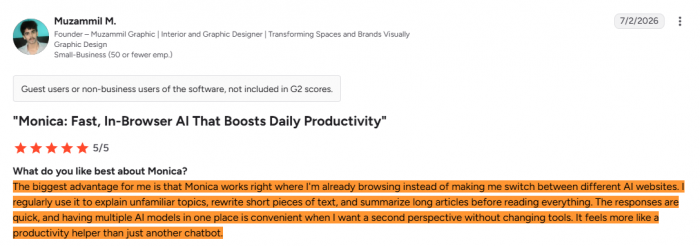
Users who complain often mention limits, pricing, billing expectations, support, technical issues, or paid-feature frustration. This also makes sense because Monica’s feature list can create high expectations. When users see many models and tools, they may expect unlimited access or perfect performance across every area.
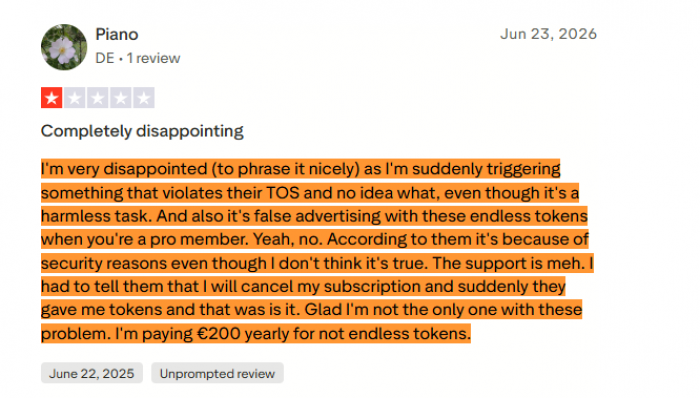
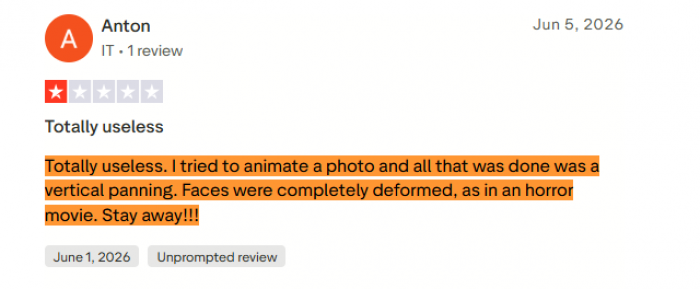
The review pattern can be understood like this:
● Browser users are more likely to appreciate Monica because summaries, rewrites, translations, and selected-text actions fit naturally into daily work.
● Writing users often find Monica helpful for drafts and quick edits, but still need to revise long-form content manually.
● Creative users may like having image and video tools inside the platform, but may be less satisfied if they expect dedicated-tool quality.
● Paid users are more likely to notice limits because advanced models, credits, and heavier tasks become part of the experience.
● Users who need support or refunds may be more sensitive to billing clarity and response time.
This is why Monica should be reviewed carefully. It can be very useful for the right workflow, but it can disappoint users who expect one subscription to replace every AI platform.
Privacy and Sensitive Work Need Attention
Monica works across browsing, prompts, files, PDFs, translations, images, and generated content. That makes privacy important.
For public research, draft writing, webpage summaries, translation, and non-sensitive PDFs, Monica can be useful. For private client documents, legal files, financial records, medical content, unpublished company documents, or internal business reports, users should be more careful.
This is not only a Monica issue. Any AI tool that processes uploaded files and prompts creates privacy questions. But Monica encourages users to work across many surfaces, so users need a clear rule.
Do not upload anything you would not be comfortable processing through a third-party AI service. If a file contains confidential, personal, legal, financial, or client-sensitive information, review the privacy terms first or use a safer internal workflow.
Pros and Cons After Real Use
| What Monica Does Well | Where Monica Falls Short |
| Monica brings multiple AI models into one browser-based workspace, which is useful for users who do not want to keep switching between separate tools. | The model access is tied to queries and credits, so users need to understand the limits before treating it like an unlimited AI hub. |
| The browser sidebar is genuinely useful for summaries, rewriting, translation, selected-text actions, and quick explanations while reading. | The interface can feel crowded because Monica combines models, chat, writing, files, images, videos, agents, and browser tools in one product. |
| The writing tools are helpful for rough drafts, cleaner rewrites, email replies, outline ideas, captions, and quick copy improvements. | Long-form writing still needs human editing because broad prompts can produce safe and generic output. |
| The PDF, YouTube, webpage, and file tools are useful for turning long content into workable notes. | Summaries can miss small but important details, especially in tables, footnotes, policies, and technical documents. |
| The creative tools are convenient for rough visuals, idea testing, and quick image or video experiments. | Dedicated creative platforms are still better when the user needs polished control, consistent visuals, or professional production quality. |
Best Use Cases for Monica AI
Monica is best for users who spend most of their workday in a browser and want AI help close to the page they are using. It is useful for people who read a lot, write short-form content, summarize sources, compare pages, translate text, check PDFs, and need quick explanations while working online.
For content writers, Monica can help with competitor scans, article outlines, paragraph rewrites, summary notes, title ideas, and source breakdowns. It works well during the messy research and drafting stage, not as a replacement for final editing.
For students, Monica can help summarize PDFs, understand difficult text, extract notes from videos, and explain study material in simpler language. The best results come when students ask Monica to explain concepts and organize notes, not when they use it to avoid learning the material.
For marketers, Monica is useful for email drafts, social captions, ad variations, campaign notes, product descriptions, and quick research. It can produce options fast, but the final message still needs brand judgment.
For professionals, Monica is most useful as a speed tool for low-risk tasks. It can summarize, rewrite, translate, and clarify. It should not be the only tool used for high-stakes decisions.
Who Should Skip Monica AI
Monica is not ideal for users who want one clean chatbot with no model choices, no credits, and no extra features. ChatGPT or Claude may feel simpler for that type of user.
It is also not the best fit for people who need research with strong source visibility as the main feature. A research-first tool may feel more focused.
Users who mainly want AI image or video generation should test Monica carefully before paying. The creative models are convenient, but Monica’s strongest identity is still browser productivity and model access, not professional creative production.
Users who dislike usage limits should also be cautious. Monica can feel powerful because it shows many models and tools, but advanced usage is controlled through queries and credits.
Final Verdict
Monica AI works best when reviewed as a multi-model browser workspace, not just another AI assistant. Its main value is convenience: users can move between text models, writing tools, research help, PDF summaries, creative tools, coding support, translation, and browser actions from one place.
The browser sidebar, selected-text actions, page summaries, model switching, PDF support, and YouTube summaries can save real time in daily work. But Monica also has clear limits. The interface can feel busy, the credit system needs attention, and creative tools may not replace dedicated image or video platforms.
My advice is to test Monica with your real workflow before paying. Try the browser sidebar, different models, one non-sensitive PDF, and any creative feature you actually need. If it saves time inside your browser every day, it can be worth paying for. If you only need one clean chatbot or one specialist tool, Monica may feel broader than necessary.
Comments