

Oxaam promises access to more than 100 premium digital services from one dashboard. That includes AI tools, design platforms, cloud storage, productivity software, streaming subscriptions and security services. The offer sounds almost too convenient, so I signed up, explored the available tools and tested how one paid AI product, Research AI, was actually delivered.
The tool worked, but the experience was not the same as buying a subscription directly. Oxaam gave me login credentials for an existing account. That made the service useful for quick testing, but it also raised questions about account ownership, privacy, stability and what happens when the supplied password stops working.
What Oxaam Actually Is
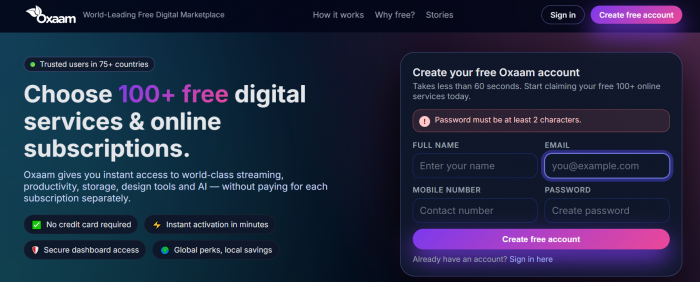
Oxaam describes itself as a digital marketplace that brings premium subscriptions and online tools into one account. Its public homepage claims more than 100 services across streaming, productivity, storage, design, AI and security. It also says registration is free, takes less than 60 seconds and requires no credit card.
That description is accurate at the dashboard level. Oxaam is a catalogue and access layer. It does not build most of the tools listed on the site. Instead, it gives users a route into third-party services through shared credentials, managed accounts, organisation seats or other activation methods.
This distinction matters because the Oxaam account and the premium tool account are often two separate things. I controlled the email and password used to enter Oxaam, but I did not necessarily control the login identity supplied for the service I selected.
The public site also makes several scale claims, including two million users and 95 million monthly page visits. Those figures are presented by Oxaam without a visible explanation of how they were measured, so I treated them as marketing claims rather than independently verified usage data.
Signing Up for Oxaam
The registration process was straightforward. Oxaam asked for my full name, email address, mobile number and a password. I did not have to enter card details during signup. Once the account was created, I could return to the login page and enter the email and password I had chosen.
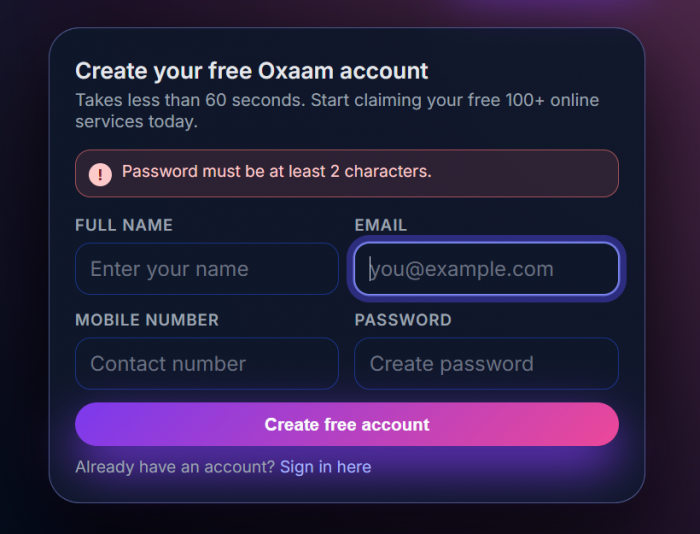
The public login page promises one-click access to more than 100 services, premium plan management, instant account upgrades and 24-hour Telegram support.
From a usability perspective, Oxaam gets the first stage right. The form is short, the purpose of the website is obvious and I did not have to complete a long onboarding questionnaire before seeing the dashboard.
The first transparency problem also appears here. Oxaam collects a mobile number as part of registration, but I did not find a clearly linked public privacy policy on the homepage or login page explaining why that number is needed, how long it is stored or how a user can request deletion. The visible footer provides support email addresses, but not detailed account or data-management controls.
What I Found in the Dashboard
After signing in, the dashboard presented a mix of tools and subscription-based services. The broad categories matched the public website: AI assistants, design tools, office and productivity services, cloud products, streaming platforms and security tools.
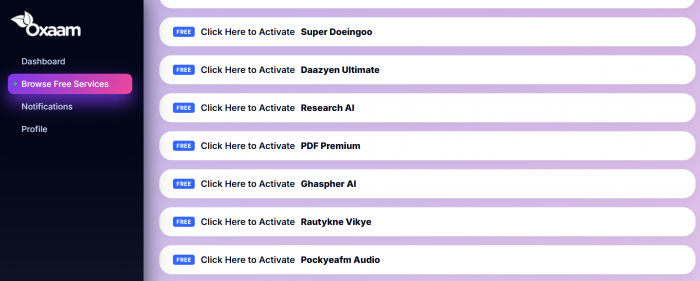
The important detail is that every listing should not be interpreted in the same way. Some tools may be available without payment. Others sit behind paid access or an upgrade. The login page itself refers to both free tools and premium plans, even though the main homepage strongly promotes free access.
Availability can also change. A service shown today may be removed, replaced or temporarily unavailable later. One Trustpilot reviewer specifically mentioned that a previously available service had been removed, while another said password changes by users caused access problems. Those reviews are personal reports rather than verified technical records, but they fit the shared-account model visible across Oxaam discussions.
The dashboard is therefore better understood as a changing access catalogue, not a permanent bundle in which every listed product is guaranteed to remain available.
How Paid Tool Access Works
The most revealing part of the test was seeing how a paid product was delivered.
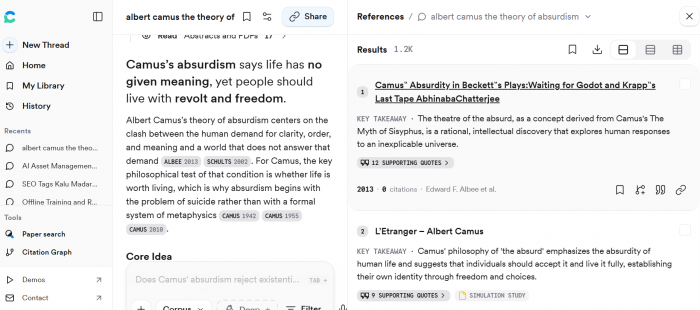
When I opened a premium tool inside Oxaam, I was not always asked to create a new account with the original provider. For the Research AI test, Oxaam displayed login access that included an email address and password. I copied those details, opened the Research AI website and signed in using the supplied account.
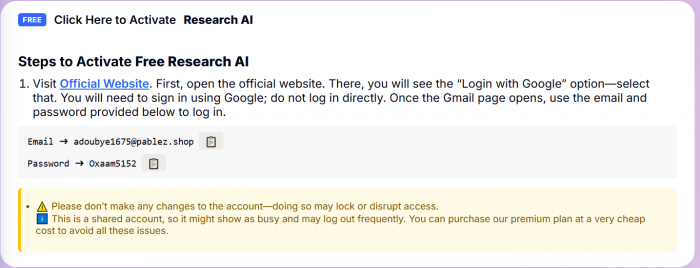
The workflow looked like this:
| Step | What I did | Who controlled the account |
| 1 | I signed in to Oxaam with my own email and password. | I controlled the Oxaam profile. |
| 2 | I browsed the dashboard and selected Research AI. | Oxaam controlled the listing and access instructions. |
| 3 | Oxaam displayed an account email and password. | The supplied account remained controlled by Oxaam or another account owner. |
| 4 | I opened Research AI and entered the supplied credentials. | I could use the tool but did not own its login identity. |
| 5 | I tested the available paid features and then saved important output elsewhere. | Continued access depended on the credentials remaining valid. |
This method is fast. I did not have to pay Research AI directly, enter billing information or wait for an account upgrade. Within a few steps, I was inside the paid version.
It also explains the largest limitation of Oxaam. The account was accessible to me, but it was not created in my name. I could not treat the email, password or recovery settings as my own. Changing them could lock out other users or interfere with the way Oxaam manages access.
Oxaam may use different methods for different products. User reports describe shared credentials, OTP-dependent logins and seats inside limited team accounts. A recent Trustpilot reviewer alleged that their Claude access was repeatedly removed from a team and restored only after contacting support. A Reddit user who said they purchased a $25 yearly combo plan reported that OTP codes stopped working and sessions were logged out after about a month. These claims are not independently verified, but they show why buyers should ask how each tool is delivered before paying.
My Research AI Test
I used Research AI as a practical example because it was listed as a paid tool and Oxaam provided the credentials needed to enter it.
The process began inside Oxaam. I signed in, located Research AI among the available tools and opened its access page. The page provided a ready-made email address and password rather than asking me to connect my personal email to a new premium plan.
I then opened Research AI separately and entered those details. The login worked, and I reached the paid interface. I ran a normal research query, checked how the tool responded and confirmed that I could use the functions available through the supplied account.
The experience showed that Oxaam can deliver real, usable access. It was not merely a listing that redirected me to a normal free trial. I could enter the product with credentials supplied by Oxaam and use the account without purchasing the subscription directly.
At the same time, I changed how I used the tool because the account did not belong to me. I avoided entering private client information, unpublished work, personal documents or anything I would not want stored in an account controlled by someone else. I also did not change the profile, password or recovery information.
I saved useful notes outside Research AI rather than depending on its account history. If the password changed, the account was removed or Oxaam replaced it, work stored only inside that login could become inaccessible.
This is the practical difference between testing a premium tool and owning a premium subscription. Oxaam succeeded at the first. It did not provide the control associated with the second.
Did the Paid Access Feel Genuine?
The Research AI account opened and its paid functions were available during my test. That is a positive result. Oxaam did what it promised at the most basic level: it gave me access to a product I had not subscribed to directly.
However, one successful session does not answer every reliability question. A supplied login can work perfectly today and fail later because the password changes, the provider requests verification or too many users enter from different locations.
The plan label should also be checked inside the original product whenever possible. A listing may use words such as premium, pro or max, but the actual account settings and usage allowance reveal what is really available.
This is particularly important for AI services because higher plans are often defined by message limits, model access, file capacity or team permissions rather than by a visibly different interface. An account can look premium while offering lower limits than the buyer expected.
Oxaam Pricing
Oxaam’s pricing is organised around category-specific bundles rather than separate subscriptions for every service. The pricing page currently shows four individual packs, each available for three or 12 months, along with a yearly combo covering all 22 listed services.
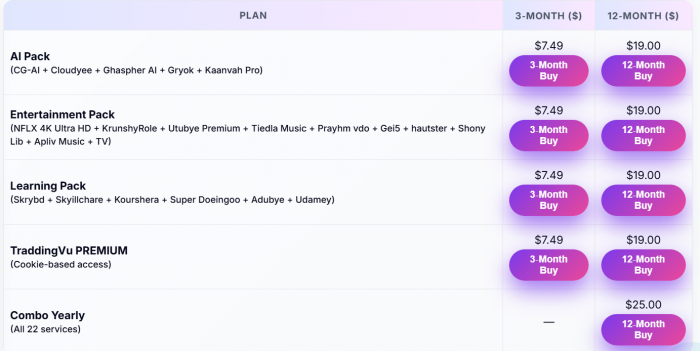
The $25 Combo Yearly plan offers the strongest value on paper because it includes all 22 listed services. However, these are not always personal subscriptions. Access may be delivered through shared login details, team accounts or cookies, so users should confirm the access method, replacement policy and refund terms before paying.
User Experience
Oxaam’s strongest UX decision is putting different kinds of tools in one place. I could enter one dashboard, browse several categories and find an AI product without visiting multiple pricing pages.
The experience becomes less smooth once I leave Oxaam. Every service can have a different login method, set of rules and failure point. One tool may provide an email and password. Another may require an OTP. A third may depend on a team invitation.
That creates a fragmented workflow hidden behind a simple dashboard. Oxaam looks like one subscription manager, but the user is really moving between several externally controlled accounts.
The interface would be more trustworthy if every listing displayed five details before activation: access method, exact plan, number of users, expiry date and recovery procedure. Those details are more valuable than a broad “premium” badge.
Privacy and Account Safety
Privacy is the area where I would be most careful.
Oxaam’s own signup form collects a name, email address, mobile number and password. Its public pages explain the categories of service available but do not prominently show a detailed privacy policy, deletion process or public terms covering managed credentials.
The supplied tool accounts create a second layer of risk. When Oxaam gives a user an existing email and password, it is reasonable to assume that the user does not have exclusive control unless Oxaam explicitly states otherwise. That creates possible exposure of search history, saved chats, uploaded documents, preferences or usage limits.
I did not see evidence that someone actively viewed my Research AI activity. The concern comes from the account structure, not from a confirmed privacy incident.
For that reason, I would follow three rules:
● Use Oxaam only for prompts and files that would not cause harm if the account were viewed or lost.
● Never reuse the Oxaam password on email, banking, cloud storage or another important account.
● Export useful results locally instead of treating a supplied premium account as permanent storage.
I would not connect a primary Google account, business drive, payment card or confidential workspace to credentials supplied by a third party.
Reliability and Support
Oxaam advertises 24-hour Telegram support. That support channel becomes especially important when the user cannot reset the supplied account independently.
Public feedback is sharply divided. Positive reviewers say they received working access to tools such as Canva and Grammarly. Negative reviews describe password changes, team-seat removal, failed logins and delayed restoration.
Trustpilot currently shows 925 reviews as of July 2026. More importantly, Trustpilot has made the company’s rating unavailable because of a guidelines breach and says it removed a number of fake reviews. Trustpilot also states that it does not fact-check individual review claims.
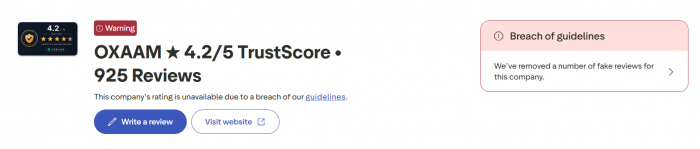
That warning does not prove every positive review is false or every negative review is correct. It means the headline rating cannot be used as a clean trust signal.
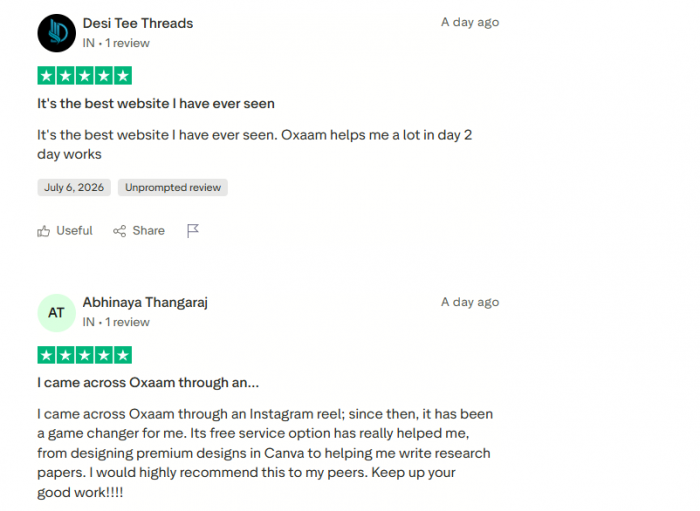
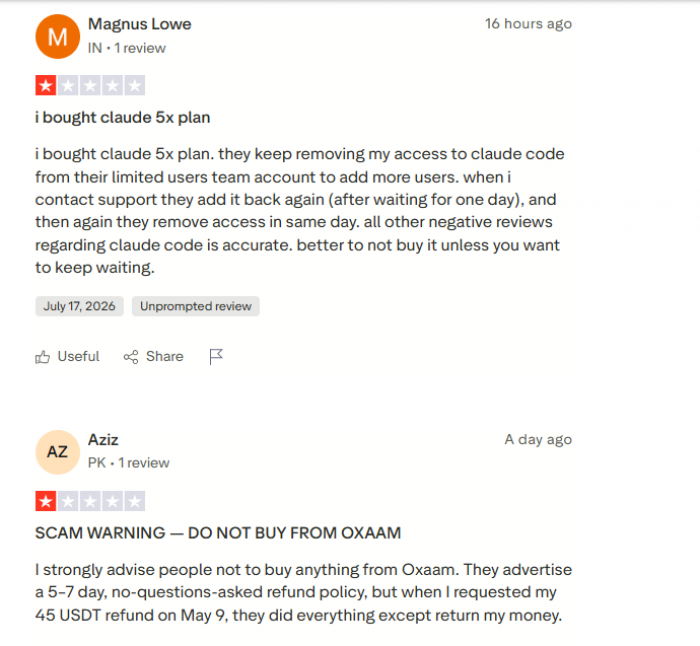
The above two images shows what the real users says about Oxaam in Trustpilot.
My test supports a balanced reading. Oxaam can provide working access. The unresolved question is how consistently it can maintain that access over weeks or months.
Where Oxaam Makes Sense
Oxaam is most useful as a testing service. It can help someone explore a premium interface before deciding whether the official subscription is worth paying for.
Reasonable use cases include trying an AI tool with non-sensitive prompts, testing a design platform for a temporary project, comparing several services or using entertainment access where losing history would not matter.
It is less suitable for ongoing professional work. A writer storing client research, a developer keeping proprietary code, a student building a dissertation or a company handling confidential files needs an account with personal recovery and predictable access.
The service is also a poor fit for anyone who expects a heavily discounted account to behave exactly like an official individual subscription.
Pros and Cons
| Pros | Cons |
| The signup and dashboard are simple enough for a first-time user. | Public pricing, terms and access methods are not explained clearly enough. |
| Oxaam gave me working access to Research AI through supplied credentials. | The Research AI account did not belong to me and could not be treated as private storage. |
| The service can reduce the cost of testing several premium tools. | Shared or managed accounts may fail because of password changes, OTP requests or seat removal. |
| Multiple categories are available from one Oxaam profile. | Support becomes part of routine account access rather than only an emergency option. |
| Some users report receiving useful free and paid services. | Trustpilot has removed fake reviews and made Oxaam’s rating unavailable. |
My Oxaam Rating
| Category | Rating | Reason |
| Signup and navigation | 7/10 | Fast registration and an understandable dashboard. |
| Tool variety | 8/10 | A broad catalogue across AI, design, productivity and entertainment. |
| Access experience | 6/10 | Research AI worked, but the supplied login was not mine. |
| Pricing transparency | 3/10 | No complete public comparison of plans, access types and refunds. |
| Privacy | 3/10 | Shared or managed credentials are unsuitable for sensitive work. |
| Reliability | 4/10 | Access can work, but public reports show repeated login and seat problems. |
| Trust | 3/10 | Limited company transparency and a Trustpilot guidelines warning. |
| Overall | 4.5/10 | Useful for testing, difficult to trust for important work. |
Verdict
Oxaam is not a conventional subscription store. It is an access marketplace that can place users inside premium services through accounts, passwords, team seats or other activation methods controlled by someone else.
My Research AI test worked. I signed in to Oxaam, found the tool, received an email and password, entered the paid Research AI account and used its available functions. That confirms that Oxaam can deliver genuine access rather than merely advertising tools that lead back to free signup pages.
The limitation is ownership. I did not control the Research AI account, its recovery options or its long-term availability. That made the tool suitable for a low-risk test but unsuitable for confidential research or work I needed to preserve.
Oxaam can be useful for people who understand that trade-off. It is a cheap way to explore premium software, not a dependable replacement for owning the subscription. I would use its free access for temporary experimentation, avoid uploading private material and hesitate before buying a long plan without written details about the account type, limits, replacement process and refund policy.
The platform’s value is real while the login works. Its risk begins when the user mistakes access for ownership.
Comments