

Conker AI is easy to understand from the outside. It promises to help teachers create quizzes faster. But a quiz generator should not be judged by how quickly it produces questions. It should be looked at to see whether those questions are accurate, usable, editable, and suitable for real students.
That is the area I used while testing Conker AI. I did not look at it as a general AI tool. I looked at it as a teacher would: can it help me prepare a quiz without creating more checking work later?
What I Wanted to Find Out
Conker AI is built around one clear use case: helping teachers generate quizzes and classroom assessments. That sounds useful, but the actual value depends on the quality of the output.
A weak AI quiz can still look polished. It may have proper formatting, multiple-choice options, and an answer key, but still fail as a classroom resource if the questions are too easy, too broad, poorly worded, or not aligned with the lesson.
So I tested Conker AI around practical teaching questions:
| Test Area | What I Checked | Why It Matters |
| Topic-based quiz generation | Whether it could create a quiz from a simple topic | This is the most common use case for busy teachers |
| Reading-based quiz generation | Whether it could turn a short passage into questions | This tests whether the tool can stay close to source material |
| Grade-level control | Whether different grade levels changed the output properly | A Grade 4 quiz and Grade 9 quiz should not feel the same |
| Editing experience | Whether weak questions could be improved easily | AI output is rarely perfect on the first try |
| Classroom workflow | Whether the quiz could be shared or exported | A quiz generator is only useful if the quiz can be used with students |
| Privacy and safety | Whether the tool should be trusted with classroom use | Student-related tools need more caution than normal AI apps |
I also looked at pricing, real user feedback, and alternatives, but the main focus of this review is the hands-on experience.
What Conker AI Actually Does
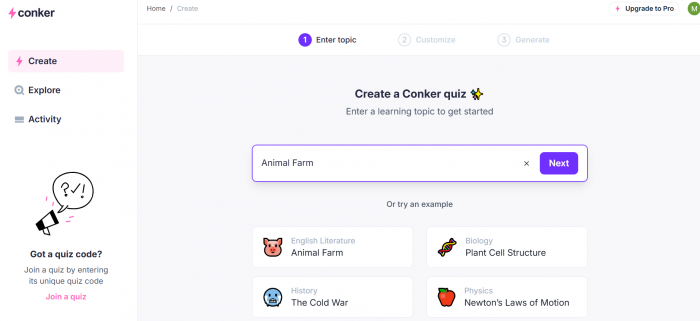
Conker AI is an AI quiz and assessment generator. Teachers can use it to create quizzes from topics, reading material, or classroom needs. It supports different question formats and is designed mainly for K-12 teaching workflows.
The important thing is that Conker AI is not a full learning platform. It is not trying to replace a complete LMS, gradebook, or student analytics system. Its job is narrower: help teachers create quiz drafts faster. That focus is both its strength and its limit.
It is strong because the workflow is simple. You do not need to learn a large platform just to create a quiz. It is limited because teachers who need deep test design, advanced reporting, or complex assessment control may find Conker too basic.
The best way to describe it is this: Conker AI helps with the first draft of a classroom quiz. It does not remove the need for teacher review.
Test 1: Creating a Simple Topic Quiz
I started with a simple science quiz because this is probably how many teachers would first test the tool.
Quiz setup I used:
Grade 6 science quiz on photosynthesis, 10 questions.
This was a basic setup, but it gave Conker enough information to work with: subject, topic, grade level, and number of questions.
The result was quick and organized. The quiz covered the expected ideas: sunlight, carbon dioxide, water, oxygen, glucose, leaves, and chlorophyll. For a Grade 6 classroom, the wording was mostly simple and easy to understand.
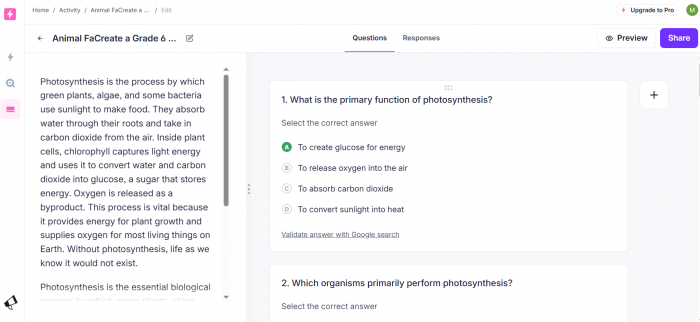
That was the good part. The tool understood the topic and produced something that looked like a real classroom quiz, not random AI text.
The weaker part was the depth of the questions. Several questions felt like direct recall. That is not automatically bad, especially for younger students or a quick lesson check. But if the goal is to test understanding, some questions would need editing.
For example, a basic question might ask what plants need for photosynthesis. That checks memory. A stronger question would ask why sunlight is important in the process or what might happen if one part of the process were missing.
The answer choices were also a mixed result. Most were clear, but some incorrect options felt too easy to eliminate. In a multiple-choice quiz, weak distractors reduce the value of the question because students can guess by removing obviously wrong answers.
My takeaway from this test was that Conker AI can create a usable first draft very quickly. For a short revision quiz or exit ticket, the output would be helpful. For a graded assessment, I would not use it without editing.
Test 2: Turning Reading Material Into a Quiz
The second test was more important because many teachers do not want generic topic questions. They want questions based on a specific passage, worksheet, chapter, or lesson note.
I used a short passage about the water cycle.
Input passage:
The water cycle describes how water moves around Earth. Water from oceans, lakes, and rivers evaporates when heated by the sun. The vapor rises, cools, and forms clouds through condensation. When clouds become heavy, water falls back to Earth as rain, snow, sleet, or hail. This process is called precipitation.
Quiz setup I used:
Grade 5 quiz from the passage, with mixed question types.
This test gave a better picture of Conker’s real classroom value. A broad-topic quiz is easier for an AI tool because it can pull from general knowledge. A reading-based quiz has to stay close to the text.
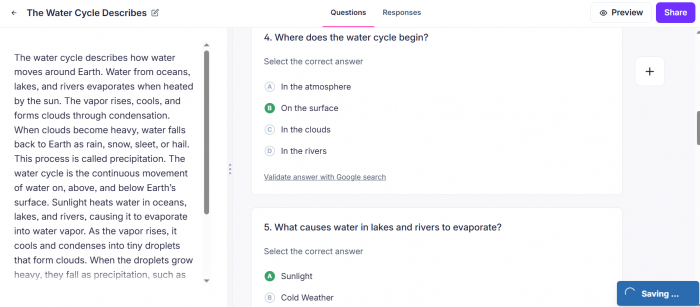
Conker did reasonably well here. The generated questions focused on the main ideas from the passage: evaporation, condensation, precipitation, and the movement of water around Earth. It did not drift into unrelated science facts, which is important.
The output would work well as a reading comprehension check. A teacher could use it after students read the passage to see whether they understood the basic sequence of the water cycle.
Still, most of the questions were built around recall. They checked whether students could identify terms and remember what each stage means. That is useful, but it is not the same as deeper understanding.
A stronger quiz would include at least one or two questions like:
● Why does condensation happen after evaporation?
● How are evaporation and precipitation connected?
● What would happen to the water cycle if there were no heat from the sun?
These questions ask students to explain relationships, not just repeat definitions.
That is where Conker AI needs teacher involvement. It can pull useful questions from a passage, but teachers may need to add reasoning-based questions depending on the lesson goal.
For simple comprehension, the result was good. For deeper learning, it needed improvement.
Test 3: Checking Grade-Level Control
Next, I wanted to see whether Conker could adjust the quiz based on grade level. This matters because a tool that ignores grade level is not very useful for teachers.
I used two similar quiz setups.
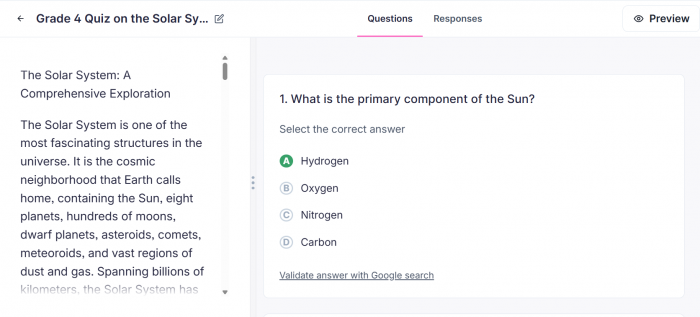
Quiz setup 1: Grade 4 quiz on the solar system.
Quiz setup 2: Grade 9 quiz on the solar system with more challenging questions.
The Grade 4 version used simpler wording and focused on basic facts: planets, the Sun, Earth, the Moon, and simple space concepts. That made sense for the level.
The Grade 9 version was more advanced. It included more complex ideas and slightly more mature wording. It felt less like a simple fact quiz and more like a middle or early high school review.
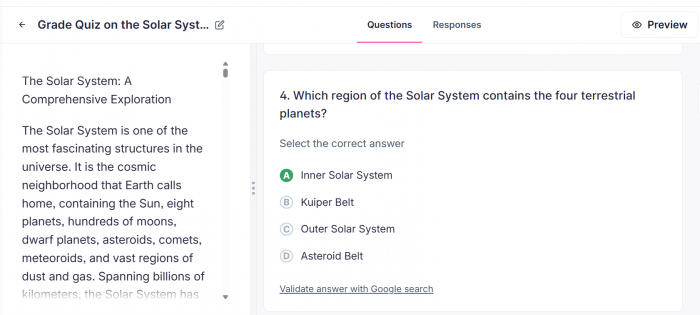
But the difference was not perfect. Some of the Grade 9 questions were more advanced in language than in thinking. This is a common weakness with AI education tools. They may make a question sound more serious without making it intellectually stronger.
For example, changing vocabulary does not automatically make a question more difficult. A stronger Grade 9 question should ask students to compare, explain, evaluate, or apply concepts. It should not only use more formal wording.
This test showed that Conker’s grade-level control is helpful, but not something teachers should trust completely. It can move the quiz in the right direction, but it does not always guarantee the exact level of complexity a teacher needs.
The best results come when the teacher gives more detail in the quiz setup.
A weak setup would be: Create a quiz on the solar system.
A better setup would be: Create a Grade 9 quiz on the solar system with 6 multiple-choice questions and 4 short-answer questions. Focus on gravity, planetary motion, inner and outer planets, and why planets orbit the Sun. Include at least two questions that require explanation, not only facts.
That kind of setup gives Conker clearer boundaries. It also reduces the chance of getting a shallow quiz.
What the Output Gets Right
Conker AI’s biggest strength is not that every question is perfect. Its strength is that it turns a blank page into a structured quiz draft quickly.
That matters because teachers often do not need a perfect quiz from AI. They need a starting point that saves time and can be edited.
The best outputs had three qualities:
1. First, the quizzes were organized. They did not come back as messy paragraphs. They looked like something a teacher could review and reshape.
2. Second, the questions usually stayed on topic. In the tests I ran, Conker did not wander far from the subject or passage.
3. Third, the wording was generally clear. The tool did not overcomplicate simple topics, which is important for younger students.
Where Conker works best is in everyday classroom situations:
● A teacher needs a quick review quiz before the next lesson.
● A tutor wants practice questions after explaining a topic.
● An online teacher needs a short check for understanding.
● A teacher wants to turn a passage into a comprehension quiz.
● A class needs an exit ticket at the end of the period.
In these situations, Conker is useful because speed matters and the stakes are relatively low.
Where the Output Needs Work
The main issue with Conker AI is not that the output is unusable. The issue is that the output can look more finished than it really is. That is an important difference.
A generated quiz may have questions, options, and answers, but still need teacher review. Some questions may be too easy. Some answer choices may be too obvious. Some wording may not match how the teacher explained the topic in class.
The most common weaknesses I noticed were:
● Some questions tested memory more than understanding.
● Some answer choices were weak because the wrong options were too obvious.
● Some questions felt similar to each other.
● Higher-grade setups did not always produce higher-level thinking.
● The quiz needed teacher editing before it felt fully classroom-ready.
This is not a reason to avoid Conker. It is a reason to use it properly. The tool is helpful when the teacher treats the result as a draft. It becomes risky when the teacher shares the quiz without checking it.
Editing Is Not Optional
The editing step is not a small part of using Conker AI. It is the step that decides whether the quiz is actually good.
After generating a quiz, I would recommend checking five things before using it with students:
| What to Check | Why It Matters |
| Correct answer | AI tools can occasionally create wrong or debatable answers |
| Question clarity | Students should understand what is being asked |
| Difficulty level | The quiz should match the class, not just the topic |
| Answer choices | Incorrect options should be believable, not silly or obvious |
| Lesson alignment | The quiz should test what was actually taught |
This is where teacher judgment matters most. Conker can produce the structure, but it cannot fully understand the classroom context. It does not know which examples the teacher used, which mistakes students made earlier, or which ideas need more practice.
That context belongs to the teacher.
This is also why I would not describe Conker as a tool that “creates ready-made quizzes” without qualification. A better description is that it creates editable quiz drafts that can become classroom-ready after review.
User Experience: Simple, But Narrow
The user experience is clean because Conker does not try to do too many things at once. The workflow is direct: enter a topic or text, choose settings, generate the quiz, review it, and share or export it.
That simplicity is good for teachers who want speed. The tool does not feel like a complex software system where the user has to learn ten different menus before doing the main task.
The interface feels especially useful when the teacher already knows the lesson goal. If you come in with a clear topic, grade level, and question type, Conker can move quickly.
But the same simplicity can feel limiting for advanced assessment work. Teachers who want detailed question tagging, deep analytics, student performance trends, rubric-based assessment, or advanced test controls may find Conker too narrow. That is not a flaw in the core product. It is a question of fit.
Conker is not designed for full assessment management. It is designed for fast quiz creation. If that is the job, the UX works well. If the job is bigger than that, the tool starts to feel limited.
Exporting and Sharing
A quiz generator becomes more useful when the quiz can be moved into real classroom tools. Conker supports sharing and export workflows, including options connected to Google Forms and Canvas-style classroom use.
This is one of the more practical parts of the tool. Many teachers already use Google Forms for quizzes because it is familiar, easy to distribute, and can collect responses. If Conker helps generate the quiz and then move it into that workflow, it saves more time than a normal chatbot response would.
Still, this part depends on the school environment. Some schools restrict third-party apps. Some teachers may need permission before connecting tools to Google Drive, Google Classroom, Canvas, or student accounts.
So the export feature is useful, but it should not be treated as friction-free in every school. For individual teachers, it may feel simple. For schools and districts, it may need approval.
That is why Conker’s value is partly technical and partly practical. The quiz generation is only one half. The other half is whether the teacher can actually use the quiz inside the systems their school allows.
Pricing: How to Think About Value
Conker AI has a free entry point and paid options, with school-level pricing handled separately. Since pricing can change, the exact live plan limits should be checked before publishing or buying.
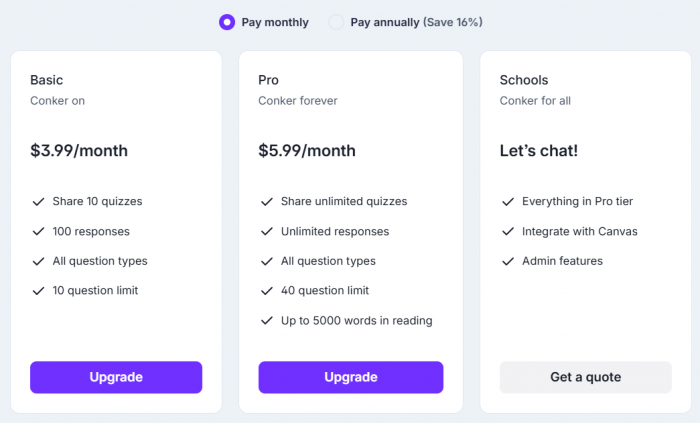
The better question is not only “how much does it cost?” The better question is “how often will I use it?”
For a teacher who creates quizzes every week, Conker can make sense because it reduces repeated work. If it saves even 15 to 20 minutes per quiz, the value becomes easier to understand.
For a teacher who only needs an occasional quiz, the free version may be enough. Paying for it may feel unnecessary if the tool is used only once or twice a month.
For schools, the decision is broader. A school should consider:
● How many teachers would actually use it.
● Whether it fits approved classroom systems.
● Whether student data rules are satisfied.
● Whether it adds something not already covered by existing tools.
● Whether teachers need training or can use it without support.
Conker’s pricing is easiest to justify for regular quiz creation. It is harder to justify if the teacher already has a strong question bank or rarely creates new assessments.
Privacy and Student Data
Privacy is important because Conker AI is an education tool. Even if teachers use it mainly for quiz creation, the classroom context means student data could become involved.
The safest way to use Conker is to generate quizzes from topics, lesson material, and general reading passages. Teachers should avoid pasting private student information into the tool.
That means no student names connected to grades, behavior, learning needs, health details, parent communication, or personal records.
A safe quiz setup would be: Create a Grade 5 quiz on the water cycle.
A risky quiz setup would be: Create a quiz for Aarav, who is struggling with reading and scored poorly on last week’s test.
The first setup gives the tool educational content. The second includes identifiable student information and learning context that may not belong in an AI system without school approval.
Conker’s privacy policy includes positive commitments, including no data selling and no ads inside the product. That is good, but teachers should still follow school policy. A privacy policy does not replace local approval, especially when students are involved.
My practical privacy verdict is simple: Conker is suitable for normal quiz generation, but teachers should not use it as a place to process private student records.
What Other Real Users Seem to Say
Public user feedback around Conker AI appears positive, but the review volume is not large. That matters because a small set of positive reviews can show useful signals, but it does not prove long-term reliability across many classrooms.
The feedback that does exist generally matches the hands-on experience. Users tend to like the time-saving value, simple workflow, quiz creation, and classroom usefulness. The concerns are also realistic: question variety, complexity, and the need to review AI-generated output.
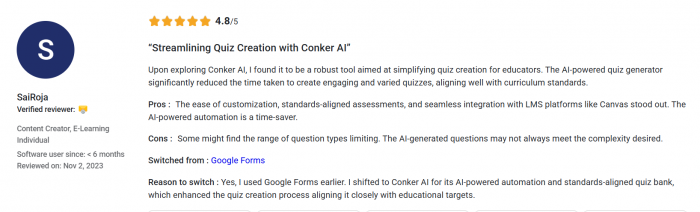
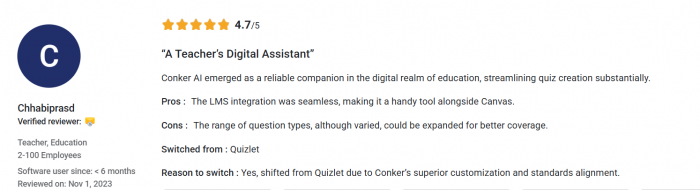
This is important because it keeps expectations balanced. Conker is not being praised because it replaces teachers. It is being praised because it reduces a repetitive part of teaching. That is a more believable value proposition.
The product is most useful when expectations are realistic. It can help create a quiz faster. It cannot guarantee that every question is pedagogically strong, perfectly aligned, or ready for high-stakes use.
Pros and Cons After Testing
| Pros | Cons |
| Creates structured quiz drafts quickly | Questions still need teacher review before use |
| Works well with clear topics and grade levels | Some outputs feel basic or recall-heavy |
| Useful for reading comprehension checks | Deeper reasoning questions may need manual editing |
| Simple workflow that teachers can understand quickly | Not built for advanced assessment design |
| Export and sharing options improve classroom fit | School permissions may affect real use |
| Good for formative assessments and exit tickets | Not a full LMS, gradebook, or analytics tool |
The fairest way to look at Conker is this: it saves time at the beginning of quiz creation, but it does not remove the quality-control step at the end.
Who Should Use Conker AI
Conker AI is best for teachers who regularly create short quizzes and want a faster starting point.
It is a good fit for K-12 teachers, tutors, online educators, and classroom instructors who need quick formative assessments. It is also useful for teachers who often create exit tickets, warm-up questions, reading checks, or review quizzes.
The tool makes the most sense when the quiz is low or medium stakes. For example, it is well suited for checking whether students understood yesterday’s lesson. It is less suitable as the only tool for building a major exam.
Conker also fits teachers who already know what they want. If the teacher has a clear topic and learning goal, the tool can help turn that idea into questions quickly.
Who Should Avoid It
Conker AI is not the right fit for users who need a complete assessment system. If you need advanced analytics, item-level reporting, detailed rubrics, secure exam controls, or large-scale testing management, Conker will likely feel too limited.
It is also not the best choice for teachers who want AI to produce final quizzes with no editing. That expectation will lead to disappointment.
The tool should also be avoided for sensitive student-data workflows unless the school has approved it. Conker can be useful for generating quiz content, but it should not become a place where teachers paste private student details.
In simple terms, avoid Conker if you need a full testing platform. Consider it if you need a faster way to create editable classroom quizzes.
Better Alternatives to Consider
Conker AI is useful, but it is not the only option. The better alternative depends on the teaching need.
| Alternative | Better For |
| Wayground, formerly Quizizz | More gamified classroom quizzes and student engagement |
| Kahoot | Live quiz games and competitive classroom activities |
| QuestionWell | Focused AI question generation from topics and materials |
| Formative | Real-time assessment, student responses, and feedback |
| MagicSchool AI | A broader set of teacher AI tools beyond quizzes |
| Eduaide.AI | Lesson plans, worksheets, activities, and teaching resources |
| Diffit | Differentiated reading materials for different student levels |
Conker is best when the main need is fast quiz generation. If the goal is live classroom energy, Kahoot may be better. If the goal is a bigger student engagement platform, Wayground may be better. If the goal is a broad AI teaching assistant, MagicSchool AI or Eduaide.AI may offer more range.
Final Verdict
Conker AI is a useful tool, but only if it is understood correctly. It is not a finished-test machine. It is a quiz draft generator for teachers who want to save time without giving up control.
In my testing, Conker worked best when the quiz setup was specific. A clear subject, grade level, question count, and learning focus produced better results than a broad request. The reading-based quiz test was especially useful because it showed that Conker can turn source material into a workable comprehension check.
The weaknesses are also clear. Some questions are too basic. Some answer choices need improvement. Grade-level control helps, but it does not always create true depth. Teachers should review every quiz before sharing it with students.
That makes Conker a good fit for formative assessments, lesson reviews, exit tickets, and quick practice quizzes. It is less convincing for high-stakes exams, advanced assessment design, or schools that need a complete testing system.
The final judgment is balanced: Conker AI can save real time, but it should not be trusted blindly. Its value is strongest when a teacher uses it as a starting point, improves the output, and keeps responsibility for the final quiz.
For everyday classroom use, that is a useful role. For serious assessment work, it is not enough on its own.
Comments