

Gimkit is easy to describe and harder to judge. A teacher selects questions, chooses a mode, shares a code and starts the session. The quality of the result depends on less visible decisions: how the Kit is written, how much gameplay each correct answer unlocks, how students enter and what the host does with the report afterward.
I approached Gimkit Host with one practical question: does it simply make a quiz more entertaining, or does it give the host enough control to create useful revision? The answer is more nuanced than the bright maps and competitive leaderboards suggest.
Hosting Is More Than Starting a Game
“Gimkit Host” is not a separate product or subscription. It describes the educator or organiser controlling a live session. The host chooses a Kit, selects a mode, adjusts the options, opens the lobby, shares the joining information and starts the game. Educators need an account to create Kits and host, while students can join ordinary live games without creating accounts.
Gimkit separates three elements that are easy to confuse:
| Element | What it controls |
| Kit | The questions, answers and subject content |
| Game mode | The rules, visual environment and way progress is earned |
| Host settings | The duration, joining rules, player identities and question-to-gameplay balance |
The host is assembling both the learning content and the game around it. A strong Kit can be weakened by the wrong mode, while an exciting mode cannot rescue vague questions or obvious distractors.
How to Host a Gimkit Game
Hosting a Gimkit session only takes a few steps, but most of the important decisions happen before students enter the lobby. Start by opening the Kit you want to use and selecting Play Live. Gimkit will then ask you to choose a game mode, followed by the settings available for that particular mode.
This is where the host should decide how long the session should run, whether students can join after the game begins, how player names will be handled, and any mode-specific rules that could affect the pace of the game. Once those settings are ready, open the lobby and share the game code, QR code, or joining link with students.
Before pressing Start, check that everyone who should be in the session has joined and that the player list looks correct. For unfamiliar modes, it is also worth giving a short explanation of the objective. The mechanics may only take a minute to explain, but skipping that minute can leave students concentrating on the game rules instead of the questions.
The Questions I Used to Judge It
I evaluated the complete hosting journey rather than the appearance of the dashboard. The main questions were practical:
● Could a first-time host move from a Kit to a live lobby without hunting through menus?
● Did the settings provide meaningful control rather than cosmetic choices?
● Could students join without unnecessary registration?
● Did the game encourage repeated practice, or allow play to dominate?
● Could the report reveal something the leaderboard could not?
● Was the free plan useful on its own?
This approach exposed an important point early: a simple non-2D mode and a map-based 2D mode can feel like different products even when they use the same questions.
The Workflow Starts in the Kit
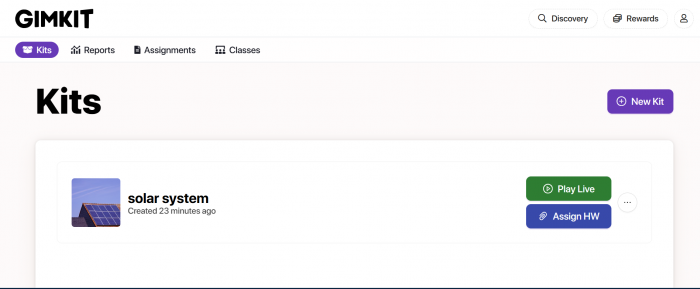
Hosting begins from a Kit through Play Live. Gimkit then opens the Mode Picker followed by the Game Options screen. The sequence is sensible because it keeps the educational material at the centre rather than asking the teacher to create an empty game first.
A Kit can also be reused with different modes. A quick recall activity may need a straightforward question-led format, while a longer session may suit a strategic 2D map. The dashboard is not where expertise is required. The difficult decisions begin with what students will answer and how the game will reward them.
Kit Quality Sets the Ceiling
A Kit is the question bank used inside the session. Gimkit makes that material easier to deliver, but it cannot judge whether a prompt is precise, whether the incorrect options are credible or whether the question tests understanding instead of recognition.
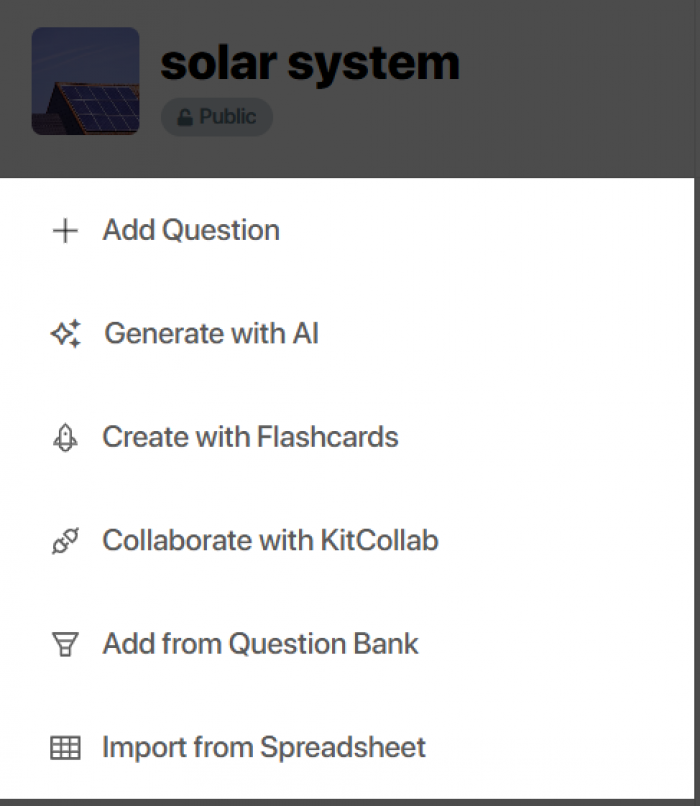
For a short review set, manual question entry is manageable. For a large unit, the work becomes more demanding because every item needs a correct answer, useful distractors and wording that remains readable under time pressure. Public Kits also require checking. Gimkit states that anyone with a link to a public Kit may be able to view its questions and answers, and public Kits can appear in searches.
Before hosting, I would check that:
● Each question tests one clear idea rather than combining several facts.
● Incorrect options expose likely misunderstandings without making the answer obvious.
● The prompt and every option remain readable on a phone or small Chromebook.
● The item still makes sense when it reappears through repetition.
● Copied or public material matches the lesson and contains no hidden errors.
Gimkit speeds up delivery, not instructional design. The host determines whether repetition will reinforce knowledge or merely familiarise students with answer positions.
Mode Selection Changes the Lesson
After Play Live, Gimkit opens the Mode Picker. Hosts can browse available modes and use Learn More before continuing. The platform includes traditional formats and 2D experiences in which students move through maps using characters called Gims. Gimkit describes 2D modes as potentially more complex and strategic than traditional modes.
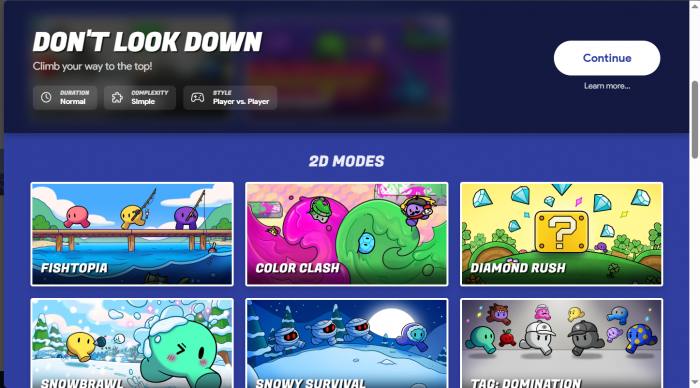
The instructional difference matters more than the visual one. In a question-led mode, answering remains the central action. In many 2D modes, questions supply energy or another resource, after which the player returns to the map.
More gameplay may keep students interested, but it can also reduce the number of questions answered in a short lesson. A mode suited to a 30-minute review may be inefficient for a five-minute exit activity.
| Teaching goal | Better hosting choice |
| Rapid recall check | A simple mode requiring little explanation |
| Collaborative review | A mode that rewards shared progress |
| Longer practice | A 2D mode with carefully adjusted rewards |
| Independent homework | An Assignment rather than a live lobby |
| Evidence of understanding | A restrained mode followed by report review |
The most impressive mode is not automatically the most useful. The right choice makes the desired student behaviour easiest.
The Settings Screen Controls the Balance
Every mode includes standard and mode-specific options. Standard controls can include the game goal, connection to a Class, late joining and the Nickname Generator. Other settings depend on the mode.
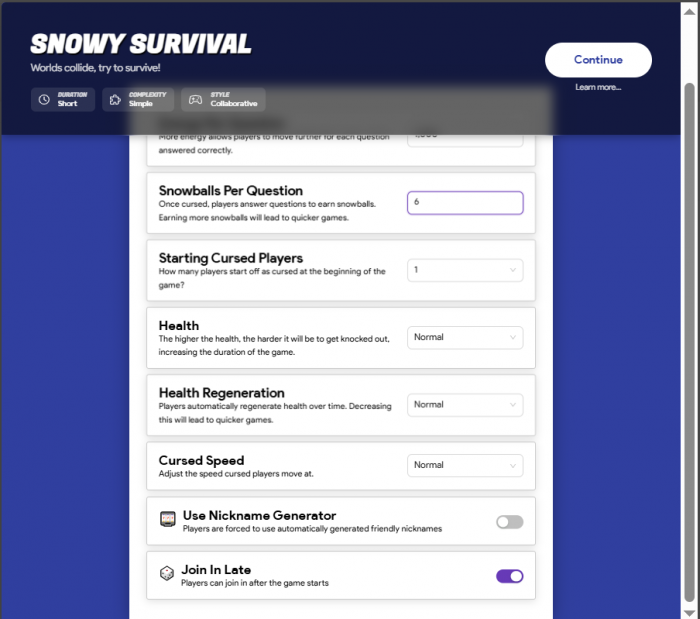
This screen changes the relationship between practice and play. In some 2D modes, the host can reduce the energy or resources earned for a correct answer. Gimkit’s guidance for One Way Out recommends lowering the energy reward when the goal is to make students answer more questions.
If one answer funds a long stretch of movement, the Kit becomes an occasional interruption. If the reward is too low, the game layer feels pointless. A well-tuned session sits between those extremes.
The game goal needs similar attention. A long timer can make weak material drag, while a short target may end before players encounter enough questions. Starting conservatively is sensible because a host can add time during a live 2D game but cannot subtract it.
Before You Open the Lobby
The best time to catch a hosting problem is before thirty students are waiting for a game code. Once the mode and settings are selected, take a final minute to check whether the session will work for the class you actually have, not just whether Gimkit technically allows the setup.
Make sure the Kit contains enough questions for the intended game length and that images, answer choices, and longer text remain readable on student devices. Decide in advance whether late joining should stay enabled, especially in classes where students regularly arrive after the activity begins. If player identity matters for the report afterward, use Classes or controlled nicknames rather than trying to work out who “DragonMaster27” was after the game.
It is also worth being conservative with unfamiliar 2D modes. A complicated mode can be entertaining once students understand it, but the first few minutes of a short review session can disappear into explaining movement, objectives, and upgrades. For a new class or a tight lesson, a simpler mode usually gives you more usable question data and less setup friction.
The Lobby Is a Management Checkpoint
Once the options are confirmed, Gimkit opens a lobby with a game code. Students can join through the code, a direct link or a QR code displayed by hovering over the code. Players who are not using Classes visit the join page and enter the temporary code.
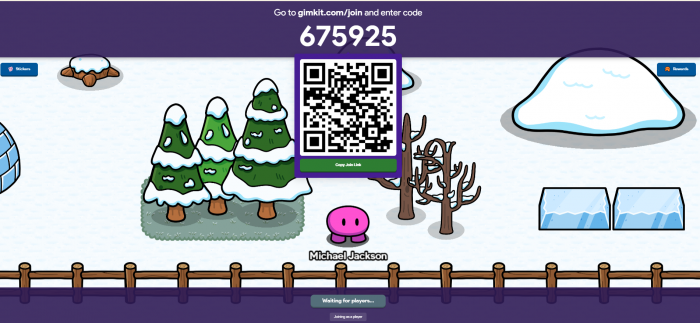
A direct link works well for remote lessons because it removes typing. A QR code is convenient for phones and tablets. The numeric code remains useful when the teacher is projecting one shared screen.
The lobby is also the host’s opportunity to verify names, confirm attendance and explain the objective before competition begins. In 2D modes, the host chooses whether to enter as a player or spectator.
Spectator mode is generally the stronger teaching choice. Playing can suit a small informal group, but spectating leaves the host free to watch behaviour, resolve technical problems and identify students who do not understand the map.
Joining Is Easy Until Identity Matters
A standard live game does not require every participant to create an account. Students can use the code or link, choose a name and enter. Accounts become necessary when the teacher uses Classes or students want account-linked progression such as XP and cosmetics.
That low-friction entry is ideal for a one-off activity. It becomes less useful when names must be controlled across repeated sessions.
The Nickname Generator assigns safe random names and disappears when a Class is connected. Classes provide stronger identity control because students join with accounts and appear using names the teacher can manage. Gimkit also uses Classes to track Assignment progress, review multiple completions and save progress.
Open joining is best when speed matters. Classes are better for regular groups where accurate names and records matter more than instant entry.
The Player Experience Depends on the Mode
From the player side, the sequence is direct: join, enter or approve a name, wait in the lobby and begin. The complexity appears after launch.
Traditional modes keep questions and scores at the centre. A 2D mode adds movement, resources, map objectives and sometimes collaboration or combat. This can make practice feel less repetitive, but it also introduces controls the teacher may need to explain.
Device choice matters. Short multiple-choice questions work on most screens. Long options become uncomfortable on phones, while movement generally feels easier with a keyboard or larger display. Gimkit’s hard player limits also do not guarantee smooth performance because the company notes that larger sessions require faster and more reliable connections.
For a mixed-device class, the host should test the exact mode on the weakest common device, not only on a modern teacher laptop. A non-2D mode using the same Kit is the most practical fallback.
Live Controls Support Real Intervention
During a 2D game, the host can enlarge the game code, move between players while spectating, adjust music and effects, open the leaderboard, inspect the player list, remove a participant, add time and end the game early.
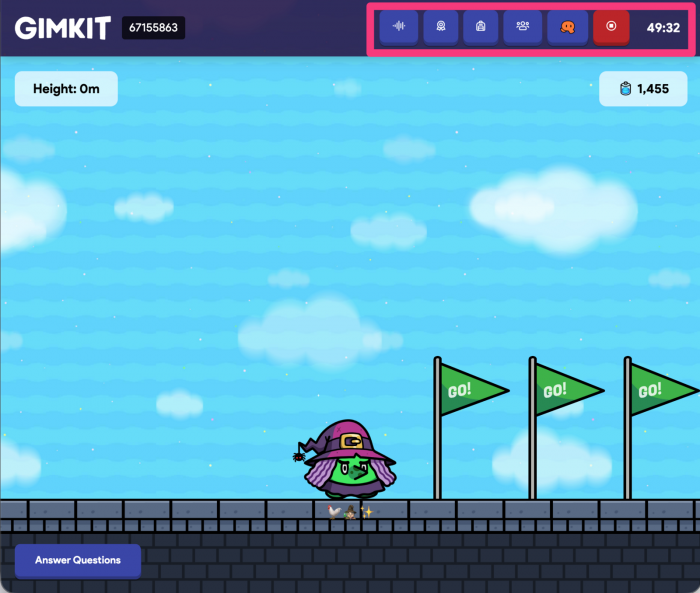
The leaderboard answers who is ahead. Spectator view answers more useful questions: is a student lost, repeatedly returning to questions, ignoring the objective or struggling with controls? The player list lets the host move directly to a student or remove someone when necessary.
Separate audio controls are practical because game music can quickly compete with classroom instructions. Time management is less flexible. Each timer click adds one minute, time cannot be removed, and ending the session early requires confirmation.
These controls are enough for supervision, but the live screen is not a reliable assessment view. Rank can reflect strategy, speed and familiarity with the mode as well as subject knowledge.
Smart Repetition Adds Individual Practice
Smart Repetition is one of Gimkit’s more meaningful learning features. Questions are shown at each player’s pace. After a player has seen every question, missed items receive higher priority in that individual repetition cycle. The process is automatic and active in live modes and Assignments.
Two students in the same game may therefore receive different repetition patterns. A question missed by one player is more likely to return for that player, while another student’s sequence responds to different errors.
The limit is explanation. Repetition provides another chance, not the reasoning behind the answer. A student can learn which option is rewarded without understanding why. The host should therefore discuss questions with high error rates after the game.
The Report Matters More Than the Winner
After a host runs a Kit they own, Gimkit produces group and individual data. Reports can be opened immediately, accessed later and saved as PDFs. The views are Student Overview, General Overview and Question Breakdown.
This is where Gimkit moves beyond entertainment. The leaderboard records performance inside the game. Question Breakdown shows which prompts caused difficulty across the group. Student Overview can reveal whether a low-ranked player answered accurately but used the mechanics less effectively.
A useful report review should lead to action:
● A widely missed question may identify a concept that needs reteaching.
● An unexpectedly poor result may expose unclear wording rather than weak knowledge.
● Repeated errors around one topic may justify a focused follow-up activity.
● Too little question data may mean the host should reduce gameplay rewards or extend the session.
The report is not a substitute for formal assessment, especially where strategy affects rank. It does provide evidence for the next teaching decision.
Live Games, Classes and Assignments Do Different Jobs
Classes are a roster and identity layer. They help control names in live games, track Assignment progress, show multiple completions and allow saved progress.
Assignments are self-paced activities for independent study, homework or distance learning. They require Gimkit Pro and use supported 2D modes that do not need a team or group. Students work toward a goal through a shared link, while teachers can review results and reports.
Live hosting is synchronous. The teacher opens the lobby, starts the session and intervenes while students play.
For occasional review, live hosting may be enough. Weekly use benefits from Classes because names and records remain cleaner. Assignments matter when practice needs to continue outside the scheduled lesson.
What the Free Plan Really Includes
Gimkit Basic is more capable than a typical restricted trial. A free educator account can host featured modes, create Classes and collect reports. The account does not expire, and new educator accounts receive a 14-day Pro trial before moving to Basic.
The main limitation is mode access. Gimkit generally rotates about three featured free modes, while Pro unlocks all modes. Pro also includes Assignments, image uploads and audio questions.
As of July 2026, Gimkit lists Pro at $14.99 per month or $59.88 annually. Its FAQ later uses $59.98 in an annual comparison, so buyers should rely on the amount displayed at checkout.
The hard limits are 500 players for a standard live game and 60 for a 2D mode. Pro-exclusive modes are capped at five players when accessed from a Basic educator account. Network quality may reduce what is practical before those limits are reached.
Basic supports a complete live session. Pro is a workflow upgrade rather than a requirement for deciding whether Gimkit suits a class.
Where the Experience Loses Focus
Gimkit’s weaknesses appear when the game and teaching purpose drift apart.
Preparation still takes time. A polished mode can make a weak Kit look successful because students remain active. The report may later show that the questions were too easy, unclear or answered too few times.
Gameplay balance also requires attention. A generous resource reward can turn questions into brief toll gates between long periods of movement. Complex 2D modes may consume lesson time before students understand the objective.
Technical inequality is another concern. Students on slower devices or restricted networks may experience the same mode differently. The safest approach is to test the chosen mode in the actual school environment and keep a simpler alternative ready.
The final problem is interpretation. The leaderboard is highly visible, but it is not the strongest evidence of understanding. Hosts who stop at the winner screen miss the platform’s more useful data.
Problems a Host Should Expect
A student who cannot join may be using an expired or mistyped code, entering after late joining was disabled or connecting through a restricted network. The host should first confirm the current lobby, joining settings and correct join page.
For larger connection problems, school IT support may be necessary. Gimkit notes that stability depends on device and internet reliability, especially as player numbers increase.
Identity problems are easier to prevent than repair. The Nickname Generator works for quick sessions, while Classes offer the stronger long-term solution. During 2D games, the player list allows the host to spectate or remove participants.
Most hosting problems fall into three areas: joining, network access, and game setup. A single student who cannot enter usually points to a code, device, or joining-setting issue, while several students having trouble at once is more likely to involve the school network.
| Problem | Likely Cause | What the Host Should Check |
|---|---|---|
| A student cannot join | Incorrect or expired game code | Confirm that the current lobby is active and resend the code or joining link. |
| Students cannot enter after the game starts | Late joining is disabled | Check the joining settings before restarting the entire session. |
| Several devices fail to connect | School Wi-Fi, firewall, or proxy restrictions | Test Gimkit on the school network and involve IT if game-server connections are blocked. |
| Player names become difficult to manage | Students are choosing unrestricted nicknames | Use the Nickname Generator or Classes when accurate identities matter. |
| A 2D mode feels slow or unstable | Device or connection limitations | Switch to a simpler mode rather than losing lesson time troubleshooting. |
| Students spend more time playing than answering | Game rewards are too generous | Reduce the resources earned per correct answer so questions remain central to the session. |
The best preparation is to test the exact mode on the network and devices students will actually use. Keeping a simpler mode ready with the same Kit also gives the host a quick fallback if a more demanding 2D game causes problems.
Who Will Benefit Most
Gimkit Host suits teachers and tutors who use frequent retrieval practice and are prepared to adjust the game around the lesson. It works particularly well for vocabulary, factual recall, concept checks and revision sets that improve through repetition.
It is less convincing as the only tool for formal assessment, written reasoning or subjects where students must show their method. Repeated multiple-choice recognition does not prove deep understanding, and a leaderboard should never replace a close look at accuracy.
Regular users will gain more than occasional visitors. A teacher who learns how one or two modes behave can tune them quickly. Someone choosing a different elaborate mode every time may spend more time explaining mechanics than reviewing content.
My Final Assessment
Gimkit Host succeeds because it gives educators more control than its colourful presentation initially suggests. Student joining is flexible, settings can change how often questions appear, Smart Repetition adapts practice to individual mistakes and reports separate educational evidence from visible competition.
Its weakness is equally clear: Gimkit can hide poor instructional choices behind an active room. A lively map does not guarantee useful practice, and the winner does not automatically have the strongest understanding.
The free plan is sufficient for meaningful live sessions. Pro becomes valuable when a teacher depends on specific modes, Assignments or richer question media. The best reason to use Gimkit is not that it makes quizzes feel like games. It is that a careful host can use the game to generate repeated practice, then use the report to decide what should happen next.
Comments