

WeInvoice.io is useful if your invoicing needs are simple: create an invoice, add client details, apply taxes or discounts, download the file, and keep a basic record. It is not the kind of tool that should be mistaken for full accounting software.
The platform works best for freelancers, consultants, creators, contractors, and small service businesses that need professional invoices without setting up a complicated finance system. Its weak points are also clear: public pricing information is inconsistent, the review base is small, and some advanced business features need better confirmation before users rely on them for daily billing.
What WeInvoice.io Actually Does
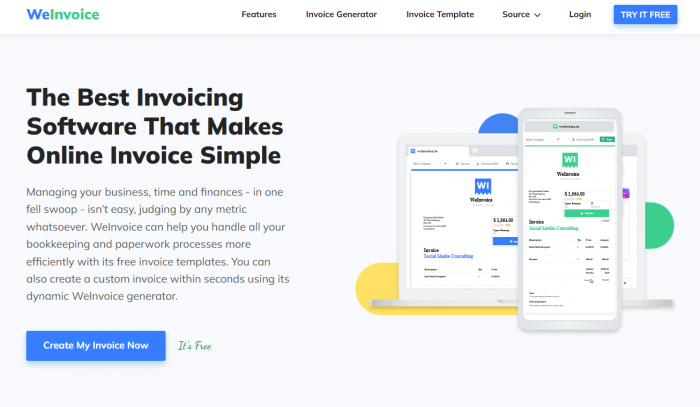
WeInvoice.io is an online invoice generator with templates for invoices, estimates, and receipts. The basic idea is simple: instead of editing old invoice files or building invoices manually in Word, Excel, or Google Docs, users can start with a ready billing format and fill in the required business details.
The tool supports common invoice elements such as business information, client details, itemized products or services, tax, discounts, payment terms, logo placement, invoice storage, contacts, and searchable invoice records. That gives it more structure than a plain invoice template, but it still feels closer to a lightweight billing tool than a complete accounting platform.
That distinction is important. WeInvoice.io is not built for deep financial reporting, GST filing workflows, payroll, bank reconciliation, accountant collaboration, or inventory-heavy businesses. It is built for users who want to create and manage basic billing documents with less manual formatting.
The Real Problem It Solves
The value of WeInvoice.io is not that it has invoice templates. Many tools have templates. The real value is that it reduces the small errors and repeated work that happen when invoices are created manually.
Manual invoicing usually creates three problems. Invoice numbers can become inconsistent. Tax and discount fields can be miscalculated. Client information can get copied from old files and left unchanged by mistake. These are not dramatic software problems, but they are common business problems.
WeInvoice.io gives users a fixed structure for these details. That makes the process more reliable for people who send invoices regularly but do not need a full accounting product.
| Manual Invoice Problem | How WeInvoice.io Helps | Where It Still Depends on the User |
| Users often reuse old invoice files and forget to update details. | The invoice builder gives a fresh structure for each invoice. | Users still need to check client names, dates, and invoice numbers before sending. |
| Tax, discount, and totals can be entered incorrectly in manual files. | The tool provides fields for itemized billing, tax, discount, and totals. | Users must confirm that the tax rate and payment terms are correct for their region. |
| Invoices can get scattered across folders and email threads. | WeInvoice.io supports invoice storage, contacts, and searchable records. | It is still not a complete accounting archive or compliance system. |
| A plain invoice can look unprofessional to a new client. | Logo support and formatted templates make the invoice cleaner. | Design control is practical, not advanced. |
This is where the tool makes the most sense. It is not solving a complex finance problem. It is solving a daily admin problem.
Workflow: From Client Details to Final Invoice
The WeInvoice.io workflow follows a normal billing order. Users select or open an invoice format, add business details, add client information, enter invoice items, apply taxes or discounts, include payment terms, and then download or send the final invoice.
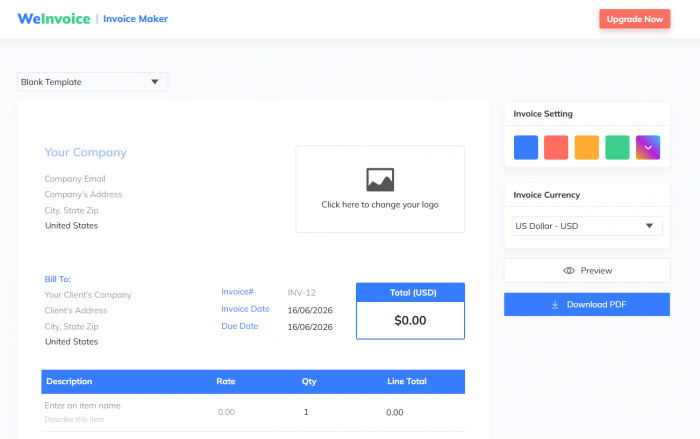
The process is easy to understand because it does not start with a dashboard full of accounting modules. It starts with the document itself. That makes it more approachable for users who only need invoices, not a complete business finance system.
A typical workflow looks like this:
● The user starts with an invoice template or generator instead of designing the invoice layout manually.
● The business section is filled with company name, contact details, address, and logo if needed.
● The client section includes the buyer’s name, billing address, and contact information.
● The invoice body lists the service or product, quantity, rate, tax, discount, and final amount.
● The final section includes payment terms, due date, notes, and payment method details before the invoice is downloaded, stored, or sent.
This workflow is simple, but that is the point. WeInvoice.io is most useful when the user wants to move from “I need to bill this client” to “the invoice is ready to send” without opening accounting software.
Template Quality and Customization
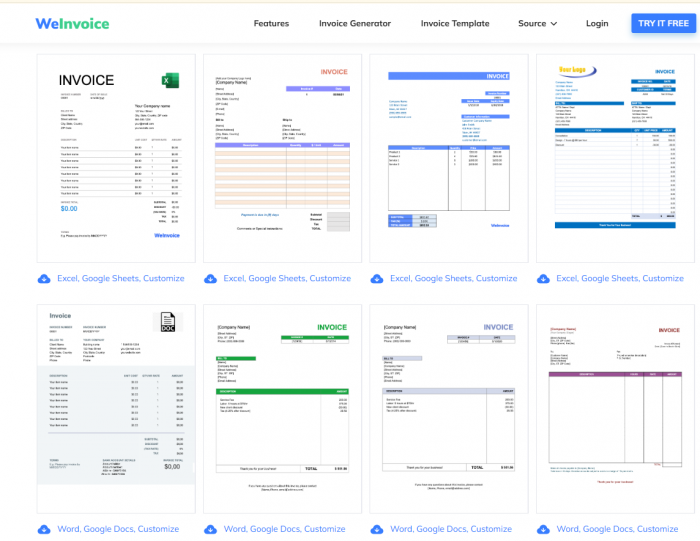
The templates are useful for basic professional billing. They give the invoice a clean structure, which is often enough for freelancers and small service providers. The invoice can include a logo, editable fields, custom sections, and standard billing information.
The customization is not deep enough for users who want highly designed invoice layouts or brand-heavy documents. For that, a design tool like Canva may offer more visual freedom. WeInvoice.io is better for users who care more about clarity than creative layout.
The platform’s template value depends on the type of invoice being created. A freelance invoice, consulting bill, repair invoice, agency invoice, or simple product invoice fits naturally. A complex invoice involving multiple departments, approval rules, purchase orders, inventory, or compliance-heavy billing may require something stronger.
Estimates and Receipts Add Practical Value
One useful point is that WeInvoice.io is not limited to invoices only. It also supports estimates and receipts. This matters because many small businesses do not begin with an invoice.
A service provider may first send an estimate, wait for the client to approve the work, finish the job, issue the invoice, and then provide a receipt after payment. WeInvoice.io fits this basic cycle better than a one-page invoice maker because it supports more than the final bill.
Still, this should not be overstated. Estimates and receipts are useful, but they do not automatically make the tool a full business management platform. The real benefit is that users can manage common billing documents in one place instead of relying on separate files.
Pricing: Useful, But Not Fully Clear
Pricing is one of the weaker parts of the WeInvoice.io story because public sources do not present one clean answer.
The official site promotes free invoice creation and free invoice templates. G2 lists a free plan at $0 per month. Capterra lists WeInvoice with a $4.99 per year starting price, a free version, and a free trial.
| Source | Public Pricing Signal | What Users Should Understand |
| WeInvoice.io official site | Free invoice templates and invoice generation are emphasized. | Basic invoice creation appears to be the main free entry point. |
| G2 | Free plan listed at $0 per month. | Some public software listings treat the product as free to start. |
| Capterra | $4.99 per year, with free version and free trial. | Directory data suggests a very low entry price, but users should verify it. |
This does not mean WeInvoice.io is expensive. The issue is clarity. A user should check the current pricing inside the platform before relying on advanced features such as storage, recurring invoices, customer support, online payments, or automation.
For occasional invoices, the free or low-cost entry point may be enough. For regular business billing, unclear pricing can become a decision factor because invoicing software is not something users want to change every month.
What Real Users Say
The public review data is positive, but it is limited.
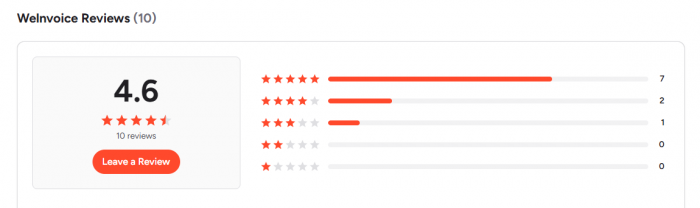
G2 lists Welnvoice at 4.6 out of 5 from 10 reviews. The rating breakdown shows 70% five-star reviews, 20% four-star reviews, and 10% three-star reviews. G2 also shows that 7 of the 10 reviewers are small-business users, while 3 are enterprise users.
Capterra India lists WeInvoice at 5.0 from 6 reviews, with 4.8 scores for ease of use, value for money, features, and customer service. That sounds strong, but the review volume is still too small to treat as broad market proof.
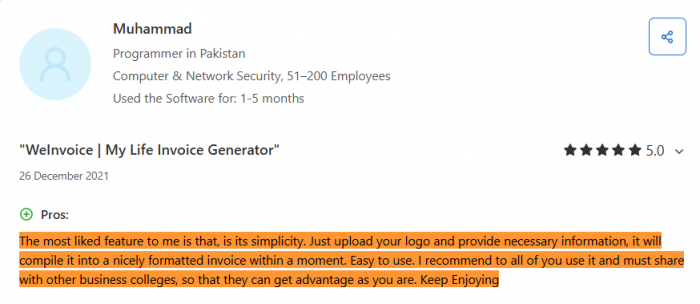
The review pattern is more useful than the rating itself. Users mostly praise WeInvoice.io for being simple, fast, and easy for non-accounting users. They like that it helps create professional invoices without much setup.
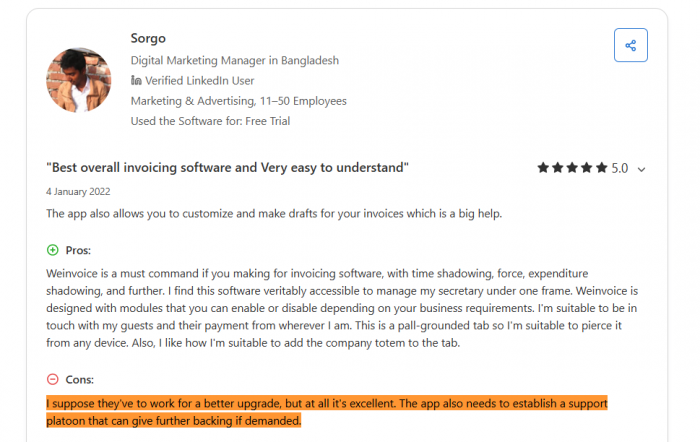
The recurring criticism is not about invoice creation itself. It is more about support, upgrades, and areas where the product could feel more complete.
That makes the conclusion clear: WeInvoice.io has enough positive feedback to look credible for lightweight invoicing, but not enough public review depth to compare it directly with mature finance platforms.
Strengths and Weaknesses
WeInvoice.io’s strengths are practical, not revolutionary. It helps users create invoices faster, keeps the format cleaner, and reduces dependence on manual files. That is useful for small businesses, but it should not be exaggerated.
| Strength | Limitation |
| The invoice builder is easier than creating invoices manually in Word or Excel. | It does not replace full accounting software for bookkeeping, reporting, or tax workflows. |
| Templates help users create cleaner and more professional billing documents. | Template customization is useful but not as flexible as a design-first tool. |
| Estimates, receipts, contacts, and searchable records make it more useful than a basic template download site. | These features still do not make it a full client management or finance system. |
| Reviewers generally like the simplicity and time-saving workflow. | The number of public reviews is small, so the feedback base is limited. |
| Free or low-cost public pricing signals make it accessible for small users. | Pricing information is inconsistent across public listings. |
This is the fairest way to judge the product. It works well for a narrow billing need, but it should not be sold as a complete business finance solution.
Best Use Cases
WeInvoice.io is best for users who need clean invoices more than deep accounting. A freelance writer sending monthly invoices, a designer billing project work, a consultant issuing estimates, a local contractor sending service invoices, or a small agency preparing client bills can use it without much friction.
It also makes sense for users who currently depend on old invoice files. Moving from manual templates to an invoice generator can reduce formatting mistakes and make records easier to find later.
The tool is less suitable when invoicing is part of a larger accounting process. Businesses that need payment reconciliation, recurring billing at scale, tax filing support, team approvals, inventory, project profitability, or detailed finance reports should compare stronger platforms before choosing WeInvoice.io.
Alternatives Worth Comparing
WeInvoice.io should be compared based on the user’s billing complexity, not just price.
| Alternative | Best For | Why It May Be a Better Fit |
| Zoho Invoice | Users who want a stronger free invoicing system with more business features. | It offers deeper invoicing tools, reminders, expenses, and better ecosystem support. |
| Wave | Small businesses that want free invoicing with basic bookkeeping. | It combines invoicing with simple accounting and payment options. |
| FreshBooks | Freelancers and service businesses that need invoicing plus accounting. | It is stronger for expenses, reporting, payments, and client management. |
| Invoice Ninja | Users who want more control, recurring billing, and client portals. | It offers more advanced billing workflows than a simple invoice generator. |
| QuickBooks Invoice Generator | Users who only need a quick one-time invoice. | It works well for fast invoice creation from a known accounting brand. |
| Canva Invoice Maker | Users who care more about invoice design and visual branding. | It gives stronger layout and design flexibility, although it is not a billing system. |
The best alternative depends on what the user needs. Zoho Invoice and Wave are stronger for users who want more complete free billing tools. FreshBooks is better for service businesses that need accounting features. Invoice Ninja is better for users who want more control over recurring billing and client portals.
The Verdict
WeInvoice.io is a practical invoice generator for users who want to create professional invoices without entering a full accounting system. Its value is strongest in simple billing workflows where the user needs templates, editable fields, logo support, estimates, receipts, tax and discount fields, invoice storage, contacts, and searchable records.
The product is most useful for freelancers, consultants, creators, contractors, small agencies, and service businesses that want to move away from manual invoice files. It saves time, keeps invoices more structured, and makes the final document look more client-ready.
The limitations should not be ignored. Pricing details are not consistent across public sources, the review base is small, and the platform does not appear suitable for businesses that need full accounting, bank sync, detailed reporting, inventory, payroll, or tax filing workflows.
For basic invoice creation, WeInvoice.io is worth considering. For long-term financial management, users should compare it with Zoho Invoice, Wave, FreshBooks, Invoice Ninja, or QuickBooks before making it their main billing system.
Comments