

PicLumen AI looks easy from the outside. You enter a prompt, choose a style, and wait for the image or video. But a good AI tool is not judged by one impressive sample. It should be judged by how often it gives usable results, how much control it offers, how fair the pricing feels, and whether the output is actually good enough for real work.
This PicLumen AI review looks at the tool from a practical user angle. I focused less on marketing claims and more on what happens when you use it for realistic prompts, creative images, blog visuals, product concepts, and short AI video ideas.
Quick Review Snapshot
| Review Area | PicLumen AI Verdict |
| Main use | AI image generation, AI art, short AI video, image editing |
| Best for | Bloggers, creators, anime users, YouTubers, small businesses |
| Free plan | Yes, with 10 daily Lumens |
| Paid pricing | Starts at $3/month on monthly billing |
| Output quality | Strong for stylized art, anime, portraits, and concept visuals |
| Weak point | Prompt accuracy and consistency can vary |
| Commercial use | Allowed for self-created outputs, but users still need rights checks |
| Overall verdict | Useful creative assistant, but not a perfect professional design replacement |
What Is PicLumen AI?
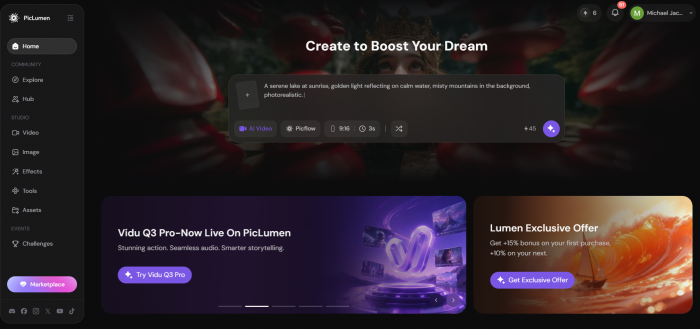
PicLumen AI is an AI image and video generation platform. It lets users create visuals from text prompts, reference images, image-to-image tools, and different AI models. It also includes basic editing tools such as image upscaling, background removal, image extension, object replacement, and color improvement.
The tool is not difficult to understand. It is made for users who want to create visuals quickly without learning advanced design software or technical AI workflows. That makes it useful for blog images, social media content, YouTube thumbnails, anime characters, fantasy art, simple product concepts, and short promotional visuals.
What PicLumen Offers
PicLumen provides text-to-image generation, image-to-image transformation, AI video generation, image editing, AI character creation, background removal, image upscaling, and a community section where users can explore other creations for prompt ideas.
The feature list is broad, but the real value depends on output quality. A tool can have many options and still fail if the images are not usable. That is why the most important part of this review is not what PicLumen says it can do, but what kind of results it gives when tested with practical prompts.
How PicLumen Works
Using PicLumen is simple. The workflow does not feel technical, which is one of its biggest advantages.
1. Sign in with an account.
2. Choose whether you want to create an image or video.
3. Select the model or style you want to use.
4. Enter a detailed prompt.
5. Upload a reference image if needed.
6. Generate the output.
7. Edit, upscale, download, remix, or regenerate the result.
The process is beginner-friendly, but prompt quality matters a lot. Short prompts can create decent images, but detailed prompts usually give better control over style, mood, lighting, composition, and final usability.
Hands-On Output Test
For this review, I focused on practical prompts instead of random fantasy prompts. I wanted to see whether PicLumen could handle the kind of visuals a real creator, blogger, marketer, or small business owner might need.
I tested five common use cases:
| Test Type | Why I Tested It |
| Realistic portrait | To check face quality, realism, lighting, and small details |
| Anime character | To see how well PicLumen handles stylized character design |
| Blog cover image | To test usefulness for publishers and content creators |
| Product mockup | To check whether it can support business-style visuals |
| Short AI video idea | To see whether video output is practical or only experimental |
Test 1: Realistic Portrait
Prompt I used:
Create a realistic portrait of a young professional woman standing near a window in a modern office, natural daylight, soft shadows, professional outfit, clean background, realistic skin texture, sharp focus, high-quality photography style.
Result I got:
The result looked polished at first glance. The lighting was soft, the office background looked realistic, and the face had a professional look that could work for a blog, profile-style visual, or business-themed article image.
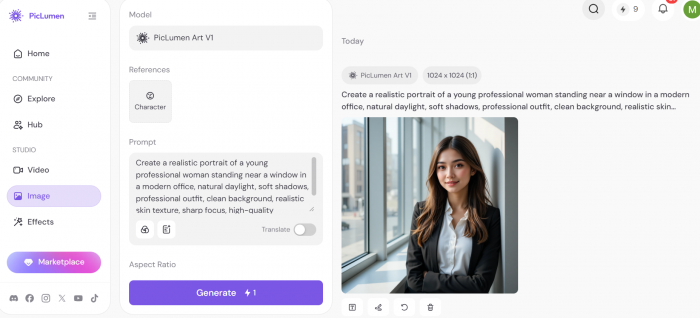
The best part was the overall composition. PicLumen understood the office setting, the natural light, and the professional mood. The image looked visually clean and did not feel overcrowded.
However, the portrait still needed close inspection. The skin looked slightly too smooth, and some facial details felt AI-generated rather than fully natural. This is common in many AI portrait tools. The result was good enough for creative use, but I would be careful using it for anything that needs a fully authentic human look.
What this test shows:
PicLumen can create strong realistic portraits for blogs, social posts, and creative visuals, but users should check the face, hands, eyes, teeth, and skin texture before publishing.
Test 2: Anime Character
Prompt I used:
Create an anime-style female warrior character with silver hair, blue eyes, a detailed fantasy outfit, glowing sword, dramatic evening sky, cinematic lighting, clean line art, high detail, colorful background.
Result I got:
This was one of the stronger outputs. The character design looked detailed, the colors were attractive, and the anime style felt more natural than the realistic portrait test. The sword, outfit, hair, and background all worked well together.
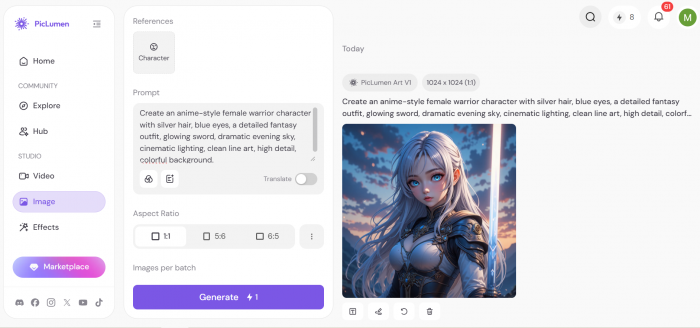
The result had a finished illustration feel. It looked useful for character concepts, profile images, fantasy stories, game ideas, and anime-style social content.
The only issue was that some small outfit details were not perfectly logical. A few accessories looked decorative but unclear. Still, because anime and fantasy art are more stylized, these small issues were less noticeable.
What this test shows:
PicLumen performs well with anime and fantasy-style prompts. This is likely one of its best use cases because the tool can create visually rich images without needing perfect real-world accuracy.
Test 3: Blog Cover Image
Prompt I used:
Create a professional blog cover image about AI tools for content creators, modern creative workspace, colorful digital screens, clean desk setup, soft realistic lighting, minimal layout, space in the center for title text, high-quality editorial style.
Result I got:
The result was useful for a content website or review article. PicLumen created a clean workspace-style visual with a modern AI theme. The lighting looked good, and the composition had enough room for adding article text later.
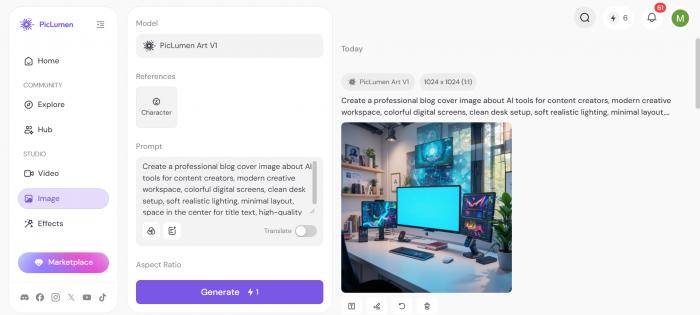
This is where PicLumen feels practical. A blogger or editor can use it to quickly create a featured image concept, then add final text and branding in Canva or Photoshop.
The weak point was that some screen details were unclear, and the image still needed final editing before publishing. It worked better as a base visual than a final complete design.
What this test shows:
PicLumen is useful for blog covers and article visuals, especially when you need a fast background or concept image. It should be paired with a design tool if you need proper text placement, brand colors, or final publishing polish.
Test 4: Product Mockup
Prompt I used:
Create a realistic product mockup of a premium skincare bottle on a marble surface, soft studio lighting, clean luxury background, simple blank label, realistic shadows, high-end commercial photography style.
Result I got:
The image looked attractive and had a premium product photography feel. The marble surface, lighting, and shadows were visually strong. For moodboarding or campaign ideas, the result was useful.
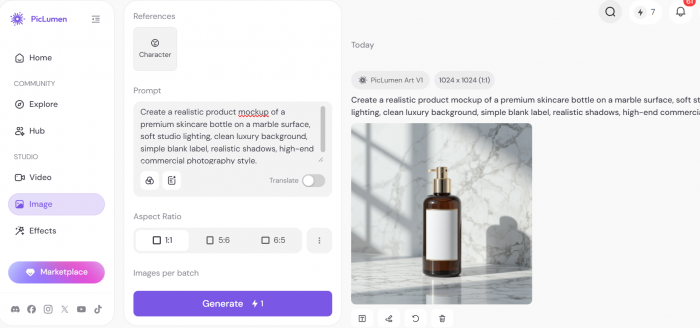
But this test also showed an important limitation. The product shape was not perfectly consistent, and the label area did not look fully ready for real branding. AI product images can look convincing, but they may not represent a real product accurately.
This means PicLumen can help with early product concepts, ad ideas, and creative direction. It should not replace actual product photography for ecommerce listings or serious brand campaigns.
What this test shows:
PicLumen is good for product concept visuals, but businesses should not treat the output as a final product image unless it is carefully reviewed and edited.
Test 5: Short AI Video Concept
Prompt I used:
Create a short cinematic video of a futuristic city street at night, glowing signs, light rain, people walking in the background, smooth camera movement, realistic cyberpunk atmosphere.
Result I got:
The video concept looked visually interesting. The city mood, lighting, and atmosphere matched the prompt. It was useful as a short creative clip or visual experiment.
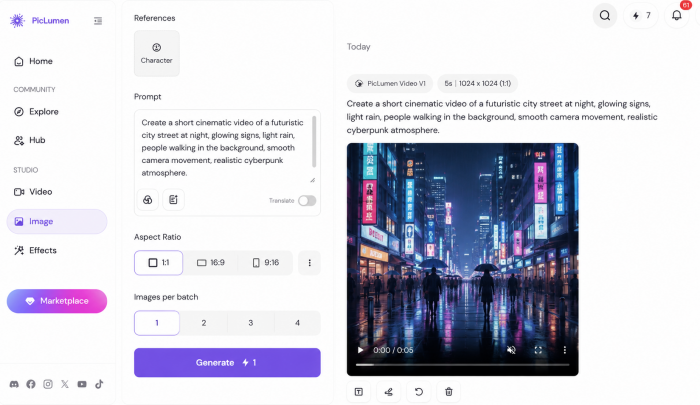
However, video generation still felt less predictable than image generation. Motion can introduce small issues such as unnatural movement, unclear background details, or visual changes between frames. The output was good for testing a visual idea, but not strong enough to replace a professional video editor or motion designer.
What this test shows:
PicLumen’s video tools are useful for short social clips, mood visuals, and experiments. They are not ideal for long, brand-controlled, or client-ready video production.
Output Quality Verdict
PicLumen’s output quality is strongest when the task is creative, stylized, or concept-based. It performs well with anime, fantasy art, character ideas, blog visuals, thumbnails, and creative portraits.
It is less reliable when the output needs exact accuracy. Product images, consistent characters, realistic human details, readable text inside images, and long video scenes still need careful review.
The best way to use PicLumen is to treat it as a fast visual idea generator. It can help you create strong first drafts, but the final image may still need editing, selection, or regeneration.
UX and Ease of Use
PicLumen is easy to use. The interface is simple enough for beginners, and the main workflow does not require technical setup. Users can enter a prompt, choose a style, generate the result, and improve it through editing or regeneration.
The community section also helps users find inspiration. This is useful because many beginners struggle more with prompt writing than with the tool itself.
The main UX issue is the credit system. Since PicLumen uses Lumens, users need to watch how many credits are used during testing. If the first output is not usable, regeneration may still cost credits. This matters more for users who create videos or test many versions.
Pricing and Value
PicLumen has a free plan and paid plans. The free plan gives users 10 daily Lumens, which is useful for testing the platform before paying. Paid plans start at $3/month on monthly billing, with higher plans offering more monthly Lumens, more generation capacity, and Relax Mode benefits. The image below shows a proper pricing of Piclumen AI. Please note that the pricing might change as per time and your region so check the updated pricing before using the tool.
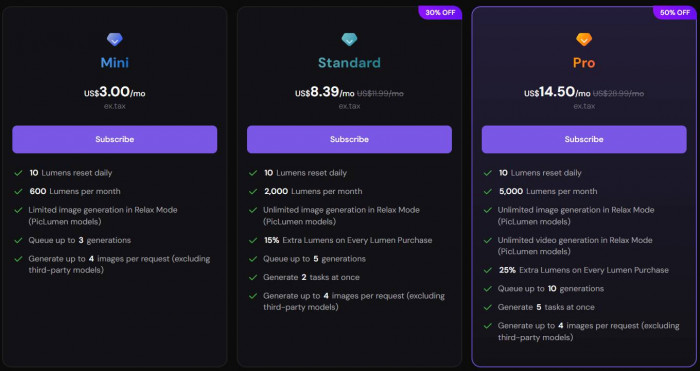
The pricing looks affordable, especially compared with some premium AI image tools. But the real question is not only the monthly price. It is how many usable outputs you get for the credits you spend.
PicLumen is good value if you create images often and are comfortable testing prompts. It may feel less predictable if you need perfect results on the first attempt.
Privacy and Commercial Use
PicLumen’s privacy policy says it may collect details such as name, email address, IP address, payment information, cookies, and service usage data. This is normal for many online AI platforms, but users should still be careful about what they upload.
Users should avoid uploading private identity documents, confidential client images, sensitive personal photos, unreleased brand assets, or copyrighted visuals they do not have permission to use.
PicLumen allows commercial use for self-created outputs under its terms. However, this does not mean every generated image is automatically safe for business use. Users still need to check for copyright, trademark, celebrity likeness, brand logo, and originality issues.
This is especially important for marketers, agencies, ecommerce teams, and businesses using AI visuals in public campaigns.
What Real Users Are Saying
Public user feedback for PicLumen is mostly positive on Trustpilot, where it has a high rating and thousands of reviews. Many users praise the platform for ease of use, visual quality, free access, model variety, and creative flexibility.
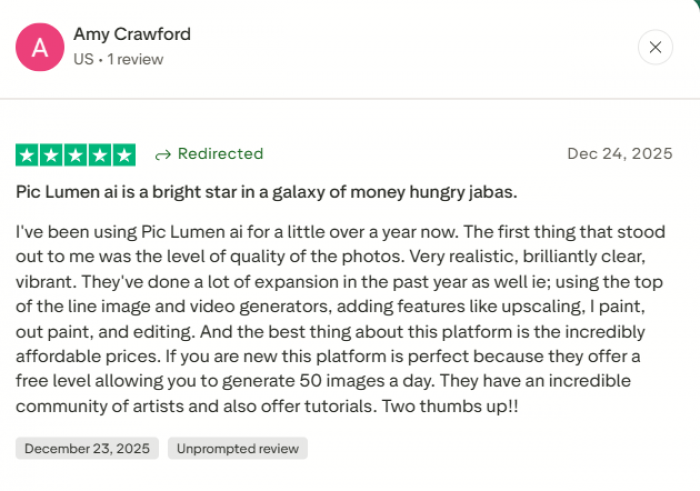
Google Play feedback is more mixed but still useful. Some users like the app experience and creative outputs, while others mention limits, subscription pressure, or feature access issues.
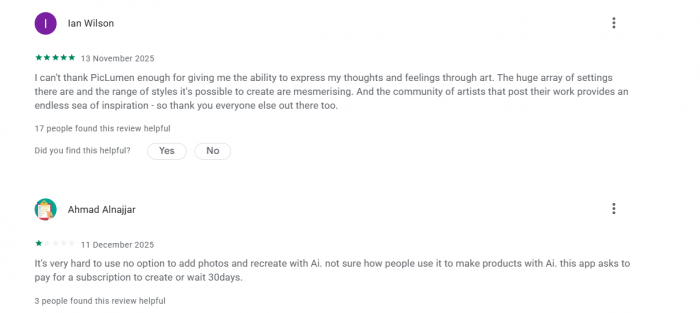
The common positive points are clear. Users like that PicLumen is easy to start with, produces attractive images, and gives enough free access to test the tool. Many casual users enjoy the creative range and community inspiration.
The common complaints are also worth noting. Some users do not like when prompts are misunderstood, credits are used on weak results, or outputs need multiple attempts before becoming usable.
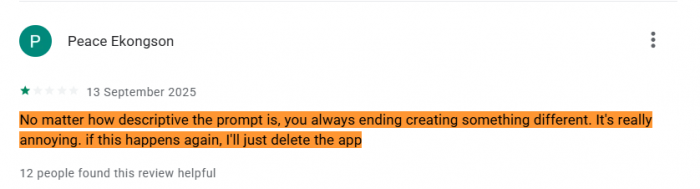
That makes PicLumen a strong casual and creator tool, but not a perfect professional system for users who need strict control.
Best Use Cases
| Use Case | Is PicLumen Good For It? | Reason |
| Blog cover images | Yes | It creates fast visual concepts for articles and reviews |
| Anime characters | Yes | Stylized character output is one of its stronger areas |
| YouTube thumbnails | Yes | It can generate dramatic backgrounds and visual ideas |
| Social media visuals | Yes | It works well for quick creative posts and concepts |
| Product mockups | Partly | It is useful for ideas, but not final product accuracy |
| Brand campaigns | Partly | Outputs need editing, review, and rights checking |
| Client work | Carefully | Users should avoid sensitive files and verify commercial use |
| Long video production | No | It is better for short clips and experiments |
Best Alternatives
PicLumen is useful, but it is not the only AI visual tool. The best alternative depends on what the user needs.
| Alternative | Better For |
| Midjourney | More polished artistic and cinematic image generation |
| Adobe Firefly | Commercial design workflows and Adobe users |
| Canva | Finished social posts, templates, and brand kits |
| Ideogram | Images that need better text handling |
| Leonardo AI | Character design, game assets, and creative control |
| Freepik AI | Stock-style visuals and design assets |
| Stable Diffusion or Flux tools | Advanced users who want more control and customization |
PicLumen’s advantage is simplicity. Tools like Stable Diffusion and Flux can offer more control, but they require more effort. PicLumen is better for users who want fast results without technical setup.
Pros and Cons
Pros
● PicLumen is easy for beginners who want to create images without learning complex AI tools.
● The free daily Lumens make it possible to test the platform before paying.
● The tool performs well for anime, fantasy art, blog visuals, portraits, and social media concepts.
● The image editing tools help users improve outputs instead of regenerating every image from scratch.
● The community section gives useful prompt inspiration for users who are new to AI image generation.
Cons
● Prompt accuracy can vary, especially when the user asks for very specific details.
● Character consistency is not perfect across multiple scenes or repeated generations.
● Credits can be used quickly if users regenerate many times to get one usable result.
● Product mockups may look attractive but are not always accurate enough for ecommerce or brand use.
● Commercial use still requires copyright, likeness, and trademark review before publishing.
Final Verdict
PicLumen AI is a useful tool for creators who want fast AI images, anime art, blog covers, thumbnail ideas, product concepts, and short AI video experiments. Its biggest strength is that it makes visual creation simple. You do not need design experience or technical AI knowledge to get started.
The output quality is strongest in creative and stylized use cases. Anime, fantasy art, portraits, and blog-style visuals can look very good. Product images, realistic human details, long videos, and consistent characters need more caution.
The pricing is affordable, but users should understand the Lumens system before paying. A low monthly price does not matter much if you need many attempts to get one usable result.
PicLumen is worth trying if you need quick creative visuals and are willing to review the output before using it. It is not the best choice if you need guaranteed accuracy, strict brand control, exact product photography, or legally risk-free commercial images.
The fair verdict is this: PicLumen is not a full replacement for a designer, photographer, or video editor. But as a fast AI creative assistant for everyday visual content, it is practical, beginner-friendly, and genuinely useful.
Comments