

CR-Remover promises something that immediately catches a video creator's attention: changing a video's digital fingerprint to prevent copyright detection on YouTube, Facebook, and other platforms. I opened the website expecting a straightforward video-processing tool, but its claims about copyright protection and monetization raised several questions.
After exploring its interface, processing workflow, features, pricing, and policies, I found a service with an interesting concept but some noticeable limitations. Here's what stood out during my examination.
My First Experience With CR-Remover
I started at the official CR-Remover website. The homepage immediately presented a video upload box, a Remove Copyright button, and an output download option. There was no complicated editing dashboard or timeline to navigate, which made the intended workflow easy to understand.
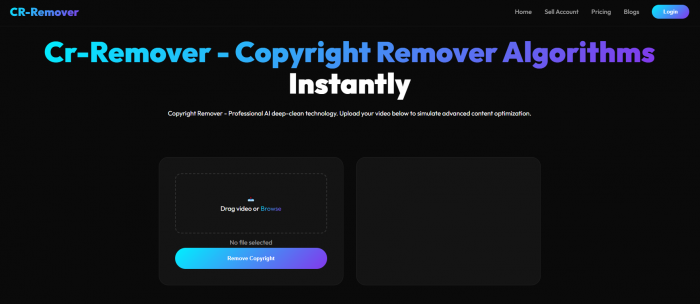
Below the upload area, the website displayed subscription plans and explanations of its processing technology. Most of its messaging focused on avoiding copyright claims, modifying video fingerprints, and addressing reused-content restrictions.
What caught my attention was the confidence of those promises. CR-Remover advertises up to 99% effectiveness against certain copyright scanners and describes its Enterprise plan as providing complete copyright immunity.
The interface looked simple enough, but the website provided little technical evidence explaining how those results were measured. I also noticed that the free trial required access through Telegram rather than offering immediate, unrestricted testing.
Exploring the CR-Remover Processing Workflow
The main processing area is designed around a short sequence: upload a video, start processing, monitor progress, and download the modified file.
I examined each part of the publicly available interface to understand how the service presents its operation.
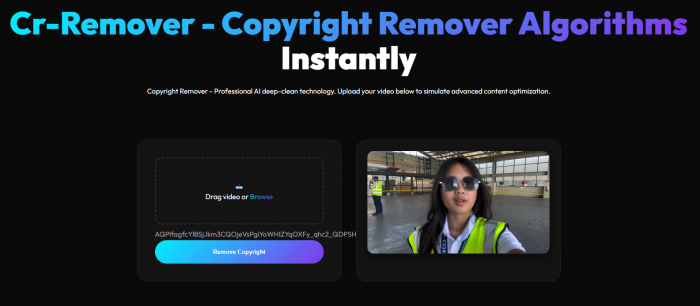
1. Video selection: The homepage provides a drag-and-drop upload area with a Browse option. The interface keeps the upload process separate from the pricing information.
2. Processing control: A Remove Copyright button sits directly beneath the upload field. The website presents this as the action that starts its automated video optimization.
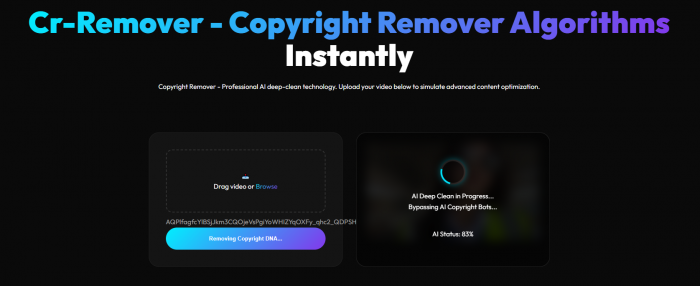
3. Progress display: The page includes processing status text, an initialization message, and a percentage indicator.
4. Output download: A Download Optimized Video button represents the final stage, where the processed file is intended to become available.
The workflow is easy to follow, particularly compared with professional video editors that require manual configuration. However, I could not verify a completed video-processing session through the public interface, so I did not obtain a modified file for comparison.
That limitation affected the assessment. The website provides a visible processing workflow, but I could not confirm its actual rendering speed, exported video quality, or copyright-detection performance.
What I Found During the Examination
My biggest takeaway from examining CR-Remover was the difference between its advertised capabilities and the results available for independent verification.
The website offers detailed descriptions of metadata cleaning, audio-visual modification, and re-encoding. However, I did not find independently documented results establishing that these processes consistently prevent copyright claims.
| Area examined | My findings |
| Website interface | Simple layout with clearly presented processing controls |
| Upload process | Drag-and-drop upload field is available |
| Free access | Requires requesting trial access through Telegram |
| Processing output | No completed export independently verified |
| Copyright effectiveness | Advertised claims lack independent supporting test results |
| Pricing | Listed plans conflict with the access duration in the terms |
The most important missing evidence was a processed video demonstrating measurable technical changes alongside a reliable copyright-check result.
CR-Remover makes several claims about producing unique digital signatures, but a new file signature does not establish that automated systems will treat the content as original. This became especially relevant when I examined the processing techniques described on the homepage.
How CR-Remover Claims to Process Videos
CR-Remover describes a three-stage system built around metadata scrubbing, audio-visual shifting, and clean re-encoding. These techniques are plausible, but their effectiveness needs to be considered separately from the marketing surrounding them.
1. Metadata Scrubbing
The first stage removes embedded file information, including technical metadata and certain digital identifiers. Video metadata can contain details such as creation dates, encoding information, and software identifiers.
Removing metadata is a legitimate file-processing operation. However, copyright detection does not depend entirely on these properties. YouTube's Content ID system analyzes audio and visual content against registered reference material, meaning a video can still be recognized after its metadata changes.
2. Audio-Visual Shifting
The second stage reportedly modifies frame characteristics and audio frequencies while preserving the original viewing experience. CR-Remover presents these adjustments as a way to interfere with automated fingerprint matching.
This is one of its more significant claims, but the website does not provide independently verified quality comparisons. Audio-visual adjustments can affect compression, sound quality, and synchronization, so preserving the original experience is not something that can be assumed.
3. Clean Re-Encoding
The final stage renders the video into a new file with different technical characteristics. Re-encoding can alter bitrate, compression, file size, and other properties, depending on the export settings.
CR-Remover describes this as generating a new digital signature. While a new encoding can change a file's technical identity, the underlying footage remains recognizable content. Re-encoding alone does not make copyrighted material legally original.
Does CR-Remover Actually Remove Copyright?
This was the most important claim I investigated because the website frequently connects video processing with copyright protection and monetization approval.
The main issue is that CR-Remover treats several different problems as though they can all be solved through video modifications.
A Content ID claim occurs when YouTube identifies material matching a rights holder's reference content. A copyright strike generally follows a valid copyright removal request. Meanwhile, reused-content restrictions concern whether a creator adds enough original value to qualify for monetization.
These are separate processes, and modifying a video file does not automatically resolve all three.
CR-Remover even suggests that changing a video's underlying code can release existing YouTube claims without requiring another upload. I found no verified evidence supporting that claim. Existing claims are managed through YouTube's copyright system, not by modifying an unrelated local file.
The same problem applies to monetization. YouTube considers originality, meaningful editing, commentary, and other factors when reviewing reused content. A video with altered metadata or encoding does not automatically qualify.
Based on the available evidence, I could establish what CR-Remover claims to do, but not that it reliably removes copyright claims or guarantees monetization.
CR-Remover Features: What Stood Out?
Beyond copyright-related promises, CR-Remover advertises several conventional video-processing features. Some are available only through higher-priced plans, so the differences matter.
● Video metadata cleaning: Included in the Starter plan, this feature is intended to remove embedded information from video files. Its practical effectiveness was not independently verified.
● HD and 4K exports: The paid plans advertise higher-resolution output, with 4K available under Enterprise. The website does not provide independent export-quality benchmarks.
● Audio synchronization correction: Pro Creator includes an advertised audio-video sync feature, although I could not confirm how it detects or corrects synchronization issues.
● Batch processing: Enterprise advertises the ability to process five videos simultaneously, making it the only clearly identified plan for bulk operations.
● Watermark-free output: Pro Creator and Enterprise advertise exports without the CR-Remover watermark, while the free and Starter plans include one.
I found the feature descriptions understandable, but the website relies heavily on phrases such as AI deep-cleaning and content DNA scrubbing without providing detailed technical specifications.
The features are presented clearly; the evidence demonstrating their actual performance is less convincing.
CR-Remover Pricing and Plans
CR-Remover currently lists four plans, starting with a free trial and extending to a higher-volume Enterprise package.
| Plan | Price (USD) | Video Limit | Key Features |
| Free | $0 | Trial, 50 MB file limit | Basic access, watermark included |
| Starter | $5.26 | 20 videos/month | 720p export, metadata cleaning, standard processing |
| Pro Creator | $9.48 | 50 videos/month | HD export, audio sync fixes, no watermark |
| Enterprise | $18.97 | 250 videos/month | 4K export, batch processing, API access |
The Starter and Pro Creator plans are advertised for one month, while Enterprise is listed for four months. However, the Terms and Conditions describe purchases as providing 24-hour access with specific video limits.
I also checked the Refund Policy, which describes the service as a 24-hour access pass and states that purchases are generally non-refundable. Access can expire once the time or video allowance is exhausted.
This was the clearest inconsistency I found on the website. The monthly allowances displayed on the homepage do not align with the duration stated in the legal policies.
The prices themselves are relatively modest, but the actual access period is more important than the advertised cost. I would not treat the monthly allowances as confirmed until the service clarifies its terms.
Three Concerns I Noticed Before Payment
Several details influenced my assessment beyond the processing features themselves.
● Free trial accessibility: CR-Remover requires visitors to join a Telegram group and request free access. That introduces an extra step and makes immediate product evaluation less straightforward than a normal browser-based free trial.
● Video privacy: The Privacy Policy states that uploaded and processed videos are deleted from its servers within 24 to 48 hours. However, I could not independently verify deletion or find detailed public documentation of its security controls.
● Responsibility for copyright issues: The website advertises strong protection against copyright problems, but its Terms and Conditions state that users remain responsible for having the necessary rights and that the company accepts no liability for strikes, suspensions, or account bans.
The third issue is particularly important. Advertising complete copyright immunity while disclaiming responsibility for copyright-related outcomes creates a gap between the marketing and the actual contractual protection offered to customers.
These findings mattered more to me than the number of advanced processing features listed on the pricing page.
Who Is CR-Remover Suitable For?
CR-Remover is marketed primarily toward creators who repurpose video content for YouTube, Facebook, Instagram, and other social platforms.
Its advertised metadata processing, re-encoding, and export features also overlap with conventional video-processing tasks. However, the service's primary selling point is copyright-detection avoidance rather than ordinary video editing.
For professional editors, agencies, and creators handling original content, the limited technical documentation and unclear subscription terms are notable disadvantages. Established video editors generally provide more direct control over codecs, resolution, bitrate, and output settings.
CR-Remover is also not a replacement for copyright permissions or the official processes used to address incorrect claims. Its advertised processing features do not establish ownership rights or guarantee compliance with monetization policies.
CR-Remover Rating
I assessed the areas that were directly observable through the website and its documentation. Processing performance remains unrated because I did not complete an independently verified video export.
| Category | Rating out of 5 |
| Website usability | 3.5/5 |
| Feature presentation | 3/5 |
| Pricing transparency | 1.5/5 |
| Policy clarity | 2.5/5 |
| Actual processing performance | Not verified |
| Copyright-removal effectiveness | Not verified |
The website earns reasonable marks for its simple interface and clearly displayed feature categories. Its weaker areas are pricing consistency, technical evidence, and the reliability of its advertised copyright guarantees.
These ratings reflect the available website experience rather than a completed hands-on processing benchmark.
Final Verdict: Is CR-Remover Worth It?
After examining CR-Remover, I found the interface more convincing than the claims surrounding it. The website presents a straightforward video-processing workflow and describes several technically plausible operations, including metadata cleaning and re-encoding.
However, I could not independently verify a completed export, and the website does not provide sufficient evidence to substantiate its strong copyright-removal promises. The contradiction between advertised monthly plans and 24-hour access terms further reduces confidence in the paid offering.
My overall assessment is cautious. CR-Remover has an understandable concept and accessible pricing on paper, but its processing quality, copyright effectiveness, and subscription conditions need stronger verification. Based on the evidence available, I cannot recommend paying for it specifically to guarantee copyright protection or monetization approval.
Comments