
Logo creation used to be a costly and time-consuming process. But thanks to technology, there are other ways around it.
With AI, platforms like BrandCrowd have made logo creation faster, simpler, and more affordable. Now, small businesses, startups, entrepreneurs, and freelancers can create logos and launch their brands in minutes.
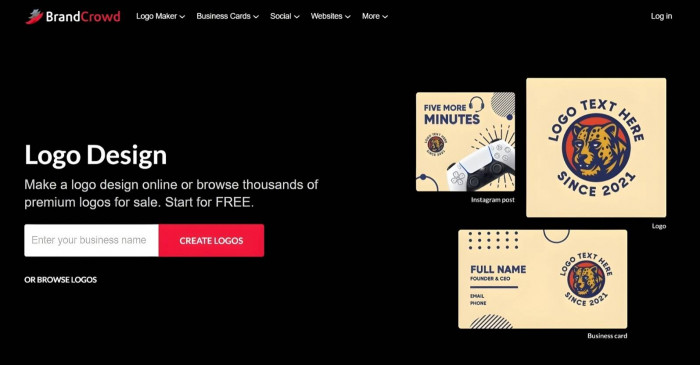
BrandCrowd stands out from other platforms because of how it uses AI and its massive design library to generate high-quality logos for you. It also offers an intuitive editing system that makes logo customization fast and easy for everyone, with or without design experience. In addition, it ensures your brand identity remains intact if you use your logo on other branding formats.
Steps to Your Perfect Logo: Features You’ll Love
With its logo maker, BrandCrowd has simplified the logo creation into five steps. Each step is supported with powerful features, ensuring the process remains fast and easy while maintaining the logo’s professional quality.
Here’s the step-by-step guide on how you can create a logo with BrandCrowd.
Step One: Enter Your Business Name – AI at Work
When you go to BrandCrowd’s homepage, you’ll immediately see the instructions “Enter Your Business Name” and “Create Logos.” That’s all you need to do to get BrandCrowd to generate logo designs for you.
BrandCrowd’s AI analyzes your business name to create multiple logo suggestions relevant to your brand. It picks the right colors, fonts, and icons suitable for your industry.
The AI also ensures the logo options you’re given are copyright-safe, and you can use any of them commercially without hassle.
Why it matters: You won’t have to spend so much time brainstorming for logo ideas and figuring out how you’ll execute them on a blank canvas.
Step Two: Browse the Generated Logos – Library That Has It All
Working with the AI is BrandCrowd’s massive collection of over 380,000 logos and more than a million design templates. All are professionally-made, ensuring that you won’t end up with a generic logo design that you may see on other platforms.
You’ll also notice some logos are marked “Free.” This means that you can use those designs even though you don’t subscribe to BrandCrowd’s paid plans.
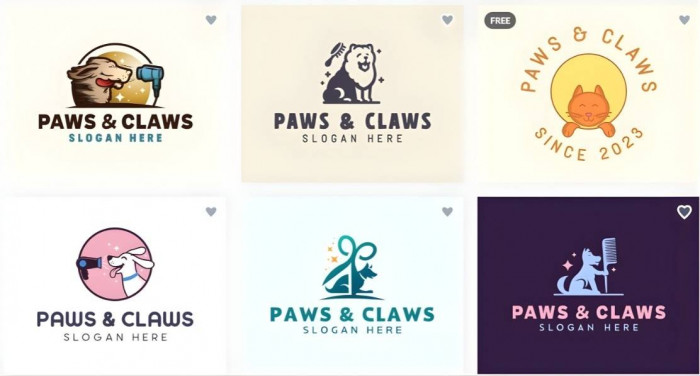
With this vast collection, the AI can generate thousands of logo suggestions for your brand. But you can filter the results according to style and color to make browsing less overwhelming. The platform also allows you to add keywords to regenerate new logos.
To help you with your decision-making process, you can favorite the designs you like and come back to them when you’re ready to choose.
Why it matters: You can have a selection of polished logos in just minutes without even hiring a designer.
Step Three: Customize Your Logo – Drag, Drop, and AI Magic
When you have selected your preferred logo, BrandCrowd will then take you to its editor.
In the editor, you’re given the freedom to make the logo your own. You can change and add colors, texts, fonts, layouts, shapes, and animations. You’ll find over 750 fonts (including more than 525 exclusive fonts) and over 62,000 custom shapes, allowing you to create a fully unique logo for your brand.
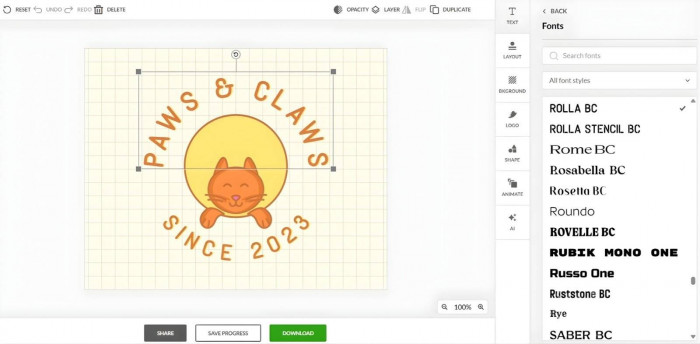
BrandCrowd features an intuitive drag-and-drop editor that lets you make all these changes manually. Using the editor doesn’t require any design expertise. It’s built to be beginner-friendly, enabling anyone to use it.
Another way to customize your logo is to use BrandCrowd’s advanced AI editing tool. It’s a chat tool where you can enter a prompt like “Can you change the background color to blue?” and the AI will apply it for you. It can also suggest modifications to match your requests.
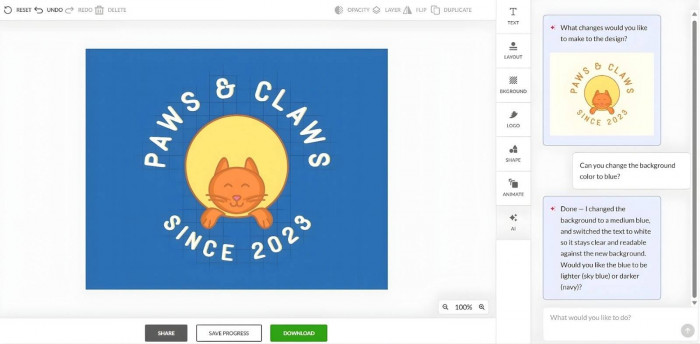
Both the drag-and-drop editor and the advanced AI editing tool are fully accessible, whether you have a free or paid plan.
Why it matters: You won’t have to struggle learning complicated design software just to have an original, high-quality logo that’s truly yours.
Step Four: Download Your Finished Logo – Every Format You Need
Once you’re satisfied with your logo, you can download the files. BrandCrowd allows you to export your logo in several formats:
● Vector files: SVG, EPS, PDF
● Raster files: PNG, JPG
● Animated formats: GIF, MP4
● Others:
○ Icon-only
○ Text-only
○ Greyscale
○ Transparent background
All of these file formats are available regardless of your BrandCrowd plan. Having all versions of your logo allows you to provide the correct logo format should you decide to make other marketing assets in the future.
Why it matters: You can ensure your logo stays at its best when printed or used on different digital platforms.
Step Five: Create Other Branded Assets – More Than Just Logos
While BrandCrowd claims to be the world’s best logo maker, the platform does more than just logos. It’s a complete branding ecosystem that can build your full brand identity.
When your logo is ready for download, BrandCrowd already integrates the colors and fonts across different assets with its automatic template branding feature. This allows you to create a host of other branded materials while maintaining uniformity.
Some of the assets you can create are:
● Business cards, digital business cards, and letterheads
● Social media posts and stories
● Flyers, posters, and menus
● Websites and “link in bio” pages
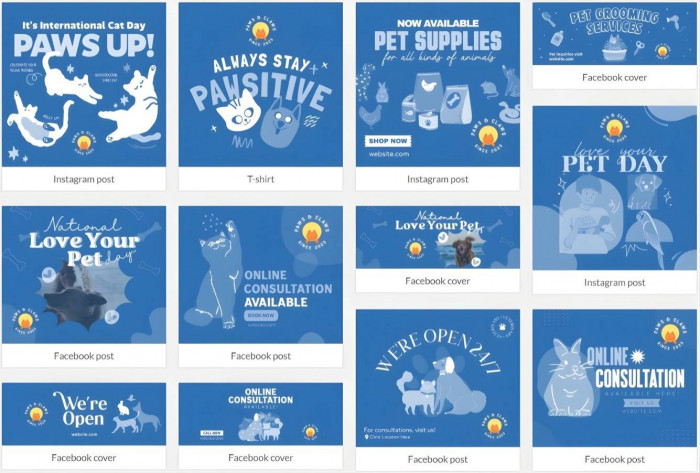
Why it matters: You won’t have to use multiple platforms to create different branding assets and end up with inconsistent branding.
BrandCrowd Plans: Free vs. Paid Options
BrandCrowd understands that not all businesses have the same needs and resources. Thus, it created flexible plans to meet where you’re currently at:
● Free Plan:
○ You can create logos and other assets at no cost using the free designs. Full customization and downloads are also available. Final designs are guaranteed to be commercially safe and watermark-free.
● Paid Plans:
○ Starter: $3/month (annual) or $9/month (monthly)
This grants you unlimited logo edits and full access to 50+ design tools and premium logo designs.
○ Value: $4/month (annual) or $14/month (monthly)
This adds the Website Builder to the Starter package.
○ Premium: $5/month (annual) or $19/month (monthly)
This gives you everything from the Value package, plus digital business cards and link-in-bio makers.
You can use BrandCrowd’s free version to get to know the platform and its features. Generate any logos and choose the free designs to explore the editor. Experience the workflow by downloading your file and seeing other templates with your logo.
What to Know Before You Start
Like any online platform, BrandCrowd has limitations. However, there are not that many. They’re also not enough to be considered as dealbreakers.
For instance, BrandCrowd is a purely web-based platform. It has no dedicated mobile or desktop app. Still, the platform runs so fast and smoothly on any web browser. You can still create a logo in just a matter of minutes.
Another drawback is the limited customization options. This affects users with advanced design experience who seek full creative control. However, BrandCrowd caters to non-designers. It’s not built to replace any sophisticated design software.
The Final Verdict: Fast, Smart, and Fully Branded
BrandCrowd’s Logo Maker promises speed, simplicity, and affordability. With its beginner-friendly interface, AI-powered customization, extensive design library, multiple file formats, and comprehensive branding, it’s safe to conclude that the platform ticks all the boxes.
As one of the smartest logo makers online, it’s perfect for small businesses, startup founders, entrepreneurs, freelancers, and creators looking for the quickest and easiest solution for their logo needs.
But since BrandCrowd is also a complete branding ecosystem, they can walk away with more than just a logo. They can also have websites, social media assets, print ads, and business cards, among others — enough to launch their brand faster than it should’ve been without BrandCrowd.
Comments