

Unstuck AI has slowly become my study operating system not just another chatbot, but a layer that sits on top of my PDFs, slides, lectures, and notes and helps me go from “overwhelmed” to “exam‑ready” with summaries, quizzes, and structured guidance. I’ll walk you through exactly how I see it, how I use it, what works, what doesn’t, and whether I think it’s worth paying for.
How I understand Unstuck AI
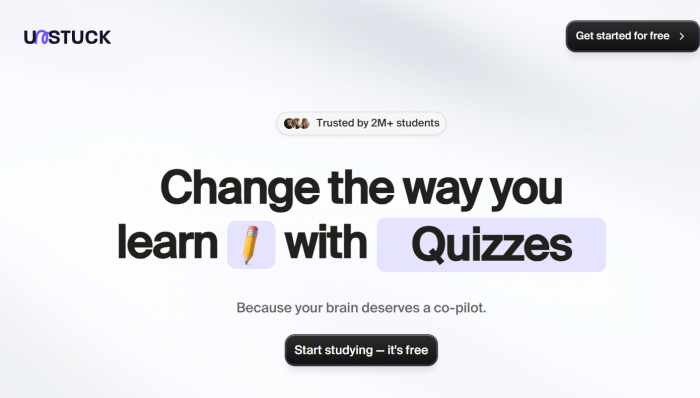
Unstuck AI is an AI‑powered study assistant that lets me upload my learning material like PDFs, PowerPoints, textbook scans, typed notes, even YouTube lectures and then “talk” to that content instead of just passively reading it. I can ask questions, get explanations in plain language, and generate practice material directly from what I’m actually studying.
What stands out to me is that Unstuck isn’t trying to be a generic all‑purpose AI; it feels opinionated and focused on study workflows and problem‑solving. It wants to help me understand material, stay productive, and manage that “I’m stuck and don’t know where to start” feeling that hits before exams or big projects.
There is some naming confusion in the wild different “Unstuck” apps exist, including therapy and productivity tools but in my mind, when I say “Unstuck AI” I’m referring to the study assistant that lets me upload course materials, chat with PDFs, and generate summaries, quizzes, and plans around my work.
Who I think Unstuck AI is for
As someone who deals with a lot of dense content, I see Unstuck AI as primarily built for:
● Students at school, college, and postgraduate level who have multiple courses and heavy reading loads.
● Research‑oriented learners who don’t just want bullet‑point summaries, they want to connect ideas across chapters, papers, and lectures.
● People who get cognitively overwhelmed and need tasks broken down into smaller, achievable steps.
It’s especially appealing if you’re like me and often feel “stuck” in the face of messy notes and long PDFs. In that sense, Unstuck sits somewhere between a study tool and a guided productivity partner. If you only want ultra‑fast flashcards with minimal guidance, other tools might feel more aligned. If you like structured thinking and planning, Unstuck feels closer to how your brain wants to study.
How Unstuck AI actually works for me
Instead of listing features in a vacuum, I think it makes more sense to describe the main jobs Unstuck does for me.
1. Turning my materials into a searchable knowledge base
First, I upload my content: PDF chapters, slide decks, scanned pages, typed notes, and relevant YouTube links. Unstuck processes all of this and turns it into something I can search and query in natural language. For me, this is where it already beats a lot of basic PDF readers plus a generic AI.
Once the upload is done, I can ask questions like:
● “Explain the difference between X and Y from this chapter.”
● “What are the main mechanisms involved in this process?”
● “Which part of my notes explains this term?”
The answers feel grounded in my materials, not like generic internet answers. When it points back to specific lines, sections, or slides, I can quickly verify the explanation and revise the original source without hunting manually.
2. Getting summaries and key concepts out of long content
I use Unstuck heavily for “pre‑reading” and “post‑reading”:
● Before reading: I ask for a concise summary of the chapter or lecture to get a high‑level map.
● After reading: I ask for key points, definitions, and examples, which I then refine into my own notes.
This is especially helpful when the content is dense or poorly structured. Unstuck helps me see the skeleton of the topic. I also like that it can make sense of graphs and charts inside PDFs, and explain what those visuals are trying to show. That’s something generic chatbots usually ignore unless I manually describe the graph.
3. Shifting from passive reading to active recall
One of my favorite parts is the ability to generate flashcards and quizzes from my own material. Instead of spending an hour manually making questions, I can get Unstuck to:
● Create a set of flashcards on a specific chapter.
● Generate quizzes with a chosen number of questions and difficulty.
● Focus questions on weak areas I specify.
This makes it much easier to practice active recall, not just reread. When I find questions I get wrong, I can jump back into chat and ask Unstuck to re‑explain that concept in another way, with examples or analogies.
4. Using it as a thinking and writing partner
Unstuck isn’t just about memorization. I also use it as a “thinking scaffold” for essays, projects, and long assignments. My typical workflow looks like this:
● I upload the relevant readings, notes, and any guidelines.
● I ask Unstuck to propose 2–3 possible essay angles or thesis statements.
● I pick one and ask it to outline the sections, arguments, and evidence.
● I then refine and fact‑check each section myself.
Compared to tools that only summarize, I feel Unstuck does a better job at helping me structure arguments and connect ideas across sources. It still needs my brain to make final decisions, but it gives me a direction when I’m staring at a blank page.
5. Staying somewhat organized (and using the Note Taker app)
I keep different courses or projects in separate folders and use Unstuck as a central hub for each of them. On top of the web experience, there’s also the Unstuck AI Note Taker mobile app, which is designed to record lectures or spoken content and turn them into structured notes and summaries.
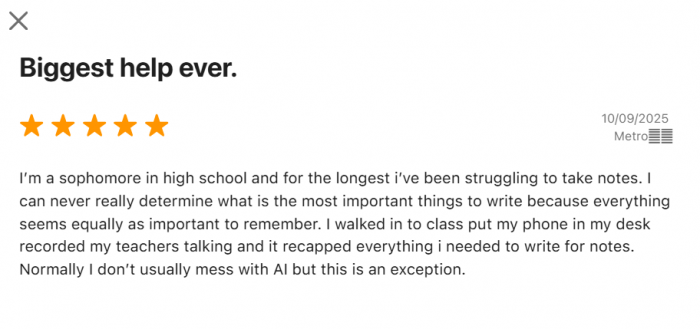
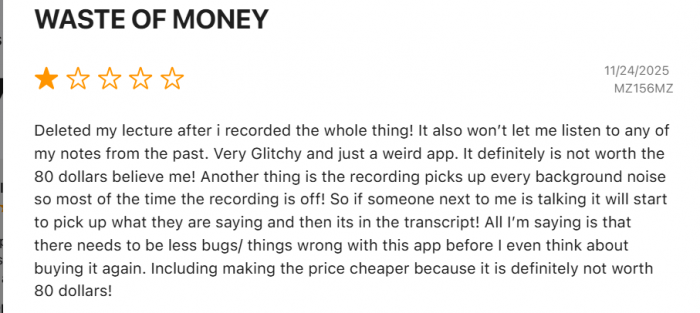
In theory, that’s incredibly powerful: I can record a lecture, get a transcript, and then immediately ask for a summary, key concepts, and practice questions. In practice, the app still feels like its evolving user feedback mentions crashes and incomplete notes but the idea itself fits the rest of Unstuck’s ecosystem very well.
How I look at Unstuck AI’s pricing
Pricing is a bit messy because different “Unstuck” products exist and things change over time, but here’s how I mentally categorize it based on what I’ve seen:
● A free plan that lets me try the core study features with some limitations (like file caps or feature caps).
● A paid Pro / Premium tier (roughly in the 19.99 USD per month zone in many reviews) that unlocks more generous limits and advanced capabilities like richer note‑taking, personalized plans, and expanded AI tools.
● An annual plan at a lower effective monthly rate (around 119 USD per year in some reviews), which softens the long‑term cost if I commit.
● Extra subscription options on mobile (like weekly/yearly in‑app purchases) for the Note Taker app.
From a value standpoint, I personally see it like this:
● If I stay on the free tier, it’s an easy yes as long as I accept the limits.
● If I go Pro, I have to consciously compare that monthly cost to what I’m getting versus cheaper or free alternatives.
For students in higher‑income regions, the Pro price can still be justified if Unstuck genuinely replaces multiple tools and saves hours every week. For students in lower‑income contexts, that subscription will feel like a bigger decision.
What real tests and other users suggest (and how I interpret them)
One of the more interesting things I’ve read is a structured comparison between Unstuck AI and Mindgrasp AI, where students tested both on the same tasks: summarizing videos, making flashcards and quizzes, generating essays, and organizing study materials.
Some patterns from that kind of testing resonate with my own experience:
● Students who just wanted quick, clear information and rapid flashcard generation tended to prefer Mindgrasp.
● Students who cared about deeper understanding, integrated ideas, and help with planning and writing leaned toward Unstuck.

I also notice a recurring theme in reviews: Unstuck is praised as a strong all‑rounder that improves learning efficiency and supports mental clarity, but reviewers also warn that it’s still possible to over‑rely on AI and stop thinking actively if we’re not careful.
On the mobile side, App Store reviews of the Note Taker app are more mixed, users like the concept and see potential, but call out issues like bugs and occasional crashes. For me, that means I use the mobile app as a convenience tool, not a single point of failure before an exam.
How I think about safety, privacy, and integrity
Personally, I’m careful with any AI tool that touches my notes and assignments, so I look at three things: data security, privacy, and academic ethics.
From what I’ve seen, Unstuck positions itself as privacy‑focused: it talks about secure handling of user data, protecting notes and reflections, and not sharing content externally. That’s essential if I’m uploading personal study notes or reflective content around stress and goals.
Ethically, I treat Unstuck as a learning partner, not as a cheat engine. That means:
● I use it to explain concepts and generate practice questions.
● I still verify important facts against textbooks, lectures, or original papers.
● I avoid pasting exam questions and copying answers blindly without understanding them.
I also try not to upload extremely sensitive personal or institutional documents just because something is “secure” doesn’t mean I should be careless. With AI tools, my rule is simple: if I’d be uncomfortable seeing it leaked, I think twice before uploading.
Unstuck AI: what I like and what frustrates me
What I genuinely like
● It acts like a guided study companion rather than a superficial summarizer.
● It handles multiple jobs- summaries, explanations, flashcards, quizzes, and writing support inside one environment.
● It fits both academic tasks and broader productivity/planning if I want to track tasks and break down big goals.
● It takes privacy and security seriously in its messaging, which matters when I’m working with personal notes.
● The existence of a free tier makes it easy to test without a financial commitment.
What bothers me or could be better
● The Pro pricing is not trivial if I’m on a tight student budget; I have to justify it.
● Like any AI tool, it tempts me to offload thinking if I’m not strict with myself.
● The Note Taker app, while promising, still feels technically unstable at times based on user reviews.
● For very advanced technical or math‑heavy tasks, I sometimes need more specialized tools.
How I see Unstuck AI compared to other tools I’ve used
In my head, I slot Unstuck alongside two main alternatives:
● Mindgrasp AI – my “academic efficiency” specialist for very fast summaries and flashcards.
● General chatbots (like broad AI assistants) – extremely flexible but not pre‑built for multi‑file study workflows.
So if I just want 20 quick flashcards, I might reach for a more laser‑focused tool. But if I’m planning an essay, revising for a big exam, or trying to organize messy notes into a coherent plan, Unstuck fits my mental model better.
A realistic “day with Unstuck AI” from my side
Here’s what a typical Unstuck‑powered study session looks like for me:
1. Upload everything: I start by dumping my chapter PDFs, lecture slides, and a couple of related YouTube links into Unstuck, organized by course or topic.
2. Ask for the big picture : Before I get lost in details, I ask Unstuck for a high‑level overview of the topic and list of key concepts.
3. Generate practice material : Once I’ve skimmed or read the material, I generate quizzes or flashcards specifically on the sections I feel weakest in.
4. Clarify what I still don’t get : When I miss quiz questions, I ask Unstuck to explain those areas with new examples or analogies, and I read the relevant section again.
5. Plan my writing or projects : If I have a related assignment, I’ll ask for possible essay structures and then refine my chosen outline with my own judgment.
6. Wrap up with a concise summary : At the end of the session, I ask Unstuck to summarize what I’ve covered today and outline what I should focus on tomorrow.
Used this way, Unstuck stops being a novelty and becomes a recurring part of my study rhythm.
My honest verdict on Unstuck AI
From a user’s point of view, Unstuck AI feels like a serious attempt to build a complete study and thinking environment, not just another AI toy. Its strengths are most obvious when I’m dealing with large, messy sets of materials and need help synthesizing, planning, and practicing.
If you often get stuck while working through complex readings or projects that involve multiple sources, Unstuck AI could be worth trying. It’s especially useful if you value structured thinking and need help with longer assignments rather than just quick answers. It works best when you treat it as a learning partner and still verify information and stay actively involved in the process.
However, you might want to consider other options if you mainly need very fast flashcards or short summaries. It may also not be ideal if the Pro pricing would strain your budget or if you already have a well-established workflow with another AI and don’t want to switch to a new system.
For me, the ideal starting point is simple: use the free tier intensively for a couple of weeks during a busy study period. If I feel that Unstuck is saving real time and genuinely improving my understanding (not just making me feel productive), only then do I consider upgrading.
FAQs
1. Is Unstuck AI free to use?
Unstuck AI currently offers a free version that lets you upload course materials and get AI‑powered help, with more features and higher limits available on paid or premium plans depending on the product tier.
2. Is Unstuck AI safe and secure for students?
Yes, reviews indicate Unstuck AI stores your files securely, doesn’t share your documents publicly, and follows industry‑standard security and encryption practices to protect academic data.
3. What can I upload into Unstuck AI?
You can upload PDFs, PowerPoint slides, DOC files, textbook scans, class notes, and even YouTube links so the AI can read them, answer questions, and create summaries or quizzes from your own materials.
4. Does Unstuck AI work on mobile devices?
Yes, you can use Unstuck via the web on any device, and there is also a dedicated “Unstuck AI Note Taker” mobile app that records lectures and turns them into structured notes and summaries.
5. Can Unstuck AI help with all subjects?
Unstuck AI is designed as a general study assistant and works across many subjects, including science, math, economics, computer science, and more, by answering from the specific materials you upload.
Comments