
PopPop AI feels less like a “tool site” and more like stumbling into a tiny AI-powered studio that just happens to live inside your browser. It strips away the usual friction, no downloads, no heavy setup, often not even an account and still hands you serious toys: vocal remover, text‑to‑speech, voice cloning, AI song covers, sound effects, and even an early peek at 3D avatars. The twist is that, despite being free to start, it’s powerful enough that a lot of creators quietly build real workflows on top of it.
The big idea: one tab, many jobs
If you think about the jobs you do around audio, they rarely come alone. You might pull vocals out of a track to make karaoke, then need a voiceover for your edit, then notice the timeline feels empty without sound effects, and somewhere in between you get a wild idea for an AI cover “just to see what happens.”
PopPop AI sits right in the middle of that mess. It wants to be the place where you do most of those things without context‑switching between five logins and three different apps. Everything runs in your browser. You jump between modules-vocal remover, TTS, cloning, AI covers, SFX, Vita3D and your only real “installation” is opening a new tab.
To give that shape, it helps to frame PopPop AI like this:
| What it is | A browser‑based AI studio for audio (vocal remover, TTS, voice cloning, AI covers, SFX) plus a Vita3D module. |
| Who it serves | YouTubers, TikTokers, podcasters, students, indie devs, hobby musicians, and budget‑conscious creators. |
| How you use it | Directly in the browser; many tools work even before you sign up. |
| Current pricing vibe | Free‑first: you can meaningfully use it without a subscription. |
From that starting point, the interesting part is how each piece behaves when you actually push it.
Vocal remover: karaoke and acapellas without the DAW
The vocal remover is PopPop AI’s “instant gratification” trick. You drag in a song (or a compatible video), tap the control to isolate vocals, and a short while later you have two files: an instrumental and an acapella. There’s no talk of stems or engineering jargon; it’s a one‑click surface on top of fairly complex under‑the‑hood processing.
On well‑mixed studio tracks, the results often feel startlingly good for something that runs in a browser. Instrumentals tend to be clean enough for karaoke channels, practice, or background music, while the extracted vocals are usable for remixes, mashups, and creative experiments. On rougher recordings and chaotic mixes, you’ll still hear artifacts and bleed, no free tool magically avoids that but the success rate is high enough that many users lean on it regularly.
The real value here is mental: you stop treating “I need stems” as a specialist job. It becomes a routine step you can handle from anywhere, even on a basic laptop, which makes karaoke content, remix sketches, and vocal‑only breakdowns far more accessible.
Text‑to‑speech: putting a studio voice on your scripts
If you create faceless content, PopPop AI’s text‑to‑speech engine quickly becomes part of the daily toolkit. The flow is straightforward: paste your script into the editor, select a language and voice, tweak parameters like speed and pitch, and generate your voiceover.
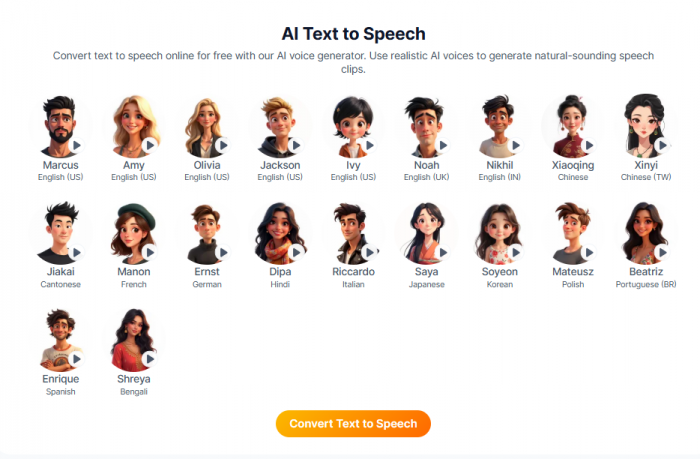
We’re not getting “voice‑actor level” nuance, but we are getting modern, clear, non‑robotic voices that are perfectly adequate for YouTube explainers, tutorials, listicles, product demos, basic podcasts, and course content. The voices span multiple languages, with a decent mix of male and female timbres and different tones from neutral to more energetic.
The magic lies in iteration. Because everything is in the browser, you can alter a sentence, regenerate, and instantly hear how the new version lands. That transforms voiceover from a “record and hope” process into something more like editing text: you test, refine, and keep moving. For many creators, the bottleneck stops being “I hate recording” and starts being “how good is my script?”
Voice cloning: your voice on autopilot
Voice cloning is where PopPop AI steps into the uncanny.
You provide clean recordings of your own voice ideally a mix of phrases, emotions, and pacing and the system learns a clone that can read any script you type. Once that’s done, your “AI self” becomes a selectable voice inside the TTS module and sometimes within the AI cover tools, so the voice your audience recognises can speak or sing things you never recorded.
This is a huge win for personal branding: your channel, your course, your product walkthroughs can all share a consistent voice, without you having to be in front of a microphone every single time. It’s also a boon for people who have limited recording time, fluctuating vocal health, or a simple dislike of talking on mic.
Of course, cloning is the point where technology demands ethics. The same mechanism that lets you scale your own voice can be misused to impersonate others. PopPop AI doesn’t police your morals for you, so any serious use should stick to one simple rule: clone only voices you own or have explicit consent to use, and stay mindful of platform policies and local laws around synthetic media.
AI song covers: turning “what if” into audio
PopPop AI’s AI cover feature is less about utility and more about curiosity. You upload a song, choose a target voice, maybe one of PopPop’s stock options, maybe your own clone and let the system reinterpret the vocal performance in that voice.
Sometimes the result is surprisingly good: the timing lines up, the timbre works, and you end up with a cover that feels fresh enough for social media or internal listening. Sometimes it’s clearly an experiment, with timing hiccups or audible artifacts. Either way, it acts as a “what‑if engine”: what if this song was sung by that style of voice?
In practice, it becomes a playground for music‑adjacent creators and meme makers. You can get dozens of ideas out of an afternoon of tinkering, then pull the strongest concepts into your main production environment for polishing or just share them as fun, low‑stakes content.
AI sound effects: describing sound instead of hunting for it
If you’ve ever lost an hour scrolling through stock sound libraries for “the right whoosh,” the SFX generator feels like a relief. Instead of browsing, you describe what you want in plain language: “soft, airy transition whoosh,” “retro arcade coin pickup,” “small metal clink with echo,” “subtle UI tap.”
PopPop AI uses that description to synthesise one or more sound effects. You listen, keep the ones you like, and if they’re not quite right, change the description and generate again. For YouTubers, indie devs, and solo editors, this collapses what used to be a time‑consuming search into a small loop of prompt → listen → tweak.
No, it won’t beat a seasoned sound designer building a cinematic soundscape from scratch. But it absolutely can cover a large percentage of everyday needs: UI sounds, transitions, basic ambience, stylised game sounds, and more. It’s a step change for creators who would otherwise just skip sound design altogether.
Vita3D: a hint of where PopPop wants to go
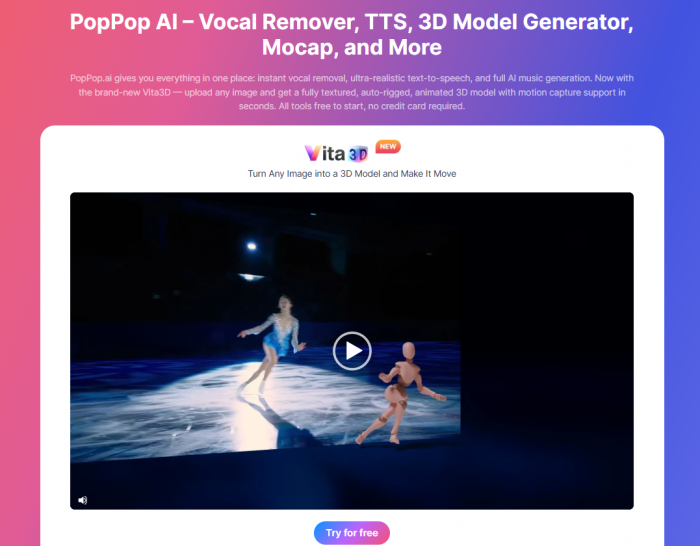
Most people arrive at PopPop AI for audio and only later notice Vita3D. This module takes images often characters or avatars and turns them into rigged, animated 3D models. When combined with PopPop’s audio capabilities, it suggests a pipeline where you can give that model a voice (via TTS or a clone) and animations in the same ecosystem.
It’s not yet the centrepiece of the platform, but it’s an important signal. PopPop AI is not content to be “the vocal remover site” or “the free TTS site.” It’s edging towards becoming a compact creative engine where voice, sound, and character live together, which matters a lot if you care about VTubing, virtual presenters, or stylised games.
The way it feels to use: friction, or the lack of it
More than any one feature, what stands out about PopPop AI is how low the friction is. You open the site, pick the tool that matches your problem, and within a few clicks you’re generating something. No installers, no plugin paths, no “trial expired” warnings. For many tools, you don’t even have to create an account to test.
This shapes how you work. Instead of planning “a session” around audio, you drop in and out of PopPop as needed throughout your creative day: ten minutes to strip vocals for a reel, fifteen to generate a voiceover and re‑generate three lines that don’t sound quite right, a quick SFX pass before you export. It behaves more like a friendly colleague than a big piece of software.
Where you notice constraints is when you try to treat it like a full DAW or an enterprise platform. You won’t find deep mastering chains, intricate routing, or ultra‑fine emotion curves for TTS. Batch operations are limited, and you’re tied to the performance of your connection and the shared infrastructure behind the scenes. It’s a studio you visit, not the warehouse where your entire broadcast operation lives.
Pricing: how “free” is PopPop AI, really?
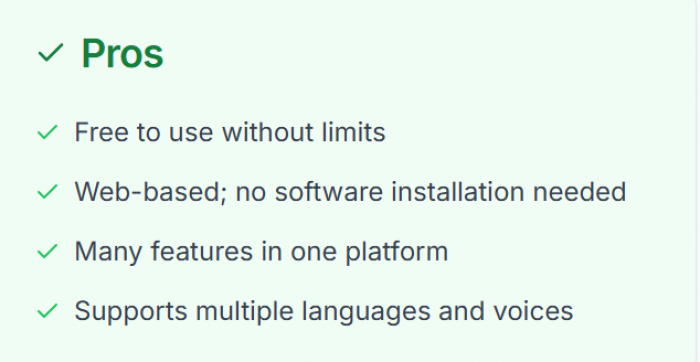
PopPop AI leans heavily into a free‑first model, and that’s a big part of its appeal. As it stands, you can access its headline features vocal remover, text‑to‑speech, voice cloning, AI covers, and sound effects directly in the browser without committing to a paid subscription up front. For most new users, that means you can meaningfully test the platform, complete small projects, and even build parts of your workflow before money ever enters the conversation.
There are, of course, trade‑offs baked into that generosity. The “price” you pay is more about limits and expectations than about a monthly bill. You should expect some practical caps around file size, processing time, and how much you can push the system in a single session before you hit soft friction like slower queues or occasional retries. You’re also working inside a consumer‑oriented studio, not an enterprise environment, so things like guaranteed uptime, SLAs, or large‑scale automation hooks aren’t the focus yet.
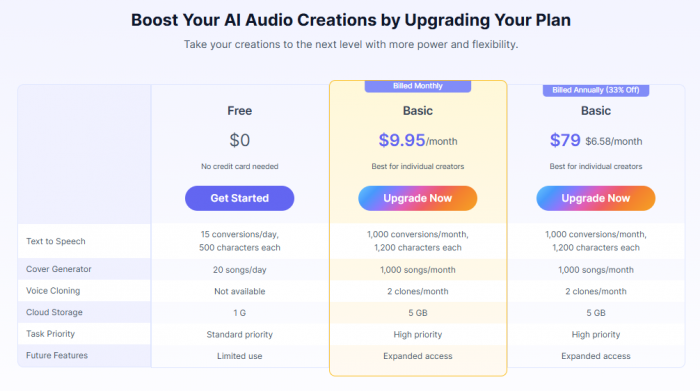
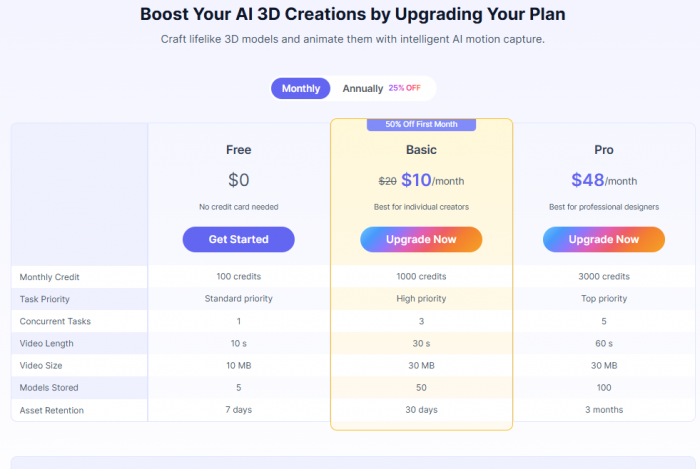
The net effect, though, is very creator‑friendly. For students, hobbyists, and smaller channels, PopPop AI effectively erases the cost barrier for serious AI audio experimentation. For pros, it becomes a low‑risk sandbox: you prototype here for free, and if an idea proves itself, you decide later whether it deserves the polish and budget of a paid, specialised stack.
Strengths and weak spots in plain language
| Aspect | Where PopPop AI shines | Where it clearly isn’t perfect |
| Cost | Free to start, with meaningful features available without paying. | No formal “pro” tiers or SLAs yet; future pricing model isn’t fully clear. |
| Coverage | Bundles vocal remover, TTS, cloning, AI covers, SFX, and 3D in one browser workspace. | Each module is shallower than a dedicated, specialist tool. |
| Usability | Extremely low friction; works in browser; friendly for beginners and non‑techies. | Limited advanced controls, batch processing, and deep configuration. |
| Quality | Solid enough for social, YouTube, education, and indie projects. | Still short of top‑tier tools for ultra‑realism and artifact‑free audio. |
| Scale | Great for individuals and small teams shipping regular content. | Not yet a full replacement for pro DAWs or large‑scale production stacks. |
That’s the reality: PopPop AI isn’t trying to win a technical spec war; it’s optimising hard for accessibility and creative throughput.
What real users tend to say
If you distil the tone of user feedback and third‑party write‑ups, three recurring ideas keep surfacing.
One: people are genuinely surprised by how much they get for free. For a lot of new users, the first reaction is some version of “I was waiting for the catch.” The fact that you can run serious workloads vocal removal, TTS, cloning experiments, SFX generation without hitting a paywall on day one earns PopPop AI a lot of goodwill.
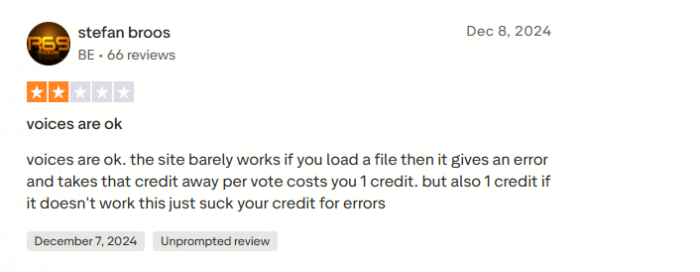
Two: more demanding users clearly treat PopPop AI as a sandbox rather than a final destination. On Trustpilot, one reviewer calls out frustrations with credit usage and reliability when files fail to process, essentially saying the voices are okay but the site can feel unstable under heavier loads. That kind of feedback lines up with blog reviews that frame PopPop as a great place to experiment testing stems, trying different voices, sketching SFX, auditioning cover ideas but not as a flawless, high‑volume production workhorse.
Three: for beginners and budget‑constrained creators, it’s an unlock. Students, small channels, and hobby musicians who wouldn’t buy multiple subscriptions can suddenly do work that used to be out of reach. Karaoke tracks, voiceover‑driven explainers, textured sound design, AI‑flavoured covers all of that becomes “I can do this today,” not “maybe someday.”

Who should seriously consider using PopPop AI?
If your world is YouTube, TikTok, Reels, Instagram, Twitch, podcasts, class projects, small games, or indie apps, PopPop AI is a very strong match. It covers most of the audio jobs you actually have, without the cost or learning curve of pro‑grade setups. You can get from idea to “publishable enough” quickly, which matters more in fast‑moving content environments than absolute theoretical quality.
It is especially well‑suited to:
● Creators who need regular voiceovers but don’t want to record everything.
● Karaoke channel owners, remixers, and musicians who need quick stems.
● YouTubers and editors who want custom SFX without living in stock libraries.
● Students and educators building explainer content on tight budgets.
● Indie developers or solo founders who want audio that doesn’t look like an afterthought.
If you run a high‑end studio, broadcast operation, or enterprise media pipeline, PopPop AI still has a place but as a sidekick. It’s where you prototype, test, and play. Your critical paths will still run through DAWs, premium TTS engines, dedicated SFX libraries, and tightly integrated systems.
Verdict: not a DAW, but a very capable lab
PopPop AI isn’t trying to be Pro Tools or a flagship enterprise platform. It’s trying to be something a lot more contemporary: a generous, low‑friction lab for modern creators who live inside browsers and ship content fast.
As that, it succeeds. You get stems, voices, clones, covers, SFX, and a hint of 3D without installing anything or paying to get started. You give up some depth, speed, and industrial‑strength guarantees in exchange for accessibility and creative flexibility. For most creators on the internet today, that’s a trade worth making.
FAQs
1. Is PopPop AI really free?
Yes, PopPop AI is currently positioned as a free‑to‑use web platform, with core tools accessible without an upfront subscription or install.
2. Do I need to download any software to use PopPop AI?
No, everything runs in the browser. You upload audio or paste text, generate outputs online, and then download the results.
3. Is voice cloning on PopPop AI safe and legal to use?
It’s technically easy but must be used responsibly. Only clone your own voice or voices you have clear consent and rights to use.
4. Does PopPop AI support multiple languages?
Yes, its text‑to‑speech engine supports many languages and a large library of voices, making it suitable for multilingual content.
5. Do I get watermarks on audio from PopPop AI?
As of now, audio outputs are generally not watermarked, but you should always check current terms and export details before commercial use.
Comments