

For years, hashtags were treated as compulsory. Creators collected lists, copied thirty tags into captions and hoped one would push a post beyond their followers. That habit no longer reflects how social platforms recommend content.
Hashtags have not disappeared, but their job has changed. They are useful as topic labels, search clues, community markers and campaign organisers. They are far less dependable as automatic reach boosters. The creators getting value from them are not using more tags. They are choosing fewer tags with a clear reason behind each one.
Relevant, but Not Magical
The debate is often framed too simply. One side claims hashtags are dead. The other still presents them as a dependable growth technique. Neither position reflects how platforms currently use them.
A hashtag can help classify a post, connect it with a searchable topic and signal the subject to a viewer. On several platforms, clicking a tag still opens a page of related content. Those functions remain useful even when the tag does not produce a visible increase in reach.
What hashtags cannot do is create demand for a post people do not want to watch, read or share. A weak opening will still lose attention. A confusing video will still struggle to hold viewers. A generic carousel will not become valuable because #ContentCreator appears underneath it.
The practical answer is yes, hashtags remain relevant when they perform a specific task. They support distribution rather than drive it. Content quality, clear language and audience response now carry much more weight than a block of tags at the end.
How Hashtag Role Changed
The old hashtag playbook was built for simpler feeds. Posts were discovered through followers, chronological timelines, Explore pages and topic streams that depended heavily on labels. Adding a popular tag could place a post inside a large public pool, at least briefly.
Modern recommendation systems can analyse captions, titles, spoken words, on-screen text, sounds, images and viewing behaviour. They also see whether people finish a video, skip it, share it, save it or visit the creator’s profile.
TikTok’s current explanation of its recommendation system shows this balance. Hashtags and sounds are content signals, but viewing, skipping, liking and sharing also influence recommendations. In search, the strength of the match between the content and the entered query is especially important.
Instagram has moved in the same direction. In December 2025, it introduced a maximum of five hashtags for a post or Reel. Instagram head Adam Mosseri said specific tags are preferable to long generic lists and that hashtags help with search but do not independently increase reach.
This is why hashtag strategy can no longer be separated from social search. A video about mobile food photography should state that subject in its spoken opening, on-screen wording, caption and title. The hashtag confirms the topic; the rest of the post explains it.
What Hashtags Still Do
Hashtags remain useful in four clear situations.
1. They Clarify the Subject
A precise tag gives the platform and viewer another clue about the post. #EmailDeliverability, for example, signals a narrower subject than #Marketing. It reinforces the language already used in the content and can improve the match with a specialist search.
2. They Connect Communities
Professional groups, fandoms, conferences and local communities often gather around recognisable tags. Here, relevance matters more than size. A small ceramics tag with an active local audience may bring better responses than a huge craft tag filled with unrelated posts.
3. They Organise Campaigns
Branded hashtags remain practical for challenges, launches, events and user-generated content. One distinct campaign tag makes customer submissions easier to find, review and measure than a vague brand term used in several contexts.
4. They Group a Series
An original tag can create an informal index for recurring content. A fitness coach might group weekly form checks under one series tag, while a designer organises interface critiques under another. The tag does not need high search volume because its purpose is organisation and continuity.
Platform Rules Are Different
A universal hashtag formula wastes time. The same set should not be copied across Instagram, TikTok, LinkedIn, YouTube and X because each platform gives tags a different place within discovery.
| Platform | Practical Role | Sensible Approach | What to Avoid |
| Topic classification and hashtag search | Use up to five tags describing the subject, niche or series | Generic fillers such as #Explore, #Reels and unrelated popular tags | |
| TikTok | Search context, topic association and trend participation | Combine an exact topic tag with a niche, community or genuine trend tag | Assuming #FYP can compensate for weak retention |
| YouTube | Clickable topic grouping and search support | Use a few accurate hashtags in the title or description | Confusing hashtags with backend video tags |
| Professional context, campaigns and niche discussions | Use a small number only when they add useful context | Decorative walls of broad business terms | |
| X | Live conversations, events and searchable topics | Keep tags limited and tied to the discussion | Letting tags interrupt a short message |
1. Instagram
Instagram now permits up to five hashtags in a post or Reel. The platform’s position is direct: specific tags are preferable to large generic collections, and hashtags should not be treated as a separate reach lever.
A strong Instagram set might include an exact topic, a niche or audience label, and a community, location, campaign or series tag when one applies. There is no need to fill all five positions.
A Reel teaching freelancers how to price logo work could use #LogoPricing, #FreelanceDesign and #GraphicDesignBusiness. Adding #Viral and #Explore does not make the subject clearer. Captions, spoken wording and on-screen text should carry the main explanation, with hashtags supporting the same topic.
2. TikTok
Hashtags remain visible in TikTok search and are among the content signals used in recommendations. Search results consider how well content matches the query, along with hashtags and sounds. Viewing and skipping behaviour remain central to feed recommendations.
Creators should therefore begin with the search intent behind the video. A tutorial called “How to remove background noise in CapCut” needs language that matches that problem. #CapCutTutorial, #RemoveBackgroundNoise and #VideoEditingTips can reinforce it, but the spoken hook and caption should state it too.
TikTok’s Creator Search Insights can show popular search subjects and content gaps in supported regions. Its AI Outline feature can also generate titles, hooks, outlines and hashtags from a prompt or selected search topic.
Use trend tags only when the video genuinely participates in the trend. Unrelated trend labels may attract viewers who leave immediately because the post does not match their expectation.
3. YouTube
YouTube hashtags are clickable topic links placed in a title or description. Up to three from the description may appear near the video title. If a video or playlist contains more than sixty hashtags, YouTube may ignore all of them.
Do not confuse them with YouTube’s separate video-tag field. YouTube says the title, thumbnail and description matter more for discovery, while backend tags generally play a limited role except for cases such as common misspellings.
A few descriptive hashtags are enough for most videos. They work well for events, recurring formats, challenges and recognisable subjects. The title and thumbnail still need to give viewers a reason to click.
4. LinkedIn
LinkedIn removed profile hashtags beginning in February 2024, although hashtags remain optional in posts and document descriptions.
Clear professional language normally matters more than volume. One or two precise tags may signal an industry, event or specialist subject. A long ending filled with #Leadership, #Success, #Business and #Motivation usually adds little.
Tags have a stronger purpose in conferences, company initiatives and recurring professional discussions. In an ordinary post, include them only when they sharpen the topic or connect it with a real conversation.
5. X
X remains a clear example of hashtags as live conversation labels. Public posts containing a tag can appear in searches for it, and X recommends no more than two hashtags per post as a best practice.
They are particularly useful during conferences, sports, television broadcasts, product announcements and fast-moving news. Because X posts are compact, one strong event or topic tag is often more useful than several broad additions. Multiword tags should use capitals, such as #CreatorEconomyReport, to make them easier to read.
Build a Smarter Set
The best hashtag set begins with relevance, not popularity. A creator should be able to explain why every chosen tag belongs under that post.
A practical set can draw from five layers:
1. The exact-topic tag should name the central subject rather than the general industry. #InstagramCaptionWriting is more informative than #SocialMedia for a post about writing captions.
2. The niche tag should identify the specialist field or content category. A food creator may use #VeganBaking, while a designer may use #MobileUXDesign.
3. The audience or community tag should connect the post with a recognisable group. This could relate to independent authors, home baristas or wedding photographers.
4. The campaign, event or location tag should appear only when the post truly belongs to it. A conference recap deserves the conference tag; an unrelated promotion does not.
5. The branded or series tag should organise repeated content. It may be small, but it gives returning followers a searchable route through the series.
Not every post needs all five. Instagram’s limit is a maximum, not a target. X may need one event tag. A YouTube video might use a topic tag and a series tag. The number should follow the job.
Compare two sets for an Instagram Reel about writing stronger opening lines:
Weak set: #Viral #Explore #Content #Marketing #Success
Focused set: #InstagramHooks #SocialMediaCopywriting #ContentWritingTips
The focused set describes the post, the skill and the likely audience. That makes it more useful to searchers and to the platform.
Research Before Publishing
A generator can speed up brainstorming, but it should not make the final decision. Hashtag meanings change, communities adopt new labels and once-useful tags can fill with spam.
Start with the language the audience uses. Search suggestions, customer questions, comments and niche communities often reveal better wording than a generic keyword list. A specialist may describe a technique one way while beginners search for it using a simpler phrase.
Next, open the tag’s results page on the destination platform. Check whether recent content matches the intended topic. Look at the language, location, formats and accounts using it. A familiar tag may have developed an unexpected meaning.
Compare broad and narrow versions. For a mobile editing tutorial, #VideoEditing, #MobileVideoEditing, #CapCutEditing and #CapCutTextAnimation reflect different levels of intent, not merely different audience sizes.
Maintain a library organised by recurring subjects, communities, campaigns and branded series, but select from it post by post. Write multiword hashtags in camel case, such as #SocialMediaStrategy, so they are easier to scan and understand.
When Tags Add Nothing
Some posts do not need hashtags at all. A personal update written mainly for existing followers may gain nothing from a topic label. The same applies to a direct response to a current discussion when the subject is already obvious from the text and no active community tag is involved.
Skipping hashtags can also improve clarity on platforms where caption space is tight. A creator should not force a tag into a strong sentence merely to complete a checklist. If the tag repeats a keyword already stated clearly, has no useful results page and does not connect a campaign or community, it may be unnecessary.
This is also why “zero hashtags” should be part of testing. The purpose is not to prove that tags are useless. It is to identify which posts receive a measurable benefit and which perform just as well without them.
Four Hashtag Generators
Generators are best treated as idea engines. They can uncover phrases a creator missed and shorten the first research stage. Unless connected to reliable live data, they cannot prove that every suggestion is currently popular or suitable.
1. Smartpostly Hashtag Generator
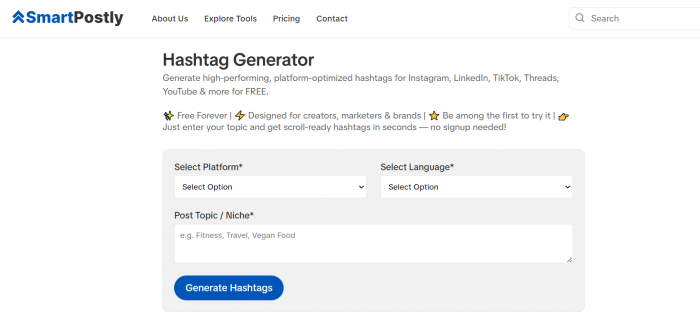
Smartpostly Hashtag Generator earns the first position for creators who want a usable shortlist without opening a large management dashboard. It asks for a platform, language and post topic or niche, then generates tags for services including Instagram, LinkedIn, TikTok, Threads and YouTube. Its public version is presented as free and requires no sign-up.
The platform selector is valuable because an X set should not resemble an Instagram caption block, and LinkedIn needs a different language from TikTok. Language selection also helps regional and multilingual creators.
Smartpostly says its results combine broad, niche and audience-focused terms. Use the tool to generate alternatives, remove vague suggestions and retain only tags that accurately describe the post. Any claim that a suggested tag is fresh or trending should be verified directly on the chosen platform.
2. Buffer Instagram Hashtag Generator
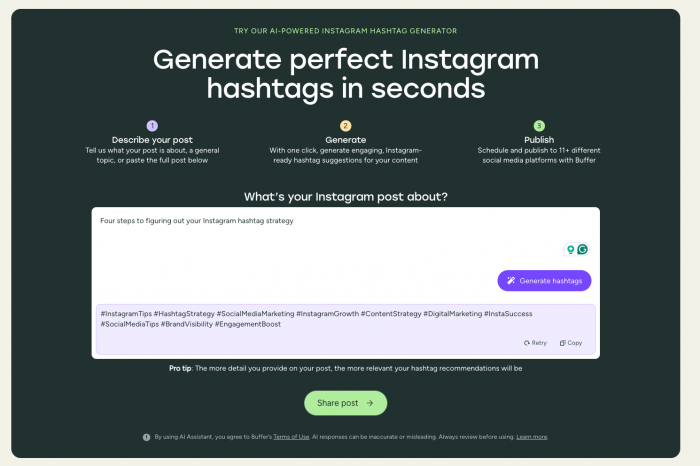
Buffer’s Instagram generator works well when the caption or concept is already developed. A creator can describe the post, enter a topic or paste the full text. The public tool offers up to five recommendations per day, with broader use available through a free Buffer account.
Buffer also states that its suggestions are not pulled directly from real-time Instagram data. They are based on learned social-content patterns, so they should be treated as informed ideas rather than proof of a current trend.
This transparency makes Buffer a useful option for context-aware brainstorming, especially for creators prepared to check the final shortlist manually.
3. Hootsuite Hashtag Generator
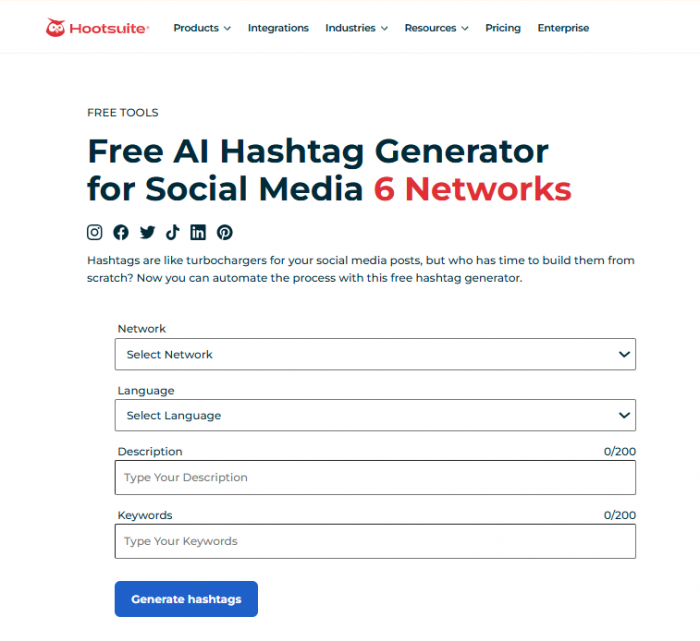
Hootsuite supports Instagram, Facebook, X, TikTok, LinkedIn and Pinterest. Users choose a network and language, then provide a description and keywords before generating a set.
It is useful for social media managers adapting one campaign across several channels. A launch may need an industry tag on LinkedIn, an event tag on X and a more specific discovery set on Instagram.
Hootsuite warns that generated material may be inaccurate or unsuitable. The output can save research time, but every tag still needs checking for meaning, relevance and current usage.
4. Later Hashtag Suggestions
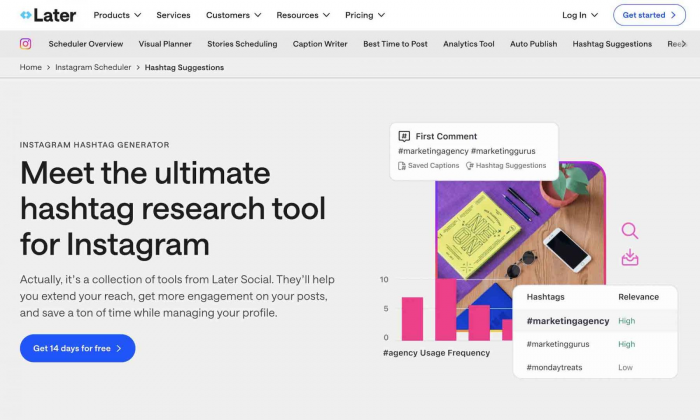
Later is the most workflow-focused option here because suggestions appear while content is being prepared inside its scheduler.
Search-based suggestions can generate up to thirty related hashtags from one starting tag for Instagram and Facebook on current paid plans. Caption-based automatic suggestions are available for Instagram on Growth plans and above.
Later suits creators already planning content through the platform because tags can be reviewed and inserted without changing tools. It is less suitable for someone seeking a simple free generator, and its suggestion features do not cover every network.
Test Hashtags for 30 Days
No guide can identify the perfect number for every account. Audience size, niche, language and format all affect the result. A thirty-day test gives creators evidence from their own posts.
Choose twelve posts from comparable content categories and divide them into three groups:
● Publish four without hashtags while keeping the topics and quality close to normal content.
● Publish four with a small set of exact, manually checked tags that match the subject and audience.
● Publish four using broader or generator-led selections, after removing anything misleading or unrelated.
Track more than total views. Review non-follower reach, search or discovery impressions where available, profile visits, saves, shares, average watch time, qualified comments and clicks.
A small tag may bring the right person to a service page even if it adds little reach. A broad tag may add passive impressions without producing any useful action.
Do not change the posting time, format, hook, subject and hashtag method at once. The test will not be perfectly controlled, but keeping other variables reasonably stable makes the result more useful. At the end, look for repeated patterns rather than one exceptional post.
Mistakes That Waste Tags
The main problem is not choosing the wrong number. It is using hashtags without a purpose.
Copying one block under every post weakens relevance. Tutorials, opinions, reviews and personal updates should not all carry the same set simply because they come from one account.
Choosing by post count alone is also unreliable. A tag containing millions of posts may look attractive, but size says nothing about audience fit, current activity or the chance of visibility. Smaller tags can be more valuable when the people around them closely match the intended audience.
Unrelated trend tags create another problem. They may produce impressions, but viewers are likely to leave when the post does not deliver what the label promised.
Do not blame every fall in reach on a tag or supposed shadowban. Check content eligibility, account status, audience response, consistency and format changes before assigning the result to hashtags.
Final Verdict
Hashtags are still relevant, but they no longer deserve the importance creators once gave them. Their strongest uses are identifying a topic, supporting search, connecting a community, organising a campaign and grouping a series.
The better approach is to state the subject clearly, use the audience’s search language, choose a few tags that add context and measure whether they bring useful discovery. Smartpostly offers the quickest starting point, while Buffer, Hootsuite and Later suit different workflows. None replaces manual checking.
A hashtag should earn its place. When it names the subject or connects the right conversation, keep it. When it is included only from habit, remove it.
Comments