

Nemin.io offers quick calculators for marketing budgets, freelance pricing, profit margins, and project costs. However, these estimates can become limiting when businesses need to consider additional expenses, compare several financial scenarios, or maintain records of previous calculations.
Some alternatives specialize in financial formulas, while others handle advertising returns, product pricing, accounting, and business forecasting. Here are ten Nemin.io alternatives, with their actual capabilities, pricing, practical applications, and the situations where each makes sense.
When Is a Nemin.io Alternative Worth Considering?
A calculator may produce the correct result without answering the entire business question. For example, a product might generate a 40% gross margin, but that figure alone doesn't reveal whether the business remains profitable after advertising, shipping, transaction fees, and refunds.
The need for an alternative usually comes down to four things:
● More calculation inputs: A business may need to include expenses or assumptions that a standard calculator doesn't accept.
● Multiple financial scenarios: Comparing five different advertising budgets is easier when results can be displayed together rather than calculated individually.
● Reusable information: Agencies and freelancers often need to update the same budget or pricing calculation throughout a project.
● Actual financial records: Calculating expected revenue is different from tracking invoices, payments, and business expenses.
A free calculator may be sufficient for occasional estimates. More advanced tools become useful when the numbers influence recurring financial decisions.
Best Nemin.io Alternatives Compared
| Tool | Best for | Starting price |
| Omni Calculator | Financial formulas | Free |
| Calculator.net | Loan and interest calculations | Free |
| Google Sheets | Custom budgets | Free |
| HubSpot Ads Calculator | Advertising ROI | Free |
| Shopify Profit Margin Calculator | Ecommerce pricing | Free |
| CalcXML | Financial planning | Free public tools |
| Microsoft Excel | Financial modelling | Free web version |
| Wave | Accounting and expenses | Free; Pro $19/month |
| Zoho Invoice | Quotations and billing | Free |
| LivePlan | Business forecasting | From $15/month, billed annually* |
*Note : Published starting prices and subscription terms can change. Paid-plan availability also varies by location.
10 Best Nemin.io Alternatives (Free & Paid)
1. Omni Calculator : Best for Financial Calculations
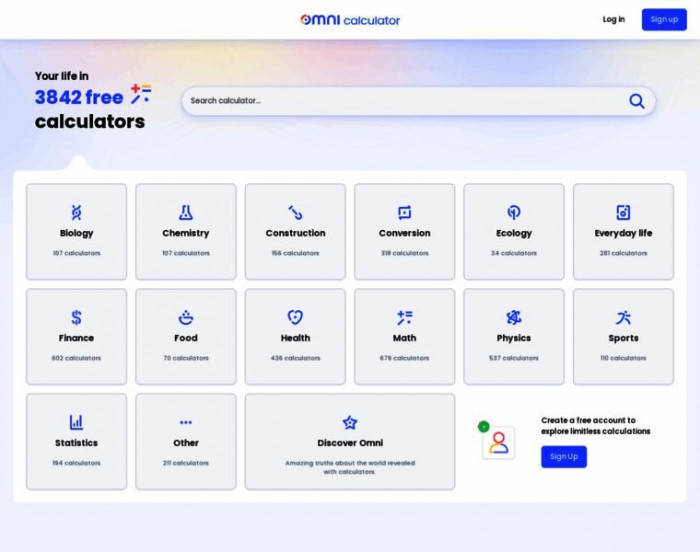
Omni Calculator brings together calculators for business, finance, mathematics, and other specialized subjects. Its advantage is the ability to work with established formulas without creating a spreadsheet. It is particularly useful when a business wants to check how changing one financial variable affects another.
What You Can Calculate
● Break-even sales: Determine the number of units required to cover fixed expenses after accounting for variable costs.
● Profit margin and markup: Distinguish the percentage added to product costs from the percentage of revenue retained as gross profit.
● Financial projections: Estimate loan payments, compound interest, investment growth, and other financial figures using adjustable inputs.
Pricing: Free online calculators.
Best for: Freelancers and small businesses requiring detailed financial calculations.
Example Use Case
A business sells products for $80 each, with $50 in variable costs and $3,000 in fixed monthly expenses. Entering these figures into a break-even calculator gives a minimum target of 100 sales. Increasing the price to $85 reduces that requirement to approximately 86 units, assuming demand and costs remain unchanged.
Where It Falls Short
The calculators are designed for individual questions, not connected financial records. If a business wants to compare monthly profits, financing costs, and sales targets together, it must maintain those results separately. There is no automatic connection to actual business transactions.
How It Compares With Nemin.io
Omni Calculator has a broader selection of mathematical and financial formulas, making it more suitable for specialized calculations. Nemin.io is more focused on common marketing and service-pricing questions, so it may be quicker for estimating agency costs.
2. Calculator.net : Best for Loan and Interest Calculations
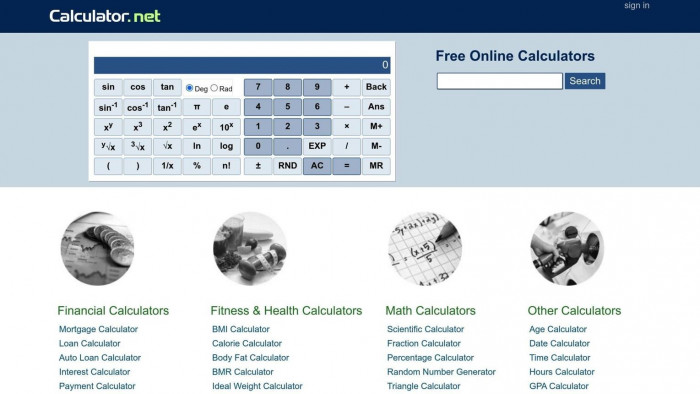
Calculator.net provides calculators for loans, mortgages, interest, savings, and other financial commitments. Its lending tools are particularly practical for understanding how borrowing terms affect monthly payments and the total amount repaid.
Financial Tools Worth Using
● Loan repayment calculator: Estimate installments using the borrowed amount, interest rate, repayment frequency, and loan duration.
● Amortization schedules: Examine how much of each scheduled payment goes toward principal versus interest.
● Investment and savings calculators: Project account balances using contributions, interest assumptions, and investment periods.
Pricing: Free.
Best for: Business owners and individuals comparing loan terms or financing commitments.
Example Use Case
A business considering a $10,000 equipment loan at 8% annual interest over three years can estimate monthly repayments of approximately $313.36. The total repayment would be about $11,281, excluding fees. Comparing the three-year term with a shorter repayment period helps identify potential interest savings.
Where It Needs Caution
The result depends on choosing the appropriate loan structure. A fixed-rate amortizing loan behaves differently from a variable-rate loan or one with a large final payment. The calculator cannot confirm whether a lender will offer the assumed rate, and additional charges can change the effective borrowing cost.
Calculator.net or Nemin.io?
Calculator.net is the more relevant choice for borrowing, repayment schedules, and interest-related decisions. Nemin.io offers more direct support for marketing estimates and freelancer pricing. Neither replaces checking the terms of a formal financial agreement.
3. Google Sheets : Best for Custom Business Budgets
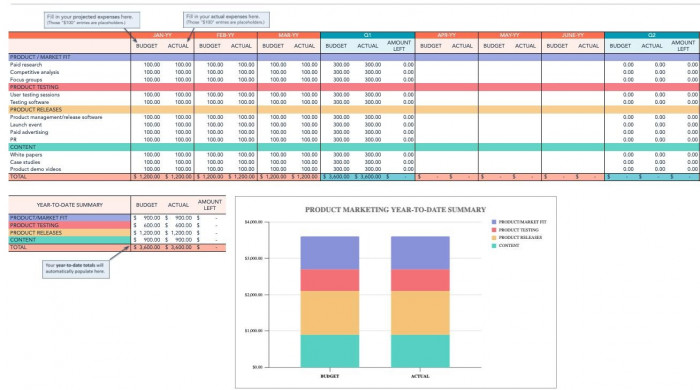
Google Sheets is useful when financial calculations need to follow a specific business workflow. Users can create formulas, connect related figures, and keep an ongoing record of expenses rather than starting a new calculation each time.
Useful Budgeting Capabilities
● Linked budget formulas: Automatically update available balances, spending totals, and differences between planned and actual expenditure.
● Scenario planning: Compare the financial effects of different prices, customer volumes, or marketing allocations.
● Collaborative editing: Let authorized team members maintain one budget with version history and access controls.
Pricing: Free for personal use; Google Workspace starts at $7/user/month (annual plan).
Best for: Agencies, startups, and teams managing recurring budgets.
Example Use Case
An agency manages a $9,000 monthly advertising budget across three clients. It can allocate $4,000, $3,000, and $2,000, then record daily campaign spending. If the first client has spent $3,200, the spreadsheet automatically shows $800 remaining and can flag the account as it approaches its limit.
What Requires Extra Work
Google Sheets doesn't automatically know which expenses belong in a business budget. Someone must design the spreadsheet, check the formulas, and maintain consistent entries. If a team records advertising costs in different formats or categories, even correctly written formulas may produce unreliable reports.
Where Sheets Beats Nemin.io
Google Sheets is better when calculations need to be saved, reused, and connected across multiple projects. Nemin.io is simpler for obtaining a single estimate without setting up formulas. Sheets becomes more valuable as the same financial information is updated repeatedly.
4. HubSpot Ads Calculator : Best for Advertising ROI
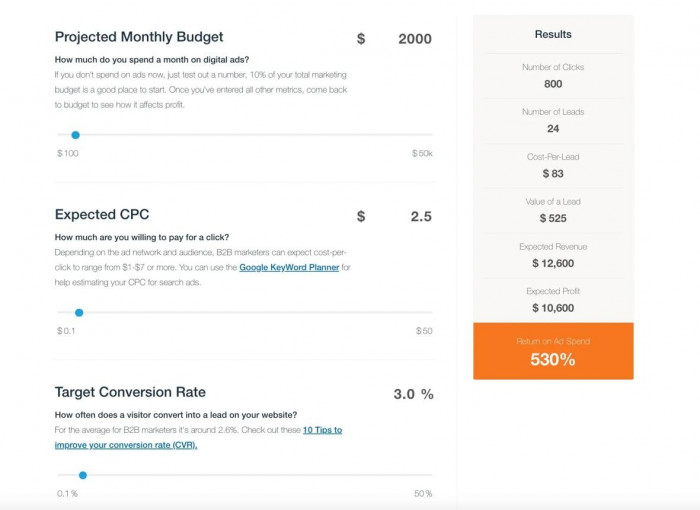
HubSpot's advertising calculator helps marketers estimate whether paid campaigns could generate sufficient revenue to justify their costs. It connects advertising budgets, cost per click, conversion rates, and customer value, making it useful for checking campaign economics before allocating more money.
Advertising Metrics It Covers
● Estimated campaign traffic: Calculate how many clicks a given advertising budget could purchase at an assumed cost per click.
● Customer acquisition estimates: Explore how different conversion rates affect the potential number of customers.
● Advertising returns: Estimate revenue, return on ad spend, and related campaign performance measures.
Pricing: Free calculator.
Best for: PPC specialists, marketing agencies, and businesses planning paid campaigns.
Example Use Case
A business budgets $3,000 for advertising at an expected cost per click of $2. That could generate 1,500 clicks. With a 4% conversion rate, the campaign would produce 60 customers. If each customer generates $100 in revenue, the projected return on ad spend is 2:1.
Where Estimates Become Unreliable
The calculator cannot determine whether a new campaign will actually achieve the entered conversion rate or acquisition cost. Audience quality, competition, and landing-page performance all affect results. A positive advertising return also doesn't guarantee profitability when product and operating expenses are included.
What Makes It Different From Nemin.io
HubSpot's calculator is a more focused choice for studying the relationship between advertising spend and potential revenue. Nemin.io also serves users estimating SEO costs and other marketing services. HubSpot is preferable when the central question is whether a paid campaign's expected performance justifies its budget.
5. Shopify Profit Margin Calculator : Best for Ecommerce Pricing
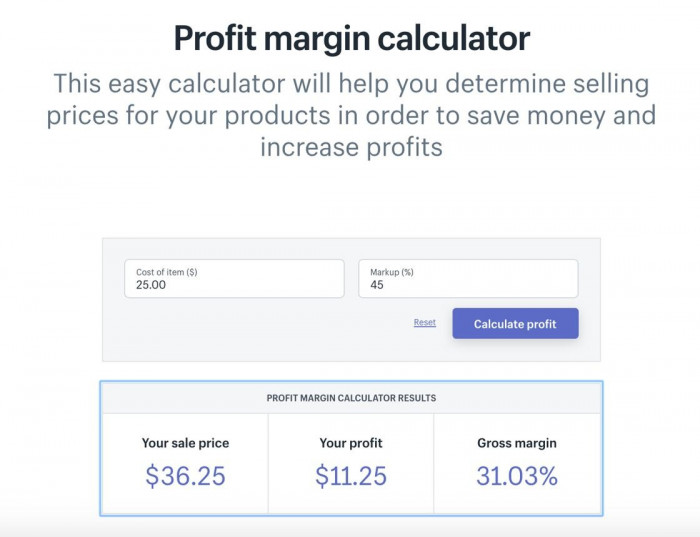
Shopify's Profit Margin Calculator helps merchants understand the difference between product cost, selling price, markup, and profit margin. Its advanced inputs also allow shipping and customer acquisition costs to be included, which is useful when estimating a product's contribution after direct selling expenses.
Pricing Functions That Matter
● Margin calculations: Estimate the share of each sale remaining after specified product costs.
● Markup adjustments: Explore selling prices based on a selected markup percentage instead of confusing markup with margin.
● Additional cost inputs: Include shipping and customer acquisition costs through the calculator's advanced options.
Pricing: Free calculator; hopify Basic starts at $29/month (annual plan). .
Best for: Online retailers and businesses assessing product profitability.
Example Use Case
A retailer buys an item for $24 and sells it for $40. Its initial gross margin is 40%, while the markup on cost is approximately 66.7%. Adding $5 for shipping and $5 for customer acquisition leaves a $6 contribution per sale, equal to 15% of the selling price.
What the Result Doesn't Show
The calculator won't automatically include expenses the merchant hasn't entered, such as refunds, storage, transaction fees, or overhead. A product with a positive contribution may still be unprofitable at the business level. Sellers should also avoid treating a margin estimate as a complete inventory or cash-flow report.
Shopify vs. Nemin.io
Shopify's calculator is more practical for merchants because it accounts for important product-selling expenses through dedicated inputs. Nemin.io is better suited to broader marketing and freelance calculations. For businesses selling physical products, Shopify provides more directly relevant pricing information.
6. CalcXML : Best for Long-Term Financial Planning

CalcXML provides calculators covering savings, borrowing, taxation, investments, and retirement planning. Its tools are useful when a financial decision involves regular payments, changing balances, or commitments extending over several years.
Available Planning Options
● Savings projections: Calculate hypothetical future balances from recurring contributions and assumed interest rates.
● Debt repayment comparisons: Examine how repayment amounts and additional payments affect borrowing costs.
● Investment scenarios: Explore possible long-term growth using starting balances, contributions, and time horizons.
Pricing: Free public calculators; Free public calculators; commercial licensing starts at $1,490/year per category .
Best for: Self-employed professionals and users evaluating longer-term financial decisions.
Example Use Case
A consultant wants to accumulate a $20,000 reserve by saving $500 every month. Assuming a 4% annual return compounded monthly, the balance would reach approximately $19,095 after three years. The projection helps show whether a higher contribution or longer saving period is needed.
Important Drawbacks
CalcXML's range is oriented toward general financial planning rather than marketing operations. Someone estimating SEO expenses or agency retainers won't find the same category-specific tools available on Nemin.io. Investment projections are also hypothetical, so they shouldn't be treated as guaranteed future balances.
Where CalcXML Makes More Sense
CalcXML is a better match for questions about savings goals, borrowing costs, and longer-term financial commitments. Nemin.io is more convenient for estimating immediate business expenses. The choice depends on whether the calculation concerns a future financial obligation or a current commercial decision.
7. Microsoft Excel : Best for Advanced Financial Models
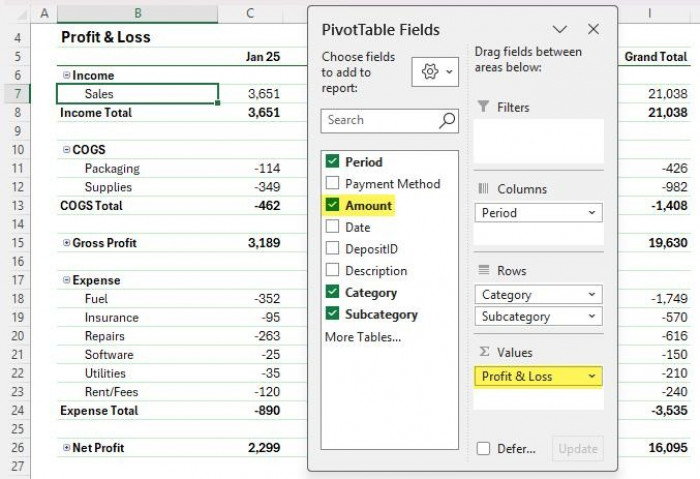
Microsoft Excel supports financial models that connect revenue, staffing, pricing, operational expenses, and cash flow. It becomes valuable when a business needs to understand the combined effects of several decisions rather than calculating each figure independently.
Financial Modelling Capabilities
● What-if analysis: Evaluate how changes in sales volumes, costs, or prices influence financial outcomes.
● Data reporting: Organize transaction records using tables, charts, formulas, and PivotTables.
● Reusable forecasts: Create financial models that update when underlying assumptions or historical figures change.
Pricing: Free web version; Microsoft 365 Personal starts at $9.99/month .
Best for: Business analysts, finance teams, and companies maintaining detailed financial models.
Example Use Case
An agency earns $12,000 monthly from eight clients and spends $8,000 on operations. Hiring an employee for $3,000 reduces its operating surplus from $4,000 to $1,000. An Excel model shows that adding two clients at $1,500 each would restore the original surplus, provided additional operating costs remain unchanged.
The Learning Curve
Excel offers considerable control, but someone must create and maintain the financial model. Incorrect formulas, missing expenses, and broken cell references can affect forecasts without being immediately obvious. Larger workbooks also need version control and clear documentation when several employees use them.
Choosing Between Excel and Nemin.io
Excel is more capable for multi-variable forecasts, financial history, and complex reporting. Nemin.io is more accessible for one-off calculations that don't need a reusable model. Businesses regularly comparing planned results with actual figures will generally gain more from Excel.
8. Wave : Best for Accounting and Expense Tracking
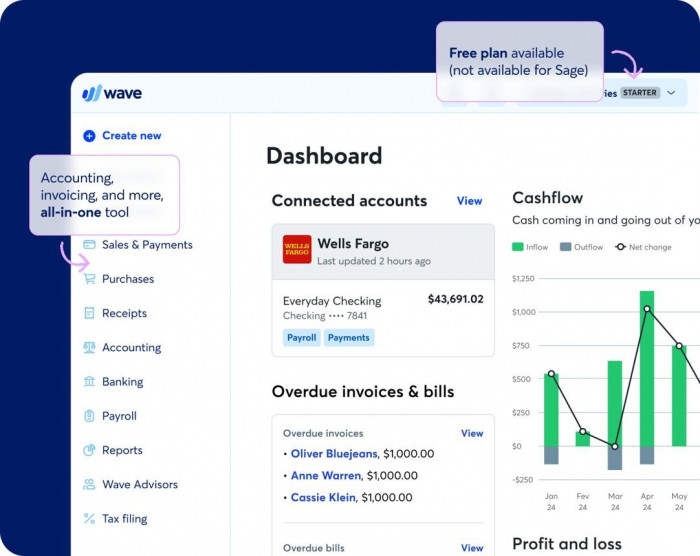
Wave combines bookkeeping, invoicing, and financial reporting for eligible small businesses. It addresses a different stage of financial management: organizing real transactions instead of generating estimates before a project or sale.
How Wave Supports Accounting
● Transaction categorization: Record business income and expenditure under accounting categories.
● Customer invoicing: Create invoices and monitor amounts that remain unpaid.
● Financial statements: Review accounting performance using recorded revenue, expenses, and account balances.
Pricing: Free Starter plan; Pro starts at $19/month in the US.
Best for: Freelancers and small businesses managing accounting and invoices in supported countries.
Example Use Case
A consultant sends three invoices worth $3,500 in total but collects only $2,700 before month-end. Wave can help track the remaining $800 receivable and separate payments received from invoices issued. This matters when deciding whether enough cash is available for upcoming business expenses.
Restrictions to Consider
Wave isn't available to every business internationally, and some bookkeeping automation is restricted to its paid plan. Its accounting features also require accurate transaction categorization. Recording an invoice correctly doesn't automatically mean the business has collected the money.
How It Differs From Nemin.io
Wave is a better option when the primary concern is maintaining financial records and monitoring customer payments. Nemin.io is designed for obtaining estimates before those transactions take place. Wave is not a direct replacement for marketing calculators, but it can address the financial administration that follows.
9. Zoho Invoice : Best for Freelance Quotes and Billing
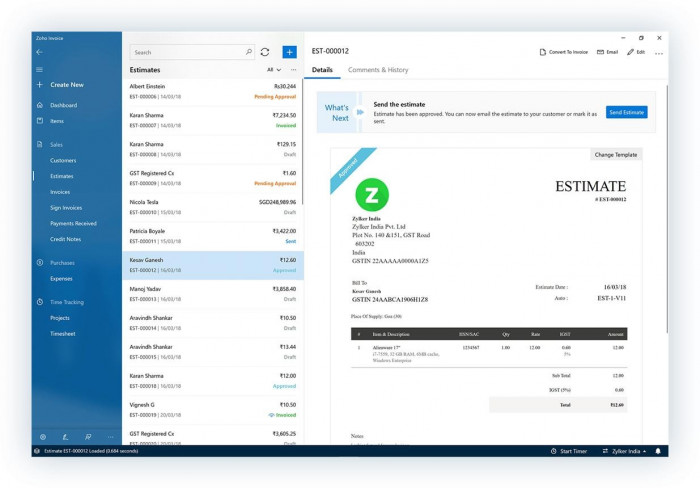
Zoho Invoice helps service providers turn agreed prices into quotations, invoices, and payment records. It is particularly useful for projects involving billable hours, additional revisions, recurring services, or customer approval before work begins.
Features for Client Work
● Professional estimates: Prepare itemized quotations with service descriptions, rates, and payment terms.
● Billable time tracking: Record project hours and use approved work when preparing invoices.
● Payment management: Set up recurring invoices, monitor outstanding amounts, and send payment reminders.
Pricing: Free, subject to applicable usage limits.
Best for: Freelancers, consultants, and small agencies managing client billing.
Example Use Case
A designer estimates 25 hours of work at $60 per hour, creating a $1,500 quotation. The client later approves five additional hours of revisions. Zoho Invoice can document the extra $300 and include it in the final $1,800 invoice, keeping the additional charge traceable.
Where Its Scope Ends
Zoho Invoice helps organize billing but doesn't tell a freelancer whether $60 per hour is a sustainable rate. That requires accounting for nonbillable hours, business costs, taxes, and expected workload. Free-plan usage limits may also matter for businesses handling higher invoice volumes.
Nemin.io or Zoho Invoice?
Nemin.io is helpful when deciding what to charge for a service, while Zoho Invoice manages the formal quotation and collection process. For freelancers who already know their rates but struggle with billing administration, Zoho Invoice solves a more immediate problem.
10. LivePlan : Best for Business Forecasting
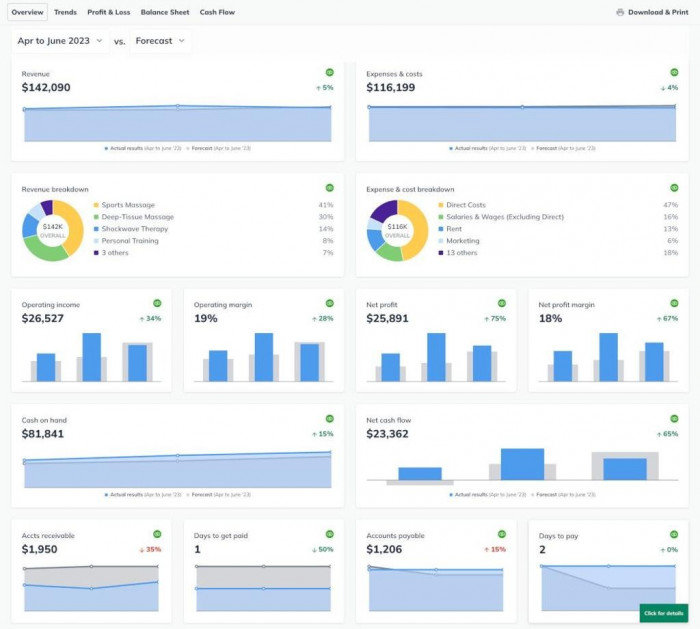
LivePlan combines structured business planning with connected financial forecasts. It is intended for founders and businesses evaluating decisions involving future revenue, recurring expenses, staffing, and cash requirements.
Business Planning Tools
● Connected financial projections: Prepare forecast income statements, balance sheets, and cash-flow statements.
● Scenario comparisons: Evaluate changes in revenue and expenses, with more advanced scenario functionality in higher-tier plans.
● Business plan development: Organize market information, operating assumptions, and financial forecasts for internal or funding discussions.
Pricing: Standard starts at $15/month (annual plan) or $20/month (monthly billing)
Best for: Startups and growing businesses preparing financial forecasts or expansion plans.
Example Use Case
A startup expects $20,000 in monthly revenue and $14,000 in expenses. It wants to introduce another service requiring $4,000 in additional monthly operating costs and a $10,000 upfront investment. LivePlan can model how those commitments affect projected profitability and cash reserves across future months.
What to Know Before Subscribing
A forecast is only as reliable as its revenue assumptions, expense estimates, and payment schedules. LivePlan requires more information and setup than an online calculator, so occasional users may find it unnecessarily complicated. Businesses also need to update forecasts when actual performance differs from expectations.
LivePlan's Advantage Over Nemin.io
LivePlan connects decisions across a complete business forecast rather than calculating isolated figures. Nemin.io is simpler when evaluating an individual expense or potential return. LivePlan makes more sense when the main question is whether a business can financially support a planned change.
Free vs. Paid Alternatives
The difference between free and paid financial tools isn't necessarily calculation accuracy. A basic margin formula produces the same mathematical result regardless of whether it runs in a free calculator or paid spreadsheet software.
Paid platforms become more relevant when businesses need connected records, workflow automation, or financial reports that can be updated over time.
| Business requirement | Suitable option |
| Occasional financial estimates | Omni Calculator |
| Loan and borrowing comparisons | Calculator.net |
| Advertising return estimates | HubSpot Ads Calculator |
| Product margin calculations | Shopify Calculator |
| Shared recurring budgets | Google Sheets |
| Advanced financial models | Microsoft Excel |
| Client estimates and billing | Zoho Invoice |
| Bookkeeping and expenses | Wave |
| Detailed business forecasts | LivePlan |
Before purchasing software, consider how frequently the task occurs and how much manual work a new platform would actually eliminate. Paying for advanced forecasting software is difficult to justify if the business only calculates a few project costs each month.
How to Choose the Right Alternative
The most practical approach is to match the tool to the financial decision rather than selecting the platform with the longest feature list.
For one-time pricing, interest, or marketing calculations, a dedicated free calculator is generally sufficient. Google Sheets and Excel offer more flexibility when figures need to be updated, shared, or compared across several scenarios.
Three checks are particularly important:
● Check the inputs: Confirm whether the calculation includes the costs that influence the final decision, such as acquisition expenses, transaction charges, or fixed overhead.
● Understand the result: Gross margin, operating profit, and available cash are different financial measures and shouldn't be treated interchangeably.
● Consider future use: A reusable model or accounting system becomes more valuable when calculations need to connect with records from previous weeks or months.
An accurate estimate is a starting point. For important financial decisions, it should be supported by realistic assumptions and, where available, actual business data.
Verdict: Which Nemin.io Alternative Is Best?
I'd choose Omni Calculator as the first alternative for general financial calculations because it covers more formulas without requiring a subscription or spreadsheet setup.
For regular budgets, I'd prefer Google Sheets. HubSpot is more relevant for advertising ROI, while Zoho Invoice is a practical choice for freelancers who need to manage quotations and payments.
Nemin.io remains useful for quick marketing and service-pricing estimates. The better alternative depends on whether the next task is calculating a figure, comparing scenarios, or managing the financial activity behind it.
Comments