

An Instagram bio can connect visitors to a website, online store, portfolio, or latest content without requiring them to search elsewhere. Instagram allows up to five clickable profile links, making it easier to share several destinations from one account. However, the order and titles of those links determine how easily visitors find the right page. This guide explains how to add multiple links to an Instagram bio, manage them, and use a link-in-bio page when five links aren't enough.
How Multiple Instagram Bio Links Work
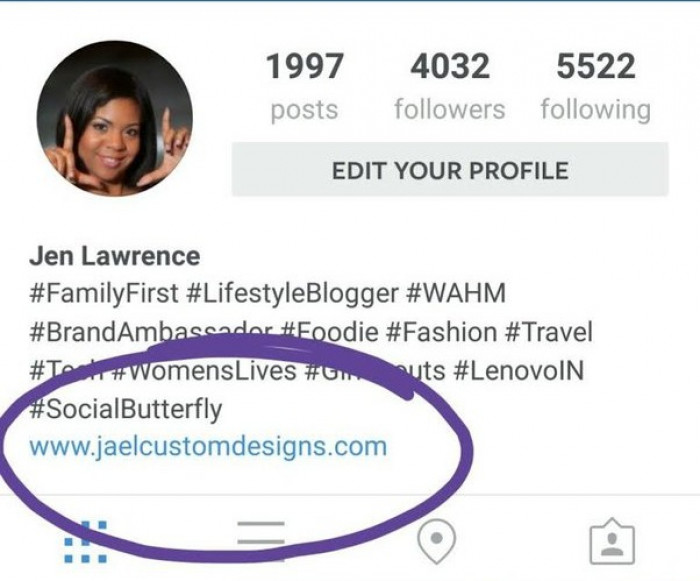
Instagram has a dedicated Links section within the profile editor. URLs added here appear beneath the bio description, allowing visitors to open external websites directly from the profile.
Previously, Instagram generally allowed only one external website link. In April 2023, the platform introduced support for up to five links across personal, creator, and business accounts.
However, all five links do not appear separately on the main profile. Instagram displays the first link and indicates that additional destinations are available. Visitors must tap the links area to view the complete list.
Another important distinction concerns URLs entered into ordinary bio text. Typing a website address in the description does not automatically make it clickable. External websites must be added through the Links section.
How to Add Multiple Links to Instagram Bio
Instagram's built-in feature works with personal, creator, and business accounts. There is no minimum follower requirement, and users do not need a paid subscription to add multiple external links.
The easiest way to manage them is through the Instagram app on Android or iPhone.
Step-by-Step Instructions
Step 1: Open the Instagram Profile
Launch Instagram and tap the profile picture in the bottom-right corner. Make sure the correct account is selected, particularly when managing multiple personal or business profiles.
Step 2: Select Edit Profile
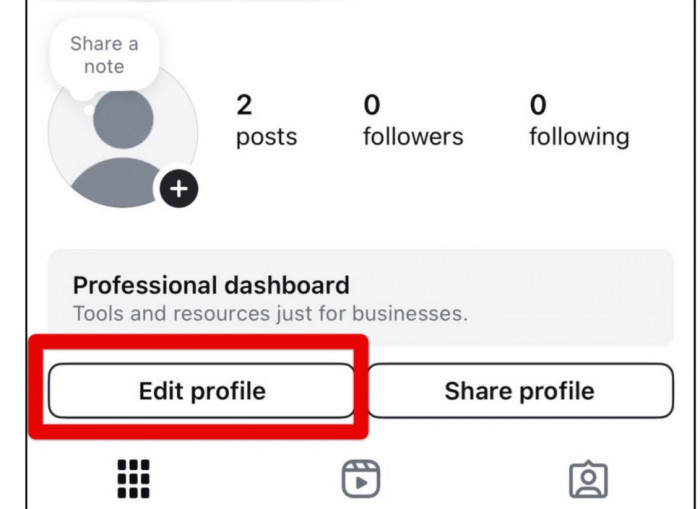
Tap Edit profile beneath the profile information. This opens the settings for changing profile details, including the biography, profile picture, and external links.
Step 3: Open the Links Section
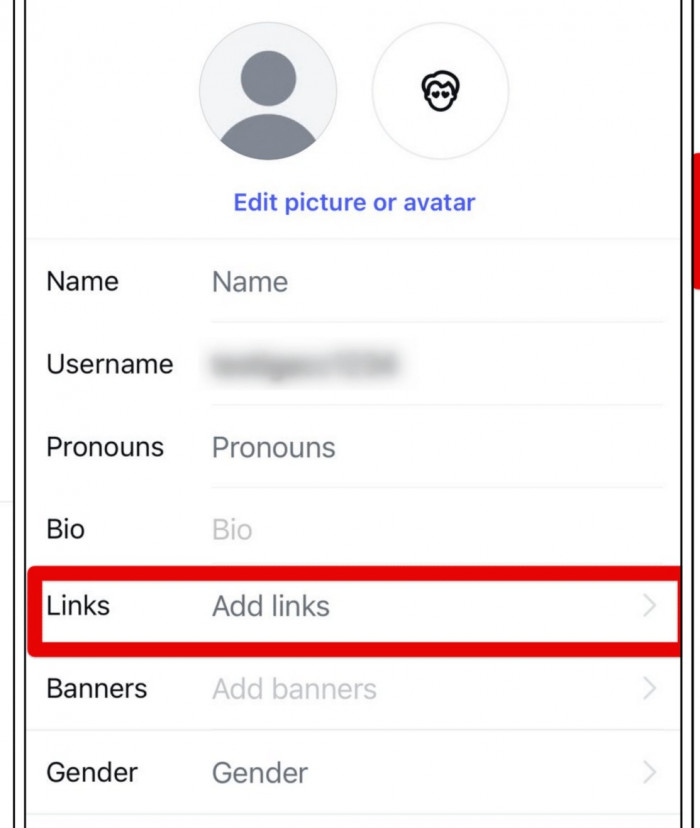
Find and select Links, then tap Add external link. Instagram provides fields for entering the destination URL and its display title.
Step 4: Add the Website URL
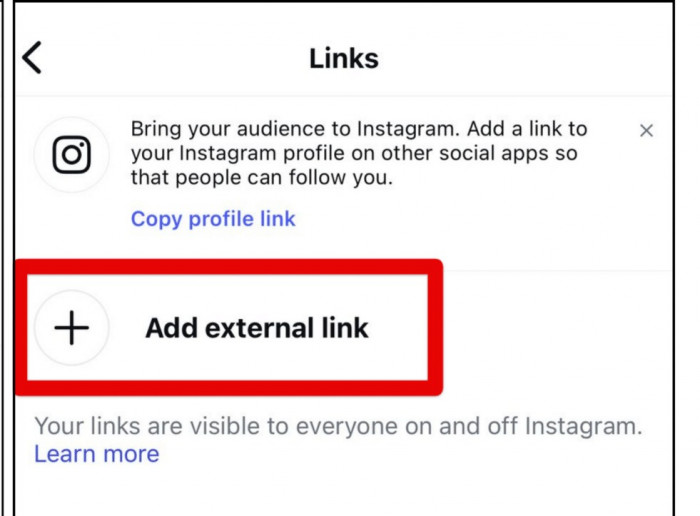
Paste the complete destination address, including https:// when applicable. For instance, a freelancer sharing published work should link directly to the portfolio page instead of the website homepage.
Step 5: Enter a Link Title
Give the link a recognizable title, such as "View My Portfolio" or "Shop New Arrivals." The title should tell visitors what they will find rather than simply repeat the website name.
Step 6: Save and Add More Links
Tap Done or the available save option. Return to the Links section and repeat the process for other destinations until the required links have been added.
Step 7: Check the Public Profile
Return to the profile and open the link list. Confirm that the titles appear correctly and that each destination loads in Instagram's in-app browser.
The final check is particularly important for booking pages, product listings, and forms. A link may be technically valid but still direct visitors to an expired offer, unavailable product, or page requiring unexpected login credentials.
Instagram Bio Link Limits
Instagram supports up to five external profile links without requiring a professional account or paid subscription. Users can also customize their titles and change the display order.
| Feature | Instagram Support |
| Maximum external links | Five |
| Personal accounts | Supported |
| Creator and business accounts | Supported |
| Custom link titles | Available |
| Link reordering | Available |
| External link-in-bio tool | Not required |
The five-link restriction applies to destinations added directly through Instagram. A linked website can contain additional pages, which is why some users connect their profiles to a separate link-in-bio landing page.
For most personal accounts, five links are sufficient. However, creators managing multiple content channels or businesses promoting different products may need additional space.
How to Reorder and Remove Instagram Links
Instagram allows users to rearrange existing links without deleting and adding them again. This is useful because the first link receives the most prominent placement on the profile.
To change the order, open Profile > Edit profile > Links, select the options menu, and choose Reorder links. Drag each link into the preferred position and save the changes.
Existing links can also be edited or removed from the same section. Select a destination to update its URL or title, or remove it when the content is no longer relevant.
For example, an online store promoting a seasonal collection can temporarily place that collection above its main website. Once the campaign ends, the store link can return to the first position.
The same approach works for creators promoting new videos, freelancers accepting bookings, and businesses announcing upcoming events.
How to Add More Than Five Links
Instagram's five-link limit can be managed by connecting the profile to a separate landing page containing additional destinations.
A link-in-bio page acts as a central location for websites, videos, products, contact details, and other resources. Instead of placing every destination directly on Instagram, users share one URL that opens the complete collection.
Platforms such as Linktree, Beacons, and SmartPostly offer ways to organize multiple destinations through a single public page. Their available layouts, customization options, and analytics depend on the service.
For example, a creator could keep the latest YouTube video and online store as direct Instagram links while using another link for a page containing older content, recommended resources, and collaboration information.
However, a separate landing page adds an extra step before visitors reach their intended destination. Direct Instagram links are generally more convenient for frequently promoted products, booking forms, or other important pages.
Instagram Links vs Link-in-Bio Tools
Instagram's native links are suitable for straightforward navigation, while external link-in-bio pages provide additional control over how multiple destinations are presented.
| Feature | Instagram Links | Link-in-Bio Tools |
| Link limit | Five | Depends on the platform |
| Setup | Inside Instagram | Separate landing page |
| Design customization | Limited | Custom layouts and branding |
| Images and sections | Not supported as link cards | Available on many services |
| Analytics | Limited link-level reporting | Depends on the provider |
| Updating links | Instagram profile editor | External dashboard |
| Best for | A few important destinations | Larger collections of links |
The better option depends on how many destinations the profile needs and how frequently those destinations change.
A freelancer with a portfolio, services page, and contact form can manage everything through Instagram. A creator selling products, publishing videos, and maintaining several content channels may benefit from a landing page that organizes those links into separate sections.
Both methods can also be combined. The first Instagram link can lead directly to the main priority, while another provides access to a broader collection of resources.
Examples of Multiple Instagram Bio Links
Different account types require different link arrangements. The first destination should reflect what visitors are most likely to need, while the remaining links should support related activities. A well-planned Instagram bio also helps visitors understand the profile's purpose before choosing which link to open.
Content Creator
Suggested order: Latest video, newsletter, recommended resources, merchandise store, collaboration inquiries.
Creators regularly publish new content, so the first link may change frequently. Keeping long-term destinations lower in the list avoids unnecessary updates whenever a new video or campaign is released.
Small Business
Suggested order: Shop products, current offers, product categories, customer reviews, contact page.
A business promoting products through Instagram should direct visitors toward relevant collections rather than a general homepage. Temporary promotions should be removed or updated after they expire.
Freelancer
Suggested order: Portfolio, services, booking calendar, work samples, contact information.
Freelancers benefit from links that explain their work and make inquiries easier. A portfolio establishes credibility, while a booking page gives interested clients a clear next step.
Personal Brand
Suggested order: Main website, newsletter, podcast, speaking engagements, free resources.
Personal brands often serve audiences interested in different types of content. Separating these destinations with descriptive titles makes the profile easier to navigate.
These arrangements are examples rather than fixed templates. A photographer accepting bookings may prioritize a consultation form, while a photographer selling prints may place the online store first.
How to Write Clear Instagram Link Titles
A link title should explain what visitors will find after opening it. Generic labels such as "Click Here" or "Important Link" provide little context, especially when several destinations appear together.
For instance, "View Writing Portfolio" communicates more than "My Website," even when both lead to the same domain.
A few practices can improve link clarity:
● Use destination-specific wording. Titles such as "Browse New Arrivals" or "Book a Consultation" explain the purpose of the linked page.
● Avoid unnecessarily long descriptions. Short titles remain easier to read on mobile screens and help visitors compare several links quickly.
● Keep the title accurate. A link labeled "Free Resources" should lead directly to the promised materials rather than an unrelated homepage.
● Update outdated labels. Completed events, expired discounts, and old campaigns should not remain prominently displayed.
The wording should also match the profile's content. If recent posts encourage visitors to book a service, the corresponding booking link should be easy to identify.
Common Instagram Bio Link Problems
Most issues with Instagram bio links involve incorrect URLs, unsaved changes, or inaccessible destination pages. Some problems also originate from the website being linked rather than Instagram itself.
| Problem | Possible Cause | Recommended Fix |
| Link is not clickable | URL entered in ordinary bio text | Add it through Edit profile > Links |
| New link does not appear | Changes were not saved | Reopen the editor and save again |
| Cannot add another link | Five-link limit reached | Remove a link or use a landing page |
| Wrong destination opens | Incorrect URL | Edit the existing link |
| Website fails to load | Broken page or redirect | Test the URL in a browser |
| Links section is missing | App or interface issue | Update and restart Instagram |
A website may also behave differently inside Instagram's built-in browser. Pages containing payment forms, complicated redirects, or external login systems can sometimes create problems even when the homepage opens correctly.
For important links, test the complete process. A booking page should allow visitors to submit an appointment request, while a product link should lead to an available item with a functioning checkout.
If Instagram blocks a particular destination, review the website and Instagram's platform policies rather than attempting to bypass the restriction through repeated URL changes.
How to Track Instagram Bio Link Clicks
Instagram provides profile activity information through Insights for eligible professional accounts. However, detailed reporting for each individual external link may not be available directly within Instagram.
Third-party link-in-bio services can offer additional information, such as clicks on individual buttons and activity over time, depending on the platform and subscription plan.
Website owners can also use UTM-tagged URLs to track Instagram link clicks through their analytics tools. This helps distinguish bio-link visits from traffic generated through other channels.
The most useful metric depends on the destination. A freelancer may focus on consultation requests rather than portfolio visits, while an online store may prioritize purchases over general page traffic.
Reviewing these outcomes helps determine whether important links deserve a higher position or whether certain destinations should be replaced.
Final Thoughts
Instagram's built-in multiple-link feature is sufficient for many profiles. It allows up to five clickable destinations, with customizable titles and flexible ordering, without requiring an external service.
I prefer keeping the most important destination first and using the remaining links for pages that visitors regularly need. A separate link-in-bio page makes sense when an account manages more destinations, frequently changing content, or additional branding requirements.
Ultimately, a useful Instagram bio is not about displaying the maximum number of links. It is about making relevant pages easy to identify and access without unnecessary navigation.
Comments