

Lighting is the hardest thing to fix after the fact. It is baked into every pixel of a photograph and every stroke of a digital illustration. That is precisely why LuminaBrush, a tool that lets you doodle over an image and have AI rebuild the illumination from scratch feels, when it works, like something genuinely new.
Before going any further, a necessary clarification: LuminaBrush is not a product from Skylum, and it has nothing to do with Luminar Neo, the photo editing suite. It is an independent open-source AI research project created by lllyasviel the researcher behind ControlNet and the IC-Light relighting framework first released in December 2024 and made accessible via Hugging Face, GitHub, and several commercial web interfaces built on top of the underlying model.
This article examines the tool as it actually is: its research foundations, what the two-stage AI framework does, how it performs in the real world across different creative use cases, what real users across GitHub, product directories, and creative forums are actually saying about it, and where it sits honestly in the rapidly evolving landscape of AI image relighting tools.
What LuminaBrush Actually Is and Where It Came From
LuminaBrush emerged from the same laboratory of ideas that produced two of the most influential tools in the AI image generation space. Its creator, known online as lllyasviel, previously developed ControlNet the technique that allows image-generation models to be conditioned on spatial inputs like depth maps, edge detections, and pose skeletons and IC-Light, an earlier relighting framework. LuminaBrush is the natural next step in that lineage: rather than controlling lighting through text prompts or preset parameters, it gives users a literal paintbrush to indicate where they want light to fall.
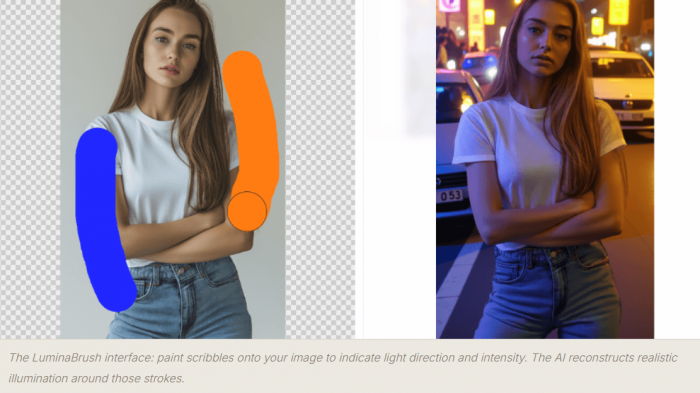
LuminaBrush AI interface paint illumination onto any image with brush scribbles
The LuminaBrush interface: paint scribbles onto your image to indicate light direction and intensity. The AI reconstructs realistic illumination around those strokes.
The tool was formally cited in the academic relighting literature as "LuminaBrush: Illumination Drawing Tools for Text-to-Image Diffusion Models" (2024), placing it within serious AI research rather than the casual app landscape. It is currently based on Flux, a state-of-the-art diffusion model and its Hugging Face demo space became one of the most visited interactive AI tools in the relighting category before going into maintenance mode in May 2025. Multiple commercial interfaces have since been built on top of the underlying model, accessible at luminabrush.ai and luminabrush.org among others.
Important distinction: "LuminaBrush" as a brand name is used by several entities the original open-source research project on GitHub (lllyasviel/LuminaBrush), the Hugging Face demo, the Chrome extension, and commercial web apps at luminabrush.ai and luminabrushai.com. These share the same core technology but are operated differently. This article covers the tool and technology holistically, not any single commercial interface.
The Two-Stage Framework: Delighting Then Relighting
The intellectual core of LuminaBrush is an elegant two-stage decomposition of the image relighting problem. Understanding this architecture is essential to understanding both why the tool works so well in specific scenarios and where it struggles.
The relighting problem, stated simply, is this: given a photograph or digital image with existing light baked in, how do you change where the light comes from without destroying the detail, texture, and coherence of the scene? A naive approach brightening selected pixels, adjusting shadows with sliders treats light as a flat layer. LuminaBrush's architecture treats light as a physical phenomenon that must be removed and then reconstructed.
01. Upload Your Image
Any JPEG, PNG, or TIFF portrait, illustration, AI-generated art, or product photo.
02. Stage 1: Delighting
AI strips existing lighting to create a uniformly-lit appearance ambient white light, no directionality. Think of it as a clean slate.
03. Stage 2: Scribble Your Light
Draw strokes over the image where you want light to fall. Red strokes = warm light. Blue strokes = cool light. The AI reads direction and intensity from your marks.
04. AI Reconstructs
The model generates physically coherent illumination falloff, highlights, shadows based on your scribbles and the scene geometry it has inferred.
Why two stages rather than one? As the original GitHub documentation explains, decomposing the illumination drawing problem into two stages makes the learning easier and more straightforward. A one-stage approach would require the model to simultaneously understand existing lighting, remove it, and apply new lighting which demands external constraints around light transport physics to stabilise behaviour. By separating delighting from relighting, each stage has a cleaner, more learnable objective.
The model was trained by first collecting images with uniformly lit appearances, then synthesising random normals to relight those images randomly, building a model that can extract uniformly-lit appearances from any input. After that, the team extracted uniformly-lit appearances from millions of high-quality real-world images to build paired data for the final interactive illumination drawing model. The training pipeline is why the results feel grounded in physical reality rather than like stylistic filters.
The colour-coding system: LuminaBrush uses an intuitive brush coding system red strokes generate warm illumination (sunlight, firelight, incandescent tones) while blue strokes generate cool illumination (skylight, fill light, studio cold tones). The model interprets the stroke direction as light direction, the stroke density as light intensity, and the surrounding scene geometry as the surface for the light to fall across.
What the Tool Can Do Across Every Dimension
LuminaBrush is a single-purpose tool with a well-defined feature set. It does not attempt to be a complete image editor. Its entire capability set orbits the central act of interactive illumination drawing. That focus is simultaneously its greatest strength and its most significant limitation.
| Feature | What It Does | Performance in Practice | Verdict |
| Directional Illumination | Brush strokes set the angle and source of new light | Realistic falloff, respects surface geometry | Strong |
| Warm/Cool Colour Control | Red = warm light; blue = cool light; intuitive coding | Colour temperature propagates naturally through scene | Excellent |
| Atmospheric Ambience | Soft, environment-fill lighting across whole scene | Very natural for portraits and concept art | Strong |
| Real-Time Preview | Instant visual feedback as strokes are drawn | Fast and stable, no freeze or lag reported | Excellent |
| Layer System | Non-destructive editing; separate subject/background layers | Functional; less flexible than Photoshop layers | Good |
| Texture Preservation | Maintains skin pores, fabric weaves, hair during relight | Works well in clean images; degrades on noisy input | Mixed |
| Rim / Edge Highlights | Subject-separating back-light effects | Good in simple scenes; inconsistent at complex edges | Mixed |
| Multi-Source Lighting | Multiple brush passes for multi-light environments | Blending artefacts appear at source boundaries | Weak |
| Standalone "Delight" Mode | Stage 1 alone — strips lighting for a flat-lit base | Useful side product; separate HF space available | Unique |
| Batch Processing | Apply consistent lighting across multiple images | Not available in standard interfaces | Absent |
| RAW File Support | Camera RAW format editing | Not supported — JPEG/PNG/TIFF only | Absent |
A particularly interesting and underappreciated capability is the standalone delighting mode Stage 1 run independently. By stripping an image to its uniformly-lit baseline without applying any new illumination, users can achieve a useful "neutral" version of an image that then works as a clean starting point for other editing workflows. The team built a separate Hugging Face space for this functionality, recognising it as a genuinely useful side product of the architecture.
“LuminaBrush sits halfway between a digital painting brush and an AI-powered lighting simulator neither entirely one thing nor the other, and better for it.”
What People Actually Experience, the Good and the Frustrating
Because LuminaBrush originated as a research project, the candid user feedback lives across several different communities: GitHub Issues (where technically sophisticated users report bugs and limitations with specificity), Hugging Face discussions, product directories like ProductHunt and Toolify, review sites like GeniusFirms, and creative communities on Reddit and ComfyUI forums. Aggregating across these reveals consistent patterns both positive and negative that paint a more honest picture than any single review site can offer.
Sarah Chen
Digital Artist · luminabrush.ai
★★★★★
“LuminaBrush has revolutionised my workflow. The AI-powered lighting effects are incredibly natural, and the real-time preview helps me work faster than ever. It's become an essential part of my digital art toolkit.”
GitHub User
IC-Light Issues · July 2025
★★★★☆
“Your IC-Light v2 and LuminaBrush are both excellent things. My work has been made more efficient because of them. It's a pity LuminaBrush went into maintenance, the HF space being down has reduced my efficiency significantly.”
Sakshi Dhingra
GeniusFirms Review · Nov 2025
★★★☆☆
“Shadows sometimes look painted instead of photographic. Complex lighting setups with multiple light sources are not handled well. It performs well in the 'controlled creative' space but not in demanding commercial retouching.”
David Park
Game Art Director · luminabrush.ai
★★★★★
“LuminaBrush's AI capabilities have transformed our concept art pipeline. The speed and quality of the lighting effects are remarkable, saving us countless hours in pre-visualisation work.”
Forum User
There's An AI For That · 2025
★★★★☆
“Edge-aware masking around hair and clothes is solid. Colour grades are fast. Relight gives believable shifts without wrecking skin tones. A genuinely useful tool for portrait quick-fixes.”
Research User
GeniusFirms · Nov 2025
★★★☆☆
“The relighting algorithm struggles with low-quality or noisy images. Results look artificial if pushed too far. No batch processing for e-commerce teams. Minimal preset library compared to other tools.”
A striking theme across the GitHub issue tracker which is where the most technically honest feedback lives is frustration with the Hugging Face space going into maintenance. Multiple users note that their professional workflows, built around the tool's relighting capabilities, were disrupted when the primary free demo interface went offline in May 2025. This availability problem is one of the most consistent pain points and reflects the tension inherent in relying on a research project's free infrastructure for production work.
Where It Genuinely Excels and Where It Consistently Disappoints
The most useful thing an independent analysis can do is map the specific conditions under which LuminaBrush delivers and the conditions under which it falls short because these are not random. They follow directly and predictably from the tool's architecture and training data.
| Where It Consistently Works | Where It Consistently Struggles |
| Light enhancement on portrait photographs | Complex product photography with multi-source lights |
| Adding mood lighting to concept art and illustrations | High dynamic range (HDR) images |
| Enhancing depth in flat AI-generated images | Very dark skin tones texture detail can be lost |
| Correcting mild studio lighting inconsistencies | Noisy or low-resolution input images |
| Creating quick lighting variations for thumbnails | Scenes requiring precise subject-background separation |
| Softening harsh shadows in simple studio shots | Commercial-grade retouching for strict colour accuracy |
| Background-to-subject light matching | Batch processing across large image sets |
| Colour temperature creative control | RAW file workflows (not supported) |
The Persistent Limitations
Multi-source lighting is the tool's most documented weakness. When users attempt to build studio-grade setups key light, fill light, and rim light simultaneously the model produces visible inconsistencies at the boundaries between brush passes. This is a structural limitation of how the Flux framework handles consistency: it performs excellently for single-source illumination but has not been robustly trained for the blending physics of multi-source environments.
Precision masking is the second significant gap. LuminaBrush provides no pixel-level control over where light falls you are working with broad brush strokes, not selection masks. For complex scenes where a light source should illuminate one object but not another immediately beside it, this produces halo effects and light bleed that cannot be corrected within the tool itself.
● Results degrade noticeably if effects are pushed beyond moderate intensity the "artificial" threshold is reached faster than in Photoshop's manual dodge and burn
● The Hugging Face demo went into maintenance in May 2025, disrupting users who depended on it for production workflows
● No preset library unlike commercial photo editors, there are no starting-point lighting setups to build from
● Mobile experience across commercial interfaces is consistently described as feeling incomplete and unpolished
● Export resolution limits exist on free tiers of commercial interfaces built on the model
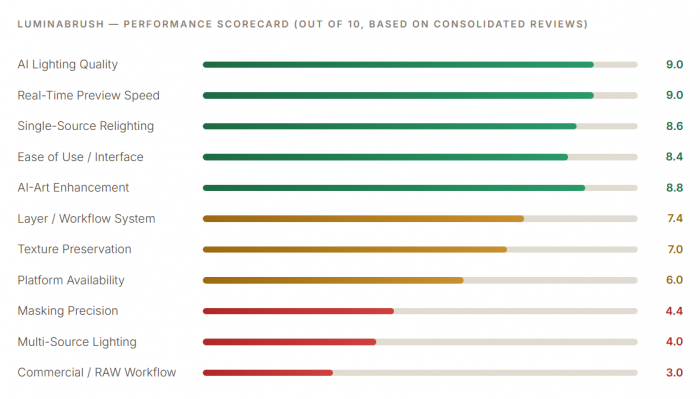
Who Should Use LuminaBrush and Who Should Not
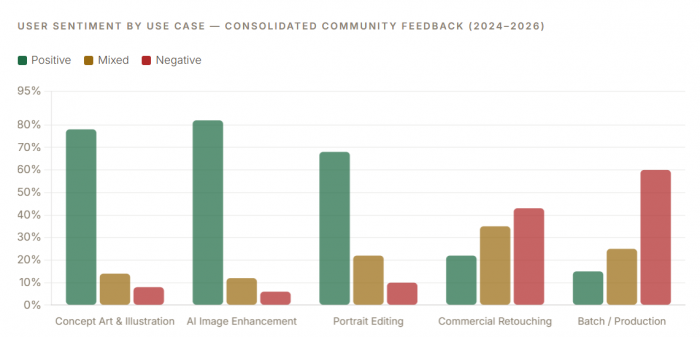
The clearest pattern across all user feedback is that satisfaction correlates almost perfectly with use case. People who use LuminaBrush for what it was designed to do artistic and semi-professional illumination control in single-light scenarios are overwhelmingly positive. People who bring it into professional commercial or RAW photography workflows are almost universally disappointed. This isn't a product failure; it's a mismatch between expectation and scope.
| User Type | Fit | Why |
| Digital illustrators & concept artists | Excellent | Single-source artistic lighting is LuminaBrush's native territory |
| AI art editors (Midjourney / DALL·E) | Excellent | Adds physical depth and directionality that AI generators lack natively |
| Game pre-visualisation artists | Excellent | Fast concept-level lighting iteration is exactly what pre-vis needs |
| Social media creators / content producers | Very Good | Fast, browser-based, no installation, eye-catching results |
| Portrait photographers (quick fixes) | Good | Single-source mood lighting and mild corrections work naturally |
| Graphic designers (mood / thumbnails) | Good | Colour temperature and atmospheric control are genuinely fast |
| Landscape photographers | Mixed | Atmospheric effects work; complex outdoor light sources are inconsistent |
| E-commerce product photographers | Limited | Colour accuracy and multi-source control are below commercial standard |
| Professional commercial retouchers | Poor Fit | Lacks precision masking, multi-source handling, and RAW support |
| RAW-file camera photographers | Not Supported | RAW formats are not supported JPEG/PNG/TIFF only |
How LuminaBrush Fits the Broader Relighting Landscape
The AI relighting space is growing rapidly. The Awesome-Relighting GitHub repository, an academic tracking list, cited LuminaBrush alongside more than thirty other relighting tools published in 2024 alone, including CVPR and SIGGRAPH papers. This context matters: LuminaBrush is not operating in a vacuum but in an active research frontier, and its specific approach interactive scribble-based control is genuinely distinctive even within that crowded field.
Its closest technical sibling is IC-Light v2 also by lllyasviel which takes a different input approach (light direction preferences rather than scribbles) and is more suited to background-conditioned scenarios. LuminaBrush distinguishes itself through its interactive scribble interface, which gives users a more expressive and intuitive form of control than selecting preset light directions. Clipdrop's Relight tool, by comparison, is more polished commercially but offers significantly less creative control over where and how light falls. Photoshop's manual dodge-and-burn remains more precise for commercial work but demands incomparably more skill and time.
Where LuminaBrush leads the field: No other freely accessible relighting tool combines physics-grounded illumination reconstruction with a direct-drawing interface. The combination of drawing-as-input and AI-as-physics-simulator is genuinely novel, and in the specific territory of single-source artistic relighting, no comparable tool exists at the same price point (free for core access).
What the Tool's Current State Reveals About Its Trajectory
LuminaBrush exists in an unusual state for a tool that has attracted meaningful professional use: it is simultaneously a research project, an open-source codebase, and the basis for several commercial web interfaces without a single unified product home or a committed commercial support structure behind it. This creates real implications for users who depend on it.
The Hugging Face demo going into maintenance in May 2025 and remaining offline for an extended period exposed the fragility of this arrangement. A user in the GitHub Issues thread noted: "it's a pity that LuminaBrush was maintained before my working efficiency has been greatly reduced as a result." This isn't a criticism of the researcher; research projects are not commercial software. But it is a genuine reliability consideration for anyone evaluating the tool for sustained workflow integration.
● The core model is open-source on GitHub anyone with technical knowledge can run it locally without dependence on any hosted interface
● The Hugging Face demo has experienced extended outages not suitable as a sole production dependency
● Commercial interfaces (luminabrush.ai, luminabrushai.com) provide more reliable access but vary in pricing transparency
● ProductHunt shows zero verified user reviews as of April 2026 the community is nascent and feedback is dispersed across platforms
● No official roadmap, version history, or public development timeline exists updates follow the researcher's priorities
● The Chrome extension version offers batch capabilities not available in standard web interfaces
The open-source trade-off: LuminaBrush's open-source roots are genuinely a feature; the model can be run locally via ComfyUI workflows, self-hosted, and extended by the community. Several ComfyUI integrations exist. But for non-technical users who need a reliable, supported interface, the fragmented landscape of commercial wrappers built on the model creates genuine confusion about which version to use, what's included, and who to contact for support.
Final Verdict : Genuinely Novel, Honestly Specialist and More Important Than It Looks
LuminaBrush is one of the most conceptually interesting tools in the current AI image editing landscape not because it does many things, but because the one thing it does, it does in a way that nothing else quite replicates. The scribble-to-illumination workflow, built on rigorous two-stage AI physics, makes it possible for a non-technical user to add directional light to an image in under two minutes that would take a skilled Photoshop practitioner twenty. For concept artists, digital illustrators, AI-art editors, and creative social media producers, that trade is compelling.
Its limitations are just as clear and just as important. Multi-source lighting, precision masking, RAW file support, and reliable platform availability are all genuine gaps not minor caveats. For commercial photographers, professional retouchers, or anyone needing batch processing at production scale, LuminaBrush at its current stage of development is the wrong tool. There is no version of honest assessment that obscures this.
The tool's most significant under-discussed quality is its academic foundation. LuminaBrush was published as research in December 2024 and is already being cited alongside CVPR and SIGGRAPH papers on relighting. This is not a hobby project, it is a genuine contribution to a technically difficult problem, wrapped in an interface accessible enough for non-researchers to use immediately. As the relighting field continues to develop through 2026 and beyond, LuminaBrush represents a meaningful early milestone in what interactive AI illumination control can look like. Whether the commercial ecosystem around it matures to match the underlying model's quality is the open question and the answer will determine whether this tool remains a fascinating research artefact or grows into something the wider creative industry relies on.
Comments