

Introduction
Dreamina AI has quickly emerged as one of the most ambitious “all‑in‑one” visual AI studios, blending image generation, video creation and editing tools inside a CapCut‑centric ecosystem built for fast, social‑ready content. It targets creators, marketers and small teams who want to ideate, generate and publish in a single workflow rather than juggling multiple apps.
But does it live up to the hype? This comprehensive analysis goes beyond features to examine Dreamina's real-world performance and how it stacks up against industry giants like Midjourney and DALL-E.
Platform Overview: What Is Dreamina AI?
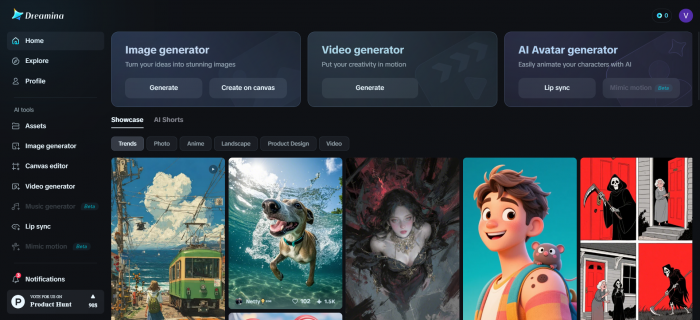
Dreamina AI is a browser-based and mobile generative AI platform that specializes in creating images and videos from text prompts or existing visual references. Launched as part of CapCut's ecosystem, it leverages ByteDance's extensive machine learning infrastructure to deliver results optimized for social media-first content creation.
Core Capabilities at a Glance
1. Image Generation Suite
● Text-to-Image: Transform written descriptions into high-resolution visuals across multiple artistic styles
● Image-to-Image: Upload reference images to guide composition, style, and aesthetic direction
● Canvas Editing: Multi-layer workspace with inpainting, expansion, and object removal tools
● Batch Generation: AI Agent feature processes up to 40 images simultaneously from natural language instructions
2. Video Creation Tools
● Text-to-Video: Generate animated sequences up to 10 seconds from written prompts
● Image-to-Video: Animate static images with realistic motion and camera movement
● Multi-Frame Video: Process up to 10 connected images as sequential scenes for cinematic storytelling
● Auto-Soundtrack: AI-generated background music synchronized to video mood and pacing
3. Advanced Features
● Interactive Editing: Click-to-edit precision with Seedream 4.5 and 5.0 models
● HD Upscaling: Enhance resolution for professional-grade outputs
● Frame Interpolation: Smooth video playback up to 60 fps
● Reference-Based Generation: Use existing images to maintain consistent style and character design
Technology Stack: The AI Models Behind the Magic
Dreamina operates on a multi-model architecture, with different engines optimized for specific tasks:
| Model | Primary Use | Key Strengths |
| Image 3.1 / Dreamina 3.1 | High-resolution still image generation | Photorealism, style versatility, detailed textures |
| Image 2.0 Pro | Stylized and artistic outputs | Fantasy scenes, anime characters, dreamy atmospheres |
| Seedream 4.5/5.0 | Interactive image editing | Region-aware modifications, context preservation |
| Video 3.0 | Complex multi-lens video | Handles intricate prompts, multi-scene sequences |
| Video S2.0 Pro (Seedance 2.0) | Realistic motion | Natural camera movement, physics-driven animation |
| Seedance 1.0 | Multi-frame sequences | Interprets motion and character interaction across frames |
The platform's strength lies in its semantic understanding—the ability to parse detailed prompts and translate nuanced language into visual elements with surprising accuracy.
Platform Accessibility: Web, Mobile, and Desktop
Multi-Platform Availability
Web Platform (dreamina.capcut.com)
The web platform, available at dreamina.capcut.com, serves as the primary access point and offers the full feature set. It features a clean, card-based interface that makes template discovery simple and intuitive. Because it runs directly in modern browsers, there is no need to download any software. The platform also includes a collaborative community feed, giving users a place to explore ideas and find creative inspiration.
Mobile Apps
Dreamina is also available through mobile apps on both iOS and Android. On iOS, it can be downloaded from the App Store and carries a 13+ age rating. Android users can access it through Google Play as well as APK distribution sites. As of April 2026, the current app version is 1.0.8, helping ensure a consistent experience across mobile devices.
Integration with CapCut
Its integration with CapCut strengthens the overall creative workflow across devices. On desktop, users can transfer content seamlessly for post-processing, while on mobile, cross-platform syncing makes it easy to access and manage generated assets anywhere. This broader ecosystem creates an added advantage, allowing users to work under a single account across all ByteDance creative tools.
Workflow Integration: Practical Implementation Strategies
The Dreamina-to-CapCut Pipeline
For creators already in ByteDance's ecosystem, this workflow maximizes efficiency:
Step 1: Concept Generation (Dreamina)
● Generate 4 image variations per prompt
● Use Canvas tools to refine best option
● Create 5-second animated sequence from final image
Step 2: Refinement (CapCut Desktop)
● Import Dreamina video with synchronized audio
● Add text overlays, transitions, additional footage
● Apply color grading for brand consistency
● Extend to desired length with B-roll
Step 3: Distribution (TikTok/Instagram)
● Export optimized for platform (9:16, compression settings)
● Cross-post with single ByteDance account
● Track performance analytics
Time savings: Concept-to-publish in ~30 minutes vs. 2-3 hours with traditional stock footage + manual editing.
Hybrid Workflow for Professional Outputs
For users needing broadcast quality, Dreamina serves as the ideation node:
Concept Phase (Dreamina)
In the concept phase, Dreamina can be used for rapid prototyping across 10 to 20 different creative directions. This allows teams to quickly generate rough cuts and present early ideas to clients for feedback and approval. It is especially useful for exploring styles, moods, and visual approaches without committing major time or production resources at the outset.
Production Phase (External Tools)
Once a concept is approved, the workflow typically shifts into the production phase using external professional tools. Final edits and assembly can be handled in software such as Premiere Pro, Final Cut Pro, or DaVinci Resolve, while visual effects work can be developed further in After Effects. Color grading and audio mastering are then completed in professional digital audio workstations and finishing tools to prepare the content for final delivery.
Result: Dreamina cuts ideation time by ~70%, but final outputs still meet professional standards.
Pricing Structure: Understanding the Credit Economy
Dreamina uses a credit-based subscription model that refreshes monthly. Understanding the credit system is essential for evaluating whether the platform fits your budget and usage patterns.
Pricing Tiers (2026)
| Plan | Monthly Cost | Credits | Images (~) | Videos (~) | Key Features |
| Free | $0 | 150-225 daily | ~50/day | ~2-3/day | Watermarked outputs, basic models |
| Basic | $18 | 1,010-3,700 | ~505 | ~42 | Watermark removal, HD exports, 60fps |
| Standard | $42 | 4,040-15,000 | ~2,020 | ~168 | All Basic features, higher limits |
| Advanced | $84 | 13,110-50,000 | ~6,555 | ~546 | Best value per credit, priority processing |
Credit Consumption Rates:
● Standard image generation: 2-3 credits
● HD image generation: 5-8 credits
● 5-second video: 20-30 credits
● 10-second video with advanced features: 50+ credits
Value Analysis
For daily creators, Dreamina's pricing presents a compelling proposition, particularly when compared to competitors:
Cost Per Image Comparison (Standard Plan)
● Dreamina: ~$0.02 per image (based on 2,020 images at $42/month)
● Midjourney Standard: ~$2 per image in Fast mode ($30 for 15 hours ≈ 180 images)
● DALL-E (ChatGPT Plus): ~$0.40 per image ($20 for ~50 images per 3-hour cycle)
The significant caveat: video generation is credit-intensive. Creators focusing primarily on video will exhaust their daily free allocation quickly, making the Basic or Standard plans necessary for consistent production.
Real-World Performance: Strengths and Limitations
What Dreamina Does Exceptionally Well
1. Stylized and Fantasy Content
Dreamina's sweet spot is in creating anime characters, fantasy scenes, and dreamy atmospheric imagery. The platform consistently delivers vibrant colors, delicate compositions, and rich atmospheres that excel in:
● Character design with Japanese anime aesthetics
● Abstract dreamy backgrounds
● Girly character illustrations
● Imaginative concepts (e.g., "a whale swimming through clouds")
2. Speed and Accessibility
Generation times typically range from 10-60 seconds, making it one of the faster platforms for iterative creative work. The interface is genuinely beginner-friendly, with:
● Clear on-screen instructions for each tool
● Template scaffolding for quick starts
● Intuitive canvas editing without steep learning curves
3. Prompt Understanding
Multiple user reviews emphasize Dreamina's strong semantic comprehension. The AI accurately interprets detailed prompts, including:
● Specific scene elements and composition
● Mood and atmospheric descriptors
● Technical photography terms (lighting, depth of field)
● Multilingual prompts (particularly Chinese and English)
4. Integrated Creative Pipeline
For CapCut users, the seamless workflow from generation to editing eliminates export/import friction. Generate concept art in Dreamina, then refine it in CapCut's NLE without leaving ByteDance's ecosystem.
Critical Weaknesses
1. Photorealism Struggles
This is Dreamina's most consistent limitation across user feedback:
● Human anatomy issues: Proportional inaccuracies, particularly with hands and facial details
● Lighting inconsistencies: Many users report outputs appearing "dim" or "dark" even when prompts specify bright, happy scenes
● Uncanny valley effect: While the platform can produce photorealistic elements, complete scenes often feel staged or overly polished
2. Video Quality Concerns
Video generation receives the most critical user reviews:
● Short duration limits: Free tier produces only 3-5 second clips; 10 seconds requires paid plans
● Prompt comprehension issues: Video AI "catches only part of what I mean" or interprets prompts at a "shallow level"
● Inconsistency: Frame-to-frame visual coherence problems (e.g., objects appearing/disappearing)
● Processing time: Despite image generation speed, video renders can take "several minutes" for short clips
3. Character Consistency
A recurring complaint from professional users: Dreamina lacks robust character reference systems. Unlike Midjourney's --cref parameter, maintaining the same character across multiple generations requires manual workarounds. Users request features to "assign values to characters by name" for consistent style across projects.
4. Credit System Limitations
Free tier users report hitting daily limits during productive sessions, creating workflow interruptions. The credit system penalizes experimentation—failed generations still consume credits, discouraging the iterative process crucial to creative work.
User Sentiment Analysis: What Real Creators Say
Product Hunt Reviews (Aggregated Sentiment: Positive with Reservations)
Positive Highlights:
● "Game-changer" for creating unique content quickly

● Intuitive interface praised by beginners and professionals alike
● Strong output quality for social media and quick mockups
● Multilingual support particularly appreciated by non-English creators
Critical Feedback:
● Slow or failed generations during peak hours
● Prompt misses on complex requests

● Rising credit costs as a barrier to heavy usage
● Weak customer support responsiveness
Representative Quote:
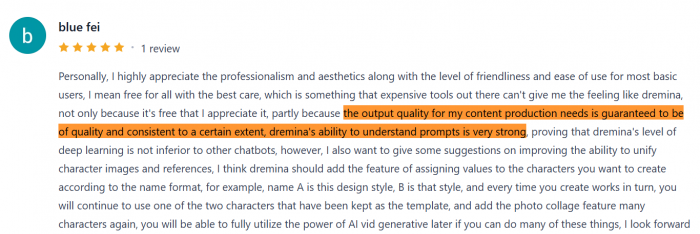
"Personally, I highly appreciate the professionalism and aesthetics along with the level of friendliness and ease of use for most basic users... Dreamina's ability to understand prompts is very strong, proving that Dreamina's level of deep learning is not inferior to other chatbots. However, I also want to give some suggestions on improving the ability to unify character images and references."
Google Play Store Reviews (Rating Context: Mixed)
Technical Issues Dominating Feedback:
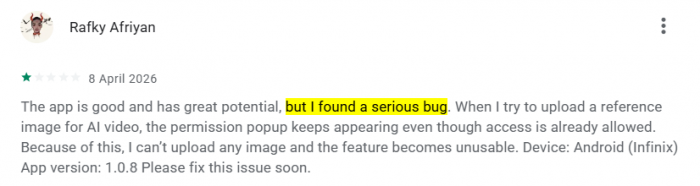
● Permission bugs: Multiple users report the app repeatedly requesting gallery access even after granting it, making image upload features unusable
● Onboarding friction: Some users never get past initial setup before uninstalling
● Device compatibility: Issues particularly noted on Infinix Android devices
Positive Notes:
● Clean interface appreciated by users who successfully access features
● Concept of mobile AI generation well-received
● Community feed provides inspiration
Representative Quote:
"The app is good and has great potential, but I found a serious bug. When I try to upload a reference image for AI video, the permission popup keeps appearing even though access is already allowed. Because of this, I can't upload any image and the feature becomes unusable."
Platform Rating Comparison
| Platform | Dreamina Rating | Data Source | Key Insight |
| Product Hunt | 4.1/5 , Generally Positive | User reviews (2026) | Praised for speed and accessibility; criticized for reliability issues |
| Google Play Store | 3.2/5 , Mixed (Technical Issues) | Android app reviews | Permission bugs significantly impact usability |
| Independent Reviews | 3.5-4/5 equivalent | Professional assessments | "Good for entry-level, not professional grade" |
Feature Satisfaction Breakdown
Interface Design: ████████████████████ 95%
Prompt Understanding: ███████████████░░░░░ 75%
Image Quality: ██████████████░░░░░░ 70%
Video Quality: ██████████░░░░░░░░░░ 50%
Character Consistency: ████████░░░░░░░░░░░░ 40%
Customer Support: ██████░░░░░░░░░░░░░░ 30%
Value for Money: ██████████████████░░ 90%
Dreamina vs. The Competition
Head-to-Head: Dreamina vs. Midjourney v7
| Criteria | Dreamina 2.6 | Midjourney v7 | Winner |
| Photorealism | Clean, well-lit renders but slightly "digital" quality | More authentically photographic results | Midjourney (narrow) |
| Artistic/Illustration | Good for specific styles (anime, fantasy) | Superior diversity and richness in artistic output | Midjourney (clear) |
| Anime/CG Content | Strong, benefits from ByteDance's East Asian visual database | Competitive but less specialized | Dreamina |
| Prompt Control | Preset-based, faster but less precise | Granular parameters (--s, --c, --cref) | Midjourney |
| Character Consistency | Limited tools, manual workarounds needed | --cref parameter for feature maintenance | Midjourney |
| Video Generation | Native image-to-video and text-to-video | No video capabilities (export to external tools) | Dreamina |
| Pricing | $18-84/month for subscriptions | $10-120/month, $10 unlocks unlimited Relax | Dreamina (volume) |
| Workflow Integration | Seamless with CapCut ecosystem | Clean export for Photoshop, external NLEs | Tie (different use cases) |
Use Case Guidance:
● Choose Dreamina if: You need integrated video generation, work primarily in social media formats (9:16 reels), require fast prototyping, or already use CapCut
● Choose Midjourney if: Image quality is paramount, you work in illustration-heavy domains, need character consistency tools, or require fine-grained creative control
Privacy and Commercial Use Considerations
Data Privacy
What Dreamina Collects:
● Account information (email, name if provided)
● Generated content and prompts
● Usage patterns and feature engagement
ByteDance Privacy Statement:
"We do not guarantee the security of your information since transmission of information via the internet is not completely secure."
User Concern: As a ByteDance subsidiary, Dreamina inherits the data governance questions surrounding TikTok. Users in jurisdictions with TikTok bans or restrictions should verify compliance with local data policies.
Commercial Usage Rights
Free Tier:
Under the free tier, generated content is limited to private, non-commercial use. This means it cannot be used for paid client projects, advertising campaigns, or commercial products. It is intended mainly for personal experimentation, testing, and creative exploration rather than professional or revenue-generating work.
Paid Tiers (Basic, Standard, Advanced):
These plans also provide watermark removal and transfer content ownership to the user. As a result, the generated assets can be used in client deliverables, marketing and advertising materials, and commercial products with greater flexibility for professional use.
Important Caveat: Dreamina's terms note that AI-generated content may not be eligible for copyright protection in all jurisdictions (a broader AI industry issue, not Dreamina-specific).
Expert Recommendations: When to Choose Dreamina
Green Light Scenarios
Dreamina is the right choice when:
✓ You need rapid concept iteration for client approval or A/B testing
✓ Primary deliverable is social media content (Instagram, TikTok, YouTube Shorts)
✓ Budget is limited but volume requirements are high
✓ You're already using CapCut and want ecosystem integration
✓ Content style is anime, fantasy, or stylized illustration
✓ You need both image and video in a single subscription
✓ You're a beginner seeking an accessible entry point to AI generation
Yellow Light Scenarios (Proceed with Caution)
Consider alternatives if:
⚠️ Photorealism is critical: Midjourney or stock photography may serve better
⚠️ Character consistency across 10+ images: Midjourney's --cref tools are more robust
⚠️ Professional broadcast work: Use Dreamina for concepts, but finish in professional NLEs
⚠️ Long-form video (30+ seconds): Runway or Kling are better suited
⚠️ Brand-critical assets: Generative AI may lack necessary control; test extensively
Red Light Scenarios (Not Recommended)
Avoid Dreamina for:
✗ Legal/medical visualization requiring anatomical accuracy
✗ Enterprise branding needing pixel-perfect control
✗ Fine art printing demanding ultra-high resolution and color accuracy
✗ Complex narrative storytelling beyond 10-second clips
✗ Photorealistic human portraits for commercial use (uncanny valley risks)
The Verdict: Dreamina's Place in Your Creative Toolkit
Overall Assessment
Dreamina AI is best understood not as a comprehensive replacement for all creative tools, but as a specialized accelerator for specific workflows. Its strengths align perfectly with the demands of modern social media content creation: speed, volume, affordability, and seamless integration into ByteDance's ecosystem.
Rating Breakdown:
| Category | Score | Rationale |
| Ease of Use | 9/10 | Genuinely beginner-friendly interface |
| Image Quality | 7/10 | Excellent for stylized; struggles with photorealism |
| Video Quality | 5/10 | Functional for social media; not professional grade |
| Value for Money | 9/10 | Industry-leading credit-to-dollar ratio |
| Feature Set | 7/10 | Comprehensive but lacks advanced control tools |
| Reliability | 6/10 | Web platform stable; mobile app has bugs |
| Customer Support | 4/10 | Consistently criticized for slow responses |
| Professional Viability | 6/10 | Good for concepts/drafts; not final deliverables |
Overall: 7/10 - A strong tool for its target use case with clear limitations outside that scope.
Three-Tier Recommendation Framework
Tier 1: Highly Recommended
● Social media creators producing 20+ pieces of content weekly
● Independent game developers on tight budgets
● Marketing teams doing rapid A/B testing
● Educators creating visual learning materials
Tier 2: Recommended with Supplements
● Freelance designers (use for ideation, finish in Adobe Suite)
● Small businesses (combine with stock photography for photorealism)
● Video editors (use for B-roll generation, not primary footage)
Tier 3: Not Primary Tool
● Professional photographers (use Midjourney or camera)
● Broadcast video producers (use Runway or traditional tools)
● High-end brand agencies (use dedicated design teams)
● Fine artists (use for reference, not final output)
Practical Tips for Maximizing Dreamina's Potential
Prompt Engineering Best Practices
For Better Image Results: For better image results, use clear and specific prompts. Mention lighting, add style keywords, define the composition, and reference a particular aesthetic to guide the output more effectively."
For Better Video Results: For better video results, write prompts scene by scene and include details about pacing, aspect ratio, and camera movement. This helps create videos that feel more structured, polished, and platform-ready.
Credit Optimization Strategies
Stretch Your Daily Allocation:
● Use editing tools instead of regeneration: Inpainting a background costs fewer credits than full re-generation
● Batch intelligently: Generate 10 variations in one session rather than one-at-a-time
● Start with lower resolution: Test concepts in standard resolution before committing credits to HD
● Use templates: Pre-made scaffolds require fewer credits than custom builds
When to Upgrade from Free Tier
Upgrade triggers: You should consider upgrading if you regularly hit daily limits early in the day, need watermark-free outputs for commercial use, require priority processing during busy hours, or need HD-quality results for client work.
Don't upgrade if: You may not need to upgrade if you create fewer than 10 images a day, use the content only for personal projects, are just casually exploring AI generation, or have a very tight budget, since the free tier can still be quite functional.
Conclusion: The AI Creative Tool Landscape in 2026
Dreamina AI represents a distinct philosophy in the AI generation space: prioritizing accessibility and integration over absolute quality. While Midjourney chases artistic perfection and DALL-E refines photorealism, Dreamina focuses on making AI creation fast, affordable, and seamless for the average content creator.
Its positioning within ByteDance's ecosystem is both its greatest strength and limitation. If you live in CapCut and TikTok, Dreamina is a no-brainer addition to your toolkit. If your workflow centers on Adobe Creative Cloud or professional NLEs, it becomes a useful supplementary tool rather than a core dependency.
The platform's future success will likely hinge on addressing three critical gaps:
1. Photorealism improvements to compete with Midjourney and DALL-E
2. Character consistency tools for professional creative work
3. Mobile app stability to match the polish of its web experience
For now, Dreamina occupies a valuable niche: the fastest, most affordable way to generate high-volume social media content with integrated video capabilities. It won't replace professional designers or cinematographers, but it has already changed how millions of creators approach their daily content production.
Final Recommendation: Try the free tier. The platform's accessibility means you can evaluate it with zero financial risk. If you find yourself hitting daily credit limits and feeling frustrated rather than satisfied, you've identified your upgrade trigger. If the free tier meets your needs, you've discovered one of the best value propositions in AI-powered creativity.
Bottom Line: Dreamina is a powerful tool for the right use case. Know your requirements, understand its limitations, and integrate it strategically into your creative workflow rather than expecting it to solve every visual challenge.
Comments