

2short.ai is built for one clear job: turning long videos into short clips for YouTube Shorts, Instagram Reels, and TikTok. It is not trying to be a full video editor. It works more like a repurposing assistant that scans spoken videos, finds possible highlights, adds captions, and prepares vertical clips.
That makes the real question simple. Can 2short.ai save creators meaningful time without cutting away too much context? The answer is yes for the right type of content, but only if users treat the output as a strong first draft rather than a finished social video.
2short.ai at a Glance
| Area | Details |
| Main use | Turning long videos into Shorts, Reels, and TikToks |
| Best for | YouTubers, podcasters, educators, coaches, interview creators |
| Best content type | Spoken videos with captions and clear talking points |
| Free plan | Yes, Starter plan available |
| Paid plans | Start at $9.90 per month |
| Main strength | Fast AI clip discovery and vertical repurposing |
| Main weakness | AI-selected clips still need human review |
What Is 2short.ai?
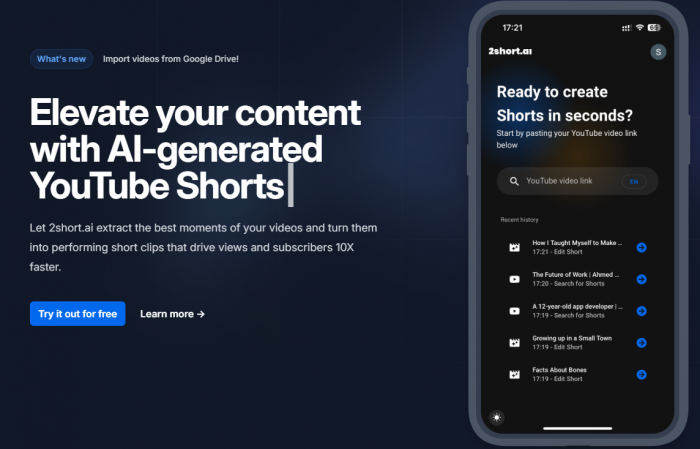
2short.ai is an AI-powered short clip generator for creators who already have long-form videos. Users can paste a YouTube video link, let the platform analyze the content, and receive short clip suggestions that can be edited and exported for short-form platforms. Its own website describes the workflow as copying a YouTube link, pasting it into the 2short app, and letting the AI transform the video into short clips with minimal manual work.
The tool is strongest with videos that contain spoken words. 2short.ai says it works well for podcasts, educational videos, commentary videos, product reviews, motivational speeches, and similar content because the AI uses speech and captions to understand the most engaging parts. That detail matters because 2short.ai is not a magic video maker. It performs best when the original video already has clear ideas, clean audio, and enough structure for the AI to identify useful moments.
The Repurposing Problem 2short.ai Tries to Solve
Most creators do not struggle only with editing. They struggle with finding the right moments inside long videos. A 40-minute podcast may contain six strong clips, but finding those clips manually can take a long time. The creator has to rewatch the timeline, mark usable moments, crop the video, add captions, resize for vertical platforms, and export multiple versions.
2short.ai tries to shorten that process. Its main value is not advanced editing control. Its value is speed at the discovery stage. Instead of starting from a blank timeline, users get a set of AI-selected clip drafts that they can review, adjust, and publish if the clip makes sense on its own.
That also explains the tool’s biggest limitation. Finding a highlight is not the same as creating a strong Short. A good short-form video needs a hook, a clean middle, a complete ending, readable captions, and enough context for a viewer who has never seen the original video. 2short.ai helps with the first version, but the creator still has to make the final judgment.
The Repurposing Audit
| Audit Area | What It Means | 2short.ai Result |
| Clip discovery | Can it find usable short-form moments? | Strong with spoken videos |
| Context | Do clips make sense outside the full video? | Mixed, needs review |
| Captions | Are subtitles useful for mobile viewing? | Useful for quick social clips |
| Vertical framing | Does it prepare clips for Shorts and Reels? | Good for talking-head content |
| Editing control | Can users polish clips deeply? | Basic, not advanced |
| Publishing readiness | Can clips go live directly? | Sometimes, but review is still needed |
Audit 1: Clip Discovery
Clip discovery is the strongest part of 2short.ai. The platform is designed to scan long videos and identify sections that could work as standalone short clips. This is useful for creators who publish interviews, tutorials, reviews, podcasts, webinars, and commentary videos.
For example, a podcast episode may include a short opinion, a useful explanation, or a strong reaction that can work as a Reel. A tutorial may include one clear tip that can become a YouTube Short. A product review may contain a direct verdict or comparison that works as a quick social post. 2short.ai is useful because it helps surface those moments without forcing the creator to scrub through the entire video manually.
The quality depends heavily on the source video. If the original video has clear speech, direct answers, and natural topic changes, the AI has more useful material to work with. If the video is slow, scattered, poorly recorded, or mostly visual, the results will be weaker. 2short.ai can shorten the editing process, but it cannot create strong content from a weak source.
Audit 2: Context and Story Flow
Context is the biggest test for any AI clipping tool. A clip can contain an interesting sentence but still fail as a Short if the viewer does not understand what the speaker is talking about. This is where 2short.ai feels helpful, but not fully automatic.
Some AI-generated clips may start slightly late, end before the idea fully lands, or remove the setup that made the original point meaningful. That does not make the tool bad. It means creators should treat each output as a suggested cut, not a guaranteed final video. The best workflow is to check whether the clip has a clear opening, a complete idea, and a natural ending.
This is especially important for educational, commentary, and interview content. A clip can misrepresent the speaker if it removes too much surrounding context. For personal brands, coaches, and businesses, that matters. The short may look clean, but if it changes the meaning of the original video, it should not be published without editing.
Audit 3: Captions and Mobile Viewing
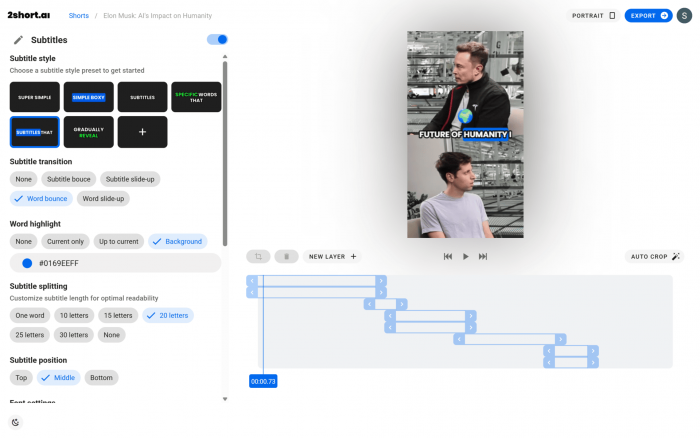
Auto captions are one of the most useful parts of the 2short.ai workflow. Short-form platforms are heavily mobile-first, and many viewers watch videos quickly, sometimes without sound. Captions make clips easier to follow and help the video feel more ready for Shorts, Reels, and TikTok.
2short.ai also supports a wide range of languages, including English, French, German, Greek, Hungarian, Indonesian, Italian, Japanese, Korean, Portuguese, Spanish, Swedish, Turkish, Ukrainian, and others listed on its website. That makes it more useful for creators who produce content outside only English-speaking audiences.
Still, captions should always be checked before publishing. AI captions can miss names, brand terms, technical words, speaker accents, and fast speech. For casual creators, small mistakes may not matter much. For educators, businesses, and professional creators, caption accuracy directly affects credibility.
Audit 4: Vertical Framing and Face Tracking
A major part of repurposing long-form video is turning a horizontal video into a vertical clip. This sounds simple, but poor framing can make a Short look awkward. If the speaker is too far to one side, cropped too tightly, or pushed out of frame during movement, the final video feels unfinished.
2short.ai’s vertical formatting and face-focused workflow are useful for talking-head content. It works best when the main subject is visible and the content is driven by speech. This makes it a practical option for solo creators, podcasters, educators, interview hosts, and YouTube commentators.
It is less useful for videos where the important action happens across the full frame. Music videos, cinematic scenes, gaming clips, travel montages, and visual storytelling videos may need more manual editing because a simple face crop does not always capture what matters in the frame.
Audit 5: Editing Control
2short.ai gives enough control for basic repurposing. Users can review clips, adjust the output, work with captions, and prepare vertical videos for social platforms. For creators who only need quick clips from long videos, this may be enough.
However, it should not be treated as a replacement for CapCut, Premiere Pro, Final Cut Pro, Descript, or other full editing tools. It is not built for detailed timeline editing, advanced B-roll placement, complex audio cleanup, motion graphics, brand templates, or heavy creative control.
This is why 2short.ai is best described as a first-pass clipping assistant. It gets users to a usable draft faster. It does not give the same level of polish that a full editor or a human short-form editor can provide.
2short.ai Features That Matter Most
The most important feature is AI clip detection. This is the reason someone would use 2short.ai instead of editing manually. It scans long-form videos and suggests clips that may work as short-form content. For creators with a regular video library, this can reduce the time spent searching for usable moments.
The second important feature is automatic captioning. Captions are no longer optional for short-form video. They help with viewer retention, accessibility, and quick mobile consumption. 2short.ai’s caption workflow makes the output more social-ready, although users should still proofread before publishing.
Vertical formatting is another major feature. The tool is designed around Shorts, Reels, and TikTok, so it helps creators move from horizontal long-form video to vertical output. This is especially useful for YouTubers who already publish long videos and want more value from the same content.
The platform also supports imports from Google Drive and public URLs on the Lite plan and above. That makes the workflow more flexible for creators who store content outside YouTube or want to work with files from shared sources.
2short.ai Pricing and Plans
2short.ai has a simple subscription structure. The company says all plans give access to its features, while the main difference is the amount of AI video analyzing time and export capacity. This makes the pricing easier to understand than tools that split features across many confusing tiers.
| Plan | Price | What It Includes | Best For |
| Starter | Free | 30 minutes of AI video analyzing per month, ability to view and export generated clips, full access to features | Testing the platform |
| Lite | $9.90/month | 5 hours of AI video analyzing per month, 60 minutes of fast server-side exports, Google Drive and public URL imports, no ads | Light creators |
| Pro | $19.90/month | 15 hours of AI video analyzing per month, unlimited fast server-side exports, everything in Lite | Regular YouTubers and podcasters |
| Premium | $49.90/month | 50 hours of AI video analyzing per month, priority support, access to beta features | Heavy creators and agencies |
The free plan is useful for testing whether 2short.ai works with your type of video. It is not enough for serious regular repurposing because long-form content can use up analysis time quickly. The Lite plan is better for occasional creators, while the Pro plan looks like the most practical option for people who publish long videos regularly.
The Premium plan only makes sense if a creator or team has a steady volume of long videos to repurpose. If you only upload one or two videos a month, the extra analysis time may not be necessary.
Content Transparency, Privacy and Safety
2short.ai is transparent about its main purpose. It takes existing long-form videos and helps convert them into shorter clips. It also explains that the tool works best with spoken content and videos with captions. That is useful because it sets realistic expectations for creators.
The safety concern is not that 2short.ai creates synthetic characters or deepfake videos. The bigger concern is content rights and context. Users should mainly repurpose videos they own, manage, or have permission to edit. Pasting another creator’s YouTube link and turning it into Shorts can create copyright, reuse, and monetization problems.
Privacy also deserves attention. 2short.ai has a public privacy policy that says it collects personal information and uses it to provide and improve the service. That is standard for many web tools, but users should still be careful with unreleased client videos, private calls, paid course footage, or sensitive internal content.
The safest workflow is simple: use your own videos, review every clip before publishing, check captions, confirm that the clip does not misrepresent the speaker, and avoid uploading private or restricted footage unless you are comfortable with the platform processing it.
What Real Users Say
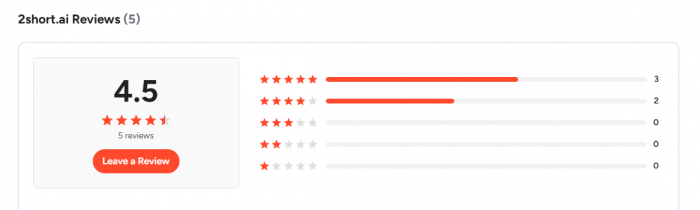
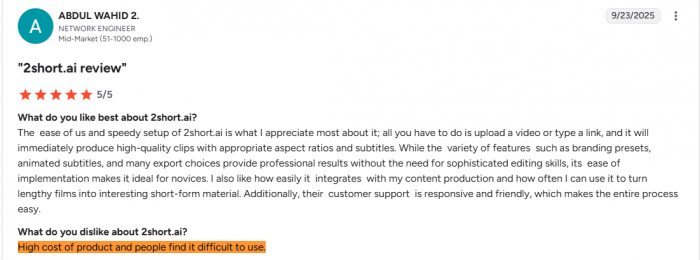
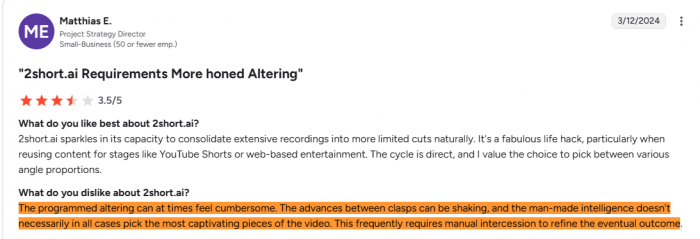
Public feedback around 2short.ai is positive, but the review base is still small. On G2, the tool currently shows a 4.5 out of 5 rating from 5 reviews. That is a good signal, but it is not enough to call it a heavily proven platform across a large user base.
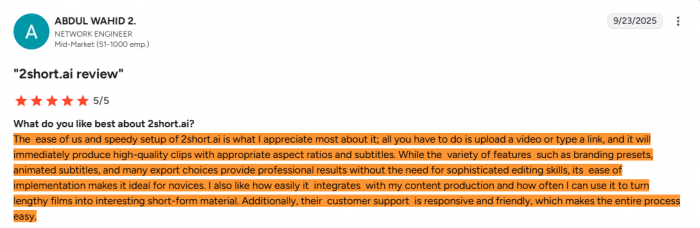
The positive feedback usually focuses on ease of use, fast setup, quick clip creation, captions, and the ability to turn longer videos into short social-ready clips. This matches the tool’s main promise. Users are not praising it as a full editor. They are praising it for saving time.
The more cautious reading is also important. With only a small number of visible reviews, it is harder to judge long-term support quality, billing experience, cancellation reliability, and performance at scale. The most accurate conclusion is: public feedback is encouraging, but limited.
Strengths of 2short.ai
2short.ai’s strengths become clear when it is judged as a repurposing tool, not a full video editor. Its main value is helping creators move faster from long videos to short-form clips.
● Fast clip discovery: 2short.ai saves time by finding short-worthy moments inside long videos, so creators do not have to manually scan a full podcast, interview, tutorial, or YouTube video.
● Simple beginner-friendly workflow: The process is easy to follow. Users add a video, let the AI suggest clips, review the results, make basic edits, and export short-form content.
● Strong fit for spoken videos: The tool works best with podcasts, interviews, tutorials, product reviews, commentary videos, and educational content where clear speech creates natural short-form moments.
● Clear pricing structure: Paid plans start at $9.90 per month, and the main difference between plans is video analysis time. This makes it easier for creators to choose based on how often they repurpose videos.
Limitations of 2short.ai
2short.ai is useful for quick repurposing, but it still has clear limits. It works best as a first-draft clipping tool, not as a fully automated video editor.
● AI-selected clips still need review: Some clips may look usable but feel weak as standalone Shorts. Users still need to check the opening, ending, captions, crop, and overall context before publishing.
● Limited editing control: 2short.ai is not a full editing platform. Users who need B-roll, brand templates, detailed audio cleanup, or advanced timeline control will still need another editor.
● Source quality affects the final result: The tool works better with clear speech and structured videos. If the original video has weak audio, poor pacing, or no strong moments, the output will likely feel average.
● Public review data is still limited: Its G2 rating is positive, but the sample size is small. There is not enough broad feedback across major review sites to fully judge long-term reliability.
Best Use Cases and Poor Use Cases
2short.ai works best for creators who already have a library of long spoken videos. YouTubers can use it to turn commentary, reviews, tutorials, and explainer videos into Shorts. Podcasters can use it to pull short discussion moments from full episodes. Educators and coaches can use it to convert lessons, webinars, and advice-based videos into quick tips.
It is weaker for highly visual videos, music content, cinematic edits, gaming footage without clear speech, travel montages, or videos where the value comes more from visuals than spoken ideas. Those formats often need more manual editing because the best moment may not be obvious from captions or speech alone.
It is also not ideal for users who want to repurpose content they do not own. The tool may make clipping easy, but it does not remove copyright responsibility.
2short.ai Alternatives
2short.ai is a useful option for fast long-video repurposing, but it is not the only tool in this category. Some alternatives offer stronger clip scoring, better editing control, or more polished social formatting.
| Alternative | Best For | How It Compares With 2short.ai |
| OpusClip | Creators who want stronger AI clip scoring | OpusClip feels more mature and better known in the AI clipping space. It may be a better fit for creators who want stronger highlight detection and a more polished short-form workflow. |
| Vizard AI | Teams, marketers, and creators who need more editing flexibility | Vizard AI is useful when users want AI clipping plus a broader editing setup. It offers more room for repurposing and polishing content beyond basic clip generation. |
| Klap | YouTubers who want a simple YouTube-to-Shorts workflow | Klap is close to 2short.ai in simplicity. It works well for creators who mainly want to turn YouTube videos into Shorts without a complex editing process. |
| Vidyo.ai | Multi-platform social media repurposing | Vidyo.ai is better for users who want to create clips for several platforms, including TikTok, Instagram, YouTube Shorts, and LinkedIn. It feels more platform-focused than 2short.ai. |
| Submagic | Caption-heavy clips, hooks, and social-style polish | Submagic is stronger when the final look matters more than clip discovery. It is useful for creators who want better captions, visual hooks, emojis, and social-ready formatting. |
Who Should Use 2short.ai?
2short.ai is a good fit for YouTubers, podcasters, educators, coaches, and creators who already produce long-form spoken content. It is especially useful for people who want more short-form output from content they have already made.
It is also useful for small creators who do not want to hire an editor for every clip. The tool can help them find moments faster and prepare clips for Shorts, Reels, and TikTok without learning advanced editing software.
It is not the best choice for advanced editors, agencies that need heavy brand control, creators making cinematic videos, or users who need a full production suite. It is also not a shortcut for legally reusing other people’s content.
Personal Rating
| Category | Rating | Notes |
| Workflow | 4.2/5 | Simple and easy to follow, especially for beginners. |
| Clip Selection | 3.7/5 | Useful for finding moments, but not always strong enough without review. |
| Caption Quality | 4/5 | Good for basic short-form content, though names and technical words may need correction. |
| Speed | 4.4/5 | Its strongest area because it reduces manual timeline scanning. |
| Editing Control | 3.2/5 | Enough for basic trimming and formatting, but limited for advanced edits. |
| Value for Money | 4/5 | Fair pricing if the user regularly repurposes long videos. |
| Overall Rating | 4/5 | A practical AI clipping tool for creators who want faster Shorts, not a full video editor. |
Final Verdict
2short.ai passes as a fast repurposing assistant, but not as a complete short-form production tool. Its strongest value is helping creators find possible clips from long videos, add captions, and prepare vertical drafts quickly.
The tool works best with spoken content that already has clear ideas and natural short-form moments. It is useful for YouTubers, podcasters, educators, coaches, and interview creators who want to get more value from long videos without spending hours searching for clips manually.
Its biggest weakness is context. AI can find a moment, but it cannot always judge whether that moment works as a complete Short. Every clip still needs human review before publishing, especially when accuracy, speaker meaning, or brand voice matters.
For creators who want speed and simplicity, 2short.ai is worth testing, especially with the free Starter plan. For users who need advanced editing, stronger creative control, or polished brand-level short videos, tools like OpusClip, Vizard AI, Vidyo.ai, Submagic, or a full editor may be a better fit.
Comments