

Wegic AI sells a simple idea: describe a website in chat, and the platform will build it for you. That is a tempting promise for anyone who has spent hours adjusting templates, choosing fonts, rewriting homepage copy, or trying to make a basic business site look less generic.
But Wegic should not be judged only by how fast it creates a first draft. The real test begins after the first website appears: Can you control the design? Can you edit without burning through credits? Can the site work for SEO? Can it support a real business beyond a quick demo?
This review looks at Wegic as a practical website-building tool, not just an AI trick. Its strength is speed. Its challenge is everything that comes after speed.
Quick Verdict
Wegic AI is useful for people who need a clean website draft quickly. It works best for landing pages, portfolios, event pages, simple business websites, creator pages, and early startup sites. It is less suitable for complex ecommerce, large blogs, SaaS websites, membership platforms, or businesses that need deep control over design, backend logic, SEO architecture, and long-term ownership.
| Area | Wegic AI Verdict |
| Ease of use | Strong for beginners |
| First website draft | Fast and useful |
| Editing control | Mixed |
| Pricing model | Credit-based and needs careful reading |
| SEO support | Helpful for basics, not a complete SEO strategy |
| Best use case | Landing pages, portfolios, simple business sites |
| Main tradeoff | Speed comes with control limits |
The cleanest way to understand Wegic is this: it is a shortcut for getting a website started, not a full replacement for a professional web design workflow.
What Wegic AI Actually Is
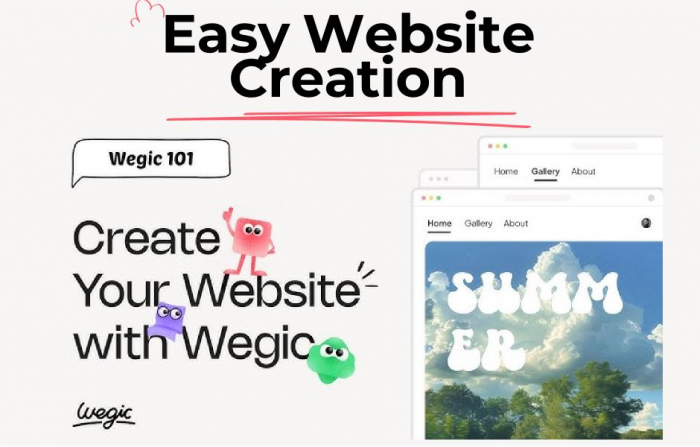
Wegic AI is a conversational AI website builder that lets users create a website by simply describing what they need. Instead of starting with templates, drag-and-drop tools, or design panels, users chat with Wegic, and the AI builds the site structure, layout, copy, visuals, and a publishable version.
This makes Wegic different from traditional builders like Wix, Squarespace, Webflow, and WordPress, where users usually have to work through templates, blocks, plugins, or settings. Wegic focuses on the result: a professional-looking website without needing to design everything manually.
Its biggest strength is that it understands what many users really want. They do not want to become designers; they just want a homepage, service pages, contact forms, and a clean site they can launch. At the same time, Wegic sits in a unique space. It is not just a chatbot, not a full design platform, and not a complete WordPress replacement. It is a chat-led website generator, which explains both its appeal and its limits.
The Wegic Workflow: From Idea to Website Draft
Wegic’s workflow is built around conversation. A user starts by describing the website they need. That description can be simple, but the output becomes better when the prompt includes more detail: business type, audience, number of pages, tone, visual style, services, CTA, and preferred structure.
A typical workflow looks like this:
1. The user explains the website idea.
2. Wegic asks for or infers the site name, purpose, style, and language.
3. The AI generates a website draft.
4. The user requests edits through chat.
5. The site can be published through Wegic.
6. The user can return later to update or refine the website.
This is where Wegic feels genuinely useful. It solves the “where do I start?” problem. A freelancer can ask for a portfolio, a local business can request a service site, a startup founder can build a waitlist page, and a coach can create a personal brand site. In each case, Wegic gives users a solid starting point quickly.
The challenge comes later, during refinement. Wegic works well when the request is broad, but it can take more patience when users want exact copy, tighter spacing, better mobile design, stronger CTAs, or a very specific brand voice. It is fast at creating a first draft, but precision still needs effort.
A strong prompt makes a visible difference. “Create a website for my agency” may produce a generic agency page. A better prompt would say:
“Create a five-page website for a boutique digital marketing agency that works with local service businesses. Include a homepage, services page, case studies page, about page, and contact page. Use a clean navy, white, and soft-blue visual style. The tone should be confident, direct, and conversion-focused. Add a hero section, service overview, proof section, testimonials, pricing preview, and consultation CTA.”
That kind of prompt gives Wegic direction. The platform is beginner-friendly, but it still rewards users who can explain the job clearly.
What Kind of Website Does Wegic Produce?
Wegic is strongest when the site is simple, visual, and informational. It can create a polished-looking starting point for websites that need to introduce a person, business, product, service, or event. It is less convincing when the site needs complex technical systems behind the design.
| Website Type | Wegic Fit | Why |
| Portfolio website | Strong | Simple structure, visual presentation, fast setup |
| Landing page | Strong | Clear goal, limited page depth, easy to generate |
| Local business website | Good | Useful for basic services, contact forms, and trust sections |
| Event website | Good | Fast page creation with schedule, details, and CTA sections |
| Blog-heavy website | Average | Needs deeper CMS and editorial structure |
| Ecommerce store | Limited | Product logic, checkout, inventory, and shipping are more complex |
| SaaS website | Mixed | Good for early landing pages, not full product systems |
| Membership website | Weak | Needs accounts, permissions, and backend control |
This distinction matters because AI-generated websites can look complete before they are operationally complete. A good-looking service website may be enough for a freelancer. A serious ecommerce store needs product management, payments, shipping, tax settings, inventory, analytics, and customer workflows. A SaaS site needs product messaging, onboarding logic, documentation, integrations, and conversion testing.
Wegic works best when the website’s job is to present and convert. It is less ideal when the website’s job is to operate a complex digital business.
User Experience : The Comfort and Friction of Chat-Based Design
Wegic’s strongest UX advantage is that it lowers the entry barrier. Users do not need to understand design systems, page builders, responsive breakpoints, hosting language, or CMS settings before starting. They can describe what they want and let the AI produce a draft.
That is useful for non-technical users. Many small business owners and creators do not care about builder mechanics. They want a clean homepage, a clear offer, a contact path, and enough credibility to start sending people to the site. Wegic makes that starting point easier.
But the same chat-first interface can become frustrating when the user wants exact control. A designer may want to drag, resize, align, duplicate, or adjust specific sections manually. Wegic’s AI-led editing can feel less predictable because the user has to explain the change and wait for the AI to interpret it.
The UX tradeoff is clear:
● It is easier than traditional builders for first-time users.
● It is faster than starting from a blank template.
● It is less precise than tools built for manual design control.
● It depends heavily on the quality of user instructions.
● It can become slower when repeated changes are needed.
That does not make Wegic difficult to use. It means the product is optimized for guided creation, not full creative control.
Features That Matter Most
Wegic’s features are built around one main idea: helping users create and publish websites through conversation instead of manual design work. Its strongest tools are useful for beginners, freelancers, small businesses, and anyone who wants a website draft without starting from zero.
● Chat-based website generation: Wegic turns plain-language instructions into a website draft. This is its core feature and the main thing that separates it from traditional no-code website builders.
● AI editing: Users can ask Wegic to revise sections, change the design direction, improve copy, and keep shaping the site through chat. For beginners, this feels easier than working through design panels and settings.
● Publishing support: Wegic is designed for users who want to launch a real website, not just create a mockup. Depending on the plan, users may get hosted publishing, custom domain support, branding removal, visitor allowances, and code download options.
● Code download: Paid users may be able to export their website code, which helps reduce platform lock-in. However, this feature should be tested carefully to see whether the exported code is clean, responsive, organized, and easy to maintain.
● Mobile optimization and AI visuals: Wegic also promotes mobile-friendly design and AI-generated visuals. These can make the site look polished quickly, but users should still review the final result for layout consistency, brand accuracy, and conversion quality.
Wegic’s features make website creation faster and more approachable, especially for users who do not want to design from scratch. Still, the final website should be checked carefully before publishing, because AI-generated sites often need human review to feel truly polished and professional.
Pricing: Plans, Credits, and What Users Actually Get
Wegic uses a credit-based pricing model, so the real cost depends on both the subscription plan and how many credits users need. Credits may be used for website generation, AI edits, and advanced actions inside the platform.
The official help center lists Starter and Premium plans with monthly credit allowances, while the live pricing page may show updated or promotional offers. Users should check the current pricing page before subscribing, but the plan structure generally separates basic website use from more professional publishing needs.
| Plan | Monthly Price | Annual Price | Credits |
| Free / Trial Access | Limited free credits or trial access may be available | Not applicable | Limited |
| Starter | $39.90/month | $286.80/year, equal to $23.90/month | 600 credits/month |
| Premium | $69.90/month | $502.80/year, equal to $41.90/month | 2,000 credits/month |
The pricing should be judged through usage, not just plan names. A user who creates one simple portfolio may find the credit allowance enough. A user who keeps regenerating layouts, rewriting sections, testing multiple styles, changing images, and refining every page may feel the limits more quickly.
This is why Wegic’s pricing question is different from a normal website builder. The real question is not only “What does Wegic cost?” It is also “How many meaningful edits can I make before the plan feels restrictive?”
For professional use, users should check these details before paying:
● Whether custom domain support is included
● Whether Wegic branding can be removed
● How many monthly credits are included
● Whether extra credits can be purchased
● Whether code download is available on the selected plan
● Whether visitor limits matter for the website
● What refund terms apply to the subscription
Wegic can be affordable if the user creates efficiently. It can feel less predictable if the user needs many rounds of AI changes.
SEO Reality Check: Helpful Start, Not a Ranking Strategy
Wegic can help create the basic structure of a website. That includes page sections, headings, service copy, calls to action, and possibly basic SEO settings. For a beginner, that is useful. Many small websites fail because they start with weak structure and unclear messaging.
But Wegic should not be treated as a full SEO strategy. Search performance depends on more than a generated website. It requires keyword research, search intent analysis, internal linking, technical SEO, content depth, local optimization, schema, speed, backlinks, and ongoing updates.
A Wegic-generated website may be a good starting point for a local business or simple brand site. But users still need to check whether the site has clear title tags, strong meta descriptions, proper heading hierarchy, clean URLs, image alt text, and page content that matches actual search intent.
This matters because “SEO-ready” can be a soft phrase in the website-builder market. A site can be technically presentable without being competitive in search. Wegic can help users start. It cannot replace an SEO plan.
What Real Users Like and Complain About
The most useful user feedback around Wegic follows a clear pattern. People like the speed, simplicity, and concept of building a site through conversation. Complaints usually appear when users move beyond the first draft and start dealing with performance, price, editing control, credits, or reliability.
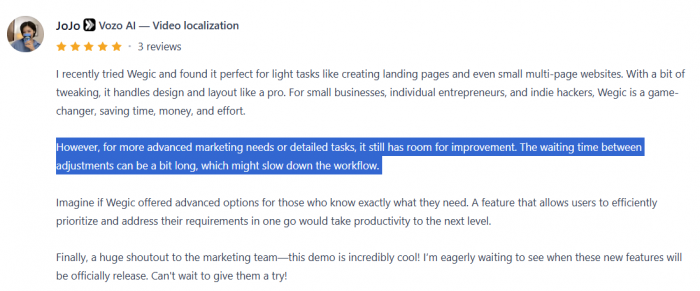
Product Hunt feedback is generally more positive, with users praising Wegic for light tasks such as landing pages, small multi-page websites, and quick business sites. Some users see it as a time-saver for small businesses, entrepreneurs, and indie builders. The positive sentiment is usually tied to speed and convenience.

Negative feedback is more practical. Some users complain about slow loading, long waits between adjustments, pricing concerns, and the product feeling less efficient when repeated changes are needed.
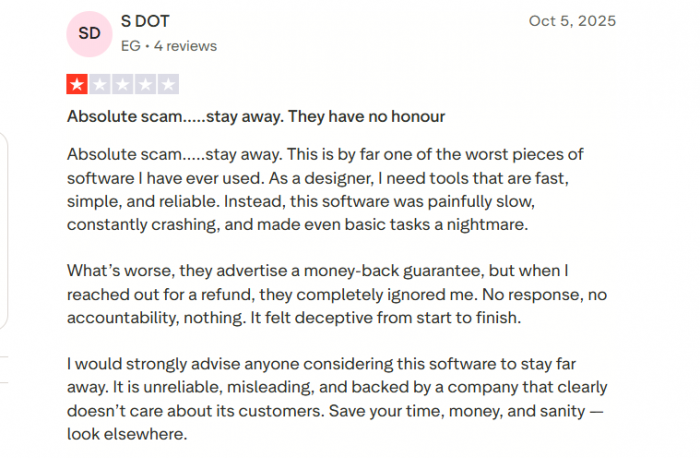
Trustpilot feedback is much harsher, although the review base is small. Complaints there focus on crashes, credit usage, difficulty editing manually, and dissatisfaction with value.
Instead of treating user reviews as a simple good-or-bad signal, it is more useful to divide them into what customers want and what customers complain about.
| What Customers Like | What Customers Complain About |
| Fast first website draft | Slow performance during editing |
| Easy chat-based workflow | Credits can feel restrictive |
| Useful for landing pages and small sites | Limited manual control |
| Beginner-friendly website creation | Repeated edits can become frustrating |
| Good concept for non-technical users | Pricing may feel high if output needs many changes |
| Saves time for simple websites | Reliability complaints, including crashes in some reviews |
The pattern is not surprising for an AI-first website builder. The first experience can feel impressive because the user gets a website quickly. The frustration often appears later, when the user wants exact changes, faster response times, predictable credit usage, and production-level polish.
That makes Wegic a tool with clear value and clear friction. It is not a product people should judge only by the first generated page.
Strengths of Wegic AI
Wegic’s biggest strength is speed. It helps users move from an idea to a website draft much faster than a traditional builder, which is useful for people who often delay launching because they do not know where to start.
It is also easy to use because website creation happens through conversation. Users can describe what they need in plain language, and Wegic turns that into copy, layout, design direction, and a publishable site. This makes it helpful for founders, creators, freelancers, and local businesses.
Wegic is especially useful for quick prototypes and simple websites, such as landing pages, personal portfolios, freelance service sites, local business websites, event pages, creator sites, startup waitlist pages, and fast client mockups.
For these use cases, Wegic can save real time and reduce the friction of getting a website online.
Limitations of Wegic AI
Wegic’s main limitation is control. Chat-based editing is easy, but it may not give users the precision they need for layout, spacing, animation, responsiveness, CMS structure, or advanced design systems.
Another limitation is credit usage. Since AI actions can consume credits, users who make many small changes may need to manage their usage carefully.
Wegic is also not the best fit for complex projects like large ecommerce stores, membership platforms, SaaS dashboards, advanced blogs, marketplaces, or custom web apps. These usually need backend logic, integrations, user accounts, and deeper technical planning.
SEO is another area where human work is still needed. Wegic can help create a starting structure, but strong search performance requires research, optimization, and ongoing updates.
Finally, Wegic is newer than platforms like Wix, Squarespace, Webflow, WordPress, and Shopify, so it does not yet have the same long-term reputation or review depth. These limits do not make Wegic weak; they simply show where the product fits best.
Best Wegic AI Alternatives
Wegic is useful, but it is not always the best option. Some users need a more mature builder. Some need better design control. Some need WordPress flexibility. Some need ecommerce strength. The better alternative depends on the website goal.
| Alternative | Best For | Why It May Be Better Than Wegic |
| Wix AI Website Builder | Most beginners and small businesses | Mature builder, AI setup, manual editing, apps, ecommerce, blogging |
| Framer AI | Startups and design-led landing pages | Stronger visual control and modern design flexibility |
| 10Web | WordPress users and agencies | AI generation with WordPress-style flexibility |
| Hostinger AI Website Builder | Budget-conscious users | Affordable website building with hosting included |
| Squarespace Blueprint AI | Creators, portfolios, premium brand sites | Strong design consistency and polished templates |
| Durable AI | Local service businesses | Fast business-site creation with marketing tools |
| B12 | Consultants and professional services | Website plus client-facing business features |
| Webflow | Advanced teams and serious websites | Deeper CMS, design control, SEO, and scalability |
Wix is the safer all-round alternative because it combines AI with a mature builder ecosystem. Framer is better for modern landing pages. 10Web is stronger for users who want WordPress-style flexibility. Hostinger is better for low-cost publishing. Webflow is better for serious websites that need long-term control.
Wegic’s advantage is simplicity. Its weakness is that simplicity can become restrictive once the site needs more depth.
Who Should Use Wegic AI?
Wegic is best for users who need a website quickly and do not want to learn a traditional builder. It is especially useful when the website has a clear, simple purpose: introduce a service, collect leads, present a portfolio, promote an event, or test an idea.
The best-fit users are freelancers, solo founders, creators, consultants, coaches, local businesses, indie hackers, and agencies creating early mockups. These users often need speed more than complex infrastructure.
Wegic is not the best fit for users who need advanced ecommerce, custom backend logic, large CMS systems, membership tools, deep design control, enterprise compliance, or complex integrations.
The ideal Wegic user thinks: “I need a clean website direction quickly, and I am comfortable refining it through AI.”
The wrong Wegic user thinks: “I need a fully custom, scalable, production-grade website system with complete control over every technical and design detail.”
Final Assessment
Wegic AI is a useful product because it solves a real problem: getting from a website idea to a working first draft is harder than most people expect. Wegic makes that first step faster, less technical, and more approachable.
Its value is strongest when the project is simple. A landing page, freelancer portfolio, service website, personal brand page, event page, or early startup site can benefit from Wegic’s chat-led workflow. It gives users a visible starting point without forcing them to learn web design first.
But Wegic is not a magic replacement for professional web design, serious SEO, complex ecommerce, WordPress flexibility, or Webflow-level control. Its biggest strength is speed. Its biggest tradeoff is precision. Users who understand that balance will get more from the tool than users expecting a perfect business website from one prompt.
The most honest verdict is this: Wegic AI is a smart shortcut for building simple websites quickly. It is not the final answer for every website project. Use it when speed, simplicity, and a fast first draft matter most. Look elsewhere when control, scale, ownership, ecommerce depth, or technical flexibility matter more.
Comments