

Most "chat with your documents" tools pick a lane. Knowbase AI refuses to. It accepts PDFs, Word files, slide decks, raw audio, video, and pasted YouTube links into a single library, transcribes the spoken material, and then answers questions across the whole pile with citations that jump to the exact page or timestamp. The pitch is breadth, and breadth is where the interesting tensions show up. What follows is a hands-on, evidence-led look at where that breadth pays off and where it strains.
What The Tool Actually Is
Strip away the marketing and Knowbase AI is two familiar things stitched together: a file locker and a retrieval-augmented chatbot. Files are uploaded, embedded, and (for audio and video) transcribed. A conversational layer then sits on top, returning answers grounded in whatever was uploaded, with numbered references that link back to the source location. The closest mental model is a personal Dropbox whose contents can be interrogated like ChatGPT.
The headline capabilities cluster into a handful of areas:
● Document chat with page-level citations. Ask a question, get an answer, click the reference, land on the exact page or paragraph it came from.
● Chat-All. A single conversation that searches the entire library at once rather than forcing a one-file-at-a-time workflow, optionally pulling in connected Google Drive, Notion, Dropbox, and web sources.
● Transcription with speaker diarization. Audio and video are transcribed, individual speakers are auto-identified, and generic Speaker 1 or Speaker 2 labels can be renamed into real names that propagate through the transcript, the chat answers, and exported subtitles.
● Embeddable AI assistant. A chatbot built from a knowledge base can be dropped onto a website as a floating bubble or side panel, with lead capture built in.
● Share and embed. Shareable links for individual files, collections (called Nests), or an entire library, viewable without the recipient creating an account.
Support spans a claimed 100-plus file types and 50-plus languages on the chat side, with transcription stretching across 90-plus languages on a Whisper-based pipeline.
Key Features of Knowbase AI
Knowbase AI has several features that make it more flexible than a basic file summarizer. Its value comes from combining document chat, multimedia support, cloud integrations, citations, and shareable AI assistants.
| Feature | What It Does | Why It Matters |
| Document chat | Lets users ask questions from PDFs, Word files, PowerPoints, TXT, and Markdown files | Useful for reports, research papers, contracts, study notes, and guides |
| Chat-All | Searches across the full knowledge library | Saves time when information is spread across many files |
| Source citations | Shows where the AI answer came from | Helps users verify answers instead of trusting the AI blindly |
| Audio transcription | Converts audio files into searchable text | Useful for interviews, lectures, meetings, and podcasts |
| Video transcription | Makes video files searchable through chat | Helpful for recorded classes, webinars, training videos, and creator content |
| YouTube link support | Allows users to chat with YouTube video content | Useful for learning, research, and content analysis |
| Google Drive integration | Connects existing Drive files | Reduces the need to manually re-upload documents |
| Notion integration | Lets users access Notion knowledge through AI chat | Useful for teams already using Notion |
| Dropbox integration | Connects cloud-stored files | Helpful for users with large file libraries |
| Web and domain search | Lets users include web sources in the knowledge workflow | Useful for combining internal files with external information |
| Shareable knowledge base | Allows users to share files, folders, or chat experiences | Helpful for teams, students, clients, and audiences |
| Embeddable assistant | Lets users create a chatbot from selected knowledge and embed it | Useful for websites, support pages, courses, and documentation |
| API access | Allows developers to connect Knowbase AI with custom workflows on higher plans | Useful for businesses and technical users |
The most important feature is Chat-All. Many tools let users chat with one PDF. Knowbase AI becomes more interesting because it can search across a wider knowledge library.
How Knowbase AI Works
Knowbase AI turns your scattered files and media into a searchable, citation-backed knowledge base so you can ask natural-language questions and get accurate, source-referenced answers.
1. Upload or connect sources : Add documents, PDFs, slides, videos, audio files, YouTube links, or cloud storage (Google Drive, Dropbox).
2. Process and index content : Extract text from documents, transcribe audio/video into text, clean the output, and index it for search.
3. Ask questions : Enter natural-language queries in the chat interface about a single file or your entire library.
4. Retrieve relevant context : The system searches the index and locates the most relevant passages or timestamps.
5. Generate answer with citations : The AI composes a concise response using retrieved material and includes source references.
6. Verify sources : Open the cited files or snippets to confirm the original context and validate the answer.
Pricing: Clean On The Surface, Tight At The Edges
Four tiers, monthly or annual, with annual billing knocking 20 percent off. The structure is refreshingly legible compared with the usual SaaS fog. The catch is in the ceilings rather than the headline prices.
| Plan | Price (USD) | Storage | Monthly Queries | Monthly Uploads | Transcription (mins) | Connectors |
| Free | $0 | 50 MB | 25 | 10 | YouTube only | None |
| Starter | $19 | 2 GB | 500 | 100 | 60 min | 1 |
| Pro | $49 | 25 GB | 2,000 | 500 | 10 hrs | Unlimited |
| Team | $99 | 100 GB | 5,000 | Unlimited | 30 hrs | Unlimited |
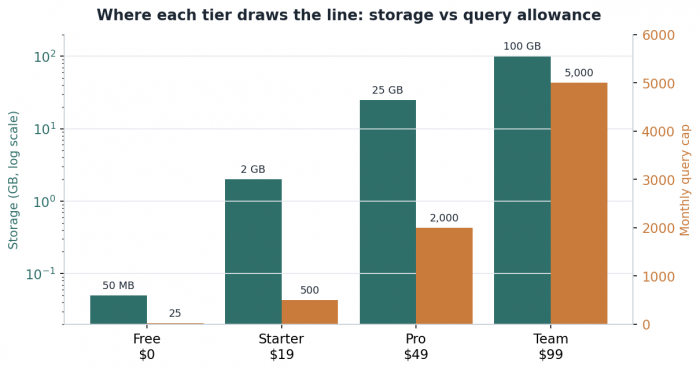
The free tier is best read as an extended demo, not a home. Twenty-five queries and 50 MB evaporate during a single afternoon of real testing. Starter at nineteen dollars suits a light, individual document load, but its 60-minute transcription cap is almost antagonistic toward anyone recording weekly meetings. Pro at forty-nine dollars is the tier where the product stops fighting the user: 25 GB, ten hours of transcription, unlimited connectors, API access, and the deeper "Thinking Mode" all arrive together. Team at ninety-nine doubles transcription and removes the upload ceiling, yet keeps queries capped at 5,000, which is the one number genuinely team-sized usage will brush against first.
Supported Input and Output Formats
Knowbase AI supports a wide range of input formats, which is one of its stronger points. It is not limited to PDFs.
| Category | Supported Formats or Sources |
| Documents | PDF, DOC, DOCX |
| Presentations | PPT, PPTX |
| Text files | TXT, MD |
| Audio | MP3 |
| Video | MP4, AVI, MOV, WMV |
| Online video | YouTube links |
| Cloud sources | Google Drive, Notion, Dropbox |
| Web sources | Domain or web-based search support |
The main outputs are text-based. Users receive AI-generated answers, summaries, citations, transcripts, and shareable chat experiences. For audio and video, Knowbase AI can also support transcript-style outputs and subtitle formats such as SRT and VTT, depending on the workflow.
| Output Type | What Users Get |
| AI answers | Natural-language answers based on uploaded or connected content |
| Summaries | Short or detailed summaries of documents, videos, or recordings |
| Citations | Source references linked to original material |
| Transcripts | Searchable text generated from audio or video |
| Subtitle exports | SRT or VTT-style subtitle files |
| Shared links | Shareable knowledge bases or file collections |
| Embedded chatbot | A website-ready assistant based on selected knowledge |
| API responses | Developer-facing responses for custom integrations |
Processing Speed: Manage Expectations By File Type
Speed is not a single number here. It scales with file size, file type, and platform load. Short documents index almost instantly; hour-long video is a coffee-break affair because audio extraction, transcription, and diarization all run in sequence.
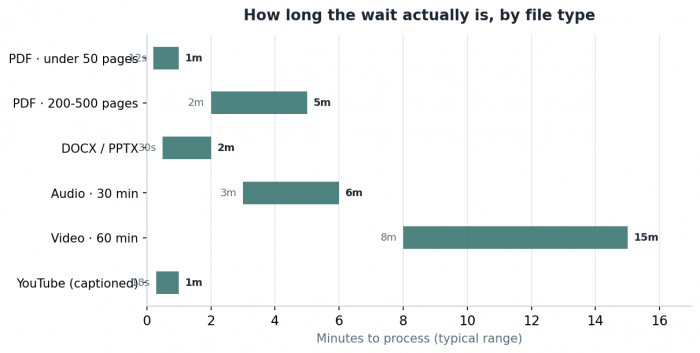
Captioned English YouTube links are the standout shortcut: existing captions are pulled directly and do not consume the transcription quota at all. The flip side surfaces during bulk work. Pushing many large files through at once can feel resource-heavy, and users on weaker connections report perceived slowdowns during batch uploads. The architecture rewards a steady trickle over a flood.
Where It Holds Up, And Where It Sags
Assessed across eight dimensions that matter to daily use, the profile is lopsided in a telling way: the core retrieval mechanics are genuinely strong, while the softer product-maturity signals lag.
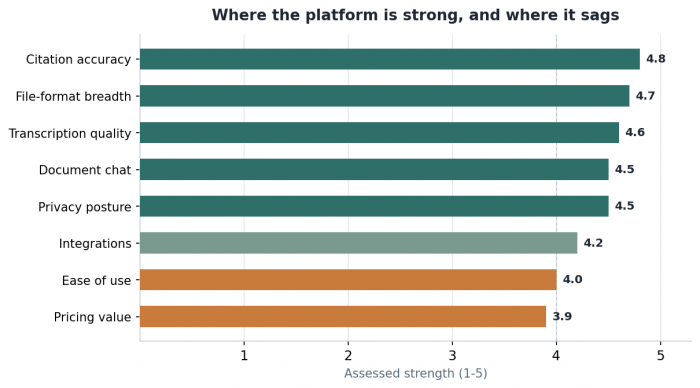
Citation accuracy is the anchor strength. References consistently match source content and resolve to the precise page or timestamp, which is the single feature that separates a trustworthy document assistant from a confident guesser. File-format breadth and transcription quality follow closely; the Whisper backbone produces near-human accuracy on clean audio and degrades predictably (not catastrophically) on noisy or overlapping speech.
The dip lands on the experience layer. Ease of use scores only adequately because the interface exposes a lot at once and can feel cluttered to a newcomer. Pricing value sits lowest, dragged down almost entirely by a free tier too thin to evaluate the product properly. Integrations cover the obvious bases but stop short of Slack, Microsoft Teams, and CRM hooks that team buyers expect.
The Transcription And Diarization Story
This is the feature most likely to justify a subscription on its own. Three export formats are offered, and all three preserve speaker labels and timing, which is the detail that turns a transcript into something usable downstream rather than something to clean up by hand.
| Format | Best for | What survives the export |
| SRT | Video editors, YouTube uploads, broadcast | Industry-standard captions; near-universal player support |
| VTT | HTML5 players, streaming, browser content | Web-native captions with positioning data intact |
| TXT | Notes, documentation, downstream LLM work | Speaker labels and timestamps in a clean, parseable structure |
Diarization handles an unlimited number of speakers and a rename done once carries everywhere, so a question scoped to a single person ("what did the finance lead commit to?") returns a coherent answer. Overlapping crosstalk still trips it, as it trips every diarization model, but the failure is graceful rather than disqualifying.
My Experience Using Knowbase AI
Using Knowbase AI feels more like working with a searchable research folder than a regular chatbot. The setup is simple: upload files, let the tool process them, and then ask questions from the material. It works best when the source files are clear, well organized, and grouped properly.
The strongest part is how it brings different formats into one place. Instead of keeping PDFs, documents, videos, audio files, and YouTube links separate, Knowbase AI makes them searchable through one chat-style interface. That makes it useful for research, study notes, meeting recordings, content planning, and long documents that would normally take time to review manually.
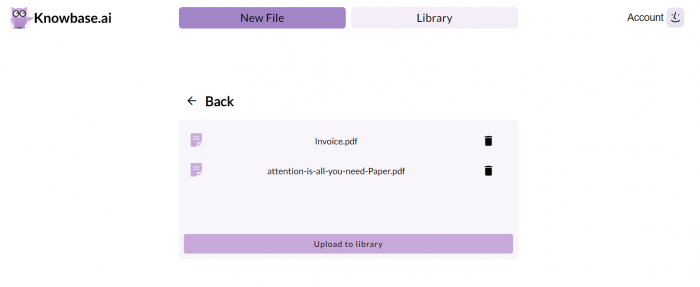
In day-to-day use, the most helpful parts are:
● Finding answers from long files without reading every page
● Summarizing PDFs, notes, videos, and recordings quickly
● Checking citations to confirm where an answer came from
● Searching across different content types in one place
● Turning scattered research material into something easier to use
The answers are strongest when the source material is specific and clean. For example, if you upload a well-structured report or a clear transcript, Knowbase AI can usually pull out useful summaries, key points, and direct answers. It is less impressive when the files are messy, poorly formatted, or too broad.
There are also a few areas where the experience could feel limited:
● The free plan is useful for testing, but not enough for serious long-term use
● File organization matters more than expected
● Large or mixed libraries may need more careful grouping
● Power users may want more dashboard customization
Knowbase AI is not perfect, but its core idea works well. It saves time when you have too much information to read manually and need a faster way to search through your own files.
Privacy: Strong Promises, Missing Paperwork
Privacy is framed as a first principle rather than a footnote, and the three concrete commitments are above the category baseline: uploaded files are never used to train AI models, content stays private by default unless explicitly shared, and every answer is verifiable through clickable citations. Access on shared files and Nests can be revoked at any time.
The gap is documentation. No formal certifications such as SOC 2 Type II, ISO 27001, or HIPAA are listed publicly. For individuals, freelancers, and most small teams that posture is fine. Any organization handling regulated health, legal, or financial records should request a security questionnaire before scaling, because the absence of public attestation is a real procurement blocker rather than a stylistic quibble.
How It Stacks Against The Obvious Rivals
The category is crowded, and the honest framing is that Knowbase AI competes on breadth rather than on being best-in-class at any single job. A focused comparison against the tools most buyers will weigh:
| Tool | Rough pricing | Multi-format support | Diarization | Embeddable bot | Notable edge |
| Knowbase AI | Free; paid from $19 | Yes (documents, audio, video, YouTube in one library) | Yes (100+) | Yes | Unified library for documents, audio, video, and YouTube |
| Google NotebookLM | Free; Plus $20 | Limited | No | No | Strongest free multi-document synthesis, good audio overviews |
| Humata | Free; from $1.99 | Documents only | No | Limited | Cheap per-page pricing for heavy document readers |
| ChatPDF | Free; Plus ~$5–20 | PDF only | No | No | One-click single-document chat, minimal friction |
| Claude (Projects) | Free; Pro $20 | Documents only | No | No | Long-context reasoning over dense or lengthy files |
Google NotebookLM
The default free alternative and the strongest at cross-document synthesis. It caps at roughly 50 sources per notebook and offers no transcription-with-diarization or embeddable widget, so it wins on research breadth and loses on multimedia and deployment.
Humata
The value pick for anyone whose work is fundamentally reading a lot of pages. Per-page pricing starts very low, but it is document-centric, with no diarization and only limited embedding, so it is a narrower tool aimed squarely at PDF-heavy researchers and contract reviewers.
ChatPDF
The minimalist option: upload one PDF, chat, done. The friction is near zero and the focus is total, which is also the limitation. No multimedia, no library-wide search, no embed, and citations that can occasionally wander.
Claude with Projects
The reasoning-first choice for long or technical single documents, with a large context window and persistent project knowledge. It is a general assistant rather than a purpose-built knowledge base, so there is no diarization, embeddable widget, or media library, but the analytical depth on dense material is hard to match.
Who Should Actually Use It
The fit is sharp at the edges. Researchers and graduate students juggling PDFs, lecture recordings, and reference videos get the most out of the multimedia-in-one-library model. Solo consultants interrogating contracts and meeting recordings, content creators who want an audience to chat with their material, small businesses needing a docs-grounded website chatbot, and podcasters or journalists who repeatedly need labeled transcripts with clean subtitle exports all land in the strong-fit column.
The weak fits are equally clear. Regulated enterprises that require formal compliance attestations should look elsewhere until the paperwork exists. Engineering teams wanting a documentation-first product with deep code awareness, support teams needing tight ticketing integration, and any team that routinely blows past 5,000 monthly queries will all run into a wall the product has not yet built around.
The Verdict
Knowbase AI is a competent, increasingly polished tool that earns its place through range rather than dominance. The retrieval core is the real asset: citations that resolve to exact locations, a transcription pipeline that holds up on clean audio, and a single library that genuinely spans documents, audio, video, and the open web. Those are not trivial achievements, and they are executed well.
The reservations are equally real and worth budgeting for. The free tier is too thin to evaluate seriously, the interface asks for patience, enterprise compliance documentation is simply absent, and the community is quiet enough that early adopters are partly on their own. None of these are disqualifying for the individual, the small team, or the creator the product is plainly built for, and for that audience the Pro tier at forty-nine dollars is the sensible entry point. For a regulated enterprise, the conversation should start with a security questionnaire, not a credit card.
Comments