

SeaArt AI is a strong choice for the AI art generation, especially if you like anime styles, community models, LoRA-style customization, image-to-image creation, upscaling, and model browsing. But it is not the perfect tool for every creator. Some users want cleaner commercial design, stronger realism, better text inside images, faster editing, or a simpler interface.
That is where SeaArt AI alternatives become useful. The right replacement depends on what you actually create. A YouTuber making thumbnails does not need the same tool as an anime artist, and a brand designer does not need the same workflow as someone exploring community models.
What to Look for in a SeaArt AI Alternative
A good SeaArt AI alternative should not only generate attractive images. It should solve a specific creative problem better than SeaArt AI. Some tools are stronger for cinematic visuals. Some are better for text-heavy posters. Some are safer for commercial work. Others are closer to SeaArt AI because they also offer community models and deeper customization.
Before choosing a replacement, look at these areas:
| Factor | Why It Matters |
| Image quality | The tool should produce clean, usable results without too many retries. |
| Style control | It should let you control mood, realism, anime style, composition, or brand look. |
| Editing features | A good alternative should support refinement, not only one-shot generation. |
| Commercial use | Business users should check licensing, privacy, and usage rights carefully. |
| Pricing | Free credits are useful, but serious use usually needs a paid plan. |
| Ease of use | Some tools are made for casual users, while others suit advanced creators. |
Quick Comparison of the Best SeaArt AI Alternatives
| Alternative | Best SeaArt AI Alternative For | Starting Price |
| Leonardo AI | Professional AI art workflow | Free plan, paid from $12/month |
| Midjourney | Cinematic and polished visuals | Paid from $10/month |
| Adobe Firefly | Commercial-safe design work | Free plan, paid from $9.99/month |
| Ideogram | Text inside AI images | Free plan, paid from $20/month for Plus |
| Tensor.Art | Model-heavy creative generation | Free access, Pro from $9.90/month |
| PixAI | Anime and character art | Free plan, paid from $7.99/month annually |
| Playground AI | Simple editing and fast visuals | Free plan, Pro around $15/month |
| NightCafe | Casual AI art community | Free version, paid from $5.99/month |
1. Leonardo AI
Best SeaArt AI alternative for: Professional AI art workflow
Leonardo AI makes the list because it gives creators a more structured way to generate, edit, and refine AI visuals. SeaArt AI is strong for model discovery and community-driven art, but Leonardo feels more practical when the goal is to create polished assets for blogs, ads, thumbnails, product concepts, game art, or brand visuals.
Compared with SeaArt AI, Leonardo AI feels less like a model-browsing platform and more like a creative production workspace. You can generate images, work with custom models, use image guidance, edit visuals, upscale outputs, and keep a more consistent style across multiple creations. That makes it useful for creators who do not want every image to feel like a fresh experiment.
Use it for:
● Creating blog cover images, YouTube thumbnails, and social media visuals.
● Generating game assets, character concepts, and product-style mockups.
● Building a repeatable visual style for marketing or content production.
What you may miss from SeaArt AI:
SeaArt AI may still feel more open and exploratory if you enjoy browsing community models, anime presets, and user-generated styles. Leonardo is more polished, but that also makes it feel slightly less like a public creative playground.
Pricing snapshot:
Leonardo AI has a free plan with 150 daily fast tokens. Paid individual plans start with Essential at $12/month, followed by Premium at $30/month and Ultimate at $60/month, before tax. Team plans start at $24 per seat/month, with a $72/month Starter team plan.
Pick this instead of SeaArt AI if:
You want a cleaner, more professional AI image workflow for repeatable creative output rather than a community-heavy model exploration experience.
2. Midjourney
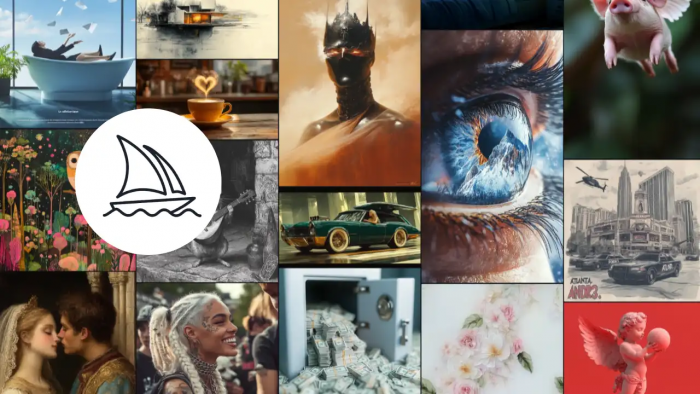
Best SeaArt AI alternative for: Cinematic and polished visuals
Midjourney is the obvious choice when image quality matters more than dashboard features. It is known for dramatic lighting, cinematic composition, strong fantasy art, editorial-style visuals, and premium-looking creative output. If SeaArt AI gives you flexibility, Midjourney gives you visual taste.
Compared with SeaArt AI, Midjourney feels more focused on the final image than the workflow around it. It is not the best pick if you want a large model marketplace or LoRA-style browsing, but it is one of the strongest options when you want artwork that looks finished with less manual setup.
Use it for:
● Cinematic blog covers, fantasy visuals, and dramatic concept art.
● Premium-looking social media graphics and editorial illustrations.
● High-impact visuals where mood, lighting, and style matter most.
What you may miss from SeaArt AI:
SeaArt AI gives you more model-level exploration and a more flexible community environment. Midjourney can feel less transparent for users who want granular model control, and it does not work like a typical web-based model library.
Pricing snapshot:
Midjourney does not currently offer a standard free plan for regular generation. Its paid plans are Basic at $10/month, Standard at $30/month, Pro at $60/month, and Mega at $120/month. Annual billing lowers the effective monthly cost to $8, $24, $48, and $96 respectively.
Pick this instead of SeaArt AI if:
You care more about polished, cinematic image output than community model browsing or advanced Stable Diffusion-style customization.
3. Adobe Firefly
Best SeaArt AI alternative for: Commercial-safe design work
Adobe Firefly is the best SeaArt AI alternative for users who create business-facing visuals. It is built around generative images, image editing, text effects, design support, and Adobe’s broader creative ecosystem. For marketers, agencies, and brand teams, the main appeal is not just image quality. It is the cleaner commercial positioning and Adobe workflow.
Compared with SeaArt AI, Firefly feels more controlled and brand-safe. SeaArt AI is better for open-ended art exploration, anime styles, and community models, but Firefly is easier to justify in professional design environments where licensing, brand consistency, and editing inside Adobe tools matter.
Use it for:
● Brand visuals, campaign graphics, and commercial design drafts.
● Generative Fill, image expansion, background changes, and asset editing.
● Social media designs that may move into Adobe Express, Photoshop, or other Adobe tools.
What you may miss from SeaArt AI:
Firefly does not feel as playful or model-heavy as SeaArt AI. If your main use case is anime-style exploration, character art, or browsing many community models, SeaArt AI will likely feel more flexible.
Pricing snapshot:
Adobe Firefly has a free access option with limited creative AI features. Paid Firefly plans include Firefly Standard at $9.99/month, Firefly Pro at $19.99/month, Firefly Pro Plus at $49.99/month, and Firefly Premium at $199.99/month in the U.S. In India, Adobe lists Firefly Standard at ₹797.68/month, Firefly Pro at ₹1,596.54/month, Firefly Pro Plus at ₹3,990.76/month, and Firefly Premium at ₹15,965.40/month including GST on monthly billing.
Pick this instead of SeaArt AI if:
You need a safer tool for brand, marketing, and commercial design work instead of an open community AI art platform.
4. Ideogram
Best SeaArt AI alternative for: Text inside AI images
Ideogram is one of the best choices when your image needs readable text. That matters for posters, quote graphics, YouTube thumbnails, logos, ad creatives, product-style visuals, and social media banners. Many AI image tools can make beautiful visuals, but they often struggle when words need to appear cleanly inside the image.
Compared with SeaArt AI, Ideogram is more focused. It is not trying to be the biggest community-model platform. Its strength is typography-aware image generation, which makes it useful for creators who need visuals with slogans, titles, labels, captions, or brand-like text.
Use it for:
● Posters, thumbnails, and social media graphics with readable wording.
● Logo-style concepts, quote cards, and ad creatives.
● Visuals where the text is part of the design, not added later.
What you may miss from SeaArt AI:
SeaArt AI is stronger if you want more anime models, broader style exploration, or a community-driven generation environment. Ideogram is more specialized, so it may feel narrower if your work is mostly character art or model experimentation.
Pricing snapshot:
Ideogram has a free plan. Its current plan structure lists Plus at $20/month, Pro at $60/month, and Team at $30/month per member with a minimum of two members. Ideogram’s older Basic plan at $8/month is now marked as a legacy plan and may not be available to new users.
Pick this instead of SeaArt AI if:
You create AI images where words, titles, slogans, or poster-style text need to appear cleanly inside the final image.
5. Tensor.Art
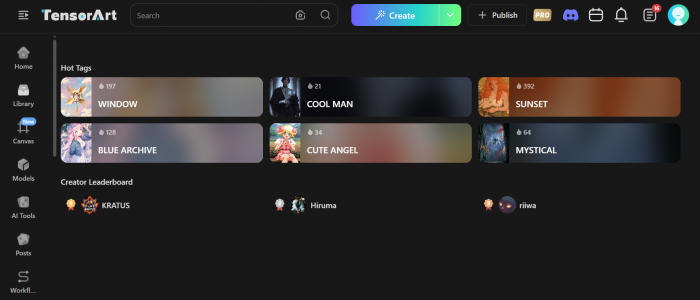
Best SeaArt AI alternative for: Model-heavy creative generation
Tensor.Art AI is one of the closest alternatives to SeaArt AI because it also appeals to users who like models, LoRA-style workflows, anime styles, and Stable Diffusion-style customization. It is not just a simple prompt-to-image website. It is better suited for creators who enjoy browsing models, testing styles, and pushing outputs through more detailed controls.
Compared with SeaArt AI, Tensor.Art feels familiar because both tools sit in the model-driven AI art space. The difference is that Tensor.Art can feel more technical depending on the workflow you choose. If you like SeaArt AI because of its model library and customization options, Tensor.Art is one of the most natural alternatives to test.
Use it for:
● Anime, fantasy, character art, and stylized AI images.
● LoRA-style model exploration and community-driven generation.
● More controlled AI art workflows that go beyond simple prompting.
What you may miss from SeaArt AI:
SeaArt AI may feel easier to browse for some users, especially if they already like its interface, daily stamina system, and creative discovery flow. Tensor.Art can become more technical when you move into deeper settings.
Pricing snapshot:
Tensor.Art has free access with credits, though exact daily credit behavior can vary by account, app, and region. Its Pro membership is listed at $9.90/month, with a quarterly option at $19.90 and a yearly option listed at $59.90 during the current offer. Credit packs are also available separately.
Pick this instead of SeaArt AI if:
You want something close to SeaArt AI’s model-heavy creative experience but with another ecosystem for exploring AI art styles and customization.
6. PixAI
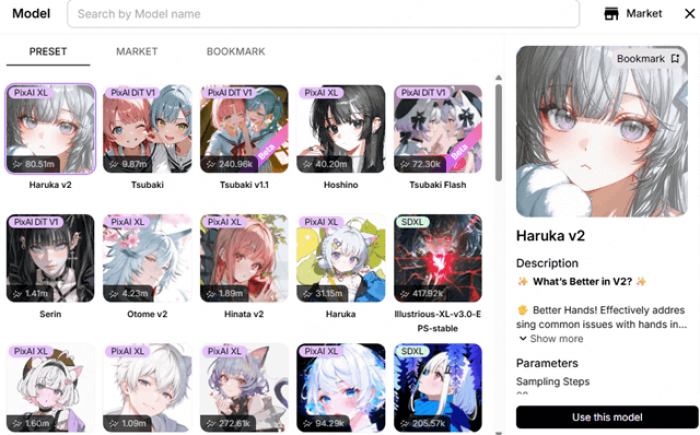
Best SeaArt AI alternative for: Anime and character art
PixAI is a strong SeaArt AI alternative if your main interest is anime-style images, character art, portraits, manga-inspired visuals, and stylized illustration. It is more focused than SeaArt AI, which can be a good thing if you do not want to sort through every possible image category.
Compared with SeaArt AI, PixAI feels more targeted toward anime creators. SeaArt AI gives you broader creative range, while PixAI is more useful when your workflow revolves around characters, anime aesthetics, and illustration-heavy prompts. For fandom-style visuals and consistent character experiments, PixAI is easier to understand.
Use it for:
● Anime characters, stylized portraits, and manga-style scenes.
● Character concept ideas for stories, games, and fan-inspired art.
● Testing pose, costume, expression, and illustration-style variations.
What you may miss from SeaArt AI:
SeaArt AI is broader. If you want photorealism, mixed media, general AI art, video tools, and a wider model environment, PixAI may feel too narrow.
Pricing snapshot:
PixAI has a free plan. Its paid membership pricing lists Starter at $7.99/month, Plus at $22.99/month, and Premium at $35.99/month when billed annually. Users who want monthly billing should check the live pricing page before subscribing because annual and monthly prices can differ.
Pick this instead of SeaArt AI if:
You mainly create anime-style characters and want a more focused platform instead of a broader AI art workspace.
7. Playground AI
Best SeaArt AI alternative for: Simple editing and fast visuals
Playground AI is a good choice for users who want quick generation and image editing without spending too much time inside model settings. It is useful for social media visuals, quick design drafts, image variations, and lightweight creative work where speed matters more than deep customization.
Compared with SeaArt AI, Playground AI feels simpler and more design-friendly. SeaArt AI gives you more room for model exploration, but Playground is easier when you want to create or edit an image quickly and move on. This makes it a better fit for creators who do not want a technical AI art workflow.
Use it for:
● Fast image edits, concept variations, and social media visuals.
● Simple design drafts that do not require deep model control.
● Beginner-friendly AI image creation with fewer distractions.
What you may miss from SeaArt AI:
You may miss the stronger model browsing culture, anime depth, and advanced art-style experimentation that SeaArt AI offers. Playground AI is better for speed, but SeaArt AI is better for creative exploration.
Pricing snapshot:
Playground AI has a free plan. Its Pro plan is commonly listed at $15/month, with annual pricing around $12/month, while heavier-use plans have been listed around $45/month. Playground also offers one-time credit purchases, including $8 for 100 credits for supported models.
Pick this instead of SeaArt AI if:
You want a simpler tool for fast image creation and editing instead of a detailed model-based AI art platform.
8. NightCafe
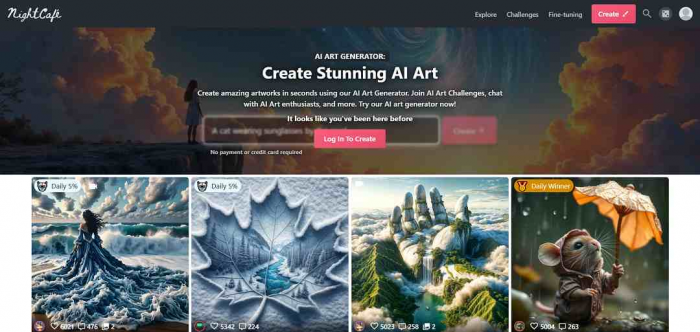
Best SeaArt AI alternative for: Casual AI art community
NightCafe is best for users who want AI art generation with a lighter, community-based experience. It supports text-to-image creation, community challenges, sharing, and experimentation across different AI models. It is less intimidating than many advanced AI art platforms, which makes it a good option for beginners and hobby users.
Compared with SeaArt AI, NightCafe feels more casual. SeaArt AI is stronger for users who want deeper model control, anime-focused exploration, or more advanced generation workflows. NightCafe works better when the goal is to make art, join challenges, collect credits, and enjoy the process without treating it like a production system.
Use it for:
● Casual AI art experiments and creative prompts.
● Community challenges, public galleries, and hobby projects.
● Beginners who want a less technical way to try AI art.
What you may miss from SeaArt AI:
NightCafe is not the best pick if you need deep model customization, LoRA-style control, or a more advanced anime generation workflow. It is easier to use, but less powerful for serious AI art control.
Pricing snapshot:
NightCafe has a free version. Paid plans are commonly listed as AI Beginner at $5.99/month, AI Hobbyist at $9.99/month, AI Enthusiast at $19.99/month, and AI Artist at $49.99/month. Credit packs and plan details can change, so heavy users should check the live pricing page before buying.
Pick this instead of SeaArt AI if:
You want a casual AI art community with simple generation and challenges rather than a more advanced model-driven workspace.
Which SeaArt AI Alternative Should You Choose?
| Need | Best Pick |
| Best overall alternative | Leonardo AI |
| Best image quality | Midjourney |
| Best for commercial design | Adobe Firefly |
| Best for text in images | Ideogram |
| Best close SeaArt-style alternative | Tensor.Art |
| Best anime-focused alternative | PixAI |
| Best beginner-friendly editing option | Playground AI |
| Best casual community option | NightCafe |
Final Verdict
SeaArt AI is still a strong platform for users who enjoy AI art generation, anime styles, community models, and creative experimentation. It is especially useful if you like browsing different models and testing visual styles without committing to one narrow workflow. But it is not the best choice for every creator.
Leonardo AI is the best overall SeaArt AI alternative because it balances image generation, editing, control, and production workflow. Midjourney is the better choice for cinematic and polished visuals. Adobe Firefly is the safer pick for commercial and brand design. Ideogram is the best option when readable text matters. Tensor.Art and PixAI are the strongest choices for users who like model-driven generation and anime-focused art.
If your work is serious, start with Leonardo AI or Midjourney. If your work is commercial, test Adobe Firefly. If your work is anime-heavy, compare Tensor.Art and PixAI. SeaArt AI remains useful, but the best alternative depends on whether you need better polish, better control, better text, better safety, or a simpler creative process.
Comments